I bought ProtonVPN for Fedora Atomic Silverblue, the Gnome desktop, because they had a sale and the price was unbeatable at €2.49/month but now I regret it, if you can afford it pay a little more and go with Mullvad or WindScribe, they both work with Fedora Atomic, I was previously with WindScribe for a year and I had zero problems with them, I did not renew because I was on a free plan and at the time WindScribe was not running any sale and ProtonVPN was.
I am going to keep ProtonVPN because I made it work in the end but be aware that if you go down this route with Fedora Atomic as your main operating sytem you will have to spend two days of reading manuals, forums and trying and testing, ProtonVPN, a company worth millions treats Linux users like garbage while Mullvad a company with a few thousand users gives the same experience to Windows and Linux users, too bad the price is double if it wasn’t for this I would not have hesitated going with them, but even ProtonVPN price has a catch, unlike Mullvad and WindScribe, ProtonVPN does not renew at the price you bought, it is set to auto renew at double the cost, the first thing to do after buying ProtonVPN on sale is to cancel your auto renewal to avoid surprises, I do think they lose money with the €2,49/month sale but they must be hopping they upscale me on their other products or that I renew at the expensive price.
Another reason why ProtonVPN is cheaper than their competitors is because unlike WindScribe or Mullvad, they run most of their locations as virtual, most of the servers Proton has are located in the United Kingdom, Singapore and Romania, all countries with cheap bandwidth and servers, you can see a list of their virtual locations in their Smart Routing page: https://protonvpn.com/support/how-smart-routing-works
ProtonVPN has a non official flatpak that some people says works fine, the catch is that it is not an official flatpak, do you really want to install security software that is not official and has no verified or known developer behind? I decided I would not do that. Shame on ProtonVPN once more for not being able to do this themselves, they don’t care about Linux users. They have a GUI for Linux users too but the killswitch works best with ProtonVPN CLI command line, and again that is a security product, if you want the best security you will need the CLI version, that means that after two days of learning how to install it, thanks to the half baked installation instructions from Proton, you will need two more days learning about the command line structure.
But enough ranting, if you already have ProtonVPN this is how you set it up in Fedora Atomic. The latest 1.0.4-1 version.
- Get proton from the official repository
wget "https://repo.protonvpn.com/fedora-$(cat /etc/fedora-release | cut -d' ' -f 3)-stable/protonvpn-stable-release/protonvpn-stable-release-1.0.4-1.noarch.rpm"
2. Install ProtonVPN layering it:
sudo rpm-ostree install ./protonvpn-stable-release-1.0.4-1.noarch.rpm
3. Reboot
systemctl reboot
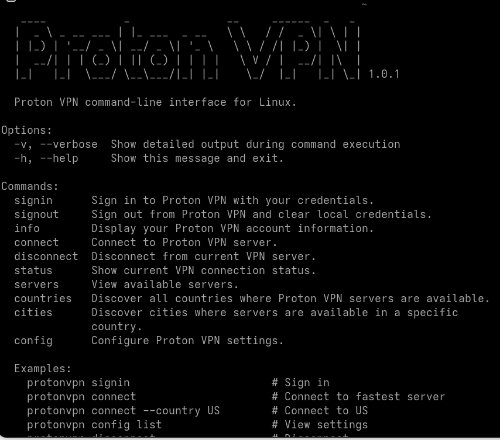
4. Learn ProtonVPN CLI commands, open terminal and type in
protonvpn --help
The main configuration you must change is setting up the killswitch, ProtonVPN CLI comes with the killswitch disabled, you set it up by typing:
protonvpn config set kill-switch standard
The setting is saved in the CLI’s configuration file. It remains “on” indefinitely until you manually change it back to “off, now you are ready to go now, but a few more notes in case you need to troubleshoot.
You should remove the local install of ProtonVPN and layer onto your system by typing in:
sudo rpm-ostree uninstall protonvpn-stable-release-1.0.4-1.noarch --install protonvpn-stable-release
You will be asked to reboot after you do you can see your layered and local packages typing:
rpm-ostree status
Problems:
The most usual problem is that if you use the permanent killswitch instead of the standard you can lose your Internet access if your computer crashes or other factors like uninstalling ProtonVPN without turning off the killswitch first, hat is why I recommended to use the standard option but if for some reason you have no Internet do this:
See your network connections:
nmcli status
Remove ProtonVPN permanent killswitch with these possible options, adjust according to what you see in nmcli status (nm stands for network manager):
nmcli c delete pvpn-ipv6leak-protection
nmcli c delete pvpn-killswitch
nmcli c down pvpn-killswitch
More instructions to restore the Internet: https://system76.com/support/articles/fix-pvpn-killswitch/
Proton CLI instructions:
https://protonvpn.com/support/linux-cli
And when the subscription runs out in two years uninstall the Linux app, open a terminal and enter:
rpm-ostree status
(copy the name of the ProtonVPN package) and:
sudo rpm-ostree uninstall (write name of ProtonVPN package)