Month: March 2015

  • List of the best encrypted chatroom services

    List of the best encrypted chatroom services

    When your access to secure communication tools is limited in a shared environment or your are on the go, the services below can be used to set up a makeshift secure chat without any technical knowledge

    These websites can create an encrypted chatroom with minimal registration details and they can be accessed by anybody with a web browser in their computer or mobile device, but the websites also require you to trust the server operator, hence, you should not use them for high security unless you host the chat software.

    I have used a few of the sites below with a VPN proxy to hide my computer IP and I didn’t have any kind of problem to do this, the only condition is that javascript always has to be enabled since this is what is used to encrypt the messages in your browser.

    Otr: Peer to peer chat in your browser with no central server and no need to register or install anything, you simply open a chatroom and send or post the link somewhere for your contacts to access it, but remember that once everybody leaves the chatroom it ceases to exist.

    Cyph: Encrypted group messenger and video calling that works in the browser and smartphone with encrypted cloud storage. Cypth uses quantum resistant cyphers and has been independently audited by Cure 53 a German cybersecurity firm.

    Teleguard: Swiss based instant messenger that does not require you to register a phone number to use ti, Teleguard can be used in smartphones, Linux, Windows and Mac computers but you have to download their application it won´t work in the browser.

    Brave Talk: From the makers of the privacy focused Brave browser, Brave talk allows you for free encrypted video chats right in your browser, one of the callers needs to be using the Brave browser to create the chatroom but the others can use any browser they want and connect by clicking on a link.

    ChatCrypt: It allows you to create an encrypted chatroom entering a name for the room, a username and a password. People who want to join in will have to visit ChatCrypt and enter the room name and password you have given them. ChatCrypt rooms are not listed anywhere, they can only be found if you let other people know that they have been created. All messages are encrypted in your browser with AES256 bit in CTR mode before transmission.

    ChatCrypt is funded with advertising and you will see a banner on top of the chatroom, Google and their NSA friends, perhaps can’t read the messages but they should still be able to track the IP of people in the chatroom using the advertising banner.
  • Open source mobile phone app SureSpot for encrypted chat

    Open source mobile phone app SureSpot for encrypted chat

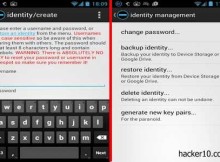
    SureSpot is an Android and iPhone open source app for encrypted end to end chat, you can send pictures and text,nobody can decrypt the messages, not even the app delelopers. AES256 bit encryption keys are created in your phone and the Diffie-Hellman key agreement protocol is used to exchange them securely without having to grant private keys access to a third party, only the person you are communicating with is able to read the messages and view the photos you send.

    An spy agency attempting to wiretap Surespot will find that there is not a single server they can attack for mass surveillance, they would have to hack all the end point phones to listen in, this would be impossible to do if Surespot became popular. For further privacy, Surespot can create multiple identities to chat with different contacts, your identity can be backed up, restored or permanently erased and the paranoid person can create new encryption keys as often as needed.

    Another nifty feature is that you can delete the messages you have sent from the receiver’s inbox and lock attached images to stop them from being saved outside the app,  Surespot also locks itself after a few minutes of inactivity to stop impersonation in case your phone is taken while still on.

    SureSpot encrypted mobile phone chat
    SureSpot encrypted mobile phone chat

    Unlike WhatsApp and other privacy invasive chat apps, people in your contact list will not get automatically notified when you install Surespot, before a chat can take place you need to know the nickname of the person you would like to communicate with and that person will have to accept the invitation. The app is free for chat, paying a small fee will add voice messaging so that instead of typing in you can talk to your mic, record a message and send it encrypted to your contact, another tab in the app allows you for an optional Paypal or Bitcoin donation.

    This privacy app earned of the highest marks in the Electronic Frontiers Foundation score card, the only downside the EFF highlighted were that Surespot code has not been audited and the possibility of somebody getting access to your phone. The common auditing problem comes down to raising enough money, it is not the developers fault, and the danger of having your phone stolen, it can be partially fixed fully encrypting the phone.

    I liked this app a lot, it has all I want from a secure mobile chat app, the most important factors being that Surespot is based on trusted encryption algorithms, it is open source which allows experts to peek in and check for bugs or backdoors, and the app does not use your phone number as a contact, the person you are chatting will not find it out unless you tell him, the only missing feature is that you can’t set up a group chat, which I don’t currently use. I am adding Surespot to my list of favourite apps.

    Visit Surespot homepage

  • Encrypt Gmail messages with SecureGmail

    Encrypt Gmail messages with SecureGmail

    SecureGmail is an open source Chrome browser extension to encrypt and decrypt Gmail messages with one click. After installation you will see a red padlock next to the compose button in Gmail, clicking on it will launch the compose window with a red bar that says “Secured“. Unlike other encryption extensions, SecureGmail does not allow Google servers to keep a draft of your message and encryption takes place in your browser, Google will be unable to read anything other than scrambled text, however, attachments are not encrypted, SecureGmail only works for text.

    You will be asked to enter a password after you have written the email and, optionally, a password hint. You will have to either, transmit the password to the receiver by secure means, or enter a password hint that the receiver can easily guess. When the other end receives the message he will see scrambled text and a warning saying “This message is encrypted, decrypt message with password“.

    encrypted Gmail messages SecureGmail
    encrypted Gmail messages SecureGmail

    The strength or SecureGmail is that Google is kept out of the equation by not giving the company any way to read plain text, SecureGmail open source code allows others to check for bugs and email encryption is extremely easy and quick, but there are also many SecureGmail downfalls, the first one is that both parts must have the same extension installed to be able to encrypt and decrypt data, the second problem is that sender and receiver must be both using the same browser, SecureGmail only works in Chrome, and a third obvious problem is that the password has be transmitted, this will encourage people to reuse passwords and it will reduce security.

    SecureGmail can be useful for an organisation that has their email hosted by Gmail, but only for staff conversations as sending email to outsiders would be sure to slam against one of the problems highlighted above. If you need a way to encrypt email that can be delivered anywhere, consider learning about PGP and Enigmail or download the Mailvelope extension.

    People concerned about privacy should not be using Gmail, but if you do, encrypting it will give the NSA some work to do in between reading clear text messages. Encryption can not protect you from the who is communicating with who server metadata, trying to fool the NSA using Gmail is like trying to win the lottery by praying to Allah, a total waste of time.

    There are plenty of reasons not involving national security about why you will want to encrypt your email messages, like not wanting readable email messages stored in your inbox for ever and protecting yourself from embarrassment if a typo sends an email message to the wrong inbox. In scenarios where metadata collection is not an issue, an extension that encrypts email is adequate protection.

    Visit SecureGmail homepage