Author: John Durret

  • Anonymous messenger chat with jTorchat

    Anonymous messenger chat with jTorchat

    jTorchat, standing for Java Torchat, is a rewrite of Torchat, a decentralized anonymous P2P messenger that works over the tor network. Being written in Java means that the code is easily carried across platforms, jTorchat should work in any operating system that has Java installed (Linux, Windows, BSD, etc), it can be used in portable mode but my Windows7 OS asked me for administrator rights to grant access to Java and allow the application through the Windows firewall, it will possibly won’t work in computers where you do not have admin rights (i.e. library, internet cafe).

    Anonymous Internet chat jtorchat
    Anonymous Internet chat jtorchat

    The settings allow you to change language interface, make links clickable, sync your buddy list and automatically start file transfers saving them to the Downloads folder, the rest of the messenger has expected basic features consisting of announcing status as away or online, adding contacts, request buddies, blacklist people and what they call “Holy contact” which means whitelisting someone, a flashing message on the Windows taskbar will warn you everytime someone joins the chat.

    At the moment there are no chatrooms but you can easily interact with other people who have marked themselves as online or broadcast a message to a whole group marked with an specific hashtag, like #linux, #torchat-help, #public, #privacy. It is also possible to use other chat commands like /nick or /help and retrieve a webpages from your buddy using the /page command but there is no support for images or html, only .txt.

    JTorChat settings
    JTorChat settings

    All users get a unique alphanumeric string randomly created by tor, based on the .onion address of a hidden service, this string is used to communicate with your buddies so that tor knows where to send the messages. jTorchat  local port can be changed to any unused one and it can work with obfsproxy, a tool  hiding the nature of the traffic to circumvent tor proxy blocking at  ISP level  by some countries.

    There wasn’t too many users when I visited jTorchat but they are relatively new and as the tool is better known it could change, something to be aware of is that you will still be browsing the Internet with your home IP, jTorchat will only route through the tor network your online chat session, be very careful if you click on a link posted by someone else in the chat.

    Visit jTorchat homepage

  • Cain & Abel Windows password cracker

    Cain & Abel Windows password cracker

    Cain&Abel is a long standing password recovery tool that can sniff passwords from the network you are in, crack encrypted passwords using dictionary, brute force and cryptanalysis attacks, record VoIP conversations creating an MP3 audio file, reveal password boxes, analyse encrypted SSH and HTTPS connections and much more. The target public are security researchers, network administrators and IT teachers but it can also be exploited by the bad guys of course, the developer will not help in illegal activities.

    I downloaded this program from the official site and AVG antivirus gave me a warning that the software contained a trojan horse, due to how password crackers work it is possible your antivirus will trigger a security warning too, it is up to you to decide what to do, I also got a popup warning from Cain&Abel saying that I had Windows firewall enabled and this would stop some features, implying that I should disable it for everything to work. You will be asked to optionally install WinPCap a packet capture library, without it Cain&Abel wireless packet sniffing won’t work.

    Cain&Abel password cracker
    Cain&Abel password cracker

     How to record a VoIP call with Cain&Abel

    To record a VoIP call with Cain&Abel go to “Configure“, click the “Sniffer” tab, select the network interface card from the list and save the settings, now go to the “Sniffer” tab in the main window choose “VoIP” and “Start Sniffing“, from now on any voice over IP call that goes through the network will be encrypted and saved as MP3, you will have to wait until enough traffic has been generated before being able to listen to the audio file.

    The configuration window can also be used to create self-signed fake digital certificates, retrieve a digital certificate using a proxy with the “Certificates Collector” or launch an ARP (Arp Poison Routing) attack with a real or spoofed IP and MAC address. This free password cracker is one of the most complete available in the market and an excellent tool to learn about computer security, everything is easily classified in tabs “Decoders“, “Network“, “Sniffer“, “Cracker“, “Traceroute“, “CCDU“, “Wireless” and “Query“, each one of those tabs contains related extra options.

    To use Cain&Abel you should have some computer security background, this is not a tool for the complete beginner, the most basic tool Cain&Abel includes is a Base64 password decoder going up to a WPA PSK (Pre-Shared Key) calculator and an RSA SecurID Token calculator, this is an excellent tool to find out about passwords, it contains a password decoder, cracker and dumper as well as hash calculators with support for Wifi for network monitoring.

    Visit Cain&Abel homepage

  • Mymail-Crypt for Gmail GPG encryption (Chrome)

    Mymail-Crypt for Gmail GPG encryption (Chrome)

    Mymail-Crypt is a Chrome browser addon to encrypt messages with GPG operating within Gmail webmail interface, the project aims to be OpenPGP compatible to be able to communicate with anybody using public key encryption even if they have different PGP or GPG software. After installing Mymail-Crypt you will have to generate your encryption keys, this can be done with the addon, entering a password is optional and highly recommended, if you don’t use a password anyone breaking into your Gmail account will be able to decrypt sign and encrypt messages supplanting your identity. Encryption keys can and must be backed up.

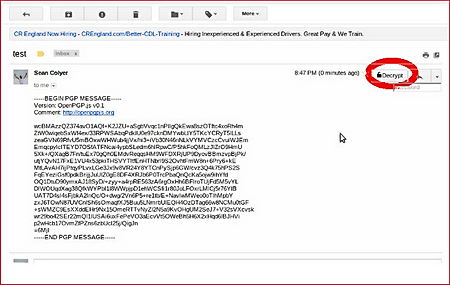
    Mymail-Crypt is fairly easy to use, you will see a button in Gmail compose screen with the options “Encrypt and sign“, “Encrypt“, “Sign“. Received encrypted Gmail messages can be read using the drop down menu “Decrypt” option and entering your password.

    MyMail-Crypt GPG Chrome Gmail
    MyMail-Crypt GPG Chrome Gmail

    The project uses an OpenPGP open source library called Openpgp.js , it runs locally in JavaScript, messages are encrypted/decrypted in your browser. This addon will stop Google and others from reading your emails during transit but email drafts and decrypted autosaves will be saved in the clear to Gmail servers, encryption only takes places after you click on the “Encrypt” button, it will not protect you while you are composing the message, the developer also warns that it is possible for Gmail to get hold of the encryption password  monitoring the user when he types it in.

    Another way to encrypt Gmail messages with GPG is using Thunderbird and Enigmail but it won’t work for webmail, or obtaining a digital certificate for your email client.

    Visit Mymail-Crypt Chrome store homepage

  • Host a tor server entirely in RAM with Tor-ramdisk

    Host a tor server entirely in RAM with Tor-ramdisk

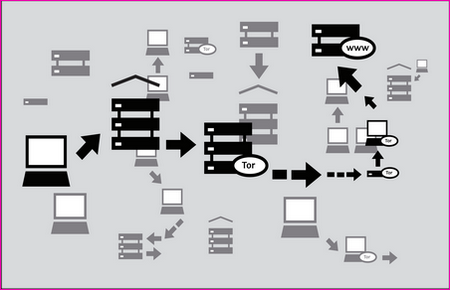
    Tor-ramdisk is a tiny Linux distribution (5MB) developed by the IT department at D’Youville College (USA) to securely host a tor proxy server in RAM memory, it can run in old diskless hardware and it will stop a forensic analysis from people stealing or seizing a tor server. In the event that a tor server is seized due to ignorance or calculated  harassment, and it would not be the first time, the end user would still safe because the chained nature of the tor proxy network makes it impossible to find out someone’s computer IP by seizing a single server but other data, even if meaningless, can still be recovered, running tor in RAM is an extra security step that can help convince people that the machine is merely acting as a relay as it contains no hard drive.

    When a Tor-ramdisk server is powered down all the information is erased with no possibility of recovery, the tor configuration file and private encryption (torrc& secret_id_key) in between reboots can be preserved exporting and importing them using FTP or SSH making the life of a tor node operator easy.

    tor server proxy diagram
    tor server proxy diagram

    One disadvantage of running a tor node entirely in RAM memory is that it can not host hidden services as that requires hard drive space, other than it is a fully functional entry,middle or exit tor node. I would advise you to block all ports (USB,Firewire) in the server with epoxy, there are computer forensic tools that can be plugged into the USB port and make a copy of the RAM memory on the fly. You might have heard about the cold boot attack where someone with physical access to a recently switched off server or computer can still retrieve data remanence from RAM memory, this is not easy to achieve and the recovery timespan is comprised of a few seconds.

    Visit Tor-ramdisk homepage

  • Convergence, a digital Certificate Authority replacement

    Convergence, a digital Certificate Authority replacement

    Convergence is an open source project that wants to replace Certificate Authority organizations issuing standardized X.509 digital certificates and confirm that the company signing it is who they say they are, for which a fee is normally charged, it can be very expensive to get a reputable Certificate Authority  (i.e. Verisign, GeoTrust)  that is included in all major Internet browsers root to confirm your identity. There has also been instances in which a Certificate Authority has been hacked by criminals, and likely nation states, to sign their unauthorized digital certificates with the own CA private keys allowing them to launch man-in-the-middle attacks against which the user has no defense.

    It is possible for someone to create a self-signed digital certificate, or buy a cheap one from a small Certificate Authority, but this will cause the Internet browser to beam a security warning during the SSL handshake and it easily scares off people not familiar with computer security.

    Convergence P2P digital certificate authority replacement
    Convergence P2P digital certificate authority replacement

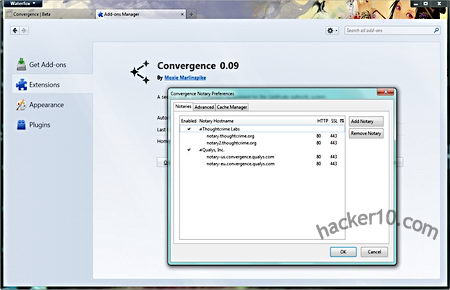
    Convergence allows people to configure a dynamic set of notaries that use the whole network to validate the communication, instead of having someone else telling you who to trust a whole set of users decide who is trustable.

    Anyone can run their own notary, the notary trust level can be set by the whole network of multiple notaries, information exchange is immediate and hides the user IP address, Convergence intends to eliminate the problem that comes with blindly trusting a single Certificate Authority and places trust in the hands of the whole community using the notaries network to check a digital certificate history before validating it, for this to work it will be necessary a large number of notaries.

    Visit Convergence homepage

    Note: Only available for Firefox users as an addon.

  • SandCat browser for website penetration testing

    SandCat browser for website penetration testing

    SandCat is a free portable penetration testing browser based on Chromium, the rendering engine behind Chrome browser, thanks to extensions support you can quickly find out what server software is being used by a website, run javascript in the loaded page, view cookies and links, use a cgi scanner, HTTP brute force a page and much more. Three tabs at the bottom of the browser allow you to easily change view from normal to source code or logs.

    Coders can create their own browser extensions with HTML, CSS and Lua (a programming language), Syhunt, the browser developers, own RudaScript library allows you to execute any scripting language, like Ruby, Python, PHP, javascript, etc.

    SandCat browser penetration testing
    SandCat browser penetration testing

    Although the browser is directed towards system administrators to test their own web server security and people scrutinizing pages that contain malware, privacy activists could use SandCat to see in real time how they are being tracked on the Internet, the browser can split its main window in half to show all HTTP live headers in real time on top of it, it can also be used to teach people how websites work, looking at the HTTP headers as you browse a website shows all of the external elements being download, packet sizes, request methods (GET/POST), pings, advertising networks, redirects… It is much more clear than seeing a website activity using a packet sniffer full of binary numbers that have to be grouped together.

    The browser is too technical for the average user, unless you are a student, hardcore geek or professional PEN tester it wouldn’t make much sense for you to run SandCat.

    Visit SandCat browser homepage