Every time you visit a website with your Internet browser through the HTTP header exchange the server will know what your browser brand you are using as well as your settings and what plugins you have installed, this data will be used in order to give you the optimum experience to serve you the best content for your Internet browser settings.
Typical information that the Internet browser transmits to the server of the visited website are the operating system, the Internet browser brand, browser version, local language settings (which can be used to determine what your native language is), if JavaScript is disabled or enabled, flash or Java plug-in presence and anything else to do with the browser environment, the combination of all of these settings together with data like geolocation, can make your browser unique and enable someone to identify and track you through websites.
Test your Internet browser uniqueness
According to an study by the Electronic Frontiers Foundation only one person in about 1,500 will have the same User Agent as you, once you combine this data with geolocation and unique browser plugins you can see how your Internet browser can become so unique that it can be used to track you down.
Before you do this be aware first that changing your identifying browser user agent can make a website to display tailor made content for a different browser brand and present you with a malfunctioning page, but not in every case, this is just the price for achieving high Internet privacy. You can always disable the browser User Agent fake ID for trustworthy websites you trust and only use for places that you believe could be tracking you down on the Internet.
The fingerprinting of your Internet browser uses a combination of your computer IP, browser header and configuration information, one of the best things you can do to confuse websites tracking you down is to use a VPN to change your geolocation combined with a random browser user agent.
It is inevitable that either because of a shaky ISP connection or some other network or software problem your Internet connection will drop at some point and if you happen to be using a Virtual Private Network proxy to browse the Internet when your VPN disconnects, you will not get a visible warning and you will carry on browsing or sharing files peer to peer as normal with your computer IP exposed for everyone to see.
The worst part of your VPN connection dropping out and not getting a warning is that you will not realize of this and your anonymous Internet surfing will have been compromised without you ever knowing, your OpenVPN software normally automatically reconnects after the VPN connection has dropped but by then your computer IP will have been compromised.
How to stop a VPN disconnection showing your computer IP?
Use an SSH tunnel for anonymous Internet surfing instead of a VPN
One option is to use an SSH tunnel instead of a VPN, when you have your browser configured to browse the Internet through an SSH tunnel when the Internet connection goes down for whatever reason the browser stops working, as simple as that.
The downside of using an SSH tunnel is that you will need to configure every single application to go through it but once you have done it once this is not difficult, your SSH tunnel provider should be able to provide you with instructions.
Most anonymity providers are jumping into the VPN bandwagon and there are not many SSH tunnels providers left, some of the ones I know of are Cotse, VPNSecure, and JTAN ProShell.
Another advantage of using an SSH tunnel for anonymous Internet browsing instead of a VPN is that it is very easy to make it work in all Unix systems, it does not matter if your main operating system is Linux, Solaris or NetBSD instead of Windows. When you use an SSH tunnel for anonymous Internet browsing you do not have to rely on the OpenVPN software given by VPN providers, which usually is closed source.
If you use an SSH tunnel for anonymous internet surfing you will also have two IPs at the same time, your real computer IP in one browser, not configured to go through the SSH tunnel, and your anonymous SSH tunnel IP to be used with a second browser to visit sensitive sites.
It is fairly easy to set up your own private SSH tunnel on a cheap shared Virtual Private Server if you know about Unix and are comfortable with the command line. Setting up your own private VPN server on the other hand normally requires a dedicated server which makes it much more expensive and not economically worthwhile for a single user.
Get a VPN provider that protects your privacy from VPN disconnections
Not all VPN providers are made equal and some of them have realised that there is a huge privacy problem when the VPN connection drops and your computer IP is exposed without warning, some VPN providers are starting to include a new feature to stop your browser from accessing the Internet unless it is through the VPN.
There are few VPN providers I know of that provide this at the moment, one of them is Hide My Asswhich has a secure IP bind which forces your specified application to only work behind their encrypted VPN. Another VPN provider that will protect you against disconnections is IdealVPN it comes with software called VPNGuardian that shuts down your Internet when the connection breaks.
Always ask a VPN service if they have they have protection against disconnections revealing your real IP before buying their product.
VPNCheck
Use a software application to stop IP exposure after VPN disconnection
VPN LifeGuard: Open source freeware application that will cease all traffic (P2P, browser,etc) in case of VPN disconnection. It can automatically reconnect the VPN and there is a portable version available, it only works with PPTP.
VPNCheck: VPNCheck will disable your web browser or any other specified application to stop your real IP being exposed when your VPN connection breaks.
VPNetMon: VPNetMon prevents unsecured connections after your VPN connection goes down, VPNetMon will close down the specified applications when your Virtual Private Network disconnects.
Use a firewall to force all your applications through the VPN
Using a software firewall you can tell it to allow applications to connect only through the VPN, including your browser, the only downside to this is that firewalls all have very different configuration settings and you will probably need to read the documentation or ask at some computing forum about how to bind your browser with your VPN connection.
The firewall that comes with Windows has few configuration options, Comodo Firewall can be customized to your taste to stop all Internet browsing that does not follow your established rules like going through the VPN.
Local Shared Objects (LSO), commonly known as Flash cookies, are used by any website that contains Flash based animations or videos, the Flash Player uses a sandbox security model and the cookies it installs are not handled by your browser, this means that you can not delete them using the browser cookie manager.
There is relatively little public awareness of Local Shared Objects, many of the most popular sites on the web are dependent on Flash, and thus a high percentage of Internet users have installed the Flash plug-in.
Adobe Flash Player default settings does not seek the user’s permission to store Flash cookies on the hard disk, those cookies are then used for tracking purposes by websites. Online banks, merchants or advertisers all may use hard to erase Flash cookies for tracking purposes.
Flash cookies storage mechanism is sometimes used by evercookies and since they are not browser based there is currently no easy way for the average user to remove them, simply deleting the files does the job but a user would need to know where they are located. This makes Flash cookies very persistent on the local system and hard to erase without specialist software.
The private browsing features in Chrome and Firefox are a complete false sense of privacy and security since both browsers do not have build in protection against Flash cookies not even in private mode browsing.
Differences between conventional cookies and Flash cookies
The Flash standard incorporates local Shared Objects (LSOs), which allows data such as preferences to be stored in the local Flash instance on a user’s machine. Flash cookies are stored as individual files with a .sol file extension, by default they are less than 100 Kb in size and unlike traditional HTTP cookies, they have no expiration date.
A browser cookie has a limit of just 4Kb while flash cookies can store up to 100Kb.
A browser cookie has an expiration date a flash cookie does not expire.
A browser cookie can be deleted using the browser cookie manager, a Flash cookie can not.
Flash Cookies give very similar information to what we find in traditional HTTP cookies such as what websites were visited, when the site was first and last visited and since the .sol (Flash cookie extension) files are saved individually, there are also a set of file system timestamps that give away the date and time certain website was visited.
Important to note that Flash based advertisements also have the ability to save Flash cookies in your computer and you do not need to have visited their domain in order to have one of its cookies stored in your hard disk, just viewing and advertisement from that website will be enough reason to have one of its Flash cookies in your hard disk.
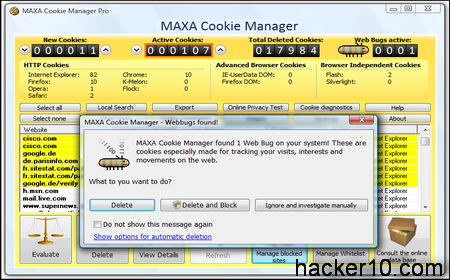
MAXA cookies manager
Firefox plugins to delete flash cookies
NoScript FireFox addon: The NoScript Firefox extension provides extra protection for Firefox, Seamonkey and other Mozilla-based browsers. This free open source add-on allows JavaScript, Java and Flash and other plugins to be executed only by the trusted web sites of your choice.
BetterPrivacy FireFox addon: BetterPrivacy is a safeguard which protects from usually not deletable Flash cookies on Google, YouTube, Ebay. Better Privacy Firefox extension is a free tool for identifying and removing Flash cookies from your local system.
Ghostery browser addon: Available for Firefox and Chrome, able to detect trackers, web bugs, pixels, and beacons placed on web pages by ad networks, behavioural data providers, web publishers, and other companies interested in your activity. Ghostery allows you to block scripts from companies that you don’t trust, delete local shared objects, and even block images and iframes.
Click&Clean FireFox addon: This Firefox addon can erase all temporary Internet files, remove downloaded files history, cookies (including Flash cookies) and typed URLs. Quick&Clean allows to delete private data when Firefox closes.
Windows software to delete Flash cookies
Flash Cookie Cleaner: Freeware application that allows you to view and delete the flash cookies from your computer, it does not offer customization but gets the job done quickly and efficiently.
Maxa Cookie Manager: A windows tool that can manage Flash cookies together with conventional cookies, works with all major browsers and handles all kinds of cookies in a centralized way. The Pro version allows you to keep some cookies while deleting the tracking cookies and web bugs.
.sol Editor (Flash Shared Object): This open source Flash cookie editor can open and create a Macromedia Flash shared object file (.sol), display the content of the file and allow you to change the values.
Macromedia Flash manager: By visiting Macromedia Flash settings website you can view Flash cookies locally stored in your computer and use the Adobe Flash player manager to delete Flash cookies as well as deciding to trust or reject them permanently in the future.
To make sure your system is clean of Flash cookies you can perform a search of your entire hard disk, including hidden and system files, for the extension *.sol, since Flash cookies use the .sol extension.
Both programs WinZip and WinRar use AES (Advanced Encryption Standard) for encryption, when implemented correctly and in conjunction with a long alphanumerical hard to guess passphrase, the AES cipher is impossible to crack in a reasonable amount of time, that means in your lifetime.
State sponsored agencies are also not able to crack a password protected Zip or Rar file if this has been encrypted with a hard to guess pass, the law of mathematics just like the law of physics, is equal for everyone.
Recovering a password protected .zip or .rar file
The only known method to recover a forgotten password from a password protected .zip or .rar file created using the latest WinZip and WinRar versions, is to use a brute force attack. In a brute force attack an automated software will use up all of the dictionary words and run all of them attempting to match the file password.
Knowing if special characters and numbers were used in the passphrase, as well as knowing the length of the password, is very helpful while setting up the program to launch a brute force attack against the encrypted .zip or .rar file.Cracking a .zip file protected with encryption can take minutes, months or a hundred years, depending on processing power and how hard to guess the password is.
Services to crack encrypted .zip files
CloudCracker: A cloud based service for cracking WPA/WPA2 keys, CloudCracker offers brute force dictionary attacks against password hashes, wireless network keys and password protected documents, you could do this yourself in your computer but this service gives you access to an online cluster speeding up the process.
PWCrack: This password cracking service covers .zip encrypted files and PKZip files. Normally they will test a dictionary attack and brute force passwords up to 7 characters long.Password Crackers Inc. also offers services to crack many more different kind of encrypted files.
ElComSoft distributed password recovery
Software to crack password protected .zip files
Advanced Archive Password Recovery: This commercial software from ElComSoft helps you crack .zip and .rar encrypted files. They claim cracking archives created with WinZip 8.0 and earlier is possible in under one hour by exploiting an implementation flaw. For.zip or .rar files encrypted using the AES algorithm a brute force attack will be launched.
Passware Kit Enterprise: This a professional solution and not targeted to end users. Password Kit Enterprise supports cracking of multiple different files, from encrypted .zip and .rar up to launching brute force attcks on fully encrypted disks using TrueCrypt. Passware Kit EnterPrice can use multiple core CPUs and nVidia GPUs to speed up the dictionary attacks.
LastBit: This company makes a full range of password recovery software to help you bring back forgotten passwords on ICQ, Skype, Firefox, PDF, PowerPoint, Zip and many more applications. Various Lastbit products support rainbow tables which considerably speeds up dictionary attacks.
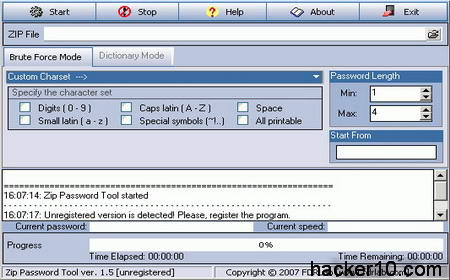
Zip Password Tool: An easy to use password recovery tool that works launching dictionary attacks on encrypted ZIP compatible software. It supports AES file encryption cracking and you can customize the brute force attack with special characters and national symbols, there is also a password recovery progress bar.
Zip Password Tool cracking .zip password
Tips to help you recover passwords from encrypted files
The following information will be of great use when launching a brute force or dictionary attack against any kind of password protected file or disk.
Find all the other passwords you can from the PC, notes around the computer and things someone might have saved in their web browsers and the Windows password, many people use the same or similar passwords everywhere.
By collecting all of the user passwords you will be able to observe a password pattern, like how many characters are normally used to create a password, names of cities, pets or family members being used, capitalizing of the first letter, etc, you can then customize your cracking software and set it up to use the same password pattern that the user normally adopts.
WinZip does not hide the encrypted filenames, you should be able to list them, unless they packed an archive inside an archive, that might give you a clue about the contents and whether it is worth to try and crack it or not. Notice that WinRar however, has an option where the user can encrypt the filenames, although this is not active by default and a checkbox needs to be ticked.
Cracking Zip file encryption from versions earlier than WinZip9.0 is easy and there is no need for a brute force attack as there was an implementation flaw in the encryption. Since WinZip version 9 and above .zip files are protected using 128 or 256 bit AES and with a sufficiently complicated password finding it out will be impossible.
Dictionary attacks for a long password with characters outside of 0-9 and A-Z are very slow, when you plan a dictionary attack on an encrypted .zip or .rar file, limit the yourself to alphanumeric unless you are certain a special character was used to create the password.
Another approach is to scan the disk for all words and then try them in different upper and low case combinations against the encrypted file.
Conclusion about security of encrypted .zip and .rar files
The latest versions of WinZip and WinRar both use AES128 or 256 bit for encryption, this cipher is a security standard and safe from cracking as long as the password is sufficiently long and contains upper and lowercase letters, special characters and numbers.
The weakest link in .zip and .rar encrypted passwords is you, avoid reusing your passwords anywhere else and writing them down, with the exception maybe being a password manager you trust.
Make sure that you only encrypt .zip and .rar files with WinZip9.0 and above and Winrar3.0 and above as earlier versions have some vulnerability.
There are many companies out there promising to crack files encrypted with WinZip and WinRar, and they all rely on the same, either you using an old version of the file compression software, or you choosing a weak and easy to guess password, as long as you cover those two vulnerabilities, you are safe using WinZip or WinRar for encryption, my first choice would be WinRar since WinZip does not support file name encryption.
Every time you use a search engine to look something up on the Internet personally identifiable information will be collected by all major search engines. The search terms submitted to the search engine, as well as the time, date, and geographical location of the computer carrying out the search will be logged and stored.
The search words you enter are often stored within search boxes in your browser, your computer will normally cache those words and pages you visit, your searched for terms can be retrieved by anyone with access to the hard disk.
Do you really want search engines like Google or Bing to know everything you search for on the internet?
What information do search engines keep?
1) IP Address: Your personal computer IP address can be traced back to you through a reverse DNS lookup with tools finding out not only your ISP but also your approximate location such as State or Province.
2) Date & Time: The exact date and time you were searching for a certain keyword will be logged. The browser you use is normally also stored in search engines logs.
3) Query Terms: The terms your searched for will be stored.
4) Cookie ID: A unique code is embedded into the cookie and assigned to a particular computer by the search engine. It allows a search engine to learn if requests came from a particular computer, as long as that identifiable cookie is still stored in the browser Internet searches can be linked and traced back to you independently of what computer IP you use.
Notice that after some pressure from privacy groups some major search engines have begun to mask the computer user IP address on their search logs but this does not make your search history anonymous.
What information do search engines send to webmasters?
After you click on one of the results given by the search engine, your search terms are passed to the website server logs, that webmaster will know what search terms you used to find that site, the referring URL and your IP address, as well as other data like your Internet browser and operating system you are using and even your default browser language, all of this can help to identify you.
Google maps search
Privacy search engine Duck Duck Go
Your web browser automatically sends information about your user agent and IP address to the search engine but Duck Duck Go will not store it at all. This information could be used to link you to your searches and other search engines will use it to show you more targeted advertising. Duck Duck Go will go out of its way to delete that data.
At Duck Duck Go no cookies are used by default and they do not work with any affiliate program that will share personally identifiable information like name and address. Feedback at Duck Duck Go can also be given anonymous not having to enter an email address in the form (it can be left blank). This privacy search engine also allows searching via its SSL website and lots of customization options.
Duck Duck Go pulls results from Microsoft’s Bing and Google search APIs, a lot of what you’re getting are results you could find on those search engines with the added advantage that your personal privacy is respected while searching the Internet. Duck Duck Go also has its own web crawler and web index.
IxQuick was awarded the first European Privacy Seal, IxQuick privacy search engine will not record your IP address, other data like the search queries are deleted from the log files within a maximum of 48 hours, often sooner.
IxQuick uses the POST method to keep your search terms out of the logs of webmasters of sites that you reach from their results, the major search engines on the other hand, use the GET method which allows web servers to log what search terms you used to reach them.
You can use encrypted Secure Socket Layer (SSL) connections to carry out your search stopping your ISP from snooping on you, this is of vital importance if you are using a public computer in an internet cafe, library or at work where the network administrator can easily spy on your search terms.
IxQuick uses a single anonymous cookie to remember the search preferences you saved for your next visit, it will not use cookies with a unique ID like many other websites do.
IxQuick also allows for advanced syntax search and being a Metasearcher, it pulls some of it results from other major search engines like Bing, Ask or the Open Directory. IxQuick also lets you visit the chosen page with a built in proxy, the webmaster server logs will only see/log IxQuick IP address and not yours.
I tested IxQuick search proxy on my server and it also spoofs your agent ID and operating system, identifying itself as Google Chrome and Windows 7, this is a good practice as it makes even more difficult to pin you down.
The Dutch IP IxQuick search proxy gives once reversed identified itself as Webhosting customers, making it obvious it is not an ISP but a hosted proxy, the URL entry was presented as blank in the server logs, overall, their proxy for searching in privacy does a good job at keeping your privacy online.
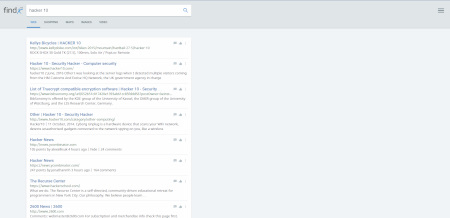
This search engine from Denmark can be used to find webpages, images, videos and shopping, results are crawled by its own bot and it does not rely on Google or Bing, users can contribute to improve search results by rating them.
In Findx your search history is not saved anywhere, you are not tracked, and no identifiable information is kept, the company has a clear privacy policy easy to find. Findx claims that if required by law to share personal data they will have to comply with it, but since they do not hold anything identifiable, it is impossible for the company to provide data.
They also plan to release an Internet browser for private browsing, called Privafox in the future.
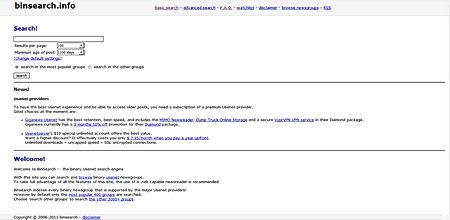
This is not an anonymous Internet searcher but it is included on the list because it carries results that nobody else does. BinSearch specialises in crawling binary Usenet newsgroups results that are ignored by all major search engines. You can search for Usenet posts subject, filenames or .nfo and limit your search to certain newsgroup or timeframe.
Due to the huge amount of data that Usenet carries, results are refreshed every few weeks and old ones dropped, Binsearch crawls thousands of groups but it is not possible to index all of them, only the major newsgroups.
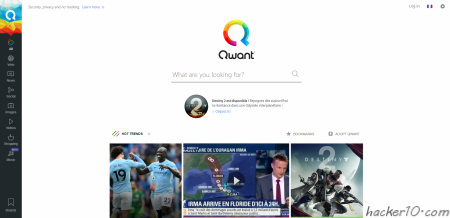
A search engine based in France that promises not to collect your data, they do not even put a cookie in your browser, if you want your settings to be remembered you have the option of opening an account with Qwant anonymously, otherwise the search engine does not remember anything. They have a data protection staff member and their privacy policy is very well explained and clear.
Search results come from its own crawling bot complemented with Bing, you might see advertising but it is not targeted since Qwant does not track its users. You can use this search engine to find webpages, images, videos, news, shopping, music and social. There are two versions of Qwant you can access, one of them where the search engine displays results from across multiple sources, including social media, and one light URL that only displays results for webpages without pictures, this saves bandwidth.
Do not accept any of the major search engines cookies, they might use them to identify you later on, if you already have a Google or Bing search engine cookie on your computer, delete them.
Do not sign up for email at the same search engine where you regularly search, your personal email address can potentially be tied up to your search terms. Using Google and Gmail (both Google products) or Bing and Hotmail (both Microsoft products) together is not a good idea.
Mix up a variety of search engines, this will spread all of your searched terms across different companies and servers. Varying the physical location you search from can also be helpful, you can use a VPN to change your computer and country IP and delete all of your search engine cookies before starting a new private searching session.
If are conscious about computer security or are using a public computer in an internet cafe or library, using some kind of protection against keyloggers is a must have.
A keylogger can easily capture your Yahoo mail and Gmail passwords as well as banking passwords, anything you type in your keyboard could be logged and stored by someone you don’t know.
Neo’s Safekeys keylogger protection is a virtual keyboard that works with the mouse and will protect you against malicious hardware and software keyloggers.
Do not be fooled by the Windows on-screen keyboard as it performs software key presses each time you click an on-screen key and even the most basic keylogger will capture everything you type using it.
Neo’s SafeKeys keylogger protection main features
Password drag and drop keylogger protection: This feature allows you to tansfer your password dragging and dropping the password from Neo’s SafeKeys to the destination program, there are no keyloggers at present that can capture a password while dragging and dropping it.
Keylogger screenshot protection: Neo’s SafeKeys keylogger protection protects you against screenshots being taken ofyour mouse movements, Neo’s SafeKeys introduces a protective transparent layer on the virtual keyboard, if any malware is taking screenshots they will only see the protective layer and not the virtual keyboard buttons, screenshots taken using Windows commands do not see the transparent Windows, Neo’s SafeKeys will always remain at least 1% transparent.
Field scrapping keylogger protection: Some commercial keyloggers can grab passwords from password fields using Windows API commands, Neo’s SafeKeys keylogger protection will keep your password away and it will never store it behind the asterisk mask in Windows fields.
Neo’s SafeKeys keylogger protection
Mouse positioning keylogger protection: Mouse position logging is often used to defeat people using the banking websites on-screen keyboards, each time you click the coordinates of your mouse are captured, since the virtual on-screen keyboard always has the same dimensions the malware can then learn what on-screen keys you clicked on.
Neo’s SafeKeys will always start in a different position on the screen and its height and width will also change. You can also use a button named Resize SafeKeys to reset your virtual keyboard dimensions.
Clipboard keylogger protection: Most malware is able to capture data copied to Widnows clipboard, that includes even passwords. Neo’s SafeKeys never uses the clipboard for anything, ever.
Neo’s SafeKeys keylogger protection extrea features
Neo’s SafeKeys allows for the creation of customized keyboard layouts, your settings (not the passwords) will be stored in a NSKconfig .ini file, you can copy it and edit to your own taste until you get the keyboard layout you want.
You can use Neo’s SafeKeys as a portable notepad, disabling the password mark you will be able to see anything you enter.
Hardware keylogger plugged in PS2 port
Hardware keyloggers like the one pictured above are notoriously hard to detect, antivirus will not find them and they work in all operating systems.
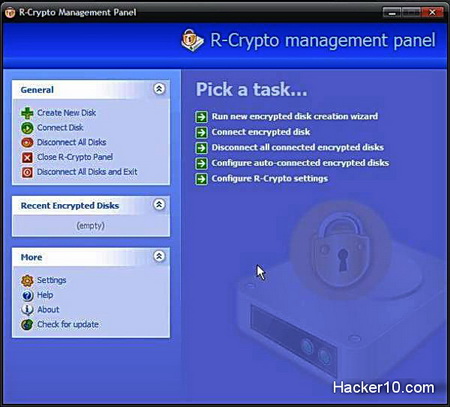
R-Crypto Data Security and disk encryption software will help you hide all of your internet pornography, financial details and other sensitive data from prying eyes. This free encryption software will create an encrypted virtual disk only visible after you enter the appropiate password, inside that encrypted disk you will be able to store anything you like and after closing it, the encrypted data will remain unaccessible for anyone without the right password.
R-Crypto encrypts data using the cryptographic infrastructure of the Microsoft operating system, this can include Microsoft AES crypto provider with key lengths of 128, 192 and 256 bits, for the password it will use the well known uncrackable Secure Hash Algorithm SHA-512. It can also use the Data Encryption Standard DES, or 3DES but it is highly reccomended to stick to AES as DES is not a safe encryption algorithm anymore.
R-Crypto constitutes a robust and safe encryption program with no backdoors, best of all R-Crypto is completely free of charge. If you want to hide your internet pornography from your wife and others, R-Crypto will be very useful and it is easy to use for beginners.
With R-Crypto you will have access to your encrypted disk control with an easy to use wizard that will guide you through the creation of the encrypted disk and it will also allow to change the size of the encrypted disk easily and it has many more features like being able to wipe the encrypted hard disk to make sure this is irrecoverable.
R-Crypto Data Security
Because R-Crypto uses Microsoft cryptographic infrastructure, it is ideal for companies that require certification for such products to meet certain governmental or corporate standards, as well as individual users with high security and privacy needs.