A server physically located in a collocation facility in New York shared by left leaning organizations Rise Up Networks&May First/People Link was seized two days ago, 18th April, by the FBI turning up with a search warrant. The server belonged to the “European Counter Network“, an Italian group defining itself as “antifascist“, it provided email accounts, mailing lists, website hosting for activists and remailing to the public. It appears that an anonymous person sent more than 100 bomb threats over a period of months through the mixmaster remailer network to the University of Pittsburgh leading to numerous building evacuations while the police cleared all false alarms. No arrests have been made so far but the investigation remains open.
Riseup press release calls the server seizure an attack on free speech that has left artists, historians, gay rights groups, feminists and others without mailing lists and email accounts, various websites have also been taken offline as a consequence of the seizure. Riseup claims that while sympathizing with the University of Pittsburgh community they do not understand why the FBI has taken the server when “authorities knew that the server contained no useful information that would help in their investigation“.
Anonymous remailer
Mixmaster remailers resemble the tor proxy network in that they do not log anything and work in chain mode, normally three servers in different jurisdictions are involved routing an email before being finally delivered to an inbox, however more servers could be involved if the sender specifies it in the settings. Mail servers running open source Mixmaster software remove header information to make it impossible finding out the sender, messages are deliberately held for some time to avoid time based attacks and it can take days or hours before an anonymous email is finally delivered.
A Mixmaster remailing server has been designed to make it impossible to trace emails back to the original source for the system to fail it would be necessary to seize all of the servers involved sending a message and recovering erased logs, assuming they ever existed. A new protocol called Mixminion is in development and intended to replace Mixmaster in the future.
Countries like Iran and China routinely block public tor IP addresses, to get around this problem relays called tor bridges are not made public and only facilitated to users living in repressive countries after request. According to recent research from Internet security firm Team Cymru, China’s Great Firewall can distinguish in between normal traffic and tor traffic using SSL deep packet inspection, one factor used by the Great Firewall of China to detect tor traffic is the tor proxy SSL cipher list, in between others. Communications can not be read because they are encrypted but a bot attempts to connect to the suspected tor server IP passing itself of as a user, when it confirms it is a tor bridge via a successful connection the tor server IP is added to the list of blocked IPs in the firewall.
Iran has also been reported in the past for having an Internet censorship system able to identify the beginning of a tor proxy SSL handshake and interrupting the handshake.
Code Talker Tunnel disguises tor proxy traffic
SkypeMorh renamed Code Talker Tunnel uses traffic shaping to convert tor packets into UDP (User Datagram Protocol) traffic preventing deep packet inspection of tor data from being recognized as such. Code Talker Tunnel traffic shaping mimics the sizes and packet timings of a normal Skype video call, the developers of this tool at the University of Waterloo in Canada chose a VoIP client to hide tor traffic because the flow of data packets, sending a request and waiting for a response with a long pause during transmission resembles how a tor proxy server works.
SkypeMorph Code Talker Tunnel is a pluggable transport that will work with the own tor project developed obfsproxya program for Mac, Windows and Linux users masking tor traffic as a different protocol specified using pluggable transports.
Sending a self-destructing note or email is a good way to to make it difficult for someone to forward your message, saving it to a hard drive or stop a third party email server from keeping the message archived for years. The only way around for someone to copy a self-destructing email would be taking a screenshot, the message would still have to be associated with the sender to compromise your privacy, some of the services below make it difficult to make a readable screen grab.
OneShar.es: Allows you to compose a text only message on their servers via SSL, you are then given a unique URL that can be copied into any email message, IM or chatroom, after someone views the URL to read the message it will automatically self-destruct. i.e. erase itself from the server
PrivNote: Web service using SSL to send secure self-destructing notes without any registration needed. The text message will be made unavailable through the link after someone reads it once, there are no configuration options other than leaving your email address to be notified when someone reads the note.
QuickForget: Designed to compose an online note through a SSL connection from your browser to their severs and easily set it up to expire after a specific number of views or length of time after which your note will be purged from the database for ever.
QuickForget secure online note
OneTimeSecret: After creating a self-destructing note you will be given two links, one that will display the message once and another link for you that will inform you if the message has been read when you visit it. Optionally you can set up a password to protect the message.
BurnNote: Mobile phone app only for Android and iPhone, Burn Note displays a count down when the recipient opens a message and automatically destroys when it reaches zero, this guarantees that if someone only one person is able to read the data. You can send messages to other Burn Note users, an email address or get a link to your message that you can post or send via Instant Messenger.
BurnNote self-destructing note
StealthNotes: Message can have a maximum of views before self-destructing or a date can be set up for the message to be erased. Messages can be composed using text or HTML code, there is no SSL.
Crypt-A-Byte: Online dropbox that allows you to send PGP encrypted messages or send a self-destructing message that is erased after the recipient reads it. The message is encrypted in the browser and the passphrase never stored in the server, it is impossible for Crypt-A-Byte to read or decrypt your notes.
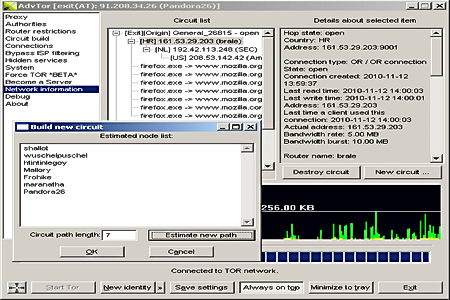
Advanced Onion Router is a free portable tor proxy server and client for the Onion Routing network, a distributed proxy network run by volunteers designed to anonymize traffic and bypass Internet filters. Advanced Onion Router is meant to be an all in one application replacement for the classic Tor+Vidalia+Privoxy Windows bundle, highly configurable, it can fake your browser headers and operating system, as well as the computer regional settings which can be used to pinpoint your location by looking at something like local time.
There is support for encrypted SSL connections, Socks4/5, corporate NTLM (NT Lan Manager) proxies, banning of addresses and routers, plugin support, hotkeys, multilingual, circuit length can be determined from 1 up to a chain of 10 proxies with priorities set, separate browsing profiles can be set by erasing identities cookies and creating new fake browser and operating system headers. You can use this tool to help the onion routing network donating some bandwidth for others or host your own hidden service, it only requires some easy re-configuration to make sure that your real location is not revealed and create your own .onion address. A tor hidden service is a way to host your own content making it impossible for a Government or powerful enemy to take it down.
Advanced Onion Router tor proxy
Advanced Onion Router lets you add your favourite program to a list making sure that when you start it all traffic will be forced through a tor proxy tunnel, each program can have its own separate settings running inside a sandbox. Configuration files can be encrypted using AES, adding another layer of security against noisy people, even better is the read only mode, where you can run this portable tor proxy from read only media, like a CD-Rom, and no personal data (history, cookies, etc) will be stored anywhere.
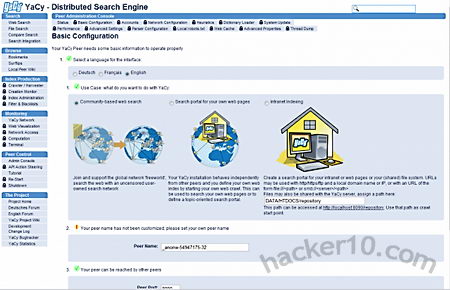
YaCy is an open source community based search engine written in Java with no central server indexing the results, search queries are produced using a worldwide peer to peer computer network, in the same way that torrent downloads work, the quantity and quality of the results will depend on the number of peers connected at the time, on top of the search results YaCy lets you know how many peers are providing them, it can be used to search text or images. Unlike Google or Bing, where the company managing the search results is open to subpoenas and censoring links (e.g. DMCA complaint, offensive images, etc), YaCy results can not be censoredas no single central authority is responsible for them and there are thousands of servers (personal computers) in multiple countries providing results, with some seed list servers including accurate p2p node information to be found in the source code.
You will need to download YaCy software to your computer to use it, during installation Windows default firewall will be configured to allow YaCy queries pass through, if you are using a different firewall you will have to set it up manually to allow YaCy to connect to the Internet. The search engine will be accessed in your browser clicking on YaCy’s logo or visiting http://localhost:8090 (default port can be changed), YaCy can be set up to crawl an specific website or FTP server creating your own search index, the crawling can be scheduled to as often as you like or limited to a single time to save computer resources.
yaCy anonymous search engine
To protect your privacy after performing a search the words used are sent to a peer in the form of distributed hash tables, peers store crawled search results as cryptographic hashes and these are all mixed in between peers, making it impossible to pinpoint search queries to a certain host. Search is not limited to the public Internet, YaCy can be used in Intranets, the configuration settings had so many options that it can take a long time to understand what everything is for, the best is to leave the defaults.
In my experience YaCy Internet results were not very good, with a tendency to link to deep pages instead of the main portal, my main predicament is that it did not have too many pages indexed and it took a couple of seconds to finish each search query, this can be improved once YaCy manages to reach a sizable number of users/peers. Until then, this search engine will be better suited for Intranets or custom crawling of forums and wikis, admittedly, their plan is not to beat Google results, but to provide a truly private search engine experience. There is no need to erase logs, because there are no logs and companies do not have to rely on a third party server to run their private search queries. In the future the developers plan on indexing tor node pages and Freenet sites.
The current 32-bit IPv4 protocol, created in 1981, can have up to 4 billion of IP addresses, every device connected to the Internet needs one of them, including mobile devices, going beyond everyone’s foresight, the Internet is now running out of IP addresses, by the end of 2012 all available IPv4 addresses could have been given.
IPv6 is a brand new version of Internet Protocol set to succeed IPv4, it isn’t an upgrade since networks using both protocols are largely incompatible at packet level and can not communicate in between them, IPv6 is based on 128bit addresses, it will provide users with a near inexhaustible number of IP addresses. You can easily identify an IPv6 address because unlike IPv4 composed of four groups of numbers separated by dots, an IPv6 address is composed of eight groups of alphanumeric characters separated by colons.
Tip: Some IPv4 routers can be converted to IPv6 with a simple firmware update.
IPv6 addresses advantages
Efficiency: Data packet headers and packet forwarding through routers has been simplified to make it more efficient
Multicast: The transmission of a packet to multiple locations in a single send operation, aka multicast, is a base specification in IPv6 (optional in IPv4)
SLAAC (Stateless Address Auto Configuration): A standard IPv6 feature that allows IPv6 hosts to autoconfigure when connected to an IPv6 router, it is able to automatically assign IP addresses and device numbering.
Jumbograms: A jumbogram is a transmission data packet exceeding the standard Maximum Transmission Unit (MTU) IPv6 jumbograms contain a payload larger than the IPv4 limit of 65,535 eight-bit bytes (aka octets).
Geolocation: IPv6 address have more geolocation options than IPv4, the new IPv6 latitude and longitude system can be scaled down to nearly microscopic pinpointing.
Computer IPv6 address
IPSec (Internet Protocol Security): Originally designed for IPv6, and later expanded to IPv4, this Internet protocol secures communications encrypting and authenticating data packets for each session, IPSec is optional in IPv4 and mandatory in IPv6.
Mobile IPv6 (MIPv6): The MIPv6 protocol enables a mobile device to switch between networks, mobile devices are identified by their home address regardless of physical location, IPv4 sends the data packets to a proxy server for relaying to the target device.
IPv6 address examples: 2001:db8:ffff:1:201:02ff:fe03:0405 OR 2607:f298:1:109::7ba:1bd8 OR 2001:41d0:1:1b00:213:186:33:87
Note: IPv6 addresses will be rolled out progressively and they are expected to coexist side by side with IPv4 networks for a long time, it is the ISP responsibility to implement IPv6, not the user.
IPv6 privacy concerns
When an IPv4 user reboots the computer a new IP address is assigned by his Internet Service Provider DHCP server, with IPv6 making billions of IP addresses available there will be no need to request a new IP when the computer boots up and dynamic IP addressing (DHCP) should eventually disappear. The first half of an IPv6 address is static, identifies the network and it never changes, it can be stored, the second half of the IP is created by an IPv6 enabled device (i.e. your computer+operating system).
IPv6 128bit computer address
IPv6 stateless configuration uses the hardware device unique MAC address to create the IP last 64 bits, this means that your computer MAC address is exposed to the Internet, since any website you visit logs your IP they can also figure out your physical network card MAC address. IPv6 has something called Privacy Extensions (RFC 4941), enabled by default in Windows (not enabled in Linux and Mac OS X before Lion), it uses a random number generated by a computer algorithm to dynamically assign a varying address block when creating the IPv6 address so that your computer MAC address is not used and remains hidden.
Example of traceable IPv6 computer address 2001:0db8:1:2:60:8ff:fe52:f9d8
Take the last 64 bits (the host identifier) and add leading zeros: 0060:08ff:fe52:f9d8
Strip the ff:fe part from the middle. If these bytes are not there, then there’s no MAC address.
For the first byte: complement the second low-order bit (the universal/local bit; if the bit is a 1, make it 0, and if it is a 0, make it 1). So: 0x00 (00000000) becomes 0x02 (00000010).
Result: 60:8ff:fe52:f9d8 translates back to computer MAC address 02:60:08:52:f9:d8
Tip: If you see the characters “ff:fe” in the middle of your IPv6 address then your network card MAC address has been used to create it, if the characters are not there, privacy extensions is enabled and you do not need to worry.
IPv6 useful websites
Test IPv6: Runs a quick test giving you all kind of technical information on your IPv6 address indicating a score of your IPv6 and IPv4 stability and readiness
IPv6 Test: Checks your IPv6 and IPv4 speed and diagnoses connection problems, it tells you if a computer is using IPv6, it can test your ping latency and compare IPv4 against IPv6 performance, it can also test if a website is reachable using IPv6.
TunnelBroker: Free Tunnel Broker service enabling people to reach the IPv6 Internet by tunneling over existing IPv4 connections from an IPv6 enabled host or router to one of their IPv6 routers.
SixXS: Offers IPv6 Tunnel Broker managing and a number of IPv6 Tunnel Servers to end users.
If you are getting a product and not paying for it then you are the product being sold, all ‘free’ VPN services I know of provide you with very limited speed and bandwidth, they advertise a barely usable VPN as if it was free when in reality it feels like a test VPN, their business model is to get users to upgrade to their paid for VPN, since their free one is full of restrictions it is highly likely that most people will upgrade, if nobody did they would go out of business very soon.
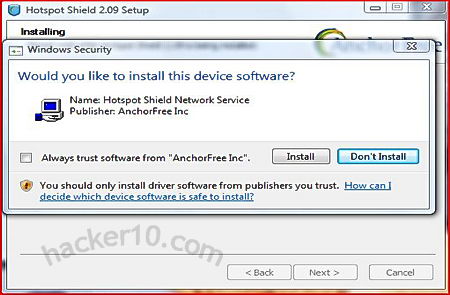
HotSpotShield is the most used free VPN service out there, browser independent, available for Windows and MAC, they claim to have over 10 millions of users, HotSpotShield finances its free VPN service injecting third party advertising banners on top of the browser in every single page you visit and trying to sell you an upgrade to their ‘elite’ ad-free VPN. HotSpotShield will attempt to install a toolbar and change your homepage when you install it, make sure to uncheck the boxes during installation, however you will have to agree to their terms and conditions and this means making your personal information available to a third party (advertising company).
HotSpotShield free VPN
HotSpotShield will give your computer a US IP, this will allow you to watch USA TV and listen to USA restricted music radio stations, it worked flawlessly with the most popular online TV and radio sites like Hulu, Crackle and Pandora, however Slacker Radio and Rdio.com both detected I was behind a proxy and did not allow me to play music, showing me a message saying that the service is only available in the US and Canada. If you ever pay for a VPN try to make sure they have more than one server, this way if a company blocks one of them a quick server switch solves the problem, with HotSpotShield free version there is not such luxury.
I was impressed with the VPN speed, I expected it to be overloaded since it is free, but it wasn’t, the ping is on the low side but acceptable, the New York server, measured from Europe it gave 3.5MB of available bandwidth and a 300ms ping rate, this is more than enough to stream online videos, the minimum bandwidth needed for video streaming is around 1MB.
I have been unable to see any kind of bandwidth restriction mentioned in HotSpotShield terms and conditions, what they do mention is that they can terminate your service wherever they feel like it, I would imagine that there is some kind of bandwidth limit but officially nothing is said about that on their website.
HotSpotShield will be fine for people living in countries that censor the Internet and can’t really afford to pay $5/month for a proper VPN, or for those on a weekend trip needing the occasional VPN, but I would not bother downloading this VPN service for anything else,frequent VPN users will end up paying for the service anyway, HotSpotShield banner can become quite annoying, it takes up part of the screen forcing you to scroll down and it slows down your Internet browsing waiting for the banner to load, the adverts can be stopped using the AdBlock Plus Firefox addon but even then I did not feel at ease knowing that my personal data was being sold to a third party.