Category: Mobile Phone

Mobile phone security

  • Run a SSH server in Android

    Run a SSH server in Android

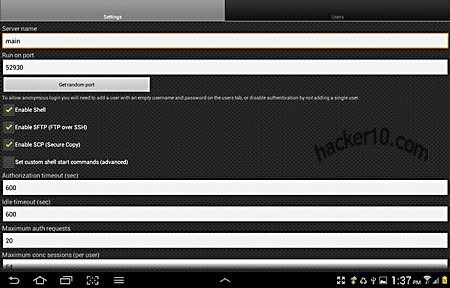
    SSH Server is a complete Secure Shell daemon, Secure FTP,  Secure Copy and Telnet server Android app that doesn’t need rooting the device. After installing the app you will be able to enter an SSH server hostname and port, with optional public key encryption authentication instead of password and allowing X11 forwarding, a way to grant graphical information to pass through firewalls, giving you a graphical interface if the Unix server you are connecting to supports it.

    Logging is very detailed, in verbose mode it includes filters and email logs, to save space it can be set to only record errors leaving connection logs out, the server is accessible from the Internet and you can whitelist IP addresses blocking everyone else.
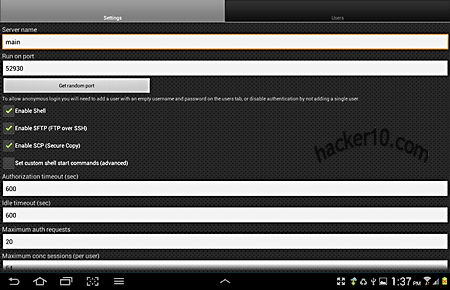
    Android SSH server app
    Android SSH server app

    The free version of SSH Server only allows for one server, it should be enough for most people, to connect to the server just use SSH command line from shell like you would do in Linux, in the form of:

    ssh -v -l USERNAME ADDRESS -p PORT

    With -v being for verbose -l for login and -p indicating the port, the server address should be the IP, the app supports dynamic DNS setting a permanent custom hostname that you can access, remaining always the same even if your device IP changes, companies like DynDNS can provide this service. There are other Android apps like Dropbear providing SSH capabilities to your phone but it requires root, and there is the connectbot app too but this SSH Server from Icecoldapps is the most complete, it comes with SFTP combined with SSH.
    Visit SSH server in Google Play

  • Access Truecrypt and EncFS volumes in Android with Cryptonite

    Access Truecrypt and EncFS volumes in Android with Cryptonite

    Cryptonite is an Android app that brings the FUSE based cryptographic filesystem EncFS and TrueCrypt to Android, you can link it to your Dropbox account with a single tap, after that you will be able to read and write on Dropbox EncFS volumes, exporting, viewing or uploading new files. Dropbox claims to keep data already encrypted in their servers but if anyone finds out your password account they will be able to read the files, encrypting them with Cryptonite you are placing a second security layer on top and block Dropbox built-in backdoor to your data.

    To access your files offline sync them to a local folder with an app providing online storage synchronization, e.g. FolderSync. EncFS has a front end interface but Truecrypt is only available as a command line version, rooted phones that support the FUSE kernel, e.g. CyanogenMod, can mount an EncFS or Truecrypt volume, there is a Truecrypt work around to avoid having to use a rooted file browser, by typing “truecrypt –fs-options=”uid=1000,gid=1000,umask=0002″ volume.tc /sdcard/tc“. EncFS will use the encryption ciphers found in the system encryption libraries, Cryptonite allows you to select the encryption method, from a “Quick” Blowfish 128bit up to a “Paranoia” AES256bit with filename block encoding, other preferences include saving temporary files on an external SD card, setting up the mount storage point, clearing the cache and the “Chuck Norris mode” for experienced users that do not want to receive any security warning from the app.

    Android Truecrypt compatible encryption Cryptonite
    Android Truecrypt compatible encryption Cryptonite

    You can browse, export and open encrypted EncFS directories and files on your Dropbox and to your phone, when you open a file from a decrypted EncFS volume Cryptonite will produce a temporary copy in “/data/data/csh.cryptonite/app_open/path_to_your_file”, anyone with access to your phone could recover those files, the app includes a text viewer that works in memory and does not save any temporary copy, there are plans to add an image viewer in the future but right now there isn’t one and if you open an image a temporary copy could be made on the phone outside the encrypted container.

    Note: App still in development and intended for advanced users.

    Visit Cryptonite Android in Google Play

  • Mobile phone password manager WISeID

    Mobile phone password manager WISeID

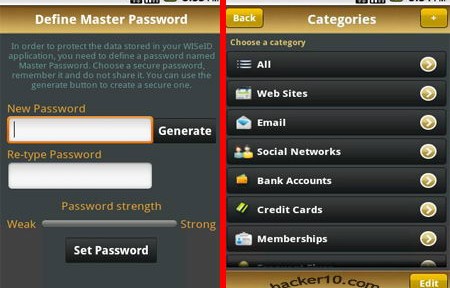
    WISeID is a password manager available for Android, iPhone/iPad, Windows Mobile and BlackBerry, it has been designed to locally encrypt data in your phone using AES256, a very secure uncrackable algorithm that is a US government standard. You will be asked to enter a master password after installing the app, to unlock the database you can use a combination of face recognition or dot pattern together with the passphrase.

    Inside the app everything can be categorized into passwords, bank accounts, social network logins, credit cards, email accounts and others, data can be searched and optionally synced across devices using a Dropbox account.

    WiseID smartphone password manager
    WiseID smartphone password manager

    After storing the username and password for a website inside WISeID you can launch the URL to automatically log in, saving you time. The encrypted data is kept in the mobile device at all times, unlike Lastpass, there is no central server where accreditations are communicated. WISeID is open to the choice of registering with them and get a free X.509 digital certificate called WISeKey’s Personal ID or eID that can be used to encrypt and digitally sign email messages.

    There is no way to recover your data if you lose your master password, no backdoor built in. At the moment of writing WISeID is free, if this changes you might want to look into KeePass mobile password manager instead.

    Visit WiseID homepage

  • iPhone & iPad steganography app Spy Pix

    iPhone & iPad steganography app Spy Pix

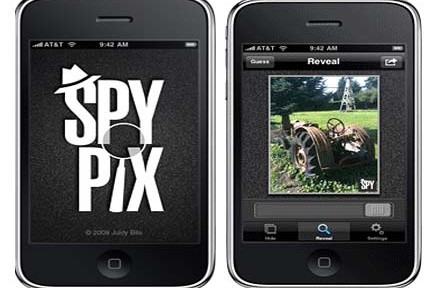
    Spy Pix is an steganographic tool to hide images inside others, the advantage over encryption is that while encrypted data indicates something of value being protected, by hiding data in plain sight an attacker would have to know first what he is looking for. This tool can be used to send secret messages to your friends, they will need to have SpyPix installed to reveal the hidden message.

    The images are saved as .png (Portable Network Graphics), they could be uploaded to flickr or photobucket and your contact download it from anywhere in the world to decode it, the  hidden image can contain a written message with instructions. This system avoids compromising your contacts, if your iPhone is seized by hostile authorities they could work out who you have been emailing with and follow the trail, uploading the image to a public website with thousands of visitors needs some guess work to find out who the receiver is.

    iPhone steganography app SpyPix
    iPhone steganography app SpyPix

    Supporting for the built-in camera Spy Pix can use photographs you take as a carrier to hide other images, use a photo from your album or copy an image from another app, the photos can be easily blended using a slider that allows you to control end image quality, you can send them by email using a single button, the options aren’t amazing but they do everything you need and keeping it simple makes operating this app easy.

    Spy Pix could be greatly improved if encryption was used and a password was asked to decipher the hidden image/message.

    Note: This app is not free, priced at $1.

    Visit Spy Pix homepage

  • Create disposable phone numbers with Burner iPhone app

    Create disposable phone numbers with Burner iPhone app

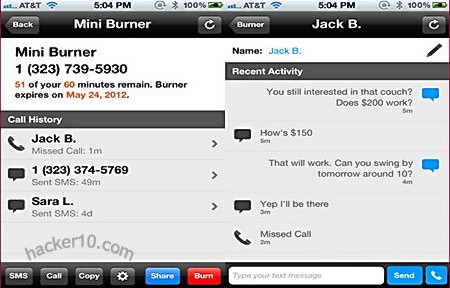
    Burner is an iPhone app allowing people to create as many disposable phone numbers as needed, the messages can be set to expire in a day, week or months and used to send and receive SMS, inbound calls or as voice mail, the caller ID will also be modified during outgoing calls and it can be replied to the disposable number. This app could be of use to post a throw away phone number to Craiglist or Facebook and wipe it if you get harassed or once the item has been sold.

    Calls and messages go through your mobile network carrier but changing the sender ID so that it appears it came from your Burner disposable phone number, the receiver will be totally unaware and will not get any kind of warning about the sender using a disposable number. Burner interface allows you to organize your various disposable phone numbers creating new ones or erasing them. When a number is erased it will be gone for ever, future callers will hear an out-of-service message, the number could be recirculated again after a two week quarantine period.

    Burner disposable phone number
    Burner disposable phone number

    Burner will keep logs associating your original phone number with the disposable one and disclosure it to US law enforcement agencies with a valid warrant, they do not say how long for logs are kept, terms and conditions also bar users from using Burner for “objectionable” activities, which could be anything they want.

    Note: This is not a free app, only available in the US and Canada with future United Kingdom coverage planned.

    Visit Burner app homepage

  • Droidcat the Android app for hacking

    Droidcat the Android app for hacking

    Droidcat is a collection of security and penetration testing tools for security professionals, it includes packet sniffers, network tools, scripts and attack tools to check your own network security using an Android phone, the idea is to use a mobile phone as a penetration testing toolkit, source code is provided for review.

    Droidcat Android PEN testing app
    Droidcat Android PEN testing app

    The developer’s plan is to compile a full suite of ethical hacking tools accessible using a single app, as more and more people start using smartphones this seems like a good idea , smartphones can be easily moved anywhere in a building inside your pocket taking advantage of Wifi proximity signal and people do not expect others to sniff passwords or run malicious scripts using a mobile phone.

    Visit Droidcat GooglePlay page

  • Serval Project, a self-powered mobile phone network

    Serval Project, a self-powered mobile phone network

    Serval Project is an autonomous mobile network for non coverage areas, it requires no mobile phone company to operate, using Wifi enabled mobile phones transmit data in P2P mode, ideal for deployment in disaster areas where mobile phone towers have been destroyed and remote places where mobile phone signal can not reach.

    The software called Distributed Numbering Architecture (‘DNA’) turns an Android phone into an independent network router broadcasting and managing calls in mesh P2P mode. To enjoy adhoc wireless networking you will have to root your phone invalidating its warranty, if you choose not to root your mobile phone you can still use it for free P2P calls with people connected to the same Access Point but you won’t be able to transmit data like SMS messages, called MeshMS, and share files.

    Serval Project batphone P2P mobile mesh
    Serval Project batphone P2P mobile mesh

    The Serval Batphone software will guide through installation using a configuration wizard, the settings allow you to make a call through the Serval network, suspend services to allow your phone to operate as normal with a mobile phone company providing coverage, and reset your phone number, which can contain from 5 to 32 digits, numbers starting with 11 are reserved for emergency lines. If something does not work you can troubleshoot problems by going to the Wifi settings changing the SSID, frequency channel or router implementation, advanced users can create a new mesh on a different subnet changing the network address.

    Serval makes use of SipDroid, an open source free VoIP client for Android, options found on SipDroid can be found in Serval too.

    Serval Project mesh phone network P2P
    Serval Project mesh phone network P2P

    Although the initial idea of this project is to provide mobile phone coverage to extreme poverty and remote zone areas, I can envision the utility of this network by a group of acute paranoid people concerned about mobile phone companies keeping logs of their calls or fed up paying high fees, but every single node in the network would have to be trusted for this since they route the calls, probably not feasible with you have a large number of devices and impersonation is fairly trivial since there is no central authority allocating phone numbers, solutions to these problems could come in the form of call encryption and requiring a verbal identification password when the call is established.

    Currently still in development, it has been successfully tested by the developers in the Australian outback to make P2P mobile phone calls covering 1 square kilometer, future features include filesharing with people who are not reachable at the moment and a version for Apple iOS.

    Visit Serval Project homepage