Tag: encrypted Instant Messenger

  • OpenPGP encrypted Instant Messenger SafetyJabber

    OpenPGP encrypted Instant Messenger SafetyJabber

    SafetyJabber is a Jabber instant messenger with integrated encryption for Windows, Mac OS, iOS and Android. The messenger uses the XMPP transmission control protocol (TCP), an open standard developed by the Jabber open source community and compatible with any other of the bountiful IM clients supporting XMPP, this includes Google Talk, Jitsi, Pidgin, Trillian and Gibberbot, but not ICQ, Yahoo Messenger or Skype.

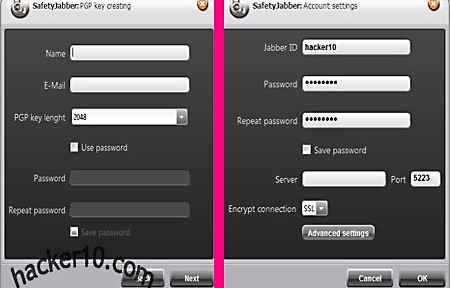
    After the installation you will be asked to create a new PGP keypair or to import your own, key length can be up to 2048 bit and the encryption keys password is optional. If you are familiar with PGP encryption everything will be intuitive, otherwise you can watch one of the video tutorials in the developer’s site or read the included help manual with screenshots, there is a user support forum too but everything appears to be in Russian.

    Before you can start chatting you will need to create a Jabber account first in any Jabber public server, a list can be found with a quick Internet search. Once you have registered for an account enter the given server settings in Accounts>Add, specifying to encrypt the connection with SSL or StartTLS, those details should be given to you during registration. The Advanced Setings button allows you to enter proxy details to connect to the server, this will hide your real computer IP from the Jabber server.

    Encryption OpenPGP messenger SafetyJabber
    Encryption OpenPGP messenger SafetyJabber

    The premium version version of this program removes an advertising banner, allows for bigger encryption keys of up to 4096 bit, comes with a portable version and a screensaver utility with hotkeys to lock your computer while you are away and to quickly shut it down during an emergency using the hotkey. The program features are simple but enough for all one needs, you get notified when contacts come online, conversations can be logged and there are smilies and a system tray icon with sound notifications, all of this can be configured within the settings. You can download SafetyJabber source code from the official website, checking that there is no backdoor and freely modify the code to add anything you want were you to have the skills for that.

    The most appealing thing from SafetyJabber for me is that you can look at the source code, very important for a security product, and they use an encryption standard like OpenPGP. This messenger will make sure that nobody can read the IM conversations with your friends, the private encryption keys always remain in your power and are not stored anywhere else, the only downside is that if you would like to send encrypted files you will have to pay for the premium version.

    Visit SafetyJabber homepage

  • DeOps, a secure decentralized Instant Messenger

    DeOps, a secure decentralized Instant Messenger

    DeOps, Decentralized Operations, is a Windows P2P instant messenger for secure file sharing and chatting, unlike Windows Live Messenger or Yahoo! Messenger there is no central registration server where to recover data from, all of the settings are locally stored in your computer, communications are P2P and ports are chosen at random to avoid traffic fingerprinting. The messenger, a small 3MB download, doesn’t have to be installed,it can be run from inside a USB thumbdrive or encrypted container, copying the profile there will move all of your settings along the way. I noticed that Windows Firewall blocked me when I launched the application asking for confirmation that I wanted to grant Internet access to DeOps this means that in guest computers you might need administrator rights.

    After launching DeOps you can create a global ID and secret passphrase for your organization, DeOps calls every separate P2P network an “organization“, each one of them can contain multiple chatrooms and groups. A deops:// link composed of a long alphanumeric string will be created for your group, you can copy it to the clipboard and share it publicly or in private with prospective members, to join your new darknet people will need to know the passphrase together with the link, the passphrase can easily be changed by the group founder in the settings.

    If you want to join an existing organization open a .dop DeOps Identity file or copy and paste a deops:// link inside the Join Organization window.

    Decentralized P2P IM DeOps
    Decentralized P2P IM DeOps

    To add buddies to your IM list copy and paste their personal deops:// link  inside the add window, to share files with everyone in the group place them inside “My Shared Files” area where they can be marked as public to be found by anyone using DeOps or private to be shared with darknet friends only, it is possible to copy and paste into websites a unique deops:// link of each file to be downloaded by other people using the same P2P messenger, the files you are sharing will only be available while you are online, file transfers are automatically swarmed (multi-sourced) when multiple people are downloading the same file.

    DeOps organization types

    • Public: Anyone can join by entering deops://orgname
    • Private: Only those invited can join, utilizes the lookup network to aid in finding new members.
    • Secret: Same as private except the look up network is not utilized. Best for large networks and LANs.

    You can find the usual IM settings like ignoring people in the network or set your status to Available, Away or Invisible, advanced options have diagnostics to automatically configure your router opening the necessary ports, successful network connection is displayed with a green bar. The tools section includes a bandwidth graph, crawler, lookup, file transfer status, technical logs (called Internals), data packets details and a searcher to find users and organizations that have chosen to go public, the help manual is very basic and has not been finished yet.

    The software includes a DeOps Internet simulator able to create dummy users and networks for troubleshooting, I did not experience any kind of problem and had everything set up in under 5 minutes. The weak spot of this software is that you are not anonymous, no measures are taken to hide your IP from other users, if someone you are communicating with is not who you think they are (infiltration, kidnapping), your real identity would be compromised.

     Visit DeOps homepage

    Note: This software development is on-going.