Author: John Durret

  • SSH in your browser with Chrome Secure Shell

    SSH in your browser with Chrome Secure Shell

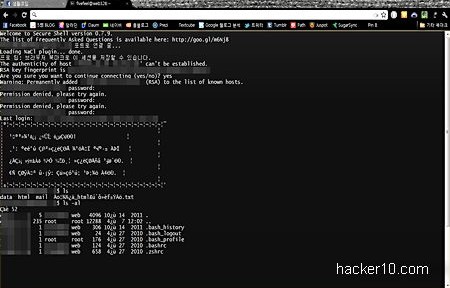
    Chrome Secure Shell is a terminal emulator, you can use it to access a remote server from within your browser, it replaces PuTTY in Windows and ssh in Mac/Linux computers. Secure Shell can emulate most things any xterm Unix terminal can do. Secure Shell runs hterm, an HTML terminal emulator written in JavaScript, it does not provide SSH access on its own but it can connect to any server running sshd on any port and it will be as secure as ssh. Executed commands are sandboxed inside the browser, this stops malware from spreading to your computer.

    Combined with a shell account the Secure Shell Chrome extension could be used to bypass Internet filtering. With sparse Linux command line knowledge it is possible to launch the Lynx browser in the remote server and access filtered websites, or use the Alpine email client or irssi IRC client within the shell.

    Chrome Secure Shell SSH
    Chrome Secure Shell SSH

    SSH server login might be accomplished with the traditional username and password or the much more secure digital certificate authentication system, this makes credentials theft very laborious. You can change shell settings like font size, cursor blinking and font colouring with some tinkering and spending time reading Secure Shell help file.

    A few native terminal features missing are X11 forwarding, SFTP to upload or download files, Syslog (data logging for auditing) and you can’t call multiple terminals but you could obtain a background process running in the shell account with the screen command for multi tasking.

    It would not make sense to have this extension in a Linux computer, since all Linux OS come with a terminal. Windows users are the ones who should be thankful that there is no need to install CygWin any more in their computer, Secure Shell brings simple Unix access to the browser,
    Visit Chrome Secure Shell

  • Encrypted chat in Apple iOS with iCrypter

    Encrypted chat in Apple iOS with iCrypter

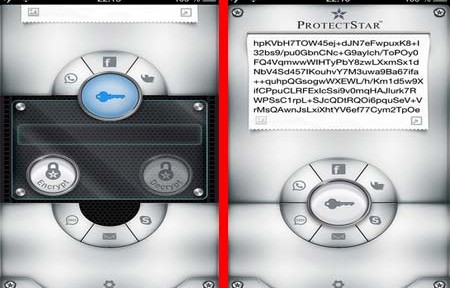
    iCrypter is a small encryption app for Apple iOS (iPhone, iPad, iPod Touch). With this app you can write or paste messages inside a window and attach any file you like, from photos or videos to documents, after that you will be asked to enter a password to scramble everything. The encrypted message can be distributed via SMS, WhatsApp, Facebook, Twitter, Skype, iMessage and the like.

    The password you used for encryption is stored in the built-in Contact Book which is also encrypted, to start a secure chat session the password is shared with other participants, when someone with iCrypter installed clicks on an incoming message decryption will initiate automatically.

    iCrypter Apple iOS encryption
    iCrypter Apple iOS encryption

    iCrypter uses symmetrical cryptography implementing the Advanced Encryption Standard 256-bit algorithm, a US National Security Agency algorithm approved to secure top secret information. Data encryption takes place in your phone before being transmitted, there is no central server that could be wire tapped to read your messages or any kind of backdoor subverting the software.

    To protect your information if the device is lost or stolen, a self-destruction function called “Fail Safe” will wipe all iCrypter content, bookmarks and settings, overwriting data with the US Department of Defence 5220.22-M E method after entering the grid application password wrong five times. The encryption algorithm source code put in action by iCrypter can be downloaded and is available for inspection.

    This is an effortless encryption app to operate, with an easy to navigate interface, the only downside is that people you communicate with needs to have iCrypter installed too and the app is not available for Android yet, a future Android release is planned for this year.

    Visit iCrypter homepage

  • Encrypt data in Android with Secret Space Encryptor

    Encrypt data in Android with Secret Space Encryptor

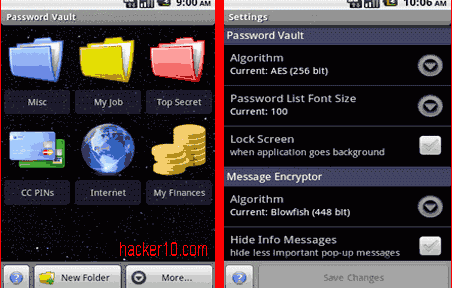
    Secret Space Encryptor is a cross platform tool made up of a password manager, message encryption to encrypt text, and file encryption to password protect photos or videos. Each function can be configured in settings to apply a different cipher algorithm, Secret Space Encryptor comes with a wide range of ciphers: AES-256bit, Blowfish-256/448bit, Serpent-256bit, Twofish-256bit and Gost-256bit.

    File encryption will preserve timestamps and associate .enc files with the utility, the password manager can classify data inside coloured folders and back everything up exporting it to an encryped .pwv file that can be later imported back or save it unencrypted to an .xml file, a standard format to import data into other applications like a different password manager.

    Secret Space Encryptor Android
    Secret Space Encryptor Android

    You will find other embedded privacy utilities like a clipboard cleaner, algorithm benchmark or customizable password generator. The software is very complete and open source, giving you some guarantee against backdoors, amazingly this free app has no advertisements or nagging screens, this a very easy to use encryption tool, the software is available for Windows, Android, Linux and Mac OS X, there is a java version of the program that runs on any OS with Java installed.

    Visit Secret Space Encryptor homepage

  • Build a VPN-Tor proxy on Amazon cloud servers with Lahana

    Build a VPN-Tor proxy on Amazon cloud servers with Lahana

    Lahana is a set of scripts that can quickly create a VPN on Amazon EC2 cloud servers using Linux instances and tunnel everything through the Tor proxy network. It defeats state level Internet censorship, thwarting DNS poisoning used in the Great Firewall of China and blocking of websites by ISPs blacklisting URLs. The only way to stop Lahana is by barring access to all of Amazon EC2 servers which would leave the whole country without a cloud platform used by many companies providing different services or censors could block a single node and play a whack-a-mole game where the user gets access to a new Lahana proxy node from someone else everytime one of them is blocked.

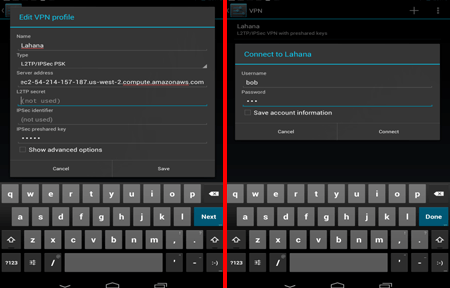
    There is no need to install any software for the user, Lahana can be used in Mac OS X, Windows, iPhone and  Android, it should work on any device with  a built in IPSEC client able to set up an L2TP VPN tunnel,. VPN node credentials can be publicly shared or only given to trusted individuals. The developer’s explanation to use Tor as exit node instead of Amazon servers IP is to protect the operator running a VPN on Amazon EC2 from abuse, if anyone commits a crime with the a Lahana VPN it would lead back to a Tor IP address and not the VPN operator. Lahana VPN sits in the middle in between the user and Tor in the form of User>>Lahana VPN>>Tor>>Website.

    Lahana VPN Tor proxy on Android phone
    Lahana VPN Tor proxy on Android phone

    Lahana nodes also serve as bridges and can be used to access hidden Tor websites, the more Lahana VPN nodes there are up, the faster the Tor network gets. This tool solves the Internet censorship problem but not privacy or anonymity, it would very easy for a Lahana VPN operator to log your computer IP and see what sites you visit and capture usernames and passwords, for high Internet anonymity you should only use Tor.

    Visit Lahana homepage

  • Portable Private Browsing by PortableApps

    Portable Private Browsing by PortableApps

    Private Browsing is an open source portable app that works in conjuction with your portable Firefox copy. While Firefox already has a private browsing mode that will not save what sites you have visited, cookies, passwords, downloaded items or search entries and run completely in RAM memory not caching files in the hard disk, Private Browsing by Portableapps comes preconfigured with all of that and a couple of privacy plugins, FlashBlock and AdBlock Plus using the EasyPrivacy tracking list to block scripts and invasive sites.

    Firefox Portable Private Browsing PortableApps
    Firefox Portable Private Browsing PortableAppsfox

    After trying Portableapps Private Browsing app I found few advantages over configuring your Portable Firefox browser yourself, other than saving time. The app could also be improved disabling the default setting of sending data to Mozilla about your browsing “so that they can improve your experience“, with the actual configuration you will be prompted about what you want to do, another setting that should have been changed are the default Google and Yahoo search engines, the app would be better off unfolding non tracking search engines like StartPage or DuckDuckGo, you can change them yourself but it fails Private Browsing aim of reducing privacy configuration to zero.

    The only unique features this app appear to have are that it will ignore local plugins, for example, if the computer you are working on has Java and Flash installed, the plugins will not work with your portable browser, and Firefox portable will not store a profile listing what sites you visited. Check out my list of the best Firefox addons for computer privacy if you need ideas to set up a custom private browser and add them yourself manually.

    Visit Private Browsing by Portableapps

  • Self-erasing chat conversations with OTR browser extension

    Self-erasing chat conversations with OTR browser extension

    Off The Record messaging is a browser addon for Chrome (Firefox and Internet Explorer coming soon), to automatically erase messages you send to your friends or co-workers after they have been viewed. When someone receives or views a photo sent with OTR they have five seconds before it self-destructs, this default setting can be changed to a longer period of time if you wish so. You have to register your email address and a password to install the plugin, then you will see a bright OTR button on the top right corner of the browser, you need to add contacts or send invites by email before you can communicate, only other OTR users in your contact list and with he same plugin installed will be able to read the messages.

    A small window opens when you click on the OTR button, big enough to write a few hundred words, photos can not be attached, they have to be taken with the computer camera.

    Off The Record browser plugin self-erasing messages
    Off The Record browser plugin self-erasing messages

    This is a very basic plugin in features and security, not suitable for high privacy, anyone can take a screenshot or photo of the message and preserve it, it will only be of real benefit to avoid exposing personal messages by accident by keeping them off email services that archive all conversations, e.g. Gmail. Off The Record browser plugin target public are company workers who don’t want the boss to learn what they are gossiping about in the office, it could do the trick for that purpose, but it will not keep a very determined boss or IT administrator from learning what messages are being exchanged, a packet sniffer is all someone would need to spy on you since there is no mention of encryption anywhere in OTR specifications.

    You should not confuse this plugin with the excellent Pidgin OTR plugin for Instant Messenger, they both have the same name but are very different.

    Visit Off-The-Record homepage

  • Android encrypted data backup with truBackup

    Android encrypted data backup with truBackup

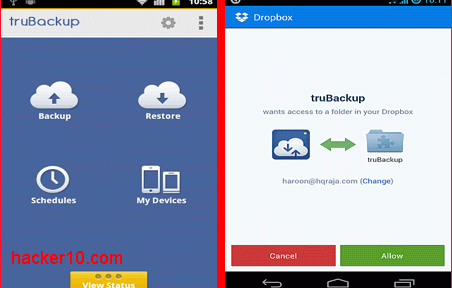
    truBackup is an Android app to backup an restore data,  it allows you to select the files you wish to copy, like contacts, SMS, applications, or media files with photos and videos. Data can be backed up to internal or external storage (SD card) or to the cloud in your DropBox account, truBackup main interface is clear and simple to use, with only four buttons to tap on its main window: “Backup” ; “Restore” ; “Schedules” ; “My Devices“.

    When you first run the app it will ask you where you would like to store the data and shown backup progress when you tap the “Show Status” bar at the bottom of the screen, you can schedule backups daily, weekly or monthly at an specified time and never have to remember again backing up your data, if you are backing up online to Dropbox, to avoid huge mobile phone bills choose the option “Wi-fi only” inside the settings.

    truBackup Android encrypted backup
    truBackup Android encrypted backup

    All data is encrypted with AES256, the app can do incremental backups, saving you time by only copying those files that have changed since the last backup, logs and reports show you what has been copied and how much space you are using, what I liked most of this app was its simple interface and being able to encrypt data prior to copying it, there are more complete Android data backup apps with built-in encryption like Titanium Backup but it is considerably more expensive.

    If you want to encrypt and back up your Android data for free you could use a cloud service like SpiderOak, but it will only work when you are online.

    Note: truBackup currently costs $2.99

    Visit TruBackup homepage