Author: John Durret

  • Uninstall a Windows program safely with iObit uninstaller

    Uninstall a Windows program safely with iObit uninstaller

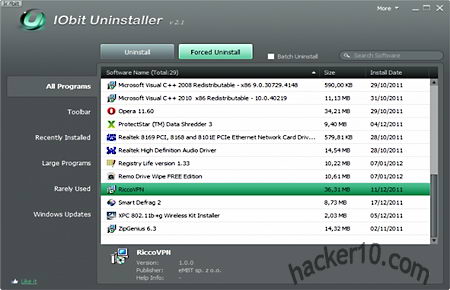
    iObit uninstaller is a tool to help you get rid of junk left behind by uninstalled programs, some of its advantages over the standard Windows uninstaller is that it will scan the registry and hard drive to find invalid keys and leftover files, allows you to uninstall various program in batch mode using a single click, and it has a “Force Uninstall” mode to eliminate software not listed in the Windows Add/Remove control panel or if the original uninstaller no longer works, however this is not guaranteed to succeed all the time.

    It’s tabbed interface classifies installed programs in “Windows Updates” ; “Rarely Used” ; “Large Programs” ; “Recently Installed” ; “Toolbars” and “All Programs“. This makes it very easy to find what you want to get rid of, an instant search box is also included, after using the Powerful Scan you will be presented with all the leftover files found and asked if you would like to erase them, anything you do is logged inside a text file accessible from the menu together with a shortcut to Windows Restore Point to reverse changes, iObit uninstaller will create a restore point every time you use the advanced uninstall mode.
    iObit free Windows uninstaller
    iObit free Windows uninstaller

    This program does not need installation and it can used in portable mode, it is a good tool to have for IT administrators, however, it requires administrator rights, unlike  some of their competitors iObit uninstaller does not track what changes are made to your computer when you install software, the program is not as complete as Revo Uninstaller Pro, but it is free, if you are having problems eradicating a hard to go program it is well worth a try.

    Visit iObit uninstaller homepage

  • Aircover mobile phone security for Android and iPhone

    Aircover mobile phone security for Android and iPhone

    Aircover is a security and privacy app for Android with an iPhone version coming soon, what makes this app stand out from the crowd is that it pretends to be an all-round solution not needing anything else to secure your smartphone.

    This app comes with an anti-virus offering real time protection against malware, GPS tracking to locate your loved ones with automatic notification when someone moves out of a pre-defined location, privacy protection allowing the user to control what apps can access what, online cloud backup with 2GB of expandable storage space to copy and restore personal data to a new device in case the mobile phone gets lost or stolen, a device found alarm that lets you track down a lost mobile phone from a PC and remotely wipe it to protect your personal data, and system optimization providing details on resource usage (CPU, battery,memory) able to kill processes, clean cache and other tasks that will speed up your device.

    AirCover mobile phone security software
    AirCover mobile phone security software

    The battery meter tells you the approximate time you have left to complete a particular activity (Wifi, voice call, 3G Internet) before it cuts off averting getting stuck in the middle. Aircover is an excellent idea, instead of having five apps to do everything, you download a single app to address all of the problems that most security conscious people have, it will help you make your mobile phone theft proof.

    It probably could be improved with a screen lock, and if you are picky, not knowing what anti-virus engine Aircover is using to find malware could be a bit concerning, we will have to trust it is as good as the likes of KasperSky and F-Secure, the only thing I would not be using this app for is the online backup, there is no mention at all of encryption for data backups, I can see someone hacking a server and getting access to your private data due to this, I am not  comfortable having unencrypted data stored online, the app is still in beta and I hope the developers add encryption to their online backups in future versions.

    Visit AirCover homepage

  • Defeat trojan keyloggers with KeyScrambler

    Defeat trojan keyloggers with KeyScrambler

    A keylogger is designed to capture every single keystroke you enter on your keyboard, it is one of the most effective ways to spy on someone and steal data, keyloggers are able to capture email passwords, credit card details and encrypted container passwords. The first line of defence to stop a keylogger from infecting your computer is a good antivirus, the second line of defence, once a keylogger has managed to make it into your computer, is to use a virtual keyboard but this will slow you down and is still vulnerable to trojan horses taking screenshots.

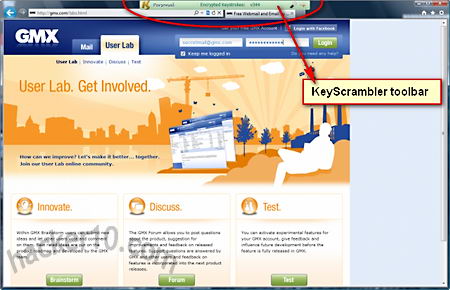
    KeyScrambler defeats keyloggers by encrypting keystrokes at keyboard level using Blowfish-128bit and an asymmetric RSA 1024bit key, the space key is also encrypted, a malicious trojan horse capturing keystrokes will only manage to gather undecipherable data, there is no need to read anything to use KeyScrambler it allows the user to work as usual with no learning curve, a small green toolbar sits on top of the browser and automatically activates when you enter data  confirming that it is working.

    KeyScrambler toolbar
    KeyScrambler toolbar

    This program is ideal for protection against new sophisticated keyloggers not detected by any antivirus in the market, the kind of trojans state sponsored spy agencies use, anyone working in a financial environment should have a tool like this installed in their computer. The application could be improved with some antiscreen capturing feature, passwords are normally behind asterisks, but what you see on the screen could still be read through screenshots. KeyScrambler free version is very limited, it only works with Internet Explorer, Firefox and Flock, any browser addon like Lastpass password manager will also be supported. The paid for version of KeyScrambler version adds East Asian languages input, protects Windows Explorer, Windows logon screen and extra applications like the Opera browser, Safari, Chrome browser, Winrar, Notepad, iTunes, Filezilla, Truecrypt, Bestscrypt, LibreOffice, Skype, long etc .

    KeyScrambler does not defeat hardware keyloggers it only starts working once the keystrokes have reached the Windows kernel working at driver level, in order for someone to install a hardware keylogger they will need physical access to the computer, most users are not at this level of risk, I think that this a good tool to have for high security environments.

    Visit KeyScrambler homepage

  • Steganography software Cipher Image hides text in pictures

    Steganography software Cipher Image hides text in pictures

    Cipher Image let’s you hide plain text inside photos, a process known as steganography, it can hide messages of up to 64Kb in size, quite a few pages of information, the text has to be typed into the program, Cipher Image can not hide attached files. The data is hidden by replacing image pixels that are similar to each other making it unnoticeable to the human eye, the messages are encrypted using 128-bit, there is no mention of the algorithm used for this, images can be saved in 7 different file formats (jpeg, Gif, Tiff, Paintbrush, Windows Bitmap and OS/2 Bitmap), the included password generator can produce a random pass, it is not configurable and I did not find it useful as it will be impossible to remember whichever pass it produces, there is the option of saving the password in a .txt file but I would not advise it if the data is important.

    Cipher Image steganography software
    Cipher Image steganography software

    You will get tooltips with instructions when you hoover your mouse over the buttons, make sure to read them as the interface is not very intuitive it is easy to get lost, I would classify this tool as an adequate steganography program for low security stuff, mainly because it is not open source, the developers are not well known and the password generator is quite lousy, my only concern was encryption about which there is little information other than to say it uses 128bit, but people really won’t be able to spot any hidden text and that is what steganography is about, ideal to deliver secret messages using your Flickr or Picasa account, if you haven’t got any security agency going after you this program will get the covert communications job done.

    Visit Cipher Image homepage

  • Advanced SSH and SFTP client Bitvise Tunnelier

    Advanced SSH and SFTP client Bitvise Tunnelier

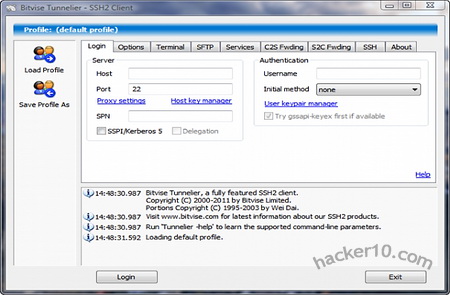
    Bitvise Tunnelier is a highly configurable Windows SSH client supporting TCP/IP tunnelling, in between others, it can be used as alternative to PuTTY for port forwarding for anonymous Internet browsing hiding your computer IP and getting around filters, there is integrated support for HTTP and Socks proxies, auto-reconnect, graphical SFTP with passive and active mode, FTP to SFTP bridge, client to server/server to client port forwarding, enabling/disabling encryption algorithms for SSH sessions, and saving of profiles. Terminal emulation supports vt100, xterm and bvterm terminals, the most common protocols in SSH servers, there is colour support for xterm and bvterm, RSA/DSA public key authentication, scriptable with a command line remote execution client.

    Optionally you can use Tunnelier in command line mode, this is normally use by IT administrators, it comes with flexible command lines able to load profiles on launching, it can be run in portable mode preventing any Windows registry changes. A .paf (PortableApps) and U3 (proprietary format specially designed for flash drives with the U3 Launchpad) portable Tunnelier made by users is available, though not supported by Bitvise.

    Bitvise Tunnelier SSH client
    Bitvise Tunnelier SSH client

    The makers of this software also develop WinSSHD (a Windows SSH server), Bitvise Tunnelier comes with features to remotely control it, Tunnelier supports speeds of up to 5 MB/s when connected to a WinSSHD server. If you are wondering how you could use this software to browse the Internet or access your email through an encrypted tunnel, be aware you will need an SSH server for that, Tunnelier is the tool that will allow you to connect to the tunnel just like OpenVPN software is the tool to allow you to connect to a VPN server.

    To get access to a SSH server for port forwarding, set up your own at home on a Windows computer with something like MobaSSH (not very difficult), learn Unix command line (advanced) and get a VPS, or find an SSH tunnel provider. I have used KiTTY and PuTTY to create SSH tunnels for Internet browsing and they both worked fine, but for high configuration and a nice GUI (interface), Tunnelier can not be beaten.

    Note: Bitvise Tunnelier is free for personal use and limited use inside organizations.

    Visit Bitvise Tunnelier homepage

  • Idoo file encryption freeware review

    Idoo file encryption freeware review

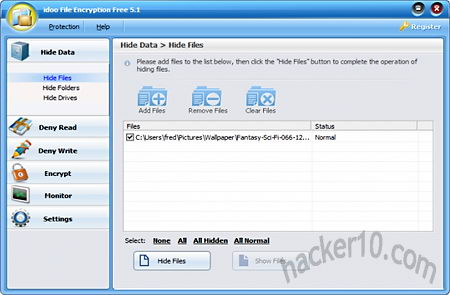
    Idoo file encryption can lock, hide and encrypt files using AES256, you will be prompted to enter the masterpassword after installation, and optionally, an email address to recover your password in case you forget it. You can lock and hide files using the interface, but not single file encryption, this can only be done through Windows context menu, I used it to encrypt a file and it did not ask me to confirm my password, you will have to be very careful what you type if it is a long passphrase, I would advise you to tick the box to see the password you are entering and do not use asterisks.

    Hiding a couple of photos worked fine, Windows was unable to see them, however, specialist computer forensics software, of the kind used by law enforcement and well funded investigators should be able to discover them, to make the photos or files visible again all that is needed is unchecking a tickbox. File write protection stopped me from erasing files where it had been applied, not even using administrator rights I was able to get around it, Idoo file encryption is fairly easy to use and you have an online help manual with screenshots.

    This tool saves encrypted files as .gfl but you can choose to use a .exe extension to be able to decrypt them without the software, files can securely wiped after use and you can use it to hide drive letters, like an external plugged in device, but I doubt this will be of use for a home user who isn’t on a network.

    Idoo file encryption free version
    Idoo file encryption free version

    I am very concerned about the password recovery feature, I used it once and I was sent my password in plain text to my email Inbox, this indicates to me that the password must be available in plain text somewhere, normally, encryption software never stores a readable password, it uses a hash algorithm instead, Idoo file encryption did not inspire me confidence due to this. I have nothing against password recovery but not this way, a good example of password recovery done right is SpiderOak, they email a password hint that the user has previously set himself, but not the full password in plain text as nobody has access to it.

    The developers website comparison in between the Free and Pro version mentions that the Free version is good enough for company documents and the Pro version for Government agencies and financial data, in reality the level of encryption it is exactly the same, the only difference is that the Pro version can encrypt folders, their comparison is not quite right, adding that their password recovery in plain text really blows me away, unless you only want to protect from your little niece spying on you, I wouldn’t waste my time with this product, lets alone any money.

    Update February 20117: I have deleted the link to IdooEncryption as it is being reported by Firefox as containing malware. Site does not look updated either, no mention of Windows 10.

  • Check your Internet browser security with Qualys’s BrowserCheck

    Check your Internet browser security with Qualys’s BrowserCheck

    Qualys Browsercheck is an online test run by a vulnerability assessment company (Qualys) that scans your Internet browser version and outdated plugins after visiting their website. In order to perform a security analysis you will be asked to install a browser plugin available for IE, Firefox and Chrome, that will show complete information about installed applications, like path and associated files. If you do not wish to install Qualys plugin you can opt for a quick online scan with limited information running in your browser, this will only check for browser version, Flash, Shockwave and Java.

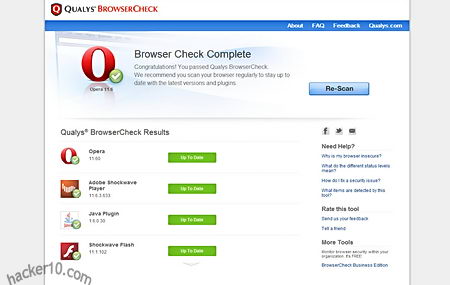
    The results are neatly presented with an easy to understand colour code, if something has been found to be outdated you will be given a link to the official site from where to download an updated patched version of the software. After the updates have been applied you should rescan your Internet browser again to make sure everything went smoothly.

    Qualys Browsercheck security test
    Qualys Browsercheck security test

    If you can not update one of the vulnerable plugins installed in your browser, it is possible to disable them going into browser settings. The vsecurity test (with the browser plugin) includes the most used applications, like Adobe Flash Player, Sun Java, Shockwave, Apple Quicktime, Real Player, Adobe Reader and Windows Media Player together with inherent OS software like security updates, firewall and antivirus. Qualys security check plugin only works when you visit their Browsercheck website, you can uninstall it once you are done with it.

    The vulnerability test is also available for mobile devices like Android, iPhone and iPad as well as little known browsers like K-Meleon, Sleipnir, MineField and Maxthon. A BrowserCheck business edition with a unique URL for company employees allows network administrators to view detailed user browser vulnerabilities in the network. Data collected by Qualys in these security test is anonymized and statistically released showing which are the most outdated plugins on the Internet, according to this data, Java appears to be the most likely application to be run outdated, hence exposed to hacking attacks.

    Visit Qualys BrowserCheck homepage