Author: John Durret

  • Review Axcrypt free file encryption program

    Review Axcrypt free file encryption program

    AxCrypt is a free open source encryption program for Windows computers available in 32-bit and 64-bit versions, after installing AxCrypt it will integrate with your right-click  menu and allow for single click encryption, it is very easy to use, there is nothing to configure, everything works straight out of the box after installation, you can right-click on a folder and instruct AxCrypt to encrypt the entire contents, the program will then create multiple encrypted file belonging to each one of the files inside.

    The software interface is multilingual, available in 7 different languages, it can be used from the command line and a portable version of AxCrypt is available for those on the go wanting an encryption programs that runs from inside a USB thumbdrive.

    There is no maximum file size for encryption, the only size limit comes imposed by your operating system boundaries on file size, AxCrypt runs on very low resources, to use AxCrypt you only need 5MB RAM, 2MB hard disk space, temporary disk space 1.5 the size of the file being encrypted, and a low end computer desktop CPU.

    Because AxCrypt is open source, you can download the source code and compile the program yourself where you to feel inclined, you could check the source code for backdoors before compiling it.

    AxCrypt encryption method

    AxCrypt uses the AES algorithm with 128-bit keys for file encryption and SHA-1 for hashes, there is no backdoor, if you forget your password that is it. The AES encryption algorithm that AxCrypt uses was selected by NIST (American Nations Institute of Standards and Technology) after a 5 year process in which fifteen competing designs were presented, AES is the current Federal USA Government standard algorithm for encryption.

    AxCrypt file encryption
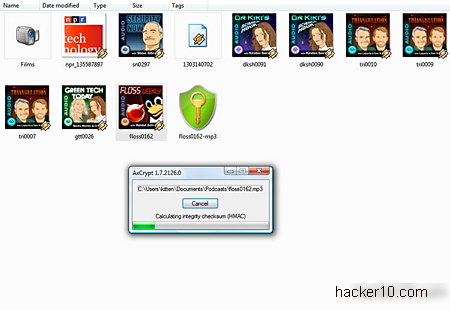
    AxCrypt file encryption of MP3 file

    Files encrypted with AxCrypt have the extension .axx, it retains the original file name and information, you can rename the file if you want to disguise a descriptive name, temporary files are automatically shred, the encryption keys are not stored in Windows page file. If you don’t want to erase the file after encryption you can just choose encrypt copy from AxCrypt menu.

    To make it more difficult for an attacker to brute force your password and make the best of the full 128-bit encryption strength potential that AxCrypt offers, you should be using with a meaningless passphrase sequence of 22 characters, if you decide to create a keyfile with AxCrypt and use it for encryption your files will automatically be secured at the maximum level, the keyfile encryption method can be used in conjunction with a password.

    AxCrypt software developers recommend that you always create a keyfile for encryption, the created keyfiles are made of 256 bits encoded in Base64, they are saved as a .txt text file with random characters in it.

    AxCrypt file decryption

    When sending your encrypted file over email to someone else that person will need AxCrypt installed to decrypt it, there is a free program called AxDecrypt that allows others to view AxCrypt encrypted files without installing the full software, AxDecrypt only serves to open files with the .axx extension and it can not encrypt.

    You can choose to create .exe self-decrypting files, the other end does not need any kind of program to view the encrypted data, they just need to know the password used, one downside is that .exe files many times contain viruses and few people trust them, antivirus could flag them as a malware, and some email services like Gmail do not accept the sending of .exe file attachments.

    Like all symmetric encryption software when you send an encrypted file to someone he/she will need to know the password you are using, you can transmit the password over a secure channel, ideally in person and if that it is not possible then using an encrypted VoIP call, or an Internet messaging program with built in encryption.

    File encryption vulnerabilities

    While AxCrypt contains no backdoor and the algorithm it uses can not be cracked at present, all file encryption programs have side vulnerabilities residing on the operating system, this is what you should watch out for.

      1. Weak password, file encryption programs are only as good as your password

    Solution: Use a very hard to guess passphrase not contained in a dictionary or use a keyfile to secure your files, use a password manager if needed to remember it.

      1. Temporary files and backup copies stored by the your operating system while viewing the decrypted file

    Solution: Use data wiping software in conjunction with your file encryption software, routinely wipe Windows locations where temporary files are normally stored, like for example the Windows page file, quality data wiping software come already preconfigured to securely erase those locations.

      1. Your computer has a keylogger installed that captures your password

    Solution: Have an updated antivirus and use a high quality firewall that will warn you of outgoing connections, the default Windows firewall will not do this.

    AxCrypt file decryption
    AxCrypt file decryption

    After decrypting a file AxCrypt will automatically overwrite it, secure data wiping consists of a single pass using pseudorandom data, this is enough to protect you from common undelete software but it will not protect you from expensive special diagnostics hardware used by well funded adversaries like corporations and law enforcement, if you need that level of protection get a different encryption software because data could be recovered from previously erased data.

    AxCrypt online documentation is very complete, if you want to know the inner workings visit their homepage, if you get stuck, they have an online forum and a mailing list where to ask questions to other users.

    Conclusion on AxCrypt file encryption

    It doesn’t have the prettiest of interfaces and its configuration capabilities are next to none, while some might view this as a disadvantage, others will see it as an advantage because it makes operation very easy to understand for beginners.

    AxCrypt strong points are that it is open source, it contains no backdoor, it uses a standard uncrackable algorithm for encryption (AES128) and it is easy to operate, its interface could be improved but it gets the job done, this is an excellent program for those on a budget because it is free (donationware) and it will securely encrypt your files.

    I would not hesitate recommending AxCrypt to friends in need of secure encryption software but the single pass temporary data overwriting was disappointing, if you are a business user stay out of AxCrypt because it is only secure enough for the home user due to this.

    Visit AxCrypt homepage

  • Anonymous web surfing with The Amnesic Incognito Live System

    Anonymous web surfing with The Amnesic Incognito Live System

    Tails, short for The Amnesic Incognito Live System, has Ad-block preinstalled on its Iceweasel (Firefox based) browser, it comes with many other privacy enhancing tools to stop companies and repressive Governments tracking down Internet users.

    This Debian based Linux live CD enables you to hide your IP address while surfing the Internet, it comes preconfigured to use the anonymous tor network for all outgoing connections, this will hide your IP at all times, you do not need to know anything about Linux to use it, just download the ISO file burn it to a CD, reboot your computer, MAC or PC, and it will work straight out of the box.

    Anonymous live CD features

    • Supports mobile broadband devices like 3G USB dongles
    • Can be booted up from a USB thumbdrive instead of a live CD
    • Multilingual support including Arabic, Chinese and Spanish in between other languages
    • Firewall drops incoming packets by default
    • Instant Messenger Pidgin comes with the OTF messaging plugin to proxy communications through tor
    • Internet browser comes with the HTTPS Everywhere, FireGPG and Ad-block extensions
    • Stops cold boot attacks by wiping RAM memory on shutdown
    • Virtual keyboard available to stop keyloggers
    • Support for i2p eepsites, hidden websites hosted anonymously
    • Email client ClawsMail comes with GnuPG support to encrypt email messages
    The Amnesic Incognito Live System
    The Amnesic Incognito Live System

    Live CD with encryption & file deletion

    The Amnesic Incognito Live System includes secure-delete integrated on its file manager, a program to wipe free disk space and sensitive files, a front end encryption key manager called SeaHorse will take care of digital signatures and GPG encryption keys.

    If you are comfortable with Linux command line you can take advantage of cryptsetup to encrypt files and macchanger to change your computer MAC address. Those are only the security features, open source everyday software for production purposes includes OpenOffice.org to edit documents, The Gimp to edit photos, Audacity to edit sound files and many others.

    This operating system to hide your IP address has two preconfigured users: amnesia and root, the password is the same for both of them, amnesia.

    Visit The Amnesic Incognito Live System

  • 3 ways to encrypt your VoIP calls

    3 ways to encrypt your VoIP calls

    VoIP calls are transmitted over the Internet unencrypted, the data packets can easily be intercepted by a malicious hacker to record the calls and listening in, a simple packet sniffer like WireShark is all that it is needed to eavesdrop on a VoIP call, no high skills are involved.

    How to encrypt VoIP calls

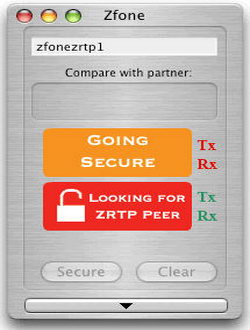
    1. Use Zfone to add encryption to your VoIP client: Zfone works on top of your unencrypted VoiP software watching for VoiP data packets going in and out of your computer, when it finds them it ciphers the packets encrypting the VoIP call, there is also a man-in-the-middle (MiTM) attack countermeasure by displaying a short authentication string for the user to verbally compare over the phone witht the other end, Zfone is open source software using the ZRTP protocol, there are no backdoors of any kind included.Before considering Zfone to secure your VoIP calls have into account that the software must be installed by both callers and Zfone does not work with Skype because Skype uses a closed source protocol not compliant with the standard VoIP protocol.

      Zfone VoIP encryption software
      Zfone VoIP encryption software
    2. Use a Virtual Private Network (VPN): A VPN like HMA can encrypt all of your internet traffic routing it through their encrypted OpeVPN tunnel, this will include all of your VoIP calls. Routing your VoIP calls through a VPN will slightly increase the bandwidth requirement and produce some CPU overhead.One benefit of using a VPN is that if your ISP or a corporate firewall is blocking VoIP calls using a VPN for VoIP will get around Internet filters, they won’t even know you are making a call, it will also get around state sponsored surveillance which is normally carried out at ISP level.

      Wiretapping VoIP password
      Wiretapping VoIP password
    3. Use VoiP software with built in encryption: Some VoIP clients like Skype have built-in encryption used to cipher VoIP data packets, if you adopt this solution to secure your phone calls, try to choose voice over IP software compatible with as many other VoIP clients as possible using open source encryption (not Skype) this will make it much harder to introduce a backdoor and it might not require the other end to have the same VoIP client installed for encryption to work.VoIP software using encryption: PhonerLite ; TiviPhone
  • 9 ways to protect your email address from spambots

    9 ways to protect your email address from spambots

    Obfuscating your email is the best way to stop spammers bots from harvesting and storing your email address from a website, newsgroup or forum, spammers automated software follows certain patterns to identify and store an email address, they can’t comprehend it when a person has deliberately hidden his/her email address to be human readable only, they are also unable of following instructions.

      1. Change your email syntax: Replace the @ symbol in between your username and email domain name with (at) , (AT), the . with the words DOT and add spaces in between the words, for example: hacker10 (AT) fastmail DOT com
      2. Create a graphic image of your email address: Spambots can’t read the letters embedded in pictures like jpegs, with a graphics editor you can create a .jpeg with your email address inside it, after that you can then either upload it, if the site allows, or use a free file hosting image site and link to it, for example:
        Hacker10 email address
        Hacker10 Email address inside graphic

        To email click on link:http://www.hacker10.com/?p=10773

        There are free online services that will create a graphical image of your email address in seconds you don’t even need a graphics editor.

      3. Use email plus addressing: If your main email address is example@gmail.com you could use example+hacker10@gmail.com and all of the messages to that email address not only will still be delivered to your main email account but also classified into the folders named after the email username + symbol, plus email addresses structure goes like this:username+foldername@domain.comYou can create an unlimited number of throw away email addresses this way, not only you will be able to filter out one particular address if it receives unsolicited email, but also spot the source of the spam, if you have only used one email address for one site and nowhere else then it is clear where spammers harvested the email from.The main caveat to email plus addressing is that few free email services support this feature, Gmail and Fastmail do but with Yahoo it only works with its premium paid for email service. Another problem you might encounter using email plus addressing is that many webforms will not accept your email address because they do not recognise the + character as valid, Yahoo mail uses a – character instead, standing a better chance to be allowed inside webforms.
    Detailed old letter mail
    Detailed old letter mail
      1. Use a disposable email address: There are plenty of services available providing free disposable email addresses, aka DEA, most of them will erase your email address in just a few minutes or some weeks at most, disposable email addresses do not normally use a password and others choosing the same username could read the contents, you would have to avoid its use for emails containing personal information and choose a hard to guess username.Disposable Email Services:
      1. Use an email forwarding service: If you need a disposable email address that lasts for months choose an email forwarding service instead, you will be asked to sign up which takes longer but you know that all subsequent email messages will be forwarded to you.Mail forwarding services:
      1. Register a domain name and use it for email: For around $10 year you can register the domain name of your choice and use that domain as a mail forwarding address, your domain registrar will supply you with a control panel from where you can activate it for email and forward all of your messages to your real email address. Make sure to choose a domain name registrar with this facility, most of them do though.Domain registrars with email forwarding:
    Stop email spam
    Stop email spam
      1. Use RecaptCha mailhide: This free service from Google will convert your email address into a clickable link and it will ask users to enter a captcha code before they can see it, a captcha code is the same antispam system many blogs use to stop spambots commenting on them.
      1. Choose a non obvious email addresses: Spammers use software to generate likely email username combinations. Do not use your own name or dictionary word as your main email address, it makes it harder to guess for an automated tool.If you need an easy to remember email address to give away you can use an alias email address that can be disabled if spam comes in but do not choose it as your main account email as you can not usually change it.
    1. Use email aliases: Many email services will allow you to create a second email address directing all of the email to your main account, always use an email alias when you communicate with someone, this way if that email is compromised you can always cancel it.
  • How to find out your router IP address in Windows

    How to find out your router IP address in Windows

    There are many router models out there and the one that your ISP gives to you sometimes does not include the router IP address, they come with an auto installable kit instead.

    Entering a router IP address into your web browser toolbar will take you to the router interface, this is very useful to change the router default settings and others.

    A router IP address can not be changed, this is embedded into the hardware by the manufacturer, a router of the same brand and series will use the same IP, which means that it is not secret, anyone using the same router as you and in range, could connect wireless to your router interface and modify the settings, you should always change the default router password.

    Step 1 to find router address:

    Open Windows run and type cmd.exe OR command.com, alternatively, if you can’t find Windows run search for cmd.exe OR command.com

    Command prompt cmd Windows
    Command prompt cmd Windows

    Step 2 to find router IP address:

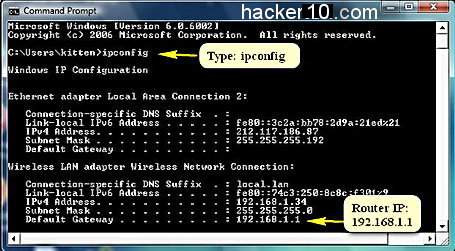
    At the Windows command line prompt type ipconfig you will now see your computer Internet IP, IPv6, MAC address and router IP address.

    The router IP address is the IP written right after where it says “Default Gateway” , you can notice in the picture that there are two default gateways, this is because the router is wireless and has more than one connection port, the RJ45 ports belongs to the wired ethernet connection (in this case empty) and the other port is a default router gateway belonging to the Wireless connection.

    ipconfig find router IP address
    ipconfig find router IP address
  • Hide data inside JPEG images using SteganPEG

    Hide data inside JPEG images using SteganPEG

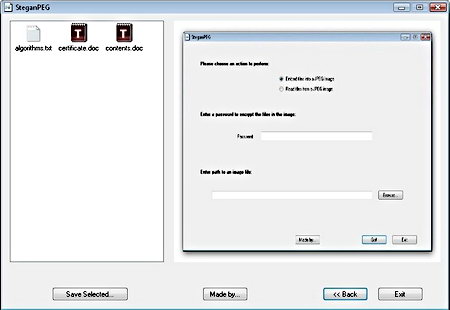
    With SteganPEG you can hide files inside JPEG images without altering them to the human eye, being JPEG one of the most common file formats that exist that will reduce suspicions when you upload it to a website, facilitating covert communications, flickr is an example of a website that can be used to share secret stego messages embedded in pictures with nobody noticing.

    You can password protect your files, even if someone analyses the image they will still need to know the passphrase to see the data although there is no mention of encryption being used to cipher the file, this is still better than nothing and enough for low security needs, another nifty feature of this open source stego software is that it shows you how much space remains available on a picture to hide data inside it.

    The hidden data you insert inside the JPEG is compressed first, you can hide any kind of file, text, images inside images or executables but the bigger the file the more difficult it will be to fit in inside the JPEG.

    This steganography software only supports DCT based Baseline Sequential JPEG images, the most widely used JPEG compression, when you download SteganPEG you also get the source code and can look at or modify it at your own discretion.


    SteganPEG open source steganography
    SteganPEG open source steganography


    Steganography vs. Cryptography

    While cryptography ciphers your data and makes it available to only those with the right passphrase, steganography hides your confidential files making it impossible for someone to investigate and try to extract something whose existence is not obvious.

    Steganography does not use cryptography per se, it uses the spare bits that files have and use them up to hide data inside them, it is possible to detect and extract that data with specialist steganography detection tools that is why high security steganography software will also include encryption.

    For those living under oppressive regimes and subjected to strict communications monitoring, and those living in places where they must hand over their encryption password to the authorities to avoid punishment, steganography is the ideal covert communication method, it has long been used by spies from worldwide agencies, Russian spies in the US in 2010 used steganography software to post photos on the Internet with embedded messages hidden in them.

    Get SteganPEG from Softpedia

  • List of programs to digitally sign PDF documents offline

    List of programs to digitally sign PDF documents offline

    A digital signature consists of a mathematical scheme to establish the authenticity of a digital message or document and protect it from tampering, it normally uses PKA (Public Key Algorithms) to digitally sign the message or document.

    A digital signature uses asymmetric cryptography and it provides with more security than a handwritten signature because it attests to the identity of the signer as well as the integrity of the document, the slightest change in the document will make the digital signature verification process to fail.

    Offline software to digitally sign documents

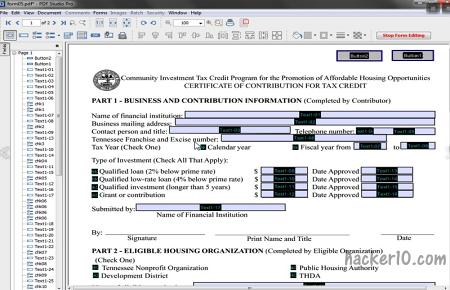
    PDFStudio Pro: Paid PDF managing software for Windows, Mac and Linux, the main function of this program is to create and interact with PDF documents but it has the capability of digitally signing them. Digital signatures can be created or imported from an existing stamp, PDFStudio can batch process multiple PDF, optimize, add watermarks, annotate and password protect in between many other things, and all round very complete PDF editing program.

    PDFStudio Pro digital signing documents
    PDFStudio Pro digital signing documents

    JSignPDF: Open source freeware program to digital sign pdf files with a visible a digital signature, image or description. It supports batch processing although only via command line, JSignPDF timestamps the document and allows you to choose the hash algorithm and certification level. JSignPDF can be used as a standalone application or as an add-on in OpenOffice.org, you will need Java installed in your computer to use it.

    JSignPDF free digital signature software
    JSignPDF free digital signature software

    Portable Signer: This free open source application based in Java, and platform independent (works in Linux, MAC and Windows) will digitally sign your PDF documents using standard X.509 certificates, the signed documents are read only. This program to digitally sign documents is made available by the Municipality of Vienna (Austria) and its signature block complies with Austrian e-government rules.

    PortableSigner-PDF-digital-signatures
    PortableSigner PDF digital signing software

    PDFsigner: Windows PDF signing software that creates digital signatures using standard X.509 certificates and it also verifies digital signatures to make sure that a document has not been tampered with. Its digital signatures are visible with most PDF readers and there is support for smartcards and signing documents in bulk, the interface is very intuitive and easy to use even for novices.

    PDFSigner digital signing software
    PDFSigner digital signing software