Author: John Durret

  • Islamic State guide to remain anonymous online

    Islamic State guide to remain anonymous online

    Posted in Twitter by an Islamic State ideological supporter with thousands of followers using the handle @AmreekiWitness, a new online guide explains to jihadists how to remain anonymous online. The manual comes with intercalated Quranic verses in between and a quotation of General’s Sunt-Zu that reads “War is deceipt“, found in the ancient book “The Art of War“, a mandatory reading for CIA intelligence officers, and also a quotation of the Islamic Hadith.

    The anonymity manual is linked to a JustPasteIt page, one of the tools of choice for Islamic State supporters to post their propaganda. Online jihadist are using JustPasteIt to spread their ideas because you don’t have to register or open any account to upload photos and documents and it can be quickly done with Tor even if many of the pages are taken down by the company when someone reports them.

    The manual recommended VPN provider is CyberGhostVPN (referred to as Ghost VPN). Trying to guess why this would be a good VPN for a jihadist I would say that it is free to use, no payment details can be traced back, the company claims no logs are kept and CyberGhost headquarters are located offshore in Romania. For extra security another security measure advised in the manual is to combine Tor and CyberGhostVPN at the same time. An excellent choice, it will slow down your Internet browsing but it adds an extra security layer, something that it is worth to do when your enemy is a country with lots of resources at their disposal to track you down. One more great tip given in the manual is to never check your real Facebook page or email account with the VPN or Tor, doing that would expose your real identity to anybody monitoring the traffic.

    The live operating system Tails is also advised for online anonymity, Tails being my favourite tool for posting comments against the NSA on various forums, I believe it to be an accomplished tool. Specially as it leaves no recoverable traces on the hard drive, other than the BIOS being set up to boot from a CD first, and all settings in Tails are good to go by default, even people who don’t understand much about technology should be safe with it.

    For email communications the anonymity manual suggests Bitmessage, a P2P email system that has no central server, optionally accessed using a Tor hidden node and which account can be nuked if it is compromised.

    For instant messenger the manual recommends, Cryptocat and ChatSecure, I would agree with ChatSecure, an open source mobile app with Off The Record. Cryptocat doesn’t appear to be a bad but I don’t feel it is suitable for paranoid privacy because they have a central server. I would only feel safe with Cryptocat if I am behind Tor, and they warn you of this on their website.

    The last part of the manual covers legal advice and it cautions people that if they use social media to avoid arrest a disclaimer should be added saying that they do not support violence and “study the radical Muslim community for recreational purposes“.

    This Jihadist guide to remain anonymous online is fairly good. I could only see minor mistakes, the first one is that the manual capitalizes The Onion Router acronym, naming it TOR. This denotes that the author does not follow Tor development too close because the official name is Tor and everybody on the Tor mailing list knows this.

    One big hole is that there is no mention of full disk or file encryption at all, DiskCryptor or similar software is very useful for anybody who wants to keep files locked out from unauthorized eyes, and they should have also mentioned steganography. As leaked Snowden’s document reveal, the use of encryption and Tor raises red flags in the security services, steganography on the other hand needs to be found first, it is extremely difficult to detect a hidden message inside a photo or MP3 posted on plain view in Flickr, unless it is known that the target is using steganography, they won’t search for it, and spy agencies would have to extract the data before decryption,it adds to their troubles.

    Islamic State fighters
    Islamic State fighters

    The manual also does not include any warning about the trojan horses that security agencies are known to email or force download in target computers using Flash, Windows and Adobe updates, trojan horses that are not detected by any antivirus software. The only way around is being cautious, not using Windows if possible, or, the best choice, to only browse the Internet with a live CD for activism.

    What the USA has in its favour is that Muslim terrorists are using USA companies like Twitter for their propaganda, giving the NSA easy monitoring of their accounts, knowing who their contacts are, what PMs they send to each other, what email addresses they have used to register, this facilitates wire-tapping and trying to download a trojan horse in the user’s computer to know more about them (it could thwarted if they use a live CD).

    Other good news for the USA government is that a quick search of real life news show that although anonymity technologies have been around for over a decade, the number of terrorists and child pornographers bothering to learn about them are a rare exception. Apparently, although Tor and encryption can keep their asses out of 20 years in prison,targets are extremely foolish and don’t learn about computer security, if they did they would not post photos with blurred faces, they can be unblurred, this has been done in the past by German law enforcement, it is necessary to use opaque black colour squares to hide faces and stop experts from making them visible again.
  • Dividing encryption keys with Secret Sharp Shamir Secret

    Dividing encryption keys with Secret Sharp Shamir Secret

    Secret Sharp is a free Windows program based on the Shamir Secret Sharing scheme, a way to divide the decryption key to distribute it in between multiple participants. Data decryption is not possible without more than one share, if one of the keys were to be compromised it would be useless to decrypt anything on its own. The only way to unlock encrypted data in a Shamir Secret scheme is with multiple keys, named shares, in Secret Sharp you can set up a minimum of 2 shares and a maximum of 100 shares.

    The software can only encrypt text messages and it needs .NET installed for it to work in Windows. After launching Secret Sharp a wizard will ask you whether you want to Combine Shares to decrypt a message or Share A Secret to encrypt data.

    When you create a new secret you will be asked how many parts you would like to create and how many of the shares will be needed to reconstruct the secret. As it might not be always possible to get all of the participants shares, you can create a secret made up of, for example, 10 shares, with only 4 of those shares needed to decrypt the data. This allows for members of the group to be away on holiday, deceased, etc, and the others will still be able to access the secret with any of the 4 keys structuring the 10 shares secret.

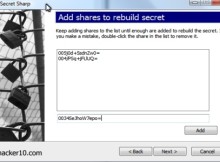
    Secret Sharp rebuild Shamir shares
    Secret Sharp rebuild Shamir shares

    The person that creates the secret gets to view all of the shares before distributing them to the participants, it is imperative that the secret creator has a secure computer with no trojan horse and can not be unsettled, there is nothing stopping that person from making a copy of the shares before distributing them instead of securely wiping the shares.

    To rebuild an encrypted secret you will need to be in possession of the necessary shares and stipulate to Secret Sharp how many shares are needed to reconstruct it, the latter can be told to everybody in the group without endangering the secret and should be written down somewhere during share distribution.

    Secret Sharp is the Windows version of ssss (Shamir Secret Sharing Scheme), a command line program for UNIX machines that does the same thing and there are also Java implementations around that will work on any machine, like Mac computers.

    You could find a Shamir Secret encryption program like Secret Sharp useful to leave written instructions to be opened if you die, instructions to be opened if you are captured by the enemy or just to make sure what there are at least two people reading the message and trust is not placed on a single person alone.

    Visit Secret Sharp homepage

  • Public key encryption with CyberSafe Top Secret

    Public key encryption with CyberSafe Top Secret

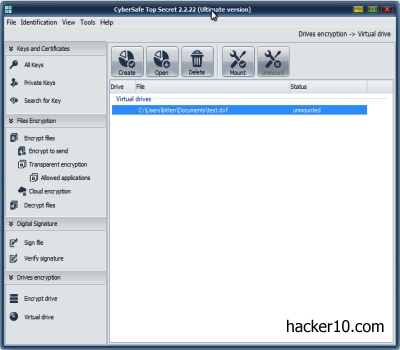
    CyberSafe Top Secret is a commercial program made in Russia to encrypt files, folders and partitions, it can be used to create virtual encrypted drives or encrypt a full partition or removable media (USB thumbdrive) where everything stored is automatically ciphered. The program’s source code is available for download from the company website to reassure you that there is no backdoor.

    The free edition of CyberSafe Top Secret should be considered trial software, the password length limit of 4 characters and DES algorithm make it very easy crack, it is only after buying the program that you get full protection with encryption algorithms that no law enforcement or sophisticated spies can penetrate.

    I found the program very versatile, it has so many options that if you have not used encryption before learning how to use digital certificates for encryption and signing files could take a few days to learn for newbies but a PDF manual explains in detail how everything works, it is not difficult, it simply takes time.

    I welcomed the addition of being able to encrypt files in your computer before uploading them to Dropbox, Google Drive and other cloud services. Google Drive, like Gmail, scans your data to find out if you have uploaded child pornography photos by matching the unique hashes of those files with the ones given to them by law enforcement. You have no guarantee that the NSA will not order Google to also scan your files to find X, once built-in scanning exists,nothing stops the NSA from abusing that capability for their own purposes. Anybody storing files in the cloud would be insane not to encrypt their files first and CyberSafe Top Secret allows you to do that easily dragging and dropping folders inside a window.

    CyberSafe Top Secret encryption software
    CyberSafe Top Secret encryption software

    When creating a virtual encrypted drive (.dvf) you are given the choice of encrypting it with the USA Department of Defense approved AES algorithm or the Russian government standard GOST symmetric block cipher. Be careful when entering the password because you will not be asked for confirmation. This was bizarre, it is one of the few times that I come across an encryption program that does not ask you to confirm your password twice when creating an encrypted container that is meant to be uncrackable.

    CyberSafe Top Secret Ultimate comes with a few business friendly features, like the optional Google Authenticator that can be activated in settings, a one time password mobile app that has to be used together with a user password before you can launch the program.

    The heavy reliance on public key encryption to secure files suggests CyberSoft Top Secret has businesses in mind. It is easier to manage a central registry of digital certificates that can be revoked over the network than managing dozens of passwords, the program allows you to access a public key server and import or export a public encryption key without having to open your web browser.

    CyberSafe Top Secret file encryption
    CyberSafe Top Secret file encryption

    My main criticism of this software is pricing, I obtained a license for the high end CyberSafe Top Secret Ultimate edition during a give away not connected to this review, otherwise, I would not have paid the €100 it costs. For slightly more money I can buy BestCrypt, WinMagic SecurDoc or SecurStar DriveCrypt Plus Pack full disk encryption.

    There is a cheaper version of CyberSafe Top Secret but it comes with a maximum password length of 16 characters, I don’t think that is long enough to secure your data from an adversary with high resources and it seems unfair that security software you have paid for can come with a limit that weakens your security unless you buy their most expensive package.

    CyberSafe Top Secret pricing can only be justified because it can manage and create encryption keys and it makes it easy to email to other people in a secure manner with a proven standard, but disk encryption wise, full disk encryption is much better.

    CyberSafe Top Secret should be praised for making the source code available for download. This does not guarantee that the program is bullet proof but it guarantees that experts can look at how encryption works and detect changes if somebody forces the company to modify the code.

    Perhaps if the price was cheaper for the Ultimate edition or if I needed support I would consider this program to encrypt my data. I see this software most suitable for a company with many employees after an easy solution to manage multiple encryption keys, home users in need of hard drive encryption might be better off looking at the other options mentioned above or with DiskCryptor (free), but if all you want is a solution to encrypt emails maybe it is worth to check out this software.

    Visit CyberSafe homepage

    PS: After writing the review I noticed that the uninstaller is only in Russian, clicking on the default options erased everything properly. There is no malware, but it is not very professional not translating the uninstaller.

  • The best XMPP/Jabber servers for anonymous chat

    The best XMPP/Jabber servers for anonymous chat

    Jabber/XMPP is a decentralised instant messenger using the open source XMPP protocol, there is no central server that could be compromised, the multiple nodes construct a resilient and hard to monitor infrastructure. Dozens of XMPP servers, encryption and its open source nature make XMPP much harder to wiretap or shut down than cloud based Google Hangouts, Yahoo Messenger or Skype, all USA companies known to have a NSA backdoor.

    One of Jabber/XMPP main vulnerabilities is that the server you are connected to is not trustworthy, this is a list of XMPP servers with the best privacy policies:

    5th July XMPP: Swedish privacy foundation promoting free speech worldwide, in between other services they provide an open XMPP server with Off-The-Record Messaging (OTR) support, hosted in Sweden and with logs tuned off. They warn you that file transfers are not encrypted, only text conversations are.

    Calyx Institute: A not for profit privacy and cyber-security foundation running a public Jabber/XMPP server that does not create any records of who you communicate with or keep logs of the content of any communications, this server forces you to use OTR, Off-the-Record Messaging, a cryptographic plugin that stops the server administrator from accessing plain text of your communications.

    Dismail.de: Free public server located in Germany, you can register for an account using the web interface or your Jabber client. The privacy policy is very clear about how long for each one of your details are stored, metadata has to be saved for Jabber to work, it would be impossible to communicate with your contacts without saving who they are and your Jabber ID is of course also saved. Personal details like the IP address used to create the account and the files you upload are erased after a month.

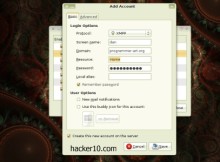
    Pidgin Jabber XMPP setup
    Pidgin Jabber XMPP setup

    Neko IM: Running a public XMPP server located in Norway, they claim that no more information is collected and stored than what is absolutely necessary, TLS everywhere is enforced and Jabber clients need to support a strong cipher or they will not be able to connect to the network. Being a free volunteer run project, this server uptime comes accordingly to this and no guarantees are made about uptime other than “as much as possible“.

    XMPP Gajim Jabber chat
    XMPP Gajim Jabber chat

    Countermail: This is a paid for service from a Sweden based email privacy company that provides the XMPP server xmpp.counternet.com with TLS and SSL encryption only available to email account holders. The username and password are randomly generated, you can not create your own, however, all XMPP clients supports “alias” or “display name” that you can manually set up and this is what other Jabber users will see.

    SystemLi: Jabber server managed by an anti-capitalist tech collective. They do not retain any kind of data and a .onion link is available for those using Tor. To avoid spam accounts registration is only possible with an Internet browser.

    About Jabber/XMPP security

    Any IM client that supports the XMPP protocol can interact with other Jabber users, a few of the best know Jabber compatible clients are Pidgin, Thunderbird and Jitsi, they can be used for videocalls and sending files, but always remember that encryption and end to end  does not mean that your computer IP is hidden. Jabber will help you protect from wiretapping with encryption but the server you use could log what you do and your contact could find out your home IP if you are not on a proxy or VPN.

    Another benefit of Jabber is that the same username and password can be used to connect with the social network Jappix, unlike Facebook, you don’t have to provide your real identity to take part in Jappix. Another way to protect your online privacy is running your own Jabber/XMPP server with a custom logs policy, it is not hard to set up an XMPP server with basic understanding of Unix, search for Prosody or Tigase to find XMPP server software to run.

    I included XMPP servers with a clear privacy policy of minimum logging or being offshore, those are the claims that the server administrators make, there is no way to verify any of them. If you are social activist RiseUp and Austici provide anonymous Jabber chat servers for people fighting for world change but they are not on the list because they are strictly for political activists.

    Sometimes privacy minded individuals set up their own XMPP server and open them to everybody, due to the nature of one man operations, instead of including here privacy servers that have little backing and less chances of long term survival it is best that you check out an updated list of all public XMMP servers at https://list.jabber.at/

  • Cold boot attack protection with YoNTMA

    Cold boot attack protection with YoNTMA

    YoNTMA (You’ll Never Take Me Alive!) is an open source tool to enhance Windows Bitlocker and Mac FileVault full disk encryption. It has been designed to protect the user from cold boot attacks. A side channel attack where an intruder with physical access to a machine retrieves the encryption keys from RAM memory.

    Cold boot attacks can be used to get access to a fully encrypted hard drive. They are very difficult to achieve once the computer has been shut down, data remanence lasts less than a minute after you power off your computer. In that time an attacker would have to open up the computer case, extract the RAM memory modules and cool them down with liquid nitrogen before extracting the keys.

    Cold boot attacks are not normally carried out by law enforcement because of the complexity and timing needed, but a cold boot attack can be easily completed if a computer is only secured with a screen lock by a user that has gone for a quick bathroom break or cup of coffee, a self executable .bat forensics file, like Mandiant Memorize, could be executed to extract the RAM memory of a fully encrypted laptop plugging in a USB thumbdrive into the locked computer, YoNTMA aims to protect you from this.

    cold boot attack RAM memory liquid nitrogen
    cold boot attack RAM memory liquid nitrogen

    You’ll Never Take Me Alive! runs in the background monitoring when your screen locks, if it detects that the power or Ethernet cable is disconnected while the machine is locked, YoNTMA immediately puts the computer into hibernation mode to remove the encryption keys from RAM, sending them to the page file on the hard drive to protect you from a thief stealing your fully encrypted laptop and extract the keys a while later. When a computer is hibernating it is not possible to execute a program from a CD drive USB port, it needs to wake up first.

    I personally feel that, if your data is so important that you need full disk encryption, it doesn’t matter if you leave the computer for ten minutes or ten seconds, you should never leave it on with the screen lock and it should be you sending it to hibernation when you need a two minutes bathroom break. But if you are the forgetful kind of person, there is no harm running YoNTMA in your computer, small things sometimes save the day when you expect it less.

    This tool will likely be the most useful for companies enforcing rules to lazy employees and not private citizens with discipline and attention to details when dealing with encrypted data.

    Visit YoNTMA homepage

  • Decentralised Internet platform MaidSafe

    Decentralised Internet platform MaidSafe

    Maidsafe is a decentralised Internet platform where users contribute computer storage space, CPU power and bandwidth to form an autonomous ecosystem, the more people join the network, the more resources are available. A denial of service attack or censorship attempt would be extremely arduous to carry out in such environment where there is no central server or DNS.

    Maidsafe’s client application is called SAFE (Secure Access For Everyone), when you upload data everything is automatically shredded and encrypted using the uploaded files as part of the public key encryption scheme, the password is never transmitted to the network, there is no way for others to see what you uploaded. Data is distributed across multiple servers, replication and  Distributed Hash Tables intercedes to deliver the files when part of the servers holding chunks of your data go offline. MaidSafe maintains 4 encrypted copies of your data and moves them around nodes as they are available.

    MaidSafe decentralised network
    MaidSafe decentralised network

    If you would like to access more data than you have been allocated  by the network and do not wish to donate more of computer resources you will have to pay for the access using Safecoins, MaidSafe’s own cryptocurrency that can be bought or exchanged by another currency at alternative cryptocurrency markets.

    A project like Maidsafe has the potential to deliver apps, host websites or store films  without fear of the server being subpoenaed or taken down by an abusive regime. With the files divided and stored encrypted in different locations, it is not feasible for state entities to wiretap a central server and track the downloaders.

    The code is open source, developers have access to an open API to build apps on top of MaidSafe. Just be warned that when you donate storage space to the network, you have no way of knowing what it is being stored encrypted in your computer, this could create legal liabilities if anybody misuses the network, but until there is mass adoption it is hard to know what would happen in a case like that.

    MaidSafe is a for profit company based in the UK, they make money with SafeCoins.

    Visit MaidSafe homepage

  • Digital image forensics with Ghiro

    Digital image forensics with Ghiro

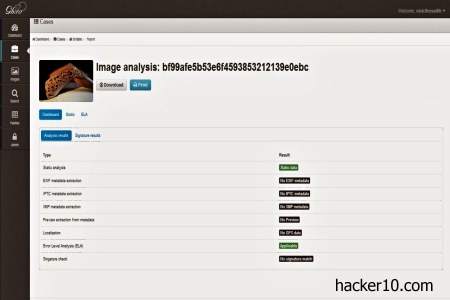
    Ghiro is an open source tool for image analysis and metadata extraction.  You can install it in a dedicated server or download the .ova appliance for Virtualbox or VMware. Either way you get a web interface to upload images and observe a deep overview of the embedded metadata, like EXIF, IPTC , XMP, GPS coordinates, etc.

    The default web interface username is ghiro and the password ghiromanager they should be changed straight away, specially as the appliance can be remotely accessed with SSH if you uploaded it to a server.

    You can use this tool to compare two images that look the same to the human eye and find out if one of them has been modified by comparing digital signatures, the hashes tab shows the image MD5, SHA1, CRC32, SHA256, and SHA512 hashes. The Error Level Analysis will let you know if the image was edited and MIME information shows extended data about the file you are dealing with, for example, if a jpeg or png.

    Ghiro image forensics appliance
    Ghiro image forensics appliance

    You can extract metadata to find out what device was used to take the photo and if any GPS coordinates were automatically added, like many digital cameras do, in which case an embedded map in Ghiro shows you the exact location of where the picture was taken.

    Other metadata that Ghiro can extract is photo resolution,  focal length and name of the software used to edit the photo if any. A case management tab lets you group images and assign users and permissions to cases.

    This is a scalable professional image forensics tool of benefit for amateurs and professionals alike, it can  detect fake photos, and allows a team of people to work in complex cases with a multiple user dashboard, saving projects, searching for specific image hashes and displaying understandable reports.

    Visit Ghiro homepage