Author: John Durret

  • Digital image forensics with Ghiro

    Digital image forensics with Ghiro

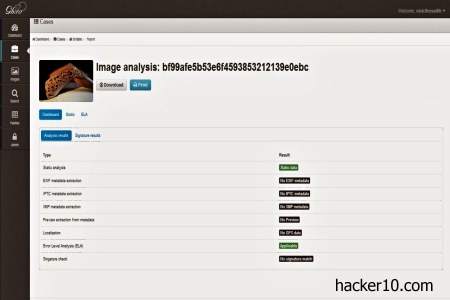
    Ghiro is an open source tool for image analysis and metadata extraction.  You can install it in a dedicated server or download the .ova appliance for Virtualbox or VMware. Either way you get a web interface to upload images and observe a deep overview of the embedded metadata, like EXIF, IPTC , XMP, GPS coordinates, etc.

    The default web interface username is ghiro and the password ghiromanager they should be changed straight away, specially as the appliance can be remotely accessed with SSH if you uploaded it to a server.

    You can use this tool to compare two images that look the same to the human eye and find out if one of them has been modified by comparing digital signatures, the hashes tab shows the image MD5, SHA1, CRC32, SHA256, and SHA512 hashes. The Error Level Analysis will let you know if the image was edited and MIME information shows extended data about the file you are dealing with, for example, if a jpeg or png.

    Ghiro image forensics appliance
    Ghiro image forensics appliance

    You can extract metadata to find out what device was used to take the photo and if any GPS coordinates were automatically added, like many digital cameras do, in which case an embedded map in Ghiro shows you the exact location of where the picture was taken.

    Other metadata that Ghiro can extract is photo resolution,  focal length and name of the software used to edit the photo if any. A case management tab lets you group images and assign users and permissions to cases.

    This is a scalable professional image forensics tool of benefit for amateurs and professionals alike, it can  detect fake photos, and allows a team of people to work in complex cases with a multiple user dashboard, saving projects, searching for specific image hashes and displaying understandable reports.

    Visit Ghiro homepage

  • Android news reader with Tor,encryption and wiper

    Android news reader with Tor,encryption and wiper

    Courier Secure News Reader is a Guardian Project mobile phone app for secure and anonymous news reading.  The app works with Orbot, a Tor proxy for Android phones from the same developers. It hides your computer IP when downloading RSS feeds,  gets around ISP censorship in countries where they block websites and it encrypts what you download to thwart wire-tapping. The feeds can be synced automatically or manually, with the option of only syncing when on a Wi-fi network to stop expensive data roaming charges.

    Download news and personal data are stored encrypted in your mobile phone, in case of emergency they can  be wiped altogether with the app by swapping on the screen.  A smart move if you expect arrest but bear in mind that most arrests are never expected and the chances of you being able to wipe evidence that you have accessed banned news sites will not be too successful unless you have forewarning of the arrest in which case disposing of the whole device would be safer.

    Courier Secure News Reader Android
    Courier Secure News Reader Android

    The menu is simple and easy to use,  a button on top lets you know when you are connected to the Tor network, a “My Favourites” tab to bookmark sites and “Stories Received” tab can be tapped to read the news. Any data you receive from a friend will be listed separately in the “Receive a Share” tab.

    People who have no Internet access can still read the news as long as one of their peers manages to get online and shares it with them P2P using Courier Secure News Reader via Bluetooth.

    Courier Secure News Reader is open source, free and without any advertisements, the developers aim is to help those living in countries where news sites access is censored to be able to read them anonymously.

    The app has been digitally signed with a 4096-bit key to verify that it really came from the developers and nobody has replaced it with a fake malware app that spies on the user.

    Note: Courier Secure News Reader is currently in beta.

    Visit Courier Secure News Reader

  • List of Truecrypt compatible encryption software

    List of Truecrypt compatible encryption software

    In light of recent news about Truecrypt being no longer developed, I compiled a list of other encryption programs that are compatible with it.

    If you have data that was archived with Truecrypt for long term storage, you should be able to decrypt it with any of the following programs.

    tcplay: Fully featured Truecrypt implementation to open and create Truecrypt compatible hidden containers with cascade ciphers and keyfiles. This is a command line utility that works in Linux and DragonflyBSD, you can add a front end graphical interface with zulucrypt or Luksus.

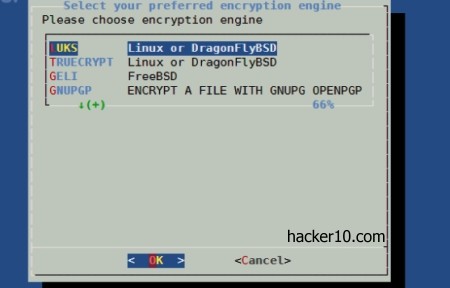
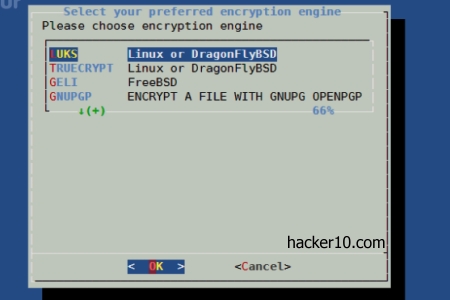
    Luksus: A terminal program for Linux and BSD that lets you encrypt and decrypt data using Geli, LUKS, GnuPG or Truecrypt. A wrapper around tcplay, Geli and cryptsetup, with a front end graphical interface for those who find the command line too difficult.

    Luksus encryption front end
    Luksus encryption front end

    RealCrypt: An open source forked version of Truecrypt for Fedora Linux, it comes as a RPM package and it can be easily installed in Fedora using the repositories. It has a graphical interface and the same capabilities that Truecrypt has, with a different name and logo as requested by Truecrypt licensing terms. There are no significant code differences in between them.

    Encrypted Data Storage (EDS): Android app that can create and open any Truecrypt container but there is no on the fly mode and data will be decrypted to a temporary file, this could be a security risk if you believe that your smartphone can be stolen as temporary data written to solid state disks is recoverable with forensic tools.

    EDS Android Truecrypt
    EDS Android Truecrypt

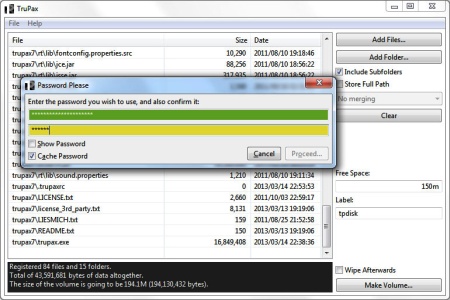
    TruPax: A Java based program that can open and create Truecrypt compatible encrypted containers. I will work on any operating system that has Java installed, Windows, Mac OS, BSD and Linux. It can be used with a graphical interface or in command line mode to automate tasks.The software is open source, portable and it was coded independently from Truecrypt.

    Truecrypt compatible software TruPax
    Truecrypt compatible software TruPax

    Cryptonite: Open source app that brings EncFS and Truecrypt to your Android phone, the program is still in development and intended for advanced users. Cryptonite can decrypt any Truecrypt container using your smartphone. If you want to run Android in your desktop, there is an open source project that has ported it to PCs and can be installed as if it was a Linux distribution. This will give you a bigger screen when decrypting data.

  • Penetration testing and ethical hacking distribution Matriux

    Penetration testing and ethical hacking distribution Matriux

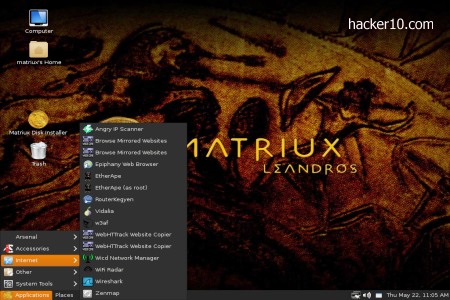
    Matrix is a penetration testing Linux distribution based on Debian with the GNOME window manager. The download is a huge 3GB and you can run it as a live DVD or install it in your computer or USB thumbdrive. The tools Matrix comes with have been specially created for ethical hackers, penetration testers and computer forensic experts. I can’t imagine anybody using Matrix as their every day desktop unless they work in this field.

    The default username is matriux and password is toor. The only main stream software you will find is an archive manager to pack files, all of the other tools are computer security related. To install this distribution a “Matriux Disk Installer” shortcut in the desktop can be clicked on but it will not partition your hard drive, you will have to prepare the drive and create a Swap partition on your own with a different tool, I suggest GParted.

    PEN testing distribution Matrix
    PEN testing distribution Matrix

    Matriux comes with two browsers, Firefox, including the Adblock Plus and NoScript addons, and Epiphany, a lightweight GNOME desktop browser. The tools you need for hacking are all nicely classified inside the “Arsenal” tab. You can find multiple scanners to test cross site scripting exploits in websites, Nmap and Angry IP scanners to scan a whole network and search for open ports and services where to infiltrate.

    The forensics sections of Matrix has every single piece of software you will possibly need for your job, orderly divided into “Acquisition“, “Analysis” and “Metadata extractors“, without leaving out tools to analyse Android mobile phones. Other crows in the jewel incorporate steganographic tools, Bluetooth hacking, VoIP hacking software, DNS attack tools, debuggers, hacking frameworks like MetaSploit, Mantra or Inguma. For those who don’t know, each framework contains further discovering, gathering, scanning, bruteforcing and exploit tools, you can spend months just learning about how to operate the software.

    I liked that Matriux comes with my favourite zsh shell and a marvelous semi transparent terminal colouring scheme that makes you real look geeky when people look at the screen even if you haven’t got a clue of what you are doing. I could not see anything missing in the cyberarsenal, from the basic Truecrypt and Tor to the more dark open source intelligence and forensics application Maltego.

    With over 300 hacking tools in a single DVD at the touch of your fingertips, Matriux is a good alternative to Kali Linux and should be a must have hacking distribution for all security professionals, students and hobbyists.

    Visit Matriux homepage

  • Windows AES256-bit file encryption with QuickCrypt

    Windows AES256-bit file encryption with QuickCrypt

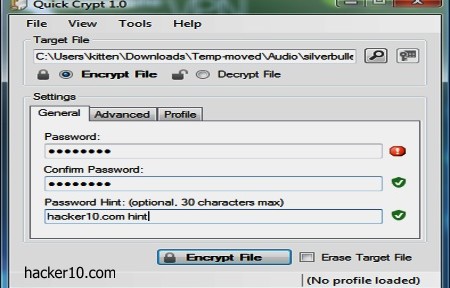
    QuickCrypt is a small portable Windows program to encrypt and securely wipe your files, this freeware program is very easy to use, implementing an encryption algorithm that is uncrackable, AES256-bit, if you lose your password there is no way to get your file back. To run QuickCrypt you will need to have Microsoft .NET Framework installed in your computer.

    One of its best features is being able to hookup the encrypted file with the computer where it was created by adding a System ID to the encrypted file unique to that computer, this makes it impossible for somebody to decrypt the proprietary .qcf encrypted file unless they are using your own machine. You can also create an automatic .zip file after encryption and add a comment visible to the person decrypting the file, the comment could be a hint to the decryption password or greeting.

    Windows file encryption AES256 QuickCrypt
    Windows file encryption AES256 QuickCrypt

    A QuickCrypt feature I have not seen anywhere else is being able to set an expire date to an encrypted file. After setting this up, if a file has not been decrypted within the specified number of days or months, it can no longer be decrypted. There isn’t any technical explanation with QuickCrypt but I am assuming that to accomplish it the decryption program checks for a date in the headers before decrypting the file.

    This is a simple but powerful file encryption program. Most useful to send files to your friends via email but they will need to be using the same program to decrypt the data and the password will have to be transmitted in a secure way, not easy to do. You can also use QuickCrypt to wipe files, going into “Tools>Erase Files” opens up a new window where you can drag and drop anything that has to be securely shredded with up to 40 passes.

    There are plenty of free file encryption programs out there, my favourite one is 7zip but choices are good and QuickCrypt could be one more option for your cyber arsenal if you trust closed source software and the developer skills of which very little is known.

    Visit QuickCrypt homepage

  • Best programs to change your DNS settings

    Best programs to change your DNS settings

    Every time you enter a URL in your computer browser a DNS query takes places and asks your Internet Service Provider to translate the typed in letters into an IP address so that you can visit the website, this is what is called a DNS query and if you happen to be in a country that censors the Internet or practises mass surveillance the sites you visit can be watched in real time. It is also possible for a spy agency or malicious hacker to sit in the middle of DNS queries and show you a fake website when you try to visit certain URL, then proceed to capture your login and password or serve malware to your computer.

    The most common use for DNS monitoring it is Internet filtering, schools and companies do this to fend off adult material and the Chinese Great Firewall does this to block news websites about the Tibet.

    The programs below come preconfigured with dozens of free DNS servers, a few of them have built-in parental controls to protect your kids, others offer censorship free DNS queries and do not log any activity, with the most security conscious offering encrypted DNS queries. The advantage of using one of these programs to change your ISP DNS servers, over doing it manually, is that it only takes one click and you don’t have to search DuckDuckGo for free public DNS providers.

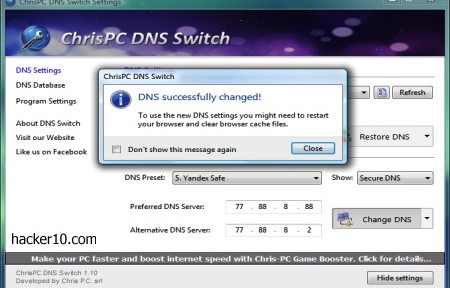
    ChrisPC DNS Switch: It comes with more than two dozen free DNS providers, one drop down menu allows you to select the network adaptor and another drop down menu classifies the DNS providers into “Anonymous” (no logs), “Family Safe DNS” (URL filtering), “Secure DNS” (malware filtering), “Regular DNS” and “Custom DNS” where you can manually enter the name server you would like to use.

    ChrisPC DNS Switch
    ChrisPC DNS Switch

    DNSCrypt Windows Service Manager: A DNS encryption only DNS changer, it helps you configure your network adaptor with one of their supported DNS encryption providers. At the moment consisting of DNSCrypt.eu in Europe and claiming to keep no logs, OpenDNS in the USA, CloudNS in Australia and OpenNIC in Japan. You are also given the option to choose UDP/TCP and IPv4 or IPv6.

    DNSCrypt Windows Service Manager
    DNSCrypt Windows Service Manager

    QuickSet DNS: A minimalist Windows utility to change the DNS settings of your computer or router. This is one of the few DNS changing utilities that allows you to change your router DNS using a graphical interface. Optionally you can also use QuickDNS from the command line.

    QuickSetDNS
    QuickSetDNS

    DNSJumper: Windows DNS graphical interface where you can select the DNS of your choice out of a long list of public DNS servers (Comodo DNS, Norton DNS, Google DNS, etc). To change DNS settings often the program lets you flush the previously applied name servers with the click of a button.Clicking on the “Fastest DNS” button will automatically find the most expeditious name servers for you.

    Name Server changer DNSJumper
    Name Server changer DNSJumper

    If you are using a VPN to encrypt your connection your ISP could still be able to see what sites you visit monitoring the DNS servers, this is know as DNS leak. To avoid this risk you should change the default DNS servers in your router or computer. For extra security you should select a DNS provider that encrypts queries, it is the equivalent of HTTPS for DNS.

    Note: If the DNS program does not have a DNS flushing button you can flush your DNS cache manually in Windows with: ipconfig /flushdns

  • Anonymous radio communications with AirChat

    Anonymous radio communications with AirChat

    AirChat is a free open source program developed by the Anonymous hacking group to anonymously communicate with other people over the air waves. To be able to use it you will need a ham radio with the open source Fldigi modem controller connected to your laptop or desktop computer.

    AirChat transmits data using a radio connection, there is no need for Internet infrastructure or mobile phone network coverage. Sending data over the air waves has been possible since the invention of radio, as the Morse code pulses over the airwaves proved. Amateur radio operators send each other data messages daily with just their radio equipment, the Anonymous collective is not devising any new technology, what they do is to add privacy and security to something that already existed.

    AirChat encrypted ham communication
    AirChat encrypted ham communication

    The main problem of sending data packets over the airwaves is lack of bandwidth, that makes this technology slow and only suitable for low bandwidth voice, text chat and low resolution photos, the developers admit that they have traded bandwidth for greater security.

    AirChat encodes data inside air waves with Anonymous own Lulzpacket protocol handling integrity and encryption. Due that in some countries encrypted airwaves over specific frequencies are banned, you are given the choice of sending the data unencrypted to avoid breaking the law. Other legal considerations are that ham radio operators must be licensed to operate on amateur radio frequencies, that will put you on a government list but this is not necessary if you only plan on listening in.

    When you transmit data with AirChat there is the option to send it to nearby contacts unencrypted or broadcast it encrypted with a public key encryption that only the receiver will be able to decrypt with his personal private key.

    The reason for Airchat is to stop a government switching off the the Internet to stop a protest group, like it has happened in the past during the Arab Spring revolution. An added benefit is that, as far as the top secret documents leaked by Snowden reveal, the NSA spying scheme only monitors the flow of data over the Internet and not the airwaves.

    There are other similar projects that allow you to exchange data with other people without an Internet connection, like Commotion Wireless, but their data transmission range is limited. AirChat developers claim to have used their software to send photos 180 miles away through the airwaves without any Internet connection. And you don’t have to worry about hardware MAC addresses identification, that ID is not passed on to any access point like it happens when you use Wi-Fi.

    Something to know about amateur radio (aka ham radio), is that it is illegal to broadcast over licensed frequencies, if you did you could interfere with commercial radio stations, airports and emergency services. Broadcasting on licensed frequencies will attract the authorities attention, they will track you down like they do with pirate radio stations and charge you. Only use AirChat over unlicensed frequencies.

    Visit AirChat homepage

    Update 2016: Project appears dead, it has not been updated for the last 3 years.