Category: Other

Other computing tips

  • SPDY, a quicker and safer HTTP browser protocol

    SPDY, a quicker and safer HTTP browser protocol

    SPDY, pronounced “speedy”, is a new experimental protocol developed by Google to speed up the Internet and make it safer. HTTP (Hypertext Transfer Protocol) was never designed to efficiently download a large number of small files, it was meant to attend a single request each time. As the Internet age advanced websites kept adding elements like CSS (Cascade Style Sheets), external javascript, XML and images, all of those multiple elements needed to be downloaded together for the user to be able to view a webpage, resulting in bottlenecks and delays.

    The ultramodern SPDY protocol ambition is to reduce website load, latency and increase security, it wants to replace parts of the old HTTP providing faster communication in between server and browser. SPDY uses less TCP connections wrapping up multiplexing in a single stream and manages TCP more efficiently prioritizing the resources needed to be send first, reducing upstream data and cutting down the number of handshakes, it also supports “server push” a technology that predicts what will be downloaded next, sending it to the browser before a request is made.
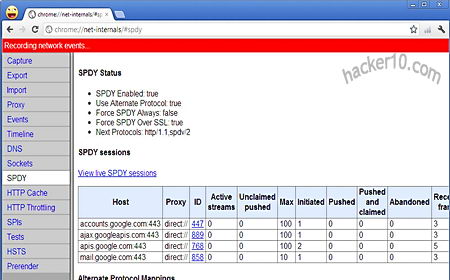
    SPDY protocol status in Chrome browser
    SPDY protocol status in Chrome browser

    SPDY is turned on by default in Google Chrome, see it by typing “chrome://net-internals” into the Omnibox, and Firefox will turn it on in their next Firefox 13 release, to enable it now, go to “about:config“, search for “network.http.spdy.enabled” and set it to “true“. An Apache server SPDY module exists and Nginx based servers (used by Facebook and Hulu) and Jetty web servers (Ubuntu, Zimbra) will support it soon making it easy for webmasters to deploy SPDY, the protocol won’t work unless server and browser both support it.

    Browsers that currently work with SDPY are Chrome, Firefox, SeaMonkey and Amazon Kindle Silk, the only websites I know of at this time supporting SDPY are Google services (Gmail, search,etc) and Twitter. Safari and Internet Explorer do not have immediate plans to support the protocol leaving half of the Internet population out and making it more difficult for the Internet Engineering Task Force ( IETF) in charge of the HTTP protocol to approve a backwards compatible neutral standard.

    Compulsory SSL connection 

    The SPDY protocol makes it mandatory to encrypt all connections with websites using SSL, webmasters must install a SSL certificate in their servers for this endeavor. As good as it seems, various webmasters have objected to the approach arguing that when you multiply millions of SSL encryption and decryption requests the server CPU hardware needs a hardware upgrade and extra arrangements for heat dissipation provoking costs to go up.

    The second problem is that  requiring all webmasters to have an SSL certificate will end up with many of them not bothering renewing the certificates and users will start to get used to see “expired digital certificate” warnings clicking on the ignore button without even reading it.

    Read Google’s SPDY white paper

  • HotSpotShield alternative, free VPN SpotFlux

    HotSpotShield alternative, free VPN SpotFlux

    Spotflux is a free VPN for Mac and Windows computers, it can help you get around censorship in countries where ISPs block websites, theoretically it can bypass computer Internet filters but it is not portable and you need administrator rights to install it, you won’t be able to use Spotflux in your college or workplace unless you have your own laptop.

    I tested their speed from Europe a few times and it gave me a consistent 1MB/1.5MB, enough to stream online video, hoovering your mouse over the Windows tray will show your given IP,  Spotflux  provides a US computer IP allowing you to access CWTV, ABC, Pandora radio and other websites restricted to US residents only, I tried to watch Hulu and it worked fine, the same with Pandora Radio.

    During installation the software will ask you to install a device driver and also to run Java, this is one part that I did not like, I have used multiple VPNs in the past and I have never been asked to run a Java app, Java runs locally in your computer it has been exploited in the past and it could endanger your security unless you are really sure that the place you downloaded it from is trustworthy.

    Free VPN SpotFlux
    Free VPN SpotFlux

    Spotflux settings are very simple, consisting of automatic updates, proxy configuration and language interface. What makes this VPN different from others is that they scan and filter all pages you request for malware and viruses, tracking cookies are filtered out too. Nearly all advertisements are blocked. As a blogger I find this VPN unethical, the reason why I don’t update hacker10 more often is because the scarce income I make here does not justify my posting time. Browser addons blocking adverts allow people configuration options to only target websites abusing privacy and overdone with adverts, Spotflux block all sites, if you use them to visit your favourite sites you will deprive them from advert income and eventually kill the site.

    Spotflux privacy policy doesn’t mention what logs they keep and how long for but they say that they will use deep packet inspection of user traffic to cooperate with law enforcement if necessary. This is definitely not a VPN to be used for privacy even if they claim so. I don’t know how they make money with it, I will speculate that Spotflux might start charging for extra services in the future. HotSpotShield privacy policy is equally bad but they don’t have any system in place filtering the sites you visit for “privacy reasons“. I would say that both VPNs, SpotFlux and HotSpotShield, are ok to watch US online TV and that is it, never use a free VPN like them to check your email if you care about your online privacy.

    UPDATE December 2012: After using Spotflux again I noticed that the installer comes with sponsored software, you can refuse to install it unchecking a tickbox. SpotFlux is also blocked in Abc.com where I get a message saying that I have to disable add blocking programs before I can watch their videos.

    Visit SpotFlux homepage

  • GPGAuth logs into a website using GPG/PGP keys

    GPGAuth logs into a website using GPG/PGP keys

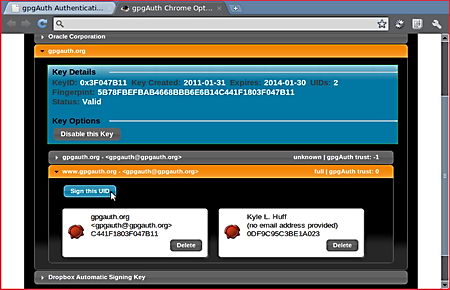
    GPGAuth is an authentication mechanism that allows you to use public/private encryption keys (GnuPG,PGP) to login into a website, there is no need to remember any password or username, GPG keys act as username and password verification is carried out in your browser, trust level for each website can be specified in GPGAuth options, like making sure that the User ID matching the domain has been signed by one of your trusted keys.

    Keyloggers are easily defeated as you don’t have to type in anything, the server’s owner is given the public encryption key before hand making man in the middle attacks extremely difficult, with GPGAuth you won’t need to remember multiple passwords for every different site, it can be used as a single sign-on system, it is possible to create multiple User IDs from a solo GPG keypair, this allows for various online identities if needed.

    Chrome GPG addon GPGAuth
    Chrome GPG addon GPGAuth

    The downside is that the website you are using must offer the possibility of using GPGAuth and it hasn’t exactly caught on. The browser addon is only available for the Chrome browser at the moment, the project uses the framework FireBreath to be cross compatible with Windows, Linux and Mac computers and all major browsers, there is no technical reason stopping it from being ported to other browsers addons in the future. If Chrome is your main browser you could use it in conjunction with WebPG, a GPG key management addon from the same author, otherwise you will need to have some kind of OpenPGP compatible software installed in your computer.

    Visit GPGAuth homepage

  • Hyperboria, censorship resistant darknet based on CJDNS

    Hyperboria, censorship resistant darknet based on CJDNS

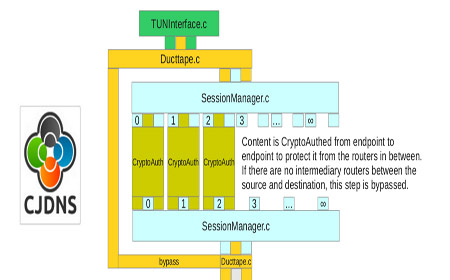
    CJDNS is an open source project building a censorship resistance decentralized network, the routing engine has been designed for security, scalability, speed and ease of use, CJDNS runs on top of your ISP network and provides you with an internal IPv6 address generated from a public encryption key.

    A virtual network card (TUN device) is used to send data to anyone connected to the network, what makes CJDNS different from other decentralized P2P projects like PirateBox is that it is routable over the current Internet, nodes can be reached anywhere in the world. In the future, as the number of nodes increases, data packets can be sent wireless in ad-hoc mode. No DNS is required to access a node,  if DNS is ever implemented it will be made decentralized and secure, at the moment  the user only needs to know the IPv6 address and paste it in the browser.

    Project MeshNet CJDNS flowchart
    Project MeshNet CJDNS flowchart

    Man in the middle attacks are not possible because public key encryption is used to send packets, CJDNS provides privacy too, other users can’t locate people by simply looking up their internal IPv6 address, node operators could track a user down but only if the community helps them out. Unlike the tor network , the node operator that gave someone access to the mesh can deal with abuse and ban people, a CJDNS network abuse policy will have been democratically decided by those who are part of the network, stopping Government interference and frivolous multinational lawsuits. CJDNS is not trying to replace tor, it wants to replace the Internet, the idea is that with all hardware working in P2P mode a single person can’t be intimidated into shutting down the network,  there isn’t any central infrastructure that can be attacked.

    Like with darknets, to join CJDNS you will first need a friend inside giving you access, once in the network you can connect to everyone else. Hyperboria is the main CJDNS network composed of dozens of nodes. To connect to the IPv6 addresses, Hyperboria sites, you will need to be running CJDNS, it doesn’t matter if your computer is using IPv4 as CJDNS encapsulates IPv6 into IPv4 packets for routing.

    The network is resistant to Distributed Denial of Service ( DDoS ) because it has too many nodes to bring down, this makes CJDNS enduring to natural disasters too, there isn’t a single point of failure. CJDNS can be installed in OpenWRT routers, MAC and Linux computers, Windows is being tested on, hardware requirements are low and if you run a node you can host anything that doesn’t go against the community values.

    Visit Hyperboria homepage

  • List of free speech and offshore hosting companies

    When choosing a free speech hosting company you should assess the kind of content you host, for example, in the USA although the 1st Amendment protects free speech a powerful multinational can try to get around it by launching a frivolous lawsuit that a small webmaster can’t fight in court due to lack of resources, and in China any pro Tibet website will be taken down by the Government.

    You will leave tracks behind when you upload your site and make payments, these companies are not truly anonymous even thought some advertise as such, to host controversial content anonymously use Tor hidden sites or i2P, but they will only be reachable by people using the appropriate software.

    Free speech hosting

    • DreamHost: Budget host offering shared and dedicated hosting, their terms and conditions allow for any content that is legal in the United States to be hosted, including pornography. DreamHost hosts the American Nazi Party website and refused to take down Prophet Muhammad cartoons even after a denial of service attack was launched against them by Alqeda sympathisers.

    Get $60 discount in Dreamhost entering code: HACKER10

    • Privex: Small hosting company operating out of Belize (yes there is a country called Belize, look it up). They have been in the free speech business for around ten years and I have confirmation from contacts that if what you want to host is legal they will not censor it, this includes controversial art, cryptocurrency payments allowed and they are happy to host Tor nodes too.
    • BuyVM: Also known as “Frantech Solutions”, affordable long standing free speech company they will host anything legal in the US as long as you pick a US server but they have servers in other parts of the World too.
    • NJalla: Provider of hosting, VPN and anonymous domain name registration, they register it under their name on your behalf and it can be paid anonymously with cryptocurrency. Staff had links to piracy sites, a couple of lowendtalk posts accuse them of being left leaning biased.
    • NearlyFreeSpeech: Webhost based in the US where you only pay for the amount of bandwidth and storage space consumed, it runs its own custom hosting panel, their terms and conditions state that the webmaster must register his real name and address, the company carries out random identity checks asking for a passport scan to be emailed.
    • PRQ.se: Servers and company located in Sweden, if your content is legal in Sweden they will host it, no questions asked. They maintain minimum information about their customers and very few logs, PRQ used to host Wikileaks and other highly controversial content, support for SQL databases, SSL certificates and DNS.
    • LiberationTek: Company owned, based and operated from the USA, they offer and all round service that includes hosting, domain name, e-mail address and others, they advertise as guaranteeing no censorship. They have partnerships with conservative websites.

     Offshore hosting

    The following hosts have a free speech policy that comes with restrictions, even if your content is legal they can refuse to host it, the only advantage over other traditional hosting is that their servers are offshore.

    • OrangeWebsite: Company and servers are all based in Iceland, they will ignore all complaints against legal websites with the exception of racist or pro-paedophilia content, which is not allowed.
    • CCiHosting: Operated and hosted in Panama, offering Linux and Windows servers, they advertise their services as anonymous webhosting. Support provided via live chat or phone.
    •  YoHost: Their terms and conditions claims that you can not use their servers to host any kind of porn, sites encouraging the destruction of property will also be removed as well as phishing scams. They only rent a VPS or full server and YoHost will collaborate with law enforcement if criminal content is found.
    • KatzGlobal: Offering hosting in multiple Asian locations (Singapore, China, India, Malaysia, Australia) as well as hosting in the US. They use cPanel and have standard features that come with it, like SQL database, FTP access and POP3 mail boxes. There is no support to host multiple domains on a single account.
    • SecureHost: Located in the Bahamas, it provides dedicated, shared and VPS hosting, they also provide a Bahamas based phone number and fax which messages can be retrieved from abroad. Their terms and conditions state that you can not host anything that SecureHost judges to be harmful to their reputation.
  • French Alqeda terrorist located thanks to his computer IP

    Mohamed Merah, a self-confessed Alqeda member of Algerian origin responsible for the murder of three off duty paratroopers, one Jewish Rabbi and three children going to school was found by French detectives after scrutinising how many people had visited an online advertisement offering a motorcycle for sale that was used to lure the first victim into a mortal trap where he was shot dead.

    Cypercops found 580 people had visited the advertisement, they narrowed it down to a list of computer IPs near the city where the first murder took place and its surroundings, then compiled an even shorter list with IPs registered to known terrorist sympathisers until they came across Mohamed Merah brother’s computer IP, whom was also a well known Islamic extremist.

    The police also had other leads like a mechanic reporting that someone (Mohamed Merah’s brother) had enquired on how to get rid of a motorcycle GPS tracking device which description coincided with that of the get away vehicle.

    Source: French newspaper LeMonde

  • HIPAA compliant email service Protected Trust

    HIPAA compliant email service Protected Trust

    Protected Trust email encryption allows for real time email traceability with auditing logs recording who read the email and what they did with it, messages can be set to expire after a certain date so that they are no longer available or cancelled if they have been sent to the wrong person. Emails are encrypted with a unique symmetric key using AES256 then sent to Protected Trust servers, data never leaves the organisation computers unencrypted. If you email anybody not using the Protected Trust email service they will receive a link to read the message securely stored in the server.

    The content is made available to the recipient until expiration, retrieved with a shared secret that can consist of a known password or receiving a PIN to your phone number. Cryptographic hashing makes sure that emails have not been tampered with or damaged in transit.

    Protected Trust email HIPAA compliant
    Protected Trust email HIPAA compliant

    This email service is directed towards companies that need to comply with data privacy laws, it will cover legal liabilities if anything goes wrong and allows for accurate message tracking in case of security incidents. You can keep your current email provider and address, emails are easily sent using a Microsoft Outlook plugin that adds an encryption button to the interface, via Protected Trust web based portal supporting all major browsers (IE, Chrome, Firefox) or from a mobile device (BlackBerry, Android, iPhone, Windows Mobile).

    Protected Trust complies with the Health Insurance Portability and Accountability Act (HIPAA) regulating how patient data must be protected, financial institutions also need to comply with Government regulations regarding non-public data. The free version of Protected Trust is limited to just a few messages per month and requires phone verification of your account.

    Visit Protected Trust homepage