Category: Other

Other computing tips

  • Best online hacking wargames

    Best online hacking wargames

    The following websites offer you a free and legal way to acquire practical hacking skills. If you are going to stop the bad guys, you need to know how they act to protect your own servers and wargames are the best way to be one of the bad guys without worrying about the FBI knocking at your door or harming anybody.

    The computers you will be hacking in wargames are virtual machines that can be easily reset, and if you get lost,  a community of white hackers will be willing to help you out teaming up with you or sharing experiences.

    Exploit Exercises: A site giving you access to various virtual machines to hack, you will be given challenges, like scanning a network to find what vulnerabilities exist and how to exploit them. This site is admirably structured with the servers separated in between different hacking skills and levels. You can download a .iso or .ova (Open Virtual Application) and run it locally in your computer to hack it as if it was online.

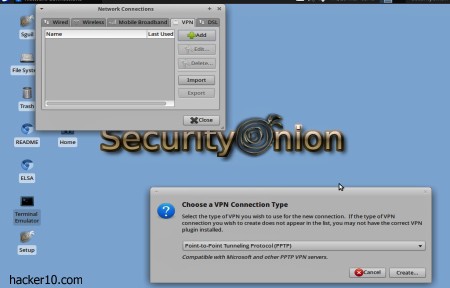
    Hacking Lab: An IT security portal with various hacking tests, it has its own custom live CD with a VPN connection that you can use for hacking. Just like in real life, where you have to scan a server to fingerprint them before launching an exploit, in hacking lab you will have to find the IP or DNS of the vulnerable server before a hacking attack can take place.

    Online hacking game hacking lab
    Online hacking game hacking lab

    Pen Tester Lab: Full of penetration training exercises for people interested in becoming a PEN tester. You are given weekly computer security exercises in the boot camp section, lessons will get more and more difficult as you complete them. Tasks are clearly explained with links to the files you have to download if necessary.

    HackThisSite: One of the wargame sites that has been the longest around, with a great hacking community that will help you expand your skills, you can chat with like minded people in HackThisSite forums or in the old school hacker’s communication tool IRC. This site stands out from the crowd with their extensive amount of free learning resources.

    cyberwar game HackThisSite
    cyberwar game HackThisSite

    Hacker Project: A fictional hacking game set in the future where governments have gone bankrupt and multinationals take over the World stopping free flow of information. Your job will be to return power to the people by infiltrating corporations and use their information technology network against them. This site is  for entertainment, you don’t hack anything for real, but the game is realistic.

    HackerForEver: Text based browser game revolving around the dark world of hackers, from the good white hackers up to the bad black hacker guys. You can choose what side you would like to be on, the game has various clans you can join and a community. You will not do real hacking here, just a simulation, games like this serve as introduction to the hacking slang world, suitable for people of any level.


  • Email providers connection logs table

    Email providers connection logs table

    Last week I emailed 14 different email providers and identifying myself as a blogger I asked them about their connection logs retention policy, here are the answers:

    Would it be possible for you to let me know for how long does your email service keep customer connection logs? (By connection logs I mean timestamp logs that contain computer IPs used to connect to the account) 

    Email provider Connection logs retention
    Countermail.com We keep a traffic log for 24h, the incoming external server IP-addresses are stored in this log, but the countermail users IP-addresses are never stored in this log
    Protonmail.ch The answer to your questions is fairly simple: we do not have connection logs where ip’s are matched with accounts and tracked
    Inbox.com We are sorry but we can not share this info with you because it is not considered a public information
    Hushmail.com They told me to read their privacy policy, I did and it says that Hushmail keeps connection logs for 18 months
    AnonymousSpeech.com For trial user we keep a connection log for 5 days. After this 5 days we delete them. For paid memberships we do not keep ANY log information
    Mailbox.org The specific logs you asked about are deleted after 7 days
    NeoMailbox.com Updated: It took them ONE MONTH to reply. “We keep email logs for 7 days after which they are securely wiped.”
    Cotse.net Did not reply
    MyKolab.com Unfortunately, I am not in the position to give you a concrete time frame for this. For example, deleted mails are not purged from our storage immediately but at regular intervals, usually every day at night time when there are less users on the systems. In addition to that, we keep backups for disaster recovery, but we only keep them for a limited amount of time and not forever
    Unseen.is We keep email server access logs for seven days. This is only to prevent abuse and spamming using our system
    OpenMailbox.org We keep logs 1 year to comply to local laws
    Posteo.de

    We only save IP addresses when an account is accessed using an external email client and in the process of sending or receiving emails. When an account is accessed via the webmail interface we generally do not save IP addresses.

    This data is automatically deleted after seven days. The data is only used to diagnose problems and can not be requested by authorities. Only in response to a judicial ruling in the case of a serious crime can this data be accessed.

    CryptoHeaven.org The logs are kept for anywhere from 8 to 48 hours, and that is only on the web server and not the mail system
    Fastmail.fm We normally keep logs of email and server activity for up to 6 months. This is for the purposes of diagnosing and fixing problems, which are often reported to us weeks or months after they occur. Backups and logs may be kept longer in special circumstances. For example, if a problem is taking a long time to resolve, logs relevant to that investigation may be retained. Or if a server that contains backups or logs is temporarily offline because of a fault, then those backups or logs may not be deleted until the server is brought back up. These situations are unusual, however, and when they do occur, they are temporary
  • Decentralised Internet platform MaidSafe

    Decentralised Internet platform MaidSafe

    Maidsafe is a decentralised Internet platform where users contribute computer storage space, CPU power and bandwidth to form an autonomous ecosystem, the more people join the network, the more resources are available. A denial of service attack or censorship attempt would be extremely arduous to carry out in such environment where there is no central server or DNS.

    Maidsafe’s client application is called SAFE (Secure Access For Everyone), when you upload data everything is automatically shredded and encrypted using the uploaded files as part of the public key encryption scheme, the password is never transmitted to the network, there is no way for others to see what you uploaded. Data is distributed across multiple servers, replication and  Distributed Hash Tables intercedes to deliver the files when part of the servers holding chunks of your data go offline. MaidSafe maintains 4 encrypted copies of your data and moves them around nodes as they are available.

    MaidSafe decentralised network
    MaidSafe decentralised network

    If you would like to access more data than you have been allocated  by the network and do not wish to donate more of computer resources you will have to pay for the access using Safecoins, MaidSafe’s own cryptocurrency that can be bought or exchanged by another currency at alternative cryptocurrency markets.

    A project like Maidsafe has the potential to deliver apps, host websites or store films  without fear of the server being subpoenaed or taken down by an abusive regime. With the files divided and stored encrypted in different locations, it is not feasible for state entities to wiretap a central server and track the downloaders.

    The code is open source, developers have access to an open API to build apps on top of MaidSafe. Just be warned that when you donate storage space to the network, you have no way of knowing what it is being stored encrypted in your computer, this could create legal liabilities if anybody misuses the network, but until there is mass adoption it is hard to know what would happen in a case like that.

    MaidSafe is a for profit company based in the UK, they make money with SafeCoins.

    Visit MaidSafe homepage

  • Digital image forensics with Ghiro

    Digital image forensics with Ghiro

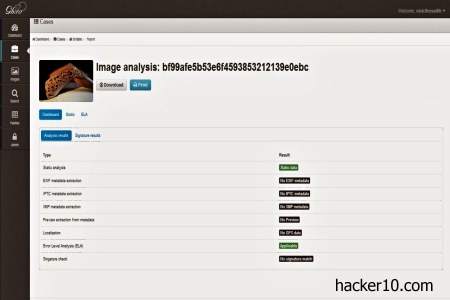
    Ghiro is an open source tool for image analysis and metadata extraction.  You can install it in a dedicated server or download the .ova appliance for Virtualbox or VMware. Either way you get a web interface to upload images and observe a deep overview of the embedded metadata, like EXIF, IPTC , XMP, GPS coordinates, etc.

    The default web interface username is ghiro and the password ghiromanager they should be changed straight away, specially as the appliance can be remotely accessed with SSH if you uploaded it to a server.

    You can use this tool to compare two images that look the same to the human eye and find out if one of them has been modified by comparing digital signatures, the hashes tab shows the image MD5, SHA1, CRC32, SHA256, and SHA512 hashes. The Error Level Analysis will let you know if the image was edited and MIME information shows extended data about the file you are dealing with, for example, if a jpeg or png.

    Ghiro image forensics appliance
    Ghiro image forensics appliance

    You can extract metadata to find out what device was used to take the photo and if any GPS coordinates were automatically added, like many digital cameras do, in which case an embedded map in Ghiro shows you the exact location of where the picture was taken.

    Other metadata that Ghiro can extract is photo resolution,  focal length and name of the software used to edit the photo if any. A case management tab lets you group images and assign users and permissions to cases.

    This is a scalable professional image forensics tool of benefit for amateurs and professionals alike, it can  detect fake photos, and allows a team of people to work in complex cases with a multiple user dashboard, saving projects, searching for specific image hashes and displaying understandable reports.

    Visit Ghiro homepage

  • Penetration testing and ethical hacking distribution Matriux

    Penetration testing and ethical hacking distribution Matriux

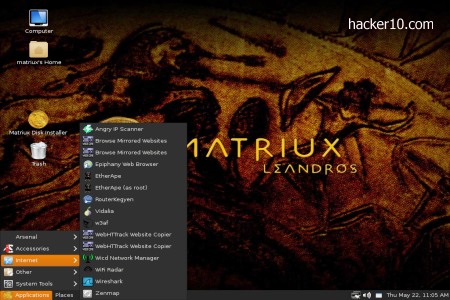
    Matrix is a penetration testing Linux distribution based on Debian with the GNOME window manager. The download is a huge 3GB and you can run it as a live DVD or install it in your computer or USB thumbdrive. The tools Matrix comes with have been specially created for ethical hackers, penetration testers and computer forensic experts. I can’t imagine anybody using Matrix as their every day desktop unless they work in this field.

    The default username is matriux and password is toor. The only main stream software you will find is an archive manager to pack files, all of the other tools are computer security related. To install this distribution a “Matriux Disk Installer” shortcut in the desktop can be clicked on but it will not partition your hard drive, you will have to prepare the drive and create a Swap partition on your own with a different tool, I suggest GParted.

    PEN testing distribution Matrix
    PEN testing distribution Matrix

    Matriux comes with two browsers, Firefox, including the Adblock Plus and NoScript addons, and Epiphany, a lightweight GNOME desktop browser. The tools you need for hacking are all nicely classified inside the “Arsenal” tab. You can find multiple scanners to test cross site scripting exploits in websites, Nmap and Angry IP scanners to scan a whole network and search for open ports and services where to infiltrate.

    The forensics sections of Matrix has every single piece of software you will possibly need for your job, orderly divided into “Acquisition“, “Analysis” and “Metadata extractors“, without leaving out tools to analyse Android mobile phones. Other crows in the jewel incorporate steganographic tools, Bluetooth hacking, VoIP hacking software, DNS attack tools, debuggers, hacking frameworks like MetaSploit, Mantra or Inguma. For those who don’t know, each framework contains further discovering, gathering, scanning, bruteforcing and exploit tools, you can spend months just learning about how to operate the software.

    I liked that Matriux comes with my favourite zsh shell and a marvelous semi transparent terminal colouring scheme that makes you real look geeky when people look at the screen even if you haven’t got a clue of what you are doing. I could not see anything missing in the cyberarsenal, from the basic Truecrypt and Tor to the more dark open source intelligence and forensics application Maltego.

    With over 300 hacking tools in a single DVD at the touch of your fingertips, Matriux is a good alternative to Kali Linux and should be a must have hacking distribution for all security professionals, students and hobbyists.

    Visit Matriux homepage

  • Share messages anonymously with KwikDesk

    Share messages anonymously with KwikDesk

    KwikDesk is a self-destructing social messaging platform to share short Twitter like messages with hash tags and a limit of 300 characters. Unlike Twitter, to use KwikDesk you will not be asked to fill in a form, you don’t have to pick any username or password, KwikDesk connection is encrypted with SSL and the website claims not to track IP addresses.

    In exchange for this anonymity, you will lose functionality, you won’t be able to create a profile and following one to one conversations will be more difficult than it is in Twitter.

    KwikDesk web app is fairly elementary, you type in a message, select after how many days the message should be self-destructed and add a hashtag so that others can find it, without people knowing what hashtag to type in the message will remain hidden. After somebody reads the message they can quickly reply using the same interface or publicise it in Twitter with their own Twitter account

    Twitter alternative KwikDesk
    Twitter alternative KwikDesk

    The main difference in between KwikDesk and a self-destructing notes site is the hashtags. You don’t have to send a link to your hidden messages, people only has to go to KwikDesk type in a hash tag and all of the messages classified under it will appear.

    There is a Chinese version of KwikDesk and as proof of concept it is great but if the website becomes a nuisance it could be blocked by a government or denied access with a distributed denial of service attack. Maybe the upcoming KwikDesk powered OneOne iPhone app will solve those flaws.

    Visit KwikDesk homepage

  • Review encrypted email service ProtonMail

    Review encrypted email service ProtonMail

    ProtonMail is a Switzerland based privacy email provider, the company stores your data encrypted in their servers and they claim that computer IPs used to connect to the account are not logged. I looked at the email headers sending myself a test message and I could see that ProtonMail does not include sender’s IP inside email metadata.

    When you first open up and account (took me a few days to get an invite), you will be asked for two different passwords, one is the email login password and the second one, not known to ProtonMail, is the password used to encrypt email messages in your browser before uploading them to the server. There is no password length check or anything forcing people to use a complicated passphrase to stop new users from being negligent and making up a short guessable pass.

    I also noticed that there is no automatic logout, you can easily forget about logging out of your account in a public computer and the person behind you could get access to your account two hours later.

    Encrypted Swiss email service ProtonMail
    Encrypted Swiss email service ProtonMail

    If you correspond with other ProtonMail users, encryption is end to end, messages never leave the ProtonMail server network, they will not travel the Internet where encrypted messages could be intercepted by the NSA international fibre optic cable wire-tapping operation to attempt postliminary cracking with their supercomputers.

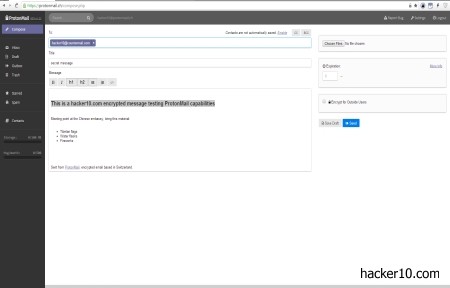
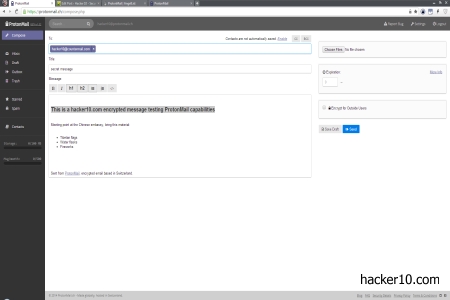
    To interact with an external email account, like Gmail, you have the option to send the message in clear text, with no protection at all, or send a password protected link where the receiver will have to click on to read the message directly from ProtonMail encrypted servers. The link can be set to expire after just a few hours or two weeks, the message will no longer exist once the expiration date is reached.

    There are a few weaknesses to sending emails in this fashion, one is that you will need to transmit the password to the other part, this will slow you down and is open to interception.  Another security weakness is that there isn’t any kind of brute force protection, after somebody has read the message it will not be automatically self-destroyed as it should be. I could not see any counter on the page letting you know if the message has been previously displayed before you read it.

    The good part of sending email messages with password protected links is that the receiver only needs javascript enabled in their browser to be able to read them and that the messages can’t be scanned en route.

    ProtonMail settings and compose screen are simple but enough to get the job done. I appreciated a button to permanently delete all account and messages, regrettably this did not work for me when I tried it, it would do nothing when I clicked.

    ProtonMail security model is based around owning their own hardware, storing it offshore outside USA and European Union laws, and fully encrypting their disks with the decryption keys split in between various individuals, with server integrity checks to detect illicit changes in the software, like somebody installing a key logger, but those checks can not stop a hardware keylogger in the data center, although since data is encrypted by the user browser, the most an unauthorised third party could do is to monitor computer IP connection logs.

    This is an easy to use email service, perhaps the only free email service that claims to keep no user logs. The company implements well known open source cryptolibraries and they allege to be audited by computer security staff at CERN (European Center for Nuclear Research). The only problem I have with ProtonMail is that there isn’t a built-in system to send messages with your own PGP keys, this is the main reason why I can’t use them as my primary email provider.

    PGP is the default standard for email encryption and I can’t ask anybody to stop using PGP encryption keys and switch to a ProtonMail account for javascript OpenPGP encryption, ideally, my perfect encrypted email provider must be able to import a PGP key from one of my friends and use it to secure data.

    Visit ProtonMail homepage