Hacker10

  • Encrypted Voice over IP chat Mumble works with Tor

    Encrypted Voice over IP chat Mumble works with Tor

    Mumble is an open source VoIP program for group or P2P chat that runs in Windows, Mac and Linux, with iPhone and Android versions in beta. Mumble encryption is implemented with public/private key authentication and unlike Microsoft owned Skype, which supposedly also encrypts calls, in Mumble cryptography experts can scrutinise the code to make sure that the NSA has not inserted a backdoor or weakened the algorithm.

    Mumble is widely used by gamers due to its low latency and background noise reduction resulting in superb audio quality, but you can use it for any kind of communication. Ninety per cent of the public chatrooms I visited where gaming clans and I had to manually add activist related Mumble servers like occupytalk. For high privacy group calls you have got to manage everything yourself, including the server, otherwise a rogue operator could carry out a man-in-the-middle attack to eavesdrop on you.

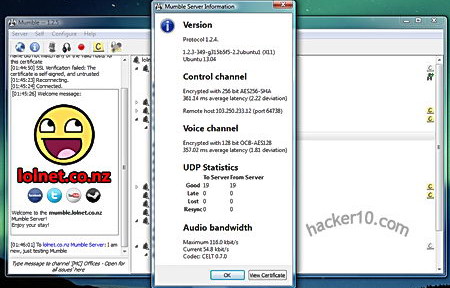
    Mumble server encryption details
    Mumble server encryption details

    When you first install Mumble you will be prompted if you would like to run your own server (called Murmur) this will give you total control over who can access the chatroom but it requires staff and time. The other option is to join one of the dozens of public Mumble servers classified by countries and create there your own chatroom or rent a Mumble server from a specialist provider, they can be easily found with an Internet search for Mumble server hosting.

    The Mumble client Audio Tuning Wizard helps you correctly set input levels for your sound card with voice activity detection and sound quality as well as optional text to speech to read typed in messages. Messages are read with a metallic voice but you have the option of buying a professional text to speech package from a third party and add it if you are going to use the feature a lot. The second Mumble client step creates a digital certificate to authenticate with servers. The most likely is that the servers you visit will have a free self-signed digital certificate poping up a warning window that you will have to accept before joining, this is not a huge security risk if you examine the certificate before accepting it and it only has to be done once.

    Besides AES256-bit encryption Mumble has the edge over other VoIP tools because it can communicate with the TCP protocol, this is absolutely necessary for any program to be tunnelled in Tor and most VoIP programs only work with UDP, Mumble also has very low bandwidth needs, it will not clog Tor nodes and it works as Push to talk (PTT), you need to push a button to transmit voice, instead of an always on call connection.

    You can either connect directly to Tor running it in your computer and configure Mumble by going to Configuration>Network tick the checkbox that says “Force TCP Mode” and fill in the SOCKS5 proxy settings with localhost and 9050 for the port, or roll your own anonymous Mumble server for your friends renting a VPS, installing the Mumble server software in the VPS, configuring the server firewall to accept incoming connections in Mumble’s default port 64738, installing Tor in the VPS and from then on all voice calls made using that server will be encrypted and anonymous.
    Visit Mumble homepage

  • Encrypted video calls, group chat, notes and files with VIPole

    Encrypted video calls, group chat, notes and files with VIPole

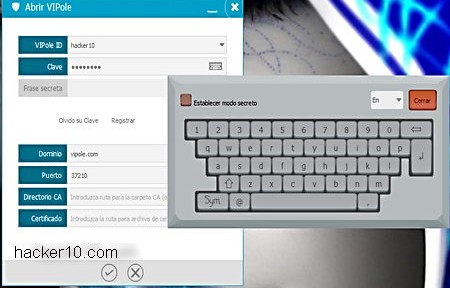
    VIPole is a Windows, Linux, Mac and Android security suite providing encrypted file sharing, VoIP, video chat, notes, passwords and organizer. Installation is straight forward and it only requires you to provide a valid email address where you will receive a verification link, select the local folder where data should be stored and move your mouse around to generate entropy to create your private encryption key. You will have to cook up two passphrases, one to encrypt your data and another to encrypt your profile, the software makes sure that you do not reuse them but there is no strength meter. A virtual keyboard can be used to stop keyloggers.

    To be able to encrypt files in your hard drive you will have to temporarily disable your antivirus and install some drivers, I also had to disable the antivirus to update VIPole software client, I am using AVG, most modern antivirus programs will allow you to disable it for only a few minutes, this should not be a big problem as long as you trust VIPole not to do anything unacceptable to your computer.

    Encrypted messenger and video calls VIPole
    Encrypted messenger and video calls VIPole

    Encryption keys are managed exclusevly by the user, VIPole has no way to decrypt your data, calls and chats are end to end encryption with AES256/RSA 4096 bit keys and no central server that could be wire tapped, the company pledges that there is no backdoor. You can see an “History” tab in the program, chats logs can be accessed there but the data is only held in your computer and nowhere else, even then, that data is encrypted (premium version) when you close VIPole, losing the laptop will not reveal private logs without the proper password.

    Another nice feature is being able to set up a fake passphrase in case you are forced to disclosure it. Helpful in countries like the United Kingdom where you must reveal your password to the police when requested or risk criminal prosecution, but giving to the police a password to a fake encrypted container would also break the law if they find out, so not really recommended. I just could not see any other applicability other than bypassing airport staff opening up your laptop.

    I was really impressed with VIPole easy of use interface, the well organized tabs make it painless switching in between functions and information is clearly displayed in a nice clean layout with avatars that help you identify the caller and shift from the chat to notes or file manager window in no time.

    VIPole encrypted calling options
    VIPole encrypted calling options

    The only thing that made me feel unease about VIPole, besides not being open source, is that although calls do not go through their servers, passwords, notes, reminders and files are kept in VIPole servers,the reason for this is to be able to sync the data with your mobile device. It would have been valuable to have the choice not to sync data and keep everything local for those paranoid about cloud security. The good news are that it is impossible for server administrators or anybody breaking into VIPole facilities, to have access to the data in plain text, everything is encrypted with your private encryption key before leaving your device, this means that VIPole can not be compelled to produce a copy of your data even if they wanted to.

    This company security model really cares about users privacy and they should be praised for being very open about how data is stored and how they are protecting it, the company has plenty of information about their security model and businesses can get their own server to make sure that they are always in control of everything.

    I found the free VIPole plan good enough for home users, the paid version buys you more features like auto logout when idle, extra file storage space, encrypted virtual drive on desktop client and other elements that are nice to have but not a must have.

    Visit VIPole homepage

  • Encrypt data in Mac OS, iPhone and iPad with Krypton

    Encrypt data in Mac OS, iPhone and iPad with Krypton

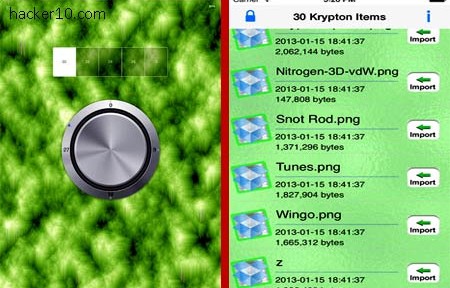
    Krypton is a Mac OS and iOS (iPhone, iPad) tool to securely encrypt your files using AES256-bit in Cipher Block Chaining mode (CBC). This program is able to encrypt any kind of file, from documents, to images, videos or MP3s and full folders. If you are familiar with Truecrypt you will notice that Krypton works in the same fashion creating an encrypted storage space, called vault, that holds any file you place inside it and makes the whole vault unreadable without entering the correct password.

    In a Mac computer you can use Truecrypt for free but iOS mobile devices do not work with it, Krypton will minimize work when transferring encrypted data in between secure vaults from your iPad or iPhone to your desktop Mac OS.

    iOS iPhone encryption Kryptos
    iOS iPhone encryption Kryptos

    When you copy text to the clipboard this can be automatically sent to Krypton for encryption, and if you select a file for encryption it is possible to tick a checkbox to shred it after it has been secured and make recovery of the original data left behind impossible.

    The software menu has a shortcut to send encrypted documents to Dropbox cloud space, encrypting files before uploading them is a good way to protect yourself from NSA spying as Dropbox can access or be compelled to access your data. Another two shortcuts in Krypton’s menu let you decrypt a file or folder, export it outside the vault and delete it from the vault.

    The developers claim that if you lose your password the encrypted data is not recoverable so there is no backdoor, this looks like a good security tool due to the developers using a standard strong encryption algorithm like AES256-bit and the cross compatibility in between mobile and desktop devices.

    You need to be aware that once the data has been exported outside the vault and accessed by another application it will no longer be encrypted and that other application could create a temporary copy that will be stored unencrypted outside the secured space, like for example, Time Machine Mac OS backup could contain a copy of decrypted confidential files.

    Krypton will be best used in conjunction with a data shredder to securely delete any files leaking out of the encrypted storage space while you edited or viewed with them.

    Visit Krypton homepage

  • Jam Wifi signals using your wireless card with wifijammer

    Jam Wifi signals using your wireless card with wifijammer

    Originally named wifijammer is a python script to interfere with Wifi access points and disrupt the network. This can be useful for penetration testing of your own network or if you suspect that spy wireless cams are around in your premises. There are online shops selling hardware wireless jammers too but they cost additional dollars, wifijammer is a simple application that anyone with a laptop and basic Linux knowledge can use. This kind of applications must be used with caution, you need to be careful not to interfere with a network that is not yours or risk arrest.

    For this jammer program to work your wireless card needs to be able to inject packets to the network. You will have to learn your wireless card chipset, running the dmesg command in Linux will often show this information, or run lsusb if you are using a wireless USB dongle. With the obtained information you can then search on the Internet to find out if the card is suitable to run aircrack-ng or any other WPA cracking utility, if the wireless chipset can run a WPA cracking tool it means it is able to inject packets on a live network and it will work with wifijammer.

    Wireless Access Point hacking
    Wireless Access Point hacking

    The jammer will automatically hop in between channels every second to determine all possible targets, after initial identification it will start jamming the signal sending constant deauthincation packets to the access point. This is a way to disassociate connected computers from the access point, cutting off their wireless access. wifijammer does not perform any denial service attack but a disconnection, the client is able to reconnect but as long as the attacks runs wifijammer keeps telling the access point to disconnect the client, with the same result than a denial of service attack without neededing that much bandwidth or resources. A benefit of getting a client to constantly re-authenticate to the access point is that it might be possible to capture the WPA2 handshake and gain access to the network.

    There is another application to jam Wifi access points found in the WebSploit framework, wifijammer has the advantage of being a very small script that should run in any operating system where you can install Python.

    If an access point has MAC filtering enabled you would have to spoof the MAC address of a client first before deauthentication packets are accepted. Having said that, expensive enterprise level wireless access points are able to detect continuous death requests and they will block you.

    Visit wifijammer homepage

  • Smartphone encrypted messenger HushHushApp

    Smartphone encrypted messenger HushHushApp

    HushHushApp is a secure Android messenger (iPhone planned), for encrypted chat and file sharing. This app will secure your conversations from eavesdropping but it will not make you anonymous, in fact, you have to register to open an account before you can use the messenger. For this you can use your phone number or an email address that will have to be confirmed with a registration code.

    During the registration process you are asked what country you live in and the app makes it very easy sending a text message or email to your contacts, querying if they want to chat with you using HushHushApp. You should be careful not to carry out a mass mail by mistake as all contacts are checked by default, and most likely people will only want to suggest the encrypted chat to a couple of friends.

    Smartphone encrypted chat HushHushApp
    Smartphone encrypted chat HushHushApp

    Once you have opened the account you will be assigned a HushHush ID, HID, and be able to manage your profile where you can upload an avatar. The HID is used for other people to find you in the network and add you to their list of contacts. You don’t need to hand over your phone number to chat with others, the short HID alphanumeric code will be your contact ID. Another option is to individually control if a contact will be allowed to be notified when you read a message and if your location can be revealed to them.

    You can create a chat group from the interface where three or four people can chat securely at the same time. If files are sent, they will be encrypted and stored that way, only accessible through the application.

    Security wise, you are only told that HushHushApp uses a scrambling algorithm with no additional knowledge of what algorithm is or how it works. HushHushApp mentions that messages are deleted from the server, this means your data flows across a central server, a potential weak spot if the server is compromised. The good points are that messages have a digital fingerprint, with local storage and users database being kept encrypted, but again, no mention of what encryption they are using, you are supposed to trust they are doing a good job but you know nothing about the company either, other than their website features section is unfinished and written all in Spanish.

    After I used the “Delete Account” option and uninstalled this app, browsing the storage phone I noticed a folder named com.hushhushapp.android and a tiny file named hushushgirl.3gp left behind on my phone, this shows some sloppiness by the developers part.

    HushHushApp interface is user friendly and easy to use but the lack of detailed information about what security measures HushHushApp deploys does not inspire trust. You can’t confide privacy on anybody saying that they will scramble your messages and hope that all will be fine. Using a central server to deliver your messages is also not ok, it adds an additional way to break your security. I would avoid this app for secure chat based on this but it should be fine for non privacy chatting, just like MSN or Yahoo.

    Visit HushHushApp homepage

  • Exchange encrypted SMS messages with Tinfoil-SMS

    Exchange encrypted SMS messages with Tinfoil-SMS

    Tinfoil-SMS is a free open source Android app to exchange encrypted SMS messages with other Tinfoil-SMS users. After installation you can import contacts from your phone and all future conversations will be handled by Tinfoil-SMS but communications with contacts will not be secure until a successful key exchange has been executed.

    To stop man in the middle attacks, where encryption keys are replaced by an attacker and messages forwarded after logging them, a signed encryption keys exchange must take place first. In the app menu you will see two fields labelled Shared Secrets, there you need to input two secret passphrases and save them, Tinfoil-SMS advises a minimum of 8 characters for each shared secret, you have to transmit the secret to your contact by secure means (not your phone).

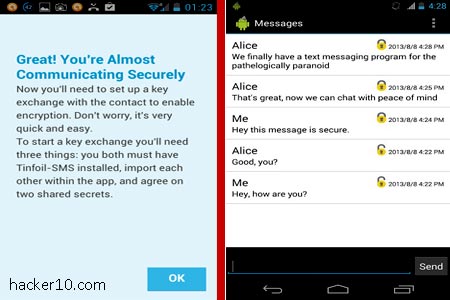
    The receiver will get a notification showing your phone number next to “Pending key exchanges“, he will have to enter the passphrase you have given him and from then on any future message exchange will be encrypted.

    Tinfoil-SMS encrypted Android SMS message
    Tinfoil-SMS encrypted Android SMS message

    Messages are secured using AES256-bit in CTR mode, in the SMS thread you will see a padlock attesting that encryption is on. Tinfoil-SMS settings allow you disable and enable SMS encryption, manage encryption keys and delete/adding contacts. It is similar to TextSecure, another encryption SMS app, the main differences in between both are that Tinfoil-SMS signs key exchange with the shared secret, encryption algorithms are slightly different, Tinfoil-SMS cipher is AES256bit and TextSecure AES128bit and Tinfoil-SMS will not encrypt messages locally in your phone whereas TextSecure does.

    The reason Tinfoil-SMS developers give to support SMS instead of real time chat encryption is that many oppressive regimes are in third world countries where people does not have data plans and use SMS messages to communicate, this has the added benefit that the app would still work if the government shuts down Internet access.

    Tinfoil-SMS future plans include incorporating steganography to hide that you are using encryption. There is also planned a detailed cryptanalysis of the application which will always be free and open source.

    This is an app I would trust due to its open source nature and what it looks like a good security model, with the only inconvenience of having to exchange the shared secrets by secure means before encrypted communication can be established, which can be problematic and it is likely to force some people to transmit the secrets insecurely.

    You can download Tinfoil-SMS from Google Play or F-Droid, an alternative Android marketplace made up entirely of free open source software and not controlled by Google.

    Visit Tinfoil-SMS homepage

  • Anonymous encrypted communications with LEAP Bitmask

    Anonymous encrypted communications with LEAP Bitmask

    Bitmask is an open source cross platform bundle from the LEAP Encryption Access Project, a non profit group dedicated to protect the right of leaking information. Bitmask can be used to send anonymous email messages, hide your computer IP when visiting websites, circumvent Internet filters and encrypting your Internet activities to stop ISPs from logging them.

    You can either set up your own Bitmask server to tunnel your traffic or find a provider that supports the application. To open a Bitmask account you only have to cook up a username and password, no additional information is required. Currently Bitmask only works with LEAP own Bitmask server but activist privacy providers like Riseup and Calyx plan on implementing it soon.

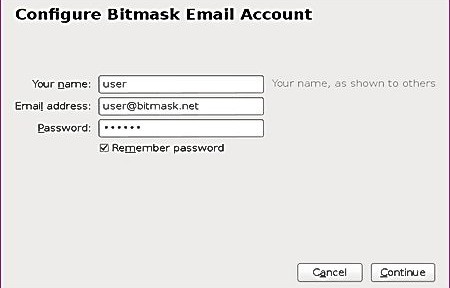
    To anonymously send email with Bitmask a help guide explains how to manually set up SMTP and IMAP to proxy messages in any email client or you can download Bitmask Thunderbird addon with a wizard guiding you through the proxy set up process, the addon also prevents Bitmask account caching.

    LEAP Bitmask anonymous email configuration
    LEAP Bitmask anonymous email configuration

    Bitmask has been designed to automatize anonymity, it uses OpenPGP for email encryption but you don’t have to exchange encryption keys with anybody, the program does it for you. Encryption takes place in your computer and should stop Gmail or Outlook from handing over email contents to the NSA, emails are stored encrypted in your computer.

    One of Bitmask email downsides is that you can not use it with webmail, it only works with email clients, and in case you wonder, the difference in between Enigmail and the Bitmask Thunderbird addon is that Bitmask exchanges encryption keys automatically.

    Encrypted Internet activities and hiding your computer IP from websites is attained with a VPN tunnel, to mitigate the risk of a VPN provider eavesdropping on you Bitmask authenticates with the VPN using an anonymous digital certificate. What I could not see if any counter measure to stop a rogue VPN from logging computer connection IP and timestamps.

    Bitmask stated goal of bringing easy always on network encryption bets on safe technologies like OpenVPN and OpenPGP, some trust is placed on the VPN provider, and although it allows organisations to roll out their own server, so does OpenVPN. I did not find Bitmask any easier than downloading a VPN program and using webmail for pseudo anonymous encrypted Internet communications. The best points of LEAP Bitmask are that it is open source, it allows people to run their own server and has detailed technical documentation.

    Future plans include anonymous chat on top of XMPP, secure VoIP, LEAP Tor hidden services and creating a darknet in between all LEAP platform providers. Of all those things the most exciting feature for me is the Bitmask darknet, for those who don’t know, a darknet is a closed private network of computers that can only be accessed by approved members.

    Note: At the moment Bitmask Windows only works with 32bits OS, if you have a 64bit OS download the Thunderbird addon..

    Visit Bitmask homepage