Tag: Android privacy

  • Android encrypted video recording app Strongbox

    Android encrypted video recording app Strongbox

    Strongbox is a free open source app for human rights and privacy activists to be able to record video with their phones without having to worry about the device being lost or seized, although in some countries you can be charged for not revealing your password to law enforcement.

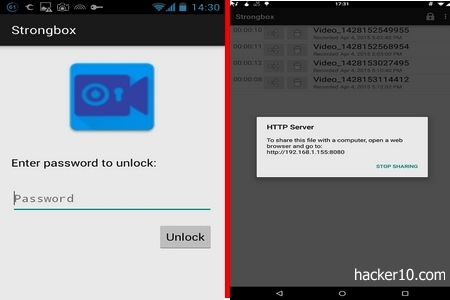
    The app is really simple to use, when you launch it for the first time you will be prompted to compose a passphrase to locally encrypt the videos, if you forget the passphrase, all data will be unrecoverable and lost.

    Straight away after login you enter the video mode with two big buttons at the bottom of the screen, the one represented by a camera logo starts the recording when tapped, the other button represented by a memory card logo gives you access to the video library.

    Stored videos have timestamps next to them, you can view the video on your phone, delete it or upload it to a server. Strongbox gives an internal IP address where the video should he uploaded, I found it confusing, being an internal IP many people will not realise it is their own computer IP, another thing is that when you erase a video no confirmation is asked for and files can be deleted by mistake.
    Android encrypted video recorder Strongbox
    Android encrypted video recorder Strongbox


    Footage is encrypted on the fly as you film, files never touch the memory card, videos are stored inside the encrypted container in Strongbox. The encryption algorithm used is AES256bit in GCM mode, this provides confidentiality and integrity, a lock allows you to instantly close down the app preventing access to the videos with one tap.

    I would use this app to keep my own videos private and not much more, I found the sharing options lacking, that is a problem if your phone is seized. An oppressive law enforcement agency will not be able to view the recordings but you will have lost access to what could be indispensable footage of abuse, I wish there was an easy way to quickly get the videos out of the phone.

    This is a basic app with basic functions using standard encryption that can be checked for bugs and backdoors, probably useful to keep video clips of your girlfriend intended for personal viewing encrypted.

    Visit Strongbox in Google Play

  • Stop Wifi tracking in Android with Pry-Fi

    Stop Wifi tracking in Android with Pry-Fi

    Pry-Fi is an Android app to stop advertisers from using your smartphone Wifi connection to track your movements. This app does not need you to switch off your Wifi, which is the only other way to accomplish this. Pry-Fi blocks broadcasting to Wifi networks while scanning in the background allowing you to connect to the network and randomizing your phone’s MAC address making you to appear unique to each access point.

    Your phone’s MAC address, used by advertisers to track down your movements as you hop Wifi access points, will never be used twice to different networks. This privacy app will show your real MAC address on the screen for your own information and the random or wanted MAC address assigned to you by Pry-Fi visible to public access points.

    Android Pry-fi stops Wifi tracking
    Android Pry-fi stops Wifi tracking

    Another Pry-Fi option called “Go to war!“, emulates dozen of smartphone MAC addresses poisoning the trackers database by listing the same MAC address in two different locations at the same time. This is an effective way to subvert trackers data mining, although this mode will quickly drain your battery life.

    Smartphone Wifi tracking is not something out of science fiction. A few high street stores are already using it to find out how many people go inside the store, what path they walk, the stops they make and if they finally buy something or not. The stores can correlate Wifi movements with CCTV surveillance, the fantastic benefit of tracking people with their own smartphone Wifi connection is that, unlike CCTV, Wifi tracking can be used for mass surveillance with little effort, in CCTV you need to manually pinpoint each target.

    Bear in mind that according to NSA documents leaked by Snowden spy agencies use cell towers to track people’s movements. Pry-Fi will protect you from advertisers but most likely not from spy agencies with access to the whole mobile phone network.

    Note: This is a proof of concept app that needs a rooted device

    Visit Pry-Fi GooglePlay page

  • Smartphone privacy Internet browser Dolphin Zero

    Smartphone privacy Internet browser Dolphin Zero

    Dolphin Zero is a privacy focused Internet browser for Android (iOS version planned). It does not store visited internet sites, cookies, passwords, favicons, or cache. Dolphin Zero is analogous to your desktop Internet browser privacy or Incognito mode with the distinction that in this browser privacy mode is always on by default.

    The browser’s default search engine is DuckDuckGo, a searcher that does not log computer IP or keep tracks of its users. If you are not happy with DuckDuckGo you can easily swap it to Google or Bing tapping on the toolbar.

    This browser will not block advertisements or scripts, your online movements will still be tracked by websites during each Internet session but on closing the window you will see an animated shredder graphic telling you that all temporary cookies and files have been erased. Websites will not be able to track your movements for more than one session at the time, the downside is that settings will never be saved.

    Smartphone privacy Internet browser Dolphin Zero
    Smartphone privacy Internet browser Dolphin Zero

    Do not be fooled by the shredding graphic, Dolphin Zero does not wipe data, it simply does not store it on the phone’s or SD card to start with. Your Internet session runs in RAM memory that vanishes when you close down the browser. This method is safer than erasing the data after it has touched the memory card. The Dolphin Zero browser main function is to protect you from people who could get hold of your mobile device, and it does it well.

    Dolphin Zero has Do Not Track enabled, a quirk in the HTTP browser headers indicating all websites you visit that you don’t want them to monitor your online behaviour to serve you advertising based on the pages you visit. However, only a few companies considerate this request and it is not compulsory to do so by law.

    Dolphin Zero is the privacy version of the long established Dolphin browser, hinting at a valuable development team behind the program, Dolphin Zero is compatible with all websites I tried it on and my experience has been that it is more polished to have a dedicated privacy browser to visit websites you don’t want anybody to know about, than switching in between private and non private tabs that are easily forgettable or mixed up.

    I find it very effective having Dolphin Zero installed alongside my main browser, I missed bookmarking but that feature would defeat the whole purpose of hiding the list of sites you visit. This browser is perfect to keep visited sites secret from anybody with access to my phone and to reduce online tracking, undoubtedly I am keeping this app.

    Visit Dolphin Zero in Google Play