Month: July 2011

  • Review anonymous file sharing P2P software Freenet

    Review anonymous file sharing P2P software Freenet

    UPDATE 2015: Read Police arrest Freenet user! This software is not safe!

    Freenet is a free P2P software designed from the ground up for anonymous file sharing, it is targeted at those who want to exercise free speech without fear of censorship or retribution, besides anonymous filesharing Freenet also lets you to publish websites and take part in online bulletin boards that are only accessible to those who use the software.

    The network is decentralized without any central hub, shared files are stored encrypted in different computers around the world, the default folder where shared files are stored is called “datastore“, the size of this folder, just like bandwidth made available, is determined by the user during installation and it can go from a few Megabytes up to dozens of Gigabytes. Because all the stored data is encrypted Freenet users do not know what they are sharing and have no saying on what is being shared, this allows for denial of knowledge, while some people will be sharing Linux distributions, others could be storing copyrighted work but they will not be aware of it because the contents in the disk are encrypted and the user can not see them, communications in between nodes is encrypted too.

    Files in Freenet are kept or deleted depending on popularity, if something isn’t downloaded for some days, Freenet will make way for new uploads.
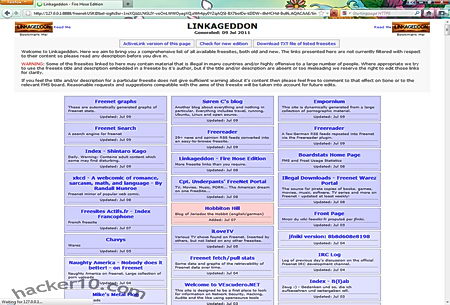
    Freenet Linkageddon site directory
    Freenet Linkageddon site directory

     How to Install Freenet

    The software is a small 13MB download and it is recommended that you have 650MB of free disk space to store the files being shared, different languages can be chosen during installation, I would recommend you to change the default installation directory somewhere else easy to find, the default folders is set to install in between Windows system folders.

    Once you have installed Freenet, if you have a proper firewall blocking outgoing connections (ie not Windows firewall), you will get a few warnings about Java attempting to access the Internet, you will need to authorize this, after that your Internet browser will launch and a wizard will guide you during the set up of your Freenet node, it took me no more than 5 minutes altogether, Freenet has no fancy GUI it operates from inside your browser but it gets the job done easily.

    Note: Freenet website has been blocked by the Chinese Government for years.

    How to be Anonymous on Freenet

    It is strongly recommended that you do not use the same browser that you normally use to surf the Internet for Freenet (Freenet runs inside the browser), a malicious script while surfing the Internet could break with your anonymity and find out what Freenet sites you have visited, Freenet works well with all major browsers (except IE), just download any other. When you first get started with Freenet you will have to use the “connect to strangers” option in order to find something of value to download, as soon as you make 5 friends on Freenet choose the high security settings called “only connect to friends“, it needs a minimum of 5 friends for this to work and it makes tracing data back to you extremely difficult.

    This anonymous file sharing software include plugins to extend its anonymity service, like for example Freemail, a messaging system where mails are sent over Freenet encrypted and anonymously, Freemail makes it very difficult for others to learn who you are communicating with. Freenet plugins can be fetched over the network to get around ISP censorship (i.e. China), you should be careful about what plugins you install, these are not necessarily approved by Freenet developers and could endanger your P2P anonymity.

    I attempted to use Freenet while running a VPN and Freenet stopped working, I think this is due to the TUN/TAP drivers that OpenVPN uses and Freenet might also be using, I noticed that without the VPN active Freenet forged ahead, in my experience it is incompatible to run Freenet and a VPN at the same time, however Freenet FAQ does not say anything about this, I can’t guarantee 100% it was something else.

    Freenet anonymous file sharing
    Freenet anonymous file sharing

     Freenet advantadges

    • Decentralized filesharing, even if one server goes down the content will still exist
    • Files shared by users are stored encrypted nobody knows what they share (helps reduce legal liability)
    • Self regulated filesharing software keeps popular files and erases files that nobody downloads
    • Communications in between Freenet nodes is anonymous and encrypted
    • Anonymous discussion boards and website publishing can be done on top of P2P file sharing

    Freenet Disadvantages

    • There are lots of offensive material around
    • When using high anonymity settings filesharing is slow (data has to be routed around nodes)
    • It can daunting for newbies, the concepts are not easy to understand

    Conclusion on anonymous P2P over Freenet

    Freenet is as close as one can get to real P2P anonymity, the network can be slow at times due to the data being bounced around nodes but anonymous discussion boards, directories with links to find content, and anonymous email over the network make up for it. This is one of the best darknets that exist for anonymous file sharing in P2P, when used accurately, Freenet is for file sharing what the tor proxy is for anonymous Internet browsing.

    I only found two downsides, the software can be hard to understand and speed is slow, other than that this darknet is brilliant.

    Freenet speed improves a lot after a few hours! Do not give up on it due to speed, the longer you run it, the quicker downloading files over Freenet will be.

    UPDATE 2015: Link to Freenet removed, this software has been cracked by law enforcement. Avoid!

  • Learn computer forensics with OSForensics

    Learn computer forensics with OSForensics

    Computer forensics is a branch of digital forensic science associated with investigations to recover, identifying and analysing data stored in digital devices (PC, iPhone, CDs, etc), the process a computer forensics investigation follows resembles that of data recovery but the evidence is subject to guidelines to document an audit trail and preserve the extracted data so that it can be used in a court of law if necessary.

    Computer forensic experts are the people who have been trained in extracting and analysing evidence from digital media , a computer forensics expert should be able to tell what happened, how it happened and who/what was involved, computer forensic experts take part in child pornography investigations, identity fraud cases, malicious hacking incidents, etc. To become a computer forensic expert it is necessary to have a background in computer science, some universities offer certification in computer forensics, you will also need work experience as a computer forensics analyst or IT Security (i.e. internship).

     How to Perform Computer Forensics and Data Recovery

    OSForensics is a collection of computer forensics tools, some of them used by law enforcement, providing you with information about computer configuration and activities.

    After creating a case with OSForensics you will be able to see the computer’s recent activities like connected USB devices, recently browsed websites or downloaded images, another option allows you to recover passwords stored in the browser, if a file has been erased by Windows this forensic tool can recover it as long as it has not been overwritten, a time line lets you see a graph with a good overview of what and when it happened, the results can be exported in CSV or HTML format for further processing, e.g. printing, email.

    OSForensics free computer forensics software
    OSForensics free computer forensics software

    The OSFMount tool allows you to mount all kind of disk images ( .iso, .bin, .nrg, .sdi, .vmd,etc) and view them without having to burn it to a CD-Rom. The Mismatch File Search tool can scan the hard disk searching for files which default extension has been changed in order to disguise them, for example renaming a .jpg file as .txt (which can be reversed), the Mistmatch File Search tool will look at the file headers bytes where the file type is specified and make sure it corresponds with the file extension it represents.

    The Memory Viewer allows you to view the computer RAM memory running processes while the computer is on, useful to find malware in RAM if you detect anomalies. Another very useful feature is the indexing of files, OSForensics can search a hard drive much quicker than the built-in Windows search and show a preview with thumbnails inside a pane. Keyword and date filtering search are on the menu just like email messages indexing, Microsoft Outlook, Thunderbird, Windows live mail, Eudora and many others are all supported (.pst, .mbox, .msg, .eml, .dbx), email message headers with the sender’s IP, can be viewed.

    OSForensics can run on a live system but a real computer expert will avoid doing so until the hard drive has been cloned first, a running operating system changes data while functioning, e.g. timestamps, running malware, logs. The first thing a computer forensic expert does before seizing a compromised system is to pull the machine’s plug off the wall to cut the power as logging off a computer using the shut down process will modify many logs and processes.

    OSForensics free version main features

    • Memory viewer and dumper
    • Raw disk viewer
    • Verify & create hash values
    • Disk imaging & drive zeroing
    • Install and run from USB stick
    • Collect system information, settings, environment

    This free forensics software can be copied to a USB device to be used onsite, it will make for a good tool in triage cases quickly determining if a digital device has anything of interest that justifies taking it away to the lab. OSForensics makes for a great appliance for those wanting to get in the computer forensics field and learn on their own, the free version has some missing features but still useful.

    Typical law enforcement agencies computer forensics software like Encase is much more complex to use, with no free version and very expensive for an individual, beginners should start learning with a cut down version such as this one.

     Visit OSForensics homepage

    Note: You can download example rainbow tables and hash sets from the OSForensics website (password cracking).

  • Digitally sign your documents with SignNow

    Digitally sign your documents with SignNow

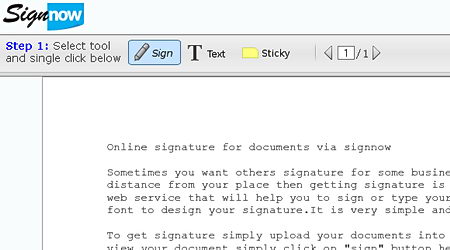
    SignNow is a free service allowing you to digitally sign a document online, it doesn’t require any registration or download making the process quick, it works with all major browsers, you can digitally sign a document using the iPhone and Android phone too, the site uses a SSL digital certificate for encrypted communication with the browser stopping third parties from eavesdropping on the uploaded document, documents are not stored and automatically erased after 30 minutes once they have been digitally signed.

    When you have uploaded the document you would like sign, PDF preferred, you will be able to create a signature with your mouse or touch screen and select the font to be used (typeface mimicking handwriting), the date will be added to the signature. If you need someone else to add a signature to the document you can choose to “Invite a signer”, that person will receive an email with the document for them to follow the same process, a sticky note with instructions can be added to the signed document.

    Are digital signatures legally binding? 

    Electronic signatures are legally binding at the very least in the US and European Union, as far as the courts are concerned there is no difference in between between a digital signature and a handwritten signature with ink on paper, with some exceptions, the US Electronic Signatures Act of 2000 mentions that the creation of wills, testamentary trusts, divorce, adoption, family papers and the like are not acceptable signed on its digital signed form.

    SignNow digital signature online
    SignNow digital signature online

    Digitally signed documents will save you money in the form of time and help the environment, document management and storage will be easier, SignNow offers extra features paying a fee, there are other similar companies offering paid for digital signing of documents, like echosign and docusign, they are more appropriate for business dealings, a digitally signed document includes the date it was signed and it is tamper proof, most services allow for timestamp settings where you can specify the organization and add some company logo or watermark.

    Visit SignNow homepage

  • Free backup software with AES256 encryption Duplicati

    Free backup software with AES256 encryption Duplicati

    Duplicati is a free open source project for Windows and Linux to back up your data encrypted on the cloud, a USB device or a network drive. The software has a user friendly interface where you can configure and monitor your backup jobs, the best feature is probably its built-in support to backup data on the cloud, Duplicati can use FTP, Webdav and SSH to send your data to a remote server, you can use one of the supported services,  Amazon S3, Cloudfare (Rackspace) and Tahoe-LAFS (open source P2P decentralized system), or rent a cheap VPS (Virtual Private Server) and use it for your own backups keeping control of everything with no third party reliance.

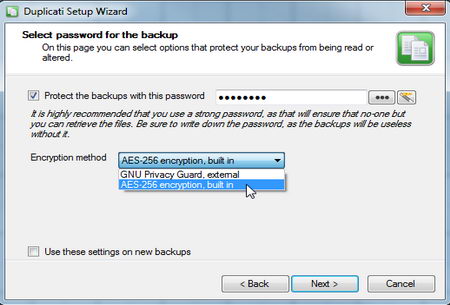
    A wizard will guide you through the process of creating your first backup job, you can choose one of the folder suggestions given (My Documents, My Music, etc) or select custom folders you would like backed up, the screen will show how much free hard disk space you need for the job, the data is all encrypted using AES256 by default or you can use Gnu Privacy Guard with PGP keys to encrypt it,  everything is digitally signed so that nobody can tamper with the data.

    Duplicati data backup with encryption
    Duplicati data backup with encryption

     Duplicati main features

    • Data encrypted and digitally signed
    • Built-in support for backing up data on cloud services
    • Support for differential backups
    • Real time backup error notifications

    Restoring a backup job is as easy as choosing “View contents” from the backup logs and launch the wizard, you will be asked if you want to schedule, edit, remove or restore files, after choosing restore files you are then offered different dates and the option to change the default location where to save the content.

    Duplicati doesn’t have a fancy interface like other free backup software but it is easy to use and the encryption and SSH options make this program one of the best for backing up sensitive data. If you are worried that the files you store on the cloud can be leaked, subpoenaed, etc, or worried about your cloud storage provider so called encryption having a backdoor (like Dropbox), use Duplicati, do not give the authority to others to look after something as important as your encryption keys, data leakage liability will be yours not theirs, this backup software encryption has no backdoor, you can even use your own PGP encryption keys (created using GNU Privacy Guard) for peace of mind.

    Visit Duplicati homepage

  • How to detect and remove rootkits with Gmer

    How to detect and remove rootkits with Gmer

    A rootkit is a collection of malicious programs that allows a cracker access to your computer with administrative rights, typical rootkits consist of spyware and trojans that monitor your computer traffic and log keystrokes, sophisticated rootkits can alter log files, erasing traces, combined with other malware, rootkits have the ability to attack other computers in the same network and the Internet.

    Rootkits can hide inside the operating system kernel, a bridge that is used to process data in between software applications and computer hardware, being very hard to remove using conventional antivirus software, the best way to prevent rootkits is to run an updated antivirus and good firewall to prevent them from installing in the first place.

    NOTE: Not all rootkits are malware, a small number of legitimate applications use rootkits, like for example DVD driver emulation software that allows the user to play a game without the physical DVD-rom inside the optical drive.

    How to uninstall a rootkit

    When a malicious rookit has already been installed in your computer, there is no guarantee that it can be removed without formatting and reinstalling the operating system, the only way to try and delete a rootkit is by scanning the operating system with a specialist rootkit removal utility and hope it will be picked up.

    A rootkit detector compares different parts of the operating system (files, processes and kernel hooks), hoping to find a mismatch, after discounting files legitimately hidden by the operating system it narrows down the list of the possible rootkits.

    Gmer rootkit removal software
    Gmer rootkit removal software

    How to use Gmer

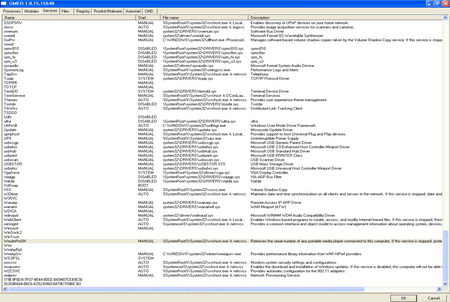
    This free rootkit removal tool will scan your computer and list running processes attempting to find hidden processes, threads, modules, services, files, disk sectors (MBR), Alternate Data Stream, registry keys, hooking SSDT, hooking IDT, hooking IRP calls and inline hooks.

    Suspected rootkits will be highlighted in red colour, when one is found, you right click on it, choose “Delete” and reboot your computer, if the red item is a service you will have to disable it first using right click, reboot your computer, detete the disabled service and reboot the computer again.

    NOTE: Read Gmer instructions carefully, this is not a click and go program, you need to know what you are doing.

    Visit Gmer homepage

  • How to report spam Emails to ISPs and police

    How to report spam Emails to ISPs and police

    There isn’t a single worldwide organization dealing with spam and fraud email, each case has to be reported to the specific local authorities, if the spam has traveled through various countries it will take the collaboration of various law enforcement agencies to track down its origins, it will be time consuming.

    The number of people that respond to spam and fraud is tiny but even a very small percentage of shoppers out of millions of emails can make money to the scammers, social media is a new opportunity for spammers and they are not missing on it, hacked Facebook and Twitter accounts are regularly used to send spam to everyone on the contact list, spam coming from a trusted friend, whose identity has been stolen unbeknown to them, is more likely to yield results with the victim ending up clicking on any link the message contains.

    Something else with what scammers count is that most people never report a small loss of under $50, they know that it will cost them more money to follow up the case that whatever they can get back, online scams schemes that want want to survive keep themselves under police radar by only stealing small amounts of money, done thousands of times it represents good income, even if they have to refund a couple of people pursuing action in court.

    Report spam emails directly to the ISP

    Spamcop is an effective and well established antispam service, all you have to do is to open an account with them, copy and paste the email you receive on an online form and Spamcop software will find out from the headers where it was sent from getting through the hub of proxies used to disguise the original computer IP that spammers used, Spamcop will also find out the abuse contact email address for the ISP and the website where the spam is being hosted then send an automatic report in a matter of seconds.

    Spamcop report spam email
    Spamcop report spam email

    Inside your Spamcop personal account you can check personal and global spam statistics, like reporting time, country of origin and past reports with dates.

    Visit Spamcop to report email spam

    Reporting fraud and spam email for US residents

    In the United States you can report emails containing fraudulent medical products or services to the Food and Drug Administration: FDA Consumer Protection.

    To report fraudulent investment emails you can do so at the U.S. Securities and Exchange Commission website clicking on the SEC website Tips and Complaints or use the StopFraud website to find the email address where to send a report of more specific financial scams like mortgage or bankruptcy fraud.

    To complaint about general email spam, like lottery scams, use the Federal trade Commission Complaint Assistant to forward them the deceptive email messages, they will store the spam in their database for future legal action, to help the FTC stop people calling you register your phone or file a complaint against companies disregarding the National Do Not Call registry at the DoNotCall website , the FTC also has an FTC Spam tips section with tips about how to avoid online scams and unsolicited email.

    The FBI, National White Collar Crime Center and the Bureau of Justice Assistant have put together the Internet Crime Complaint Center where identity theft, phishing emails and other general cybercrime can be reported, a partnership in between law enforcement agencies and regulatory agencies makes sure online complaints go to the right hands.

    The StopFakes website gives information on Intellectual Property theft and provides with a contact email address where to send questions about what to do when a product is being counterfeited, scroll down and click where on a small button that says “Report IP theft” to go to the US Immigration and Customs Enforcement IP theft online report form.

    To report online crime across borders outside the US use eConsumer and initiative made up of over two dozen consumer associations from all over the world in charge of enforcing fair trade practises.

    Non US residents reporting email scams

    Paypal has set up an antifraud department where you can report suspicious email and start an unauthorized transaction claim.

    The Anti-Phishing Working Group (APWG)  is an organization composed of businesses and law enforcement organisations focused on eliminating identity theft online resulting from email phishing scams, they have a report a suspected phishing website page, all of the emails are compiled into a list and analysed to spot trends and plan countermeasures.

    Free money online scam
    Free money online scam

    Netcraft runs a very complete free antiphishing toolbar that warns you of suspected scam sites giving you vital information about every site you visit like country where the site is hosted, site popularity and risk rating, using the same toolbar you can report a phishing site with just one click.

    Links to report spam (non US)

    • Australians can report spam at the SCAMwatch

    When you report email fraud and spam online do not expect automatic results or even a response, that will depend on the organization taking your report, how serious the case is and how easy it is to follow the trail, many spammers are based abroad and they send emails using compromised computers, the best method to stop spam still is to never buy anything from them.