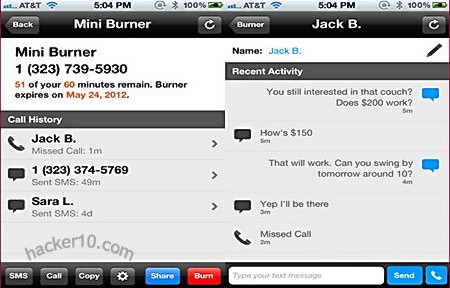
Burner is an iPhone app allowing people to create as many disposable phone numbers as needed, the messages can be set to expire in a day, week or months and used to send and receive SMS, inbound calls or as voice mail, the caller ID will also be modified during outgoing calls and it can be replied to the disposable number. This app could be of use to post a throw away phone number to Craiglist or Facebook and wipe it if you get harassed or once the item has been sold.
Calls and messages go through your mobile network carrier but changing the sender ID so that it appears it came from your Burner disposable phone number, the receiver will be totally unaware and will not get any kind of warning about the sender using a disposable number. Burner interface allows you to organize your various disposable phone numbers creating new ones or erasing them. When a number is erased it will be gone for ever, future callers will hear an out-of-service message, the number could be recirculated again after a two week quarantine period.
Burner disposable phone number
Burner will keep logs associating your original phone number with the disposable one and disclosure it to US law enforcement agencies with a valid warrant, they do not say how long for logs are kept, terms and conditions also bar users from using Burner for “objectionable” activities, which could be anything they want.
Note: This is not a free app, only available in the US and Canada with future United Kingdom coverage planned.
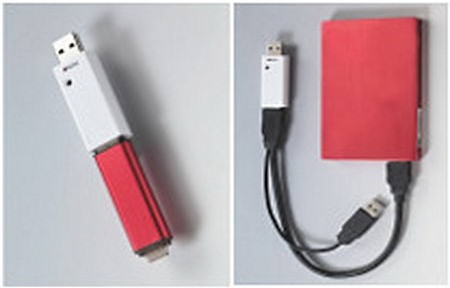
These encryption adapters are not to be confused with encrypted USB thumbdrives, the dongles do not store any data themselves, they are are simple hardware devices with a cryptochip to perform the encryption process making data only accessible using the dongle.
The USB ciphering dongle sits in between a USB host (desktop computer) and a USB device (thumbdrive, external HDD, blu-ray, etc), encrypting all data going through it before writing everything on the external device, there is no need to install drivers and no software is involved, encryption is hardware based with little performance issues, the dongle will work in any operating system.
In addition to desktop computers these devices can be used to encrypt data in tablets and smartphones as long as a USB port is present
Enova Enigma USB
NIST (National Institute of Standards and Technology)/CSE (Communications Security Establishment) certified, using hardware AES-256 ECB/CBC encryption strength. Data written to the USB drive through the Enova Enigma dongle is automatically encrypted and decrypted when read out from the drive, requiring no additional hardware or software.
Enova Enigma USB encryption dongle
It works in Windows, Mac, Linux and Android but configuration can only be done in Windows and data can not be encrypted in place you will have to start from zero wiping everything. USB3 compliant, there is more than one model, AES128/256bit in ECB or CBC mode, Cipher Block Chaining with AES256 is the most secure dongle, all models are strong enough to withstand state sponsored attackers but AES256 in CBC mode should buy you more time in case of future cryptographic breakthroughs.
A recovery password of up to 32 characters can be set up and used if you lose the device. A “Write-Protect” function protects the USB stick from malware infections, FIPS 140-2 certification of the crypto module is in progress.
Hardware-based, FIPS-certified AES 256-bit encryption, strong enough to protect top secret information in Government agencies, it does not require software or driver installation, operating system agnostic (Windows, Mac, Linux, Solaris, BSD), it can encrypt Blu-Ray, DVD or CD discs using an external burner connected to the dongle.
It is not possible to encrypt content already in place, you will have to format the drive first and restore the data.
Addonics CipherUSB encryption adapter
CipherUSB can be daisy-chained, if you insert two or more devices together to encrypt a drive it will be impossible to decrypt it again unless it is using the same two chained devices, this allows you to split the decryption keys in between more than one person.
The enclosure is made of plastic but tamper resistant, preventing opening of the unit without destroying the plastic housing, a power/activity LED will show that everything is working as expected. There is no backdoor but you have the option of inserting a recovery password of up to 32 characters long, if you lose your device you can buy a new one and decrypt the data using this recovery password, if you do not set it up the data would remain undecipherable.
CipherUSB can be used for full disk encryption, including the Master Boot Record, encrypted disks will show as blank when viewed.
After looking at the specs, both encryption adapters are equally secure, certified and fast, there is little difference in between them, Enova Enigma has the unique “read only” feature that stops malware from installing into the USB but CipherUSB specifically mentions on its page that they have no backdoor, Enova Enigma does not confirm nor deny anything about backdoors, this is an important piece of information that all security vendors should make clearly visible.
I would probably go for CipherUSB if I had to buy one of them, CipherUSB is slightly cheaper and I would get peace of mind about no factory backdoors included.
Droidcat is a collection of security and penetration testing tools for security professionals, it includes packet sniffers, network tools, scripts and attack tools to check your own network security using an Android phone, the idea is to use a mobile phone as a penetration testing toolkit, source code is provided for review.
Droidcat Android PEN testing app
The developer’s plan is to compile a full suite of ethical hacking tools accessible using a single app, as more and more people start using smartphones this seems like a good idea , smartphones can be easily moved anywhere in a building inside your pocket taking advantage of Wifi proximity signal and people do not expect others to sniff passwords or run malicious scripts using a mobile phone.
Serval Project is an autonomous mobile network for non coverage areas, it requires no mobile phone company to operate, using Wifi enabled mobile phones transmit data in P2P mode, ideal for deployment in disaster areas where mobile phone towers have been destroyed and remote places where mobile phone signal can not reach.
The software called Distributed Numbering Architecture (‘DNA’) turns an Android phone into an independent network router broadcasting and managing calls in mesh P2P mode. To enjoy adhoc wireless networking you will have to root your phone invalidating its warranty, if you choose not to root your mobile phone you can still use it for free P2P calls with people connected to the same Access Point but you won’t be able to transmit data like SMS messages, called MeshMS, and share files.
Serval Project batphone P2P mobile mesh
The Serval Batphone software will guide through installation using a configuration wizard, the settings allow you to make a call through the Serval network, suspend services to allow your phone to operate as normal with a mobile phone company providing coverage, and reset your phone number, which can contain from 5 to 32 digits, numbers starting with 11 are reserved for emergency lines. If something does not work you can troubleshoot problems by going to the Wifi settings changing the SSID, frequency channel or router implementation, advanced users can create a new mesh on a different subnet changing the network address.
Serval makes use of SipDroid, an open source free VoIP client for Android, options found on SipDroid can be found in Serval too.
Serval Project mesh phone network P2P
Although the initial idea of this project is to provide mobile phone coverage to extreme poverty and remote zone areas, I can envision the utility of this network by a group of acute paranoid people concerned about mobile phone companies keeping logs of their calls or fed up paying high fees, but every single node in the network would have to be trusted for this since they route the calls, probably not feasible with you have a large number of devices and impersonation is fairly trivial since there is no central authority allocating phone numbers, solutions to these problems could come in the form of call encryption and requiring a verbal identification password when the call is established.
Currently still in development, it has been successfully tested by the developers in the Australian outback to make P2P mobile phone calls covering 1 square kilometer, future features include filesharing with people who are not reachable at the moment and a version for Apple iOS.
GPG4USB is a portable program to encrypt text and files using GnuPG, the open source public key encryption system compatible with PGP. It works on Windows and Linux computers and does not require administrator rights for execution, files and messages can be exchanged with anyone using OpenPGP compatible software, like PGP Desktop or GPG4Win. The main interface will be familiar to anyone who has used PGP/GPG encryption in the past, you can create a keypair, import, export encryption keys, check key properties, upload keys to a keyserver, sign files, encrypt and decrypt files.
You can also remove and add PGP headers to your messages, to see this feature you will have to go into settings click on the advanced tab and tick the “Show Steganographic Options” checkbox. Another advanced option is the possibility to split PGP encrypted attachments into pieces.
Portable encryption GPG4USB
The software comes with a very complete offline manual that any beginner will understand, to make this tool portable move the extracted files and “start_windows.exe” binary to a memory stick. GPG4USB could also become your main desktop GPG encryption software since it has a splendid interface that some people might find easier to use than other similar applications like WinPT.
You should remember temporary files belonging to the encrypted data could still be found in any computer you use, that is the case for nearly all portable software.
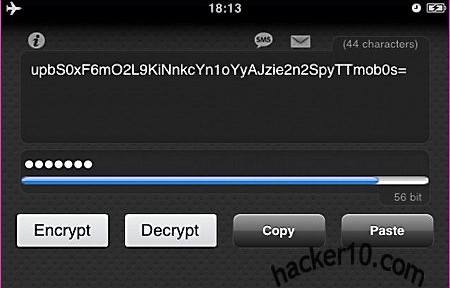
TXTCrypt is a free app for Android, iPhone, Palm and desktop computer to encrypt any text message, from SMS up to notes, an online version exists to encrypt/decrypt messages if you do not want to download the app.TXTCrypt uses RC4 for encryption, a malleable and quick stream cipher designed in RSA laboratories, these days it is not considered secure enough to withstand a state sponsored attack on your communications but it should stop the average hacker.
TXTCrypt uses symmetric encryption, where you password protect your text message and it can be decrypted by anyone who knows it, a system will have to be designed to pass on the password, which should be as long as possible to employ the full 64bit cipher strength.
TXTCrypt mobile phone text encryption
While more secure encryption apps exist, TXTCrypt appeal lies on its simplicity and multiple platform support, being available as a Java download means that this program will run in obscure operating systems like Solaris and FreeBSD, adding to Windows, Mac and Linux.
Being available for desktop as well as mobile phones it is also a strong point, as long as your security needs are low this is a good app, otherwise search for an encryption app using the AES cipher.
Crystal Anti-Exploit Protection is a free utility to stop malware hijacking your computer, it will not replace your antivirus but act as a complement, the program will apply filters to your incoming and outgoing connections to decide if they should be allowed. Ironically enough my AVG antivirus flagged CrystalAEP as malware and I had to whitelist it.
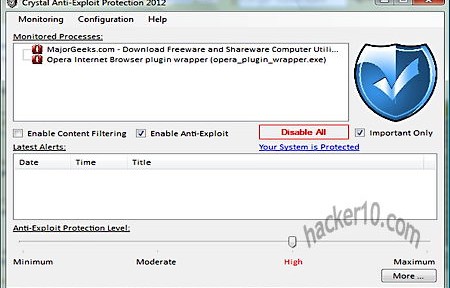
After launching CrystalAEP you will presented with a quick tutorial and asked to select all programs exposed to the Internet, like your Internet browser or messenger, CrystalAEP will monitor them in real time, you can check what each program is doing in the alerts window, the default is set up at High Protection, programs security level can be individually modified using a level slider.
Crystal Anti-Exploit Protection
CrystalAEP will stop malicious attacks carried out without user interaction, like a website instructing your Internet browser to load a module, but if you choose to willingly execute a process, i.e. download an unknow codec to see a cool video, then you will have to rely on your antivirus to pick that up. This program is targeted at advanced computer users, the expert mode has many configuration options that few people will understand, like DEP monitoring and COM/ActiveX monitoring, I would stick with the basic mode, it is adequate to stop malicious websites from exploiting software vulnerabilities.
This tool consumes minimal resources and can be easily removed, it should help the computer paranoid, people visiting dodgy sites or those in high security environments to stop zero day exploits.