Author: John Durret

  • Police cracks encryption software CrypticDisk and Acer

    Police cracks encryption software CrypticDisk and Acer

    New top secret documents leaked by Snowden (link below) reveal that GCHQ, Britain’s spy agency, has a team to reverse engineering popular encryption software and they routinely collaborate with British police when they come across encrypted data during the course of an investigation. Since it is not needed to explain in court how law enforcement has managed to access the encrypted data, it can remain secret when GCHQ finds a vulnerability in an specific program.

    In one particular case, GCHQ assisted the National Technical Assistance Centre, a domestic law enforcement agency, to decrypt child pornography stored inside a virtual encrypted container created with Crypticdisk and in another case, GCHQ cracked Acer eDataSecurity Personal Secure Disk for an undetermined “high profile police case“.

    Acer eDataSecurity is a free file encryption utility that comes with Acer laptops. I was not able to find out what algorithm Acer is using for encryption but I learned reading the laptop manual that the user can choose a bit strength of in between 128bit and 256bit, the manual textually says that “If you lose your password, there will be no way to decrypt your encrypted file!“, it has not been designed with a backdoor, deducing that GCHQ cracked it on its own without assistance from Acer.

    Exlade CryptDisk encrypted container
    Exlade CryptDisk encrypted container

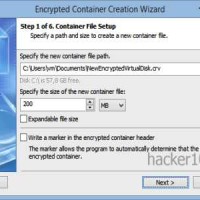
    The other cracked software, CrypticDisk, from Canadian company Exlade, has thousands of companies and government agencies as customers. CrypticDisk can create a virtual encrypted disk or encrypt and external device, like a USB memory stick, where you can store data or programs, once the container has been closed, it is meant to be inaccessible, it works like Truecrypt and the company page mentions that CrypticDisk encryption keys can be made of up to 2944-bits in strength, with built-in support to open Truecrypt containers.

    CrypticDisk containers can use multiple encryption algorithms in cascade, there is a selection of AES, Twofish, Serpent, Blowfish and CAST6. The encryption wizard advises that the more algorithms you choose in cascade, the higher the cryptographic strength.

    There isn’t any clue in the leaked papers about how GCHQ cracked this software, I will make a guess of a bad implementation because the encryption algorithms are all open and AES has been widely reviewed by expert cryptographers. I am discounting the possibility of a user mistake choosing a weak password because British police is known to have a computer cluster where they can try thousands of dictionary words per minute, theoretically there should be no need for the UK secret services to help out law enforcement brute forcing a passphrase.

    The same secret documents reveal that GCHQ has obtained a warrant from the Foreign Secretary so that they can not be prosecuted for breaching copyright law from proprietary software companies. The agency is also targeting antivirus companies to be able to send trojan horses to targets without being detected. KasperSky, a Russian antivirus company, is named in the documents as being a challenge to them.

    Snowden documents: https://firstlook.org/theintercept/2015/06/22/gchq-reverse-engineering-warrants/

  • Censorship resistant hosting platform Zeronet

    Censorship resistant hosting platform Zeronet

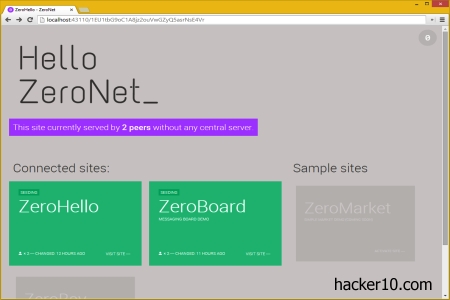
    Zeronet is an open source decentralized peer to peer webhosting platform using cryptographic hashes and torrents to distribute websites and files. Any computer with an Internet browser and the software installed can access websites hosted in Zeronet. When you first launch your browser you will not see any IP in the toolbar, a Zeronet website is served from your own computer after downloading the files, your browser toolbar will show localhost:43110 and a cryptic address, supporting .bit domains, a peer to peer top level domain name managed by  a decentralized registrar called Namecoin.

    To make a website available in Zeronet you only have to host it in a single machine, visitors to the site will help distribute the content from their own computers when they view the pages, the more nodes/visitors a website has, the quicker it will be for others to download it, scalability is easy, when a site becomes very popular files are available from multiple sources.

    Decentralised P2P webhost Zeronet
    Decentralised P2P webhost Zeronet

    Zeronet users can see in the interface what websites they are seeding, how many peers it has and right click on one of the sites to update, pause or delete it from their system. Cryptographic hashes verify the integrity of the files in the website, it tells Zeronet what to download and protects from man in the middle attacks. When you upload a website to the network you will be handed over a private encryption key for when you wish to modify and update the content, visitors automatically use the public encryption key to verify that the files have been changed by the rightful owner.

    The network is not truly anonymous, but their websites are quicker to download than hidden Tor sites, optionally you can run Zeronet over Tor to hide your computer IP from anybody tracking file downloads although this will slow it down. Zeronet also comes with a guestbook and forum where to debate and post links to internal websites that are not accessible using the regular Internet, only people with the software installed can access websites.

    Zeronet should work very well for Chinese surfers craving for information about the national liberation struggle in Tibet, but if the content is banned worldwide, this network isn’t going to cut it. Since it is possible to find out what computers are hosting the content, authorities can knock on the door of people distributing those files until not a single one of them is left.

    Personally, I don’t believe in censorship resistant networks that don’t provide anonymity by default and I am skeptical of the need for this project when Iranian or Chinese users can download a VPN proxy to access banned information instead of using Zeronet with access to a limited range of websites.

    Visit ZeroNet homepage

  • List of mobile apps to film incidents with the police

    List of mobile apps to film incidents with the police

    The following mobile apps allow you to record casual encounters and conversations you have with police officers. In a court of justice the word of a law enforcement agency is worth more than the word of a civilian, without a witnesses or a full recording of the encounter the judge will not believe you, the evidence gathered by these apps will protect you from misunderstandings.

    Before recording the police, make sure that this is legal to do in your country, it will greatly vary from place to place but, as a rule of thumb, you are not normally allowed to record inside private property unless it is your own or you have permission, but you are allowed to film in the street, parks and roads.

    Hands Up App: With the phone placed on your car’s dashboard, after being pulled over by the police, a single click recording button can be activated to capture video and audio of the car stop. The phone’s main window goes black after the first 10 seconds to give the impression that the phone is switched off. Videos will be tagged with GPS coordinates and they can be automatically saved online to your YoutTube or Dropbox account every 2 minutes.

    Handsup4Justice mobile phone police recording
    Handsup4Justice mobile phone police recording

    I Am Getting Arrested: Inspired by the Occupy Wall Street protest movement, this app can be used to broadcast an SMS message to the contact list of your choice letting them know with a single click that you are have been arrested and the GPS coordinates of where it happened. Recording of the incident is not available.

    Unlawful Stop: Integrated with Google +, this app can stream live footage of your interaction with the police to Google Hangouts, placing a video call to up to 10 friends for them to be able to watch the police stop in real time. A copy of the recording can also be saved online to help out the police remembering facts when their cameras have stopped working or evidence has been accidentally destroyed. This is a paid app with prices depending on the level of features you need.

    Stop and Frisk Watch: Made by the American Civil Liberties Union in New York, this mobile application can start audio recording with a single trigger on the phone’s frame. After you have been stopped by the police, an alert function will send a warning to other app users in the area to let them know of this and where it happened. Police misconduct can be reported to ACLU from within the app.

    Mobile phone police app Stop And Frisk
    Mobile phone police app Stop And Frisk

    Mobile Justice: Made by ACLU in Oregon, this app captures exchanges in between police officers and community members and emails the videos directly to ACLU Oregon to preserve the evidence. Optionally, it can alert other app users nearby that a police interaction has just taken place, useful in demonstrations to ask for witnesses. The app includes a Known Your Rights legal guide for Oregon.

    The SWAT App: Currently in development, this app will allow you to record police encounters with a single click and stream it live to the Internet or keep a save on the cloud. It will also have basic legal information on what your rights are when stopped by police and allow you to fill in an incident report that can be saved on your phone or send it directly to a police department using your phone’s location services.

  • Sync multiple devices with open source tool Syncthing

    Sync multiple devices with open source tool Syncthing

    Syncthing is a decentralized open source tool to synchronize files across multiple devices without using third party cloud servers like Dropbox, what should be an objective for people who care about privacy.

    Data in Syncthing is transmitted peer to peer via TLS encryption with perfect forward secrecy directly to your other devices, it never touches the Internet where it could be intercepted, only nodes you have previously authenticated are able to connect.

    Other advantages or running your own cluster are that there is no storage space restriction other than your own drive, you will not be reliant on a cloud service that could not be available when you need it and data transfer is speedy.

    Dropbox alternative Syncthing
    Dropbox alternative Syncthing

    Syncthing is cross platform, it works in Windows, Mac, Linux, BSD, Solaris, Android, iPhone, it can be installed on any computer, server or mobile device you own. This tool is similar to Bittorrent Sync with the difference that everything is open source, including the protocol used to synchronize files, called Block Exchange Protocol.

    Machines are identified with an ID, when you add a node ID to the network, any folder listed in the repository starts to synchronise downstream, files are split into blocks for easier transmission, the more devices are connected, the quicker everything will sync as more download sources are available.

    There is one downside to running your own cloud, if you wish to publicly share files over the Internet, it can be done but you have to be tech knowledgeable, you will have to combine it with something like Cloudup or Freehold, it is not supported by the developers. If you often share files over the Internet, it is best to download to Owncloud, which needs a server, whereas Syncthing can be run on any desktop computer.

    I liked the open source nature of this tool as well as the support it has for all operating systems, it is more complex to use than BT Sync but it gives you more control over how you share files on a network.

    Visit Syncthing homepage

  • Best apps to encrypt mobile phone calls

    Best apps to encrypt mobile phone calls

    The following apps allow you to make free worldwide calls to other people that have the same app installed. Security wise, not only are your calls encrypted,  additionally, VoIP apps bypass data retention laws, calls made with a calling app are not recorded by your network provider.

    The best apps to make a secure call are those that are open source, available for Android and iPhone and encrypt your call with keys you only hold, you should also try to go with a company that does not have servers or offices in a country where mass surveillance is known to take place.

    RedPhone: Free worldwide end to end encrypted calls implementing the open standard ZRTP, app source code is open to review, there is no need for another ID, this app will use your everyday phone number to make and receive secure calls.

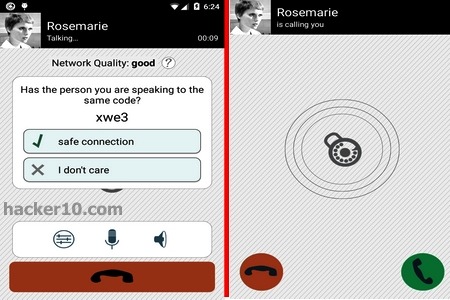
    Simlar: Developed in Germany, open source app to establish end to end encrypted calls with the ZRTP protocol, a cryptographic key agreement for VoIP calls, not even Simlar developers can listen in to the calls. To protect from man-in-the-middle attacks, Simlar shows a small code on the screen that can be read to your contact to confirm that you are both looking at the same.

    Secure voice calls Simlar app
    Secure voice calls Simlar app

    Wiper: This app keeps no logs of the encrypted calls, it can also be used to send messages with a wipe option that will erase them from the wiper server, your phone and your friend’s handset, making later recovery impossible. An integrated Bitcoin wallet in Wiper lets you receive or send payments without leaving the encrypted chat, transactions will show on the same screen.

    Zoiper: Encrypted VoIP calls with TLS/SRTP and ZRTP protocols, this softphone can be used in Windows and Linux desktop computers as well as mobile phones, it appears to be targeting the business market. The program can be used in a call centre, hooking up remote workers with a business telephone system.

    CoverMe: Full mobile phone communications suite securing calls, messages, files and phone storage. CoverMe encrypts your calls, sends selfdestructing text messages and creates an encrypted vault in your phone where to store private data. A decoy password can be set up in the event that you are forced you to reveal it, the app also assigns you a US phone number that can be used to receive calls.

    CoverMe secure Android calls
    CoverMe secure Android calls

    CryptTalk (subscription): Peer to peer encrypted calls using standard algorithms and perfect forward secrecy without any server involved in the process, only communicating parties have access to the encryptions keys, third party decryption of text messages is not possible. A monthly subscription is required to use this service after the trial period but you can use it for free indefinitely in receiver mode.

    Signal: Compatible with the Redphone app in Android from the same developers. Signal is open source, using ZRTP for secure voice communications. Calling somebody who has not installed Signal will be trigger an SMS link prompting them to download it. The company plans to add secure text messaging that will be compatible with TextSecure and a future release of an Android version.

  • OnionMail an anonymous mail server running on Tor

    OnionMail an anonymous mail server running on Tor

    OnionMail is an open source mail server developed by hacktivists fighting mass surveillance, it runs on the Tor network and is able to communicate with the Internet as well as Tor hidden nodes.

    Running an OnionMail server and joining the federated network is open to everybody, connections in between servers are always encrypted with SSL, transition servers do not store any data, only in the final destination OnionMail server saves messages and it automatically erases them after reading or if they have not been picked up by the user in a period of days, using the wipe command (Linux) to make forensic recovery impossible.

    An OnionMail email inbox is encrypted with RSA/AES asymmetric encryption keys and user passwords, data is then hashed and scattered around multiple OnionMail servers in the network, if a server is seized no meaningful information or metadata can be obtained. Another security feature is the ability to remotely nuke a server’s digital certificate, this is useful if an administrator loses physical access to the server, OnionMail checks the legitimacy of digital certificates in the network and servers not using a valid one will be disconnected.

    OnionMail anonymous Tor email
    OnionMail anonymous Tor email

    In Tor you don’t have to worry about revealing your computer IP but a local email system clock can give away your approximate geographical location, to stop this, OnionMail spoofs your time zone, it will also spoof the PGP version you are using, helpful in case a vulnerability is discovered in a specific PGP release, an attacker would be unable to find out who is using it without testing everybody.

    For internal email communications inside the Tor network you are assigned a cryptic .onion address, this is automatically transformed into a a clearnet comprehensible address using the Virtual Mail Address Translation protocol to append the .com/.net/.info of your Tor exit node so that people on Yahoo or Gmail can reach you.

    For example, if you are using the onionmail.info exit node, your .onion email address will be transformed into test.serveraddress.onion@onionmail.info when you send an email message to the Internet. Spam is eliminated using custom blacklists that mail server operators can tweak.

    You can find a few Tor email providers but they are not chained and their addresses can’t be used to contact people outside Tor. OnionMail stands out from the crowd uniting all email servers in a single network and allowing users to send and receive email to the Internet from within Tor.

    More than a dozen OnionMail servers are listed in the homepage, to open an account you only need to select one of them with Tor installed in your computer, or download a python script that can be used in Tails to configure your email client. Windows users can download a beta version of OnionMail and the more technical advanced people can install OnionMail in a rooted Android device with Orbot, a free proxy app that runs Tor, the K9 Mail client, and APG, a PGP key manager.

    OnionMail anonymous email
    OnionMail anonymous email

    OnionMail does not hide that it has been specifically developed to stop the NSA and similar espionage agencies from following you. The developers know what they are up against and they make sure that their zero knowledge design will withstand rogue operators and mail server seizure, which leaves only a trojan horse or spear phishing attack as the only way to get into your email account.

    A very well designed, thought out email system with good documentation and help screenshots that has all a security paranoid person can wish for, anonymity, encryption, free and running on Tor.

    Visit OnionMail homepage

  • StegoTorus a camouflage tool to hide Tor traffic

    StegoTorus a camouflage tool to hide Tor traffic

    StegoTorus is an open source tool that disguises Tor traffic simulating it is an innocuous protocol, this foils packet analysis making Tor harder to monitor and block. A client and server are both available for download, the software is available for Linux, Mac and Windows but is is command line operated and it has to be compiled from source, you will have to be knowledgeable in computers to benefit from it. StegoTorus website has clear instructions on how to do this, it is not exceptionally challenging.

    Any Tor operator can run StegoTorus in their own bridge. Tor bridge relays not listed in the main directory, they are intended for people living in countries where public Tor nodes are blocked. Bridges can be acquired sending an email to bridges@torproject.org from Yahoo or Gmail accounts only.

    Tor network bridge configuration
    Tor network bridge configuration

    When you run StegoTorus with Tor an intermediate connection is created to an StegoTorus server acting as the first node to the network, the software running on that server will camouflage all traffic as PDF, JPEG or HTTP, a payload is introduced in the downstream data before passing it on to you with the real requested file or website visited hidden using steganography techniques. A StegoTorus proxy will make believe anybody watching network traffic that no Tor connection is taking place, your Internet browsing should not slow down noticeably, the payload injection is done within miliseconds.

    If you are worried about Deep Packet Inspection by your ISP, used by China and Iran in between others, your only choice to avoid blockage is what the Tor project calls Pluggable Transports, these are used together with secret Tor relays, aka bridges, and they transform traffic to hide that you are using Tor. A few supported transport type Tor bridges are Obfsproxy, ScrambleSuit and the Format-Transforming Encryption, other schemes like SkypeMorph and StegoTorus can be deployed but they are not officially assisted, although both projects are listed in the Bridges Tor project website, bridges of this type can not be requested by email.

    If you know of a bridge that is running StegoTorus, you can connect to that node going to the Tor browser network settings and entering the custom bridge address that leads to it.

    Visit StegoTorus homepage