LibertyVPS is a hosting provider that has been in business four years and they specialise in free speech. Their servers are located in the Netherlands, so your content will have to be compliant with Dutch law, the company provides hosting for those facing censorship but they also warn in their terms and conditions that they will work with law enforcement to prevent illicit activity.
I asked them if I could host pharmacy related products like Viagra or vitamin supplements and I was given a link to their terms and conditions where the only listed content restrictions are child porn, spam, malware and human and animal pain sites, the bottom line is that LibertyVPS doesn’t allow any activity which is illegal but will happily host whistle blowers and sites exposing government and corporations malpractice and abuse.
LibertyVPS control panel free speech hosting
Prices are reasonable, I did not feel I was being charged extra for privacy, but if you are after unlimited bandwidth you have to upgrade to a VPS, which can be set to CentOS, Ubuntu, Fedora, Debian or OpenSUSE, even if you pick one distribution you will not be stuck with it for ever, you can reinstall the VPS with a new distribution using the control panel.
For shared hosting LibertyVPS is using a standard cPanel that most people will be familiar with and you can back up your own site using it. They also offer Windows VPS which I did not test.
Uptime was fine, I have not been with them for long but so far all good and the backbone is provided by Dutch company Ecatel, with up to 1 Gigabit line speed. Support is only via ticket, LibertyVPS replied to the three tickets I opened in under 24 hours.
Overall I think that this company fills in a much needed niche, free speech hosting on a budget, reliable, with good support, standard industry hosting software and payment in Bitcoins. I can´t think of too many improvements for this company and even if you don´t need a free speech host, given their average prices, I would also recommend them for hosting mainstream content outside the US.
Posteo is a paid privacy email provider based in Germany. I signed up with them after a recent Fastmail price increase and my concern about Fastmail being an Australian company with servers in the USA.
I briefly considered Yandex, a free Russian email service with interface in English, but it does no good to me to trade NSA illegal spying for Russian Federal Security Service (FSB) illegal spying.
I came to the conclusion that all countries spy and the only way I was going to protect myself from that is by using an email service that is transparent about logs, has encrypted storage with the email provider locked out of them, with no access to the keys, and end to end encryption. What is known in the privacy industry as zero knowledge, and if the company is based out of the Five Eyes wiretapping alliance (UK,US,CA,AUS and NZ) even better.
Posteo fulfilled all the requirements I had in mind and I also liked that they do not have a Facebook page, it shows they really care about customers privacy.
How to open a Posteo account
Opening an account with Posteo took me around one minute, the company does not want to know your name, address, back up email or phone number.
You only need three things to sign up for a Posteo account:
Pick a username
Pick a password
Pay with cash, Paypal, wiring, credit card or voucher (payment methods are anonymised)
Posteo payment
I used Paypal to buy the account, I know Paypal stores all transactions for years and the NSA probably has a direct feed to them but the transaction does not show your Posteo email address, the only available record in Paypal is the date and amount of money you sent to Posteo, your inbox or username is never printed anywhere in the receipt.
Posteo Paypal payment (5 years prepaid)
Futhermore, Posteo payment system automatically assigns a code to the inbox so that usernames can never be linked by the company with a payment. Tax laws compel Posteo to keep payment information for 10 years, this includes your name if you used bank transfer o Paypal to buy the account, but it never includes what your email address is and if the company was asked for this they are unable to provide the information, there is no law forcing Posteo to keep that data.
Specific details on how your payment is anonymized is very well explained with screenshots within Posteo’s FAQ.
One of my favourite things from this company is that their help pages disclose in plain English (German&French) the security measures they take to protect customers from illegal spying by government agencies, what logs Posteo keep, how long for and what happens if they receive a subpoena, as well as some background information about Germany privacy laws.
There are no trial Posteo accounts, payment is taken from day one, but if you are not happy with the service you have the right to revoke it within 14 days and credit will be refunded.
If I had to criticise anything from the payment system is that they do not accept Bitcoins.
Posteo email basics
You can access your email via web, IMAP or POP3, attachments are a generous 50MB and the initial inbox is 2GB with a couple of aliases, all of this can be increased according to needs.
Posteo has a single basic email package that is prepaid, if you feel like you need more storage space or more email aliases you can go to account settings and move a slider bar to add extras, as you do this the screen shows you how much more this will cost you, for example, an alias currently costs €0.10 a month, if you need four email aliases that is €0.40 more a month, if you no longer need them next month, you delete it and monthly price comes down again.
The way Posteo pricing is set up you don’t have to pay for things you don’t need, you customize it to your needs, it works out cheaper than paying for an oversized email package that subsidizes heavy or business email users.
The account includes a decent online calendar, that can be optionally be shared with a public URL, address book and notes, all of which can be encrypted, in which case sharing is no longer be possible.
Posteo email calendar
Consider carefully if you need your inbox encrypted, after you enable it some functions like email searching will no longer work and if you lose your password Posteo support can reset your account but you will not be able to read your old email messages without your old password as Posteo has no way to decrypt them.
For example, because I only plan on using Posteo in the browser I activated the additional email account protection that eliminates IMAP access, and this stopped notes from autosaving so I had to reactivate it. Next to each encryption setting you will see a box that tells you what features stop working if you choose security over functionality.
Posteo email security
There are a ton of security measures, and nearly all of them can be configured, Posteo is ideal for advanced privacy email users that like to have control and spend time tinkering with their security settings. It took me a good couple of hours of reading understanding all that Posteo had to offer.
This company is one of the first email providers to implementing DANE, a DNS based authentication method that checks the digital certificate fingerprints of other email providers, this detects bogus certificates replaced by sophisticated hackers, state sponsored operatives have been known to do this trick in the past.
For DANE to work other email providers must support it too, when sending an email to somebody a small green check box in Posteo let’s you know if the server you are communicating with is DANE compliant. Tutanota supports it and Protonmail has plans to have DANE this year, but the big NSA back doored email providers, like Gmail, Yahoo and Outlook, have no DANE support.
Encrypted email provider Posteo
Another setting activates a TLS-sending guarantee, with the checkbox ticked your messages will not be delivered to any TLS insecure email server, if Posteo comes across one you get a warning and have the option of sending the message without proper encryption in transit or not sending it.
To use PGP you need to install MailVelope addon browser, after that a new button that says “Compose&Encrypt” magically appears in the webmail interface.
You can add your public encryption key to Posteo keyserver and activate “encrypt all incoming email“, this means that all messages you receive will be automatically encrypted with your own PGP key at the door, on top of the encrypted inbox.
You might want to do this if you don’t trust Posteo’s own encryption, you add an extra layer with your own keys, however if you lose your private keys you will not be able to read the messages again and every time you click on an email in your inbox you are required to to enter the decryption password in MailVelope.
I found incoming encryption too burdensome, I would only propose it to the most paranoid kind not concerned with quick email access.
Posteo PGP encryption Mailvelope
Hat tip to Posteo for automatically bouncing my public encryption key back to my inbox with a warning that it did not conform to security.
During key generation I made the mistake of adding my first name to the public encryption key and Posteo very rightly rejected it in their keyserver as the name can be used to track down your identity, I was only able to add the key to the server after changing the name field with a non descriptive text, like my email address.
Two factor authentication is possible too, Posteo works with any open standard TOTP app, like Google Authenticator, but the company recommends FreeOTP because it is open source (developed by Fedora), or if you own a Yubikey you can use it for two factor authentication, the help pages come with clear instructions and screenshots about how to set it up.
Posteo downsides
It put me off Posteo that they don’t own the .com of their email address, I had people in the past sending me messages to a .com version of my address, it is a common mistake many people do. I find it very short sighted that a company like Posteo, offering a choice of 30 different domain names for your email aliases, does not have a single neutral .com that you can pick for an email address. You can have a @posteo.af address, country code from Afghanistan, and a @posteo.jp country code from Japan, but .com is not an option.
I would have appreciated a non descriptive .com domain which URL does not resolve to Posteo homepage that can be used as an alias.
Another downside for me is that Posteo does not have a Spam folder and you can not have one. Posteo drops all spam silently and you must trust they do it correctly.
My experience with email providers so far has been that no spam filter is 100% perfect and I have no way of finding out if a message is not getting to my inbox because it was flagged as spam by mistake or because it was never sent.
You can whitelist addresses in the filter but there is no way of whitelisting something you don’t know about.
Posteo advantages
Posteo comes with Mailvelope preconfigured, after installing the addon in my browser a new encryption button appears in the webmail interface and this gives me the ability to communicate with other PGP users holding my own encryption keys instead of Posteo doing that.
The encrypted email inbox and being able to encrypt all incoming messages with my own private encryption keys is a huge perk too.
Posteo message filtering
It takes time time to encrypt messages yourself, entering passwords, selecting the right keys, etc, if you are tight on time and security is not that important for you it might be best that your email provider does all of that, but if you want to err on the cautious side and trust nobody with your encryption keys, owning your own keys is they right way to do it.
I also liked the email filtering, being able to file messages into folders as they arrive, according to subject, sender, etc.
Posteo support
Support is not suited for businesses, but I think that an individual will be ok waiting one or two days for a reply. You can contact Posteo by email during German working hours.
I sent Posteo support an email to ask a question about my settings and it took 24 hours to get a reply that solved my question.There is no ticketing system, this might unnerve some people, because you keep wondering if the email was ever received, but not having a ticketing system is advantageous for those who value privacy and a very good idea
The company barely keeping records of anything means that the information can not be lost or stolen and you can always check the “sent receipt” box if you email support, this way you will know they have received your inquiry.
Posteo vs Protonmail
I like Protonmail design and them forcing two different passwords to access the encrypted inbox. The main reason why I did not buy a Protonmail premium account is that their paid accounts cost five times more than Posteo. Protonmail has a bigger inbox but I wasn’t going to use it.
It also put me off a bit knowing that in 2015 Protonmail had paid ransom to some cybercriminals DDoS their servers, it shakes my trust on how much of a fight the company is willing to put up for what it is right when I see Protonmail selecting the easy way and pay up to avoid problems.
Posteo vs Tutanota
I was really close to buying a Tutanota premium account, they offer more aliases than Posteo, both companies are based in Germany, and cost the same, plus I like a couple of features Tutanota not found in Posteo, like being able to send links to password protected messages.
I finally went for Posteo because of their Mailvelope pre-configuration and because I wanted a company that will not go bust. Posteo has been around for more years than Tutanota and they do not offer loss making free accounts which makes it more likely that they will survive.
Posteo review conclusion
If you are comfortable managing your own PGP encryption keys, want an email service with an encrypted inbox that does not keep logs or records your identity and it comes with lots of features at a cheap price, I think that Posteo is unbeatable, far cheaper than other paid providers (€12/year).
You should also pick Posteo for an email provider with calendar, notes and aliases that will respect your privacy and if you need a mailing list provider, this is still in beta but it should be rolled out soon.
But if you rather have your email provider do to all PGP encryption for you at the back end don’t pick Posteo and if you wish to pay with Bitcoins Posteo should be out of limits for you too.
Psiphon is free open source application from a Canadian company helping out millions of people from all over the world bypass Internet filtering. The software acts like a proxy and hides your computer IP from websites you visit but it was not built to make people anonymous on the Internet, the reason for Psiphon’s existance is to bypass filtering in countries which Internet Service Providers block websites.
The software can only be used in Android and Windows, if you are an Apple user this is not for you, the lack of iOS support perhaps is because Psiphon is targeted at users in the Middle East where few iPhones and Mac computers are sold.
Psiphon anonymous Internet browsing
Although my ISP does not have filtering I was thinking of using Psiphon in my smartphone because it is free and my current VPN charges me extra if I add a mobile phone device to the package, I also liked that registration and configuration are not necessary and there are multiple proxy locations. I don’t use my smartphone for banking or shopping of any kind hence even low security is enough for what I want to do, stop marketers tracking me online.
Psiphon for Android comes with its own browser, built-in adblocker and set to a homepage that can not be changed. The homepage contains a small ad banner, that is how the company makes money, I did not find it too intrusive, the are no adverts while you surf the Internet, I was only shown them when I launched the browser and if it really bothers you, a paid for Psiphon Pro version gets rid of all advertising. But since my main reason for using Psiphon was price, i.e. free, I would never pay for the Pro version, anybody willing to do that will be better off with a specialised VPN provider.
What Psiphon is good for
Access georestricted content
Bypass ISP filters and unblock Facebook and Twitter
Protect your data in public Wifi access points
What Psiphon is not recommended for
Hide from the NSA or law enforcement
Filesharing or bandwidth intensive activities
Wishleblowing and other high security needs
The app has four easy to navigate tabs, my favourite, the Stats tab, displays how much data is being sent and received. If you are on a tight data metered plan you might want to download Psiphon for this feature alone. Another tab displays connection logs, another one has settings and the Home tab lets you stop and start Psiphon. Everything nicely organised.
The main problem I had with Psiphon is that most websites I visited using the Psiphon browser did not identify I was on a mobile device and they showed me the desktop version of the site which made it very hard to read. The way to solve this is going into options tick the “tunnel the whole device” box, and use your own smartphone browser e.g. Brave, Firefox, etc instead of the one that comes with Psiphon.
I also felt the speed was low and pages were taking a bit too long to load. Because of this I have decided to uninstall Psiphon, I would recommend this application if you are inside a country that blocks access to websites but otherwise, I believe it might be better a free VPN, I specially did not like the embedded Psiphon browser, I like to use my own.
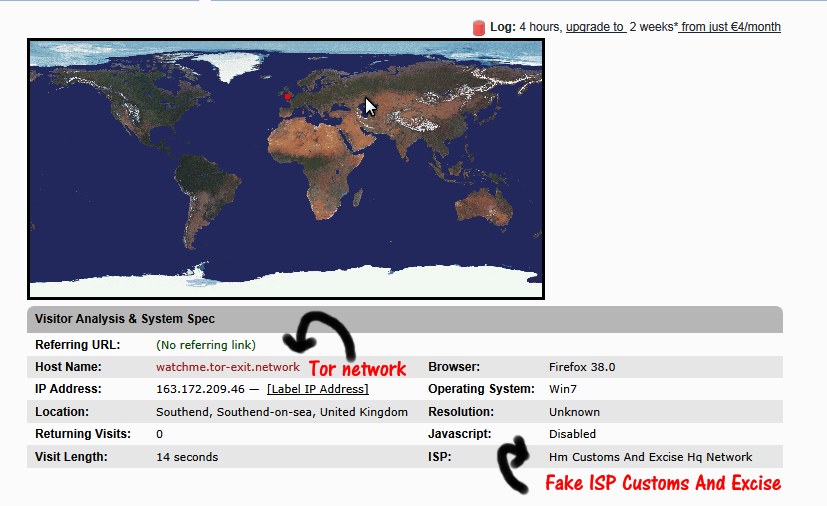
I was looking at the server logs when I detected multiple visitors coming from the HM Customs And Excise HQ Network, the UK government agency in charge of collecting custom duties at the border. I became mistrustful of so many visits from the same government department, using IPs 163.172.209.46, 163.172.145.100, 163.175.5.218 and others in the same range.
The first thing I did was a traceroute and I found out that 163.172.209.46 was in fact not located in the UK but in France, I then looked at the host name, as you can see in the picture it reads watchme.tor-exit.network, at the URL there is a message displayed saying that they are Tor Exit Router.
Additionaly I reaserched open data with DuckDuckGo and I uncovered a customer of a VPN company complaining in a blog that his OpenVPN French node was being identified on the Internet as belonging to UK Customs and Excise. Futhermore, I have discovered numerous warez and porn websites like Yellowasians identifying themselves as being hosted by Her Majesty Customs and Excise HQ.
Fake ISP Customs And Excise UK
What happened here? I suspect the network administraror entered as an IP owner HM Customs and Excise HQ when in reality their hosting company is Online.net, a subsidiary of the Iliad Group, a French company renting dedicated servers in France, also being marketed as Dedibox.
Likely they are doing this to avoid being blocked, many data centers out there block Tor exit nodes and this way it makes them harder to spot, the hostname is not always labelled you would need a traceroute to know this is not a UK IP, another benefit is that with this French IP you should be able to watch online TV restricted to UK viewers like the BBC iPlayer, but malicious bots can also use the craft to gather information before a hacking attack or spam.
I don’t know if it is legal impersonating a government agency in the IP, that is for lawyers to say and it will likely differ from country to country. I am only posting the information to help out other webmasters seeing multiple visits from a UK government to their site, no, they are not monitoring you, it is a fake ID.
Getting fed up noticing daily brute force attacks in the server logs I decided to upper the game and implement two factor authentication (2FA) in the blog login page, this way even if a trojan horse in my PC captures the long random password nobody will be able to break in.
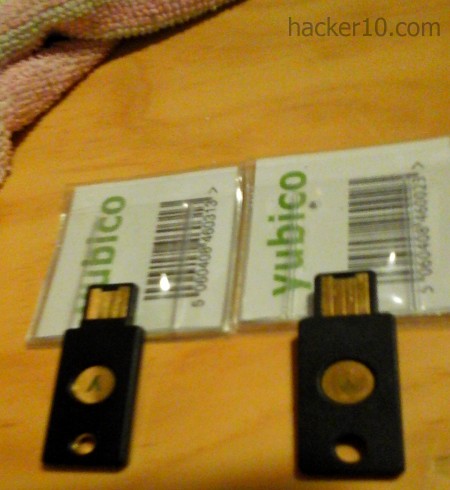
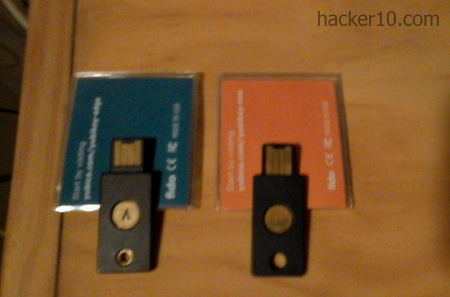
The most common choice for two factor authentication is Google Authenticator, or a compatible mobile app like LastPass Authenticator or Authy. The problem I had with them is that I carry my mobile phone with me everywhere and I was afraid of losing it, together with the matter of mobile apps wasting time requiring you to enter a long random number in the login page. For those reasons, I decided that a hardware token authentication was preferable and I bought a Yubikey Edge and a Yubikey Neo.
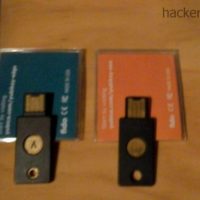
The main difference in between the Yubikey Neo and the Edge is that Neo has NFC and it can be used with a smartphone or tablet that supports NFC, usually high end models, without the need for any USB port.
Yubikey Neo and Edge
Something to remember is that Yubikeys only work with the Chrome browser, Mozilla Firefox intends to add U2F support in the future but this has not been done yet.
Fortunately there is a Firefox addon called “U2F Support Add-on” that has been reviewed by the Mozilla team to make sure that it doesn’t have security complications and it works. I also use the Yubikey with Vivaldi, a Chrome based browser and it also works, this way I can avoid a pure Chrome browser loaded with Google spyware.
Before buying the tokens I researched on Yubico’s website what online services I could use the Yubikeys with, that was my first mistake. Trusting everything a manufacturer says when they are trying to sell a product is not clever.
Yubico lists self-hosted WordPress blogs as “supported“, after buying the Yubikey I found out that the plugin for WordPress is not developed by Yubico, it has been coded by an individual and it has not been updated for over two years, it rightly comes up flagged with a security warning in the WordPress plugin directory.
Will I expose my website’s security to a plugin not updated for the last 2 years that looks like abandonware? Sure not and I think that anybody who cares about their WordPress blog wellbeing should not use a Yubikey until a company or somebody reliable officially updates and supports the necessary plugin.
The second account I wanted to use the Yubikey with is my Google Account, again a problem comes up. I have no idea why it happened but facts are facts and after setting up the Yubikey with my Google Account and using it a couple of times it suddenly stopped working.
I attempted to make it work with a Chrome based browser (Vivaldi) and Firefox, I confirmed that my Yubikey was fine by going to Yubico’s demo page. For whatever reason my Google Account doesnt like the Yubikey, although officialy Google supports Universal Two Factor authentication tokens the Yubikey will not show up in the log in page anymore.
The third account I wanted to secure with the Yubikey is my Fastmail account, another unexpected obstacle I did not count on. It was remarkably painless for me to add the Yubikey to Fastmail, but then I found out that having a Yubikey added in Fastmail does not disable single factor authentication, all it does is to give you the choice to use a Yubikey to login into your email account from a public computer without having to worry about the password being stolen.
Yubikeys with Fastmail will not stop brute force attacks of your main username, and if anybody steals your login masterpassword you will lose your account. For me the whole point of setting up 2FA is making it impossible for others to access the account without the key and the password together, and Fastmail can not do that.
Yubikey Edge and Yubikey Nano with NFC
Yet more dissapointments trying to set up my Yubikey with Evernote, Yubico lists it as supported but I find out that that for it to work you have to install the Yubico Authenticator Desktop application and configure it with Evernote. It is not complicated but it means software has to be installed into your computer and time spent which defeats some of the purposes of using a hardware token for authentication, like simplicity.
Another problem, Dashlane is listed as one of the password managers supporting Yubikey to login, but only for a price, you can only enable a Yubikey with Dashlane if you have a paid account. Perhaps Yubico should have mentioned this on their page of supported services.
Conclusion Yubikey review
I am entirely out of love with the Yubikey, a few of the problems I had were not Yubikey’s fault, like Dashlane charging you money for the privilege of securing your account with it, but other problems like the outdated plugin for WordPress I feel it is partly Yubico’s responsability. They should have some kind of agreement or a developer to make sure that the most popular services work with the Yubikey and do not look like abandoned projects.
The commendations for the Yubikey are that it is sturdy, it needs no battery and I had zero problems about drivers, but until it works for real in major websites I am not going to recommend it to any of my friends and I would not trust any of the supported services listed on Yubico’s site. If you plan on using a Yubikey on a certain service, visit that page and get the information directly from them instead of Yubico.
Promising project, too bad it can’t be used as intended anywhere meaningful.
A judge from Galveston County named Chris Dupuy has been forced out of office after being charged with online harassment for placing fake hooker advertisements with the photographs and phone numbers of two former girlfriends in the escorts section of a classifieds ads website.
Harris County Sheriff’s investigator Scott Hardcastle subpoenad Backstage.com to find out who had placed the adverts and found out that the IP had been masked with offshore proxy servers. Houston Press reports that the affidavit of the lead detective says that he “had worked backwards from the ads to trace masked IP addresses in Venezuela, Colombia and Germany.” and the articles goes into making fun of the software name “hidemyass.com“
If Chris Dupuy was using software to hide his computer IP, it could not have been Hide My Ass free online proxy as it is web based and there is no need for software, the article also mentions masked IPs in Venezuela and Colombia, servers that are not available to free users, only somebody with a paid account can access those proxies. Based on this Chris Dupuy was possibly using HideMyAss VPN and not the online proxy.
Click to enlarge Chris Dupoy HideMyAss
There are no further details on how the detective “traced masked IP addresses” from HideMyAss but the VPN provider logging policy page states that HideMyAss keeps logs of:
a time stamp when you connect and disconnect to our VPN service;
the amount data transmitted (upload and download) during your session;
the IP address used by you to connect to our VPN; and
the IP address of the individual VPN server used by you
The data is more enough to identify a customer if necessary and it is stored for in “between 2 and 3 months“, or “longer if required by law”, HideMyAss parent company Privax LTD operates from England and was recently acquired by AVG Technologies.
Futhermore, HMA terms and conditions do not allow using the VPN for filesharing, if you are found doing this “then we may store your VPN data for an extended period of time beyond the normal 3 month maximum“, and HMA online proxy is even more detailed than VPN logs, they record the address of every single website you visit and files you view, keeping it for 30 days.
If HideMyAss has handed over the logs for one of his users, which is not confirmed as there are no specific details on how the detective traced back the IP, this would not be the first time they help out the law enforcement, in 2011 Cody Kretsinger, was arrested thanks to HideMyAss handing over logs proving that he was responsable for hacking Sony.
Despite all the FBI talk against encryption software, public records show that Radio Free Asia, a broadcaster funded by the United States Congress to help advance their foreign policy in East Asia, in 2012 created the Open Technology Fund, which in turn gave over a million dollars to Open Whisper Systems, the company responsible for developing the iOS and Android encryption apps Signal, Redphone and TextSecure, apps recommended in Twitter by various Islamic State members.
It is very bizarre that American taxpayers are financing development of the same encryption software that American officials say are helping terrorists evade surveillance and supposedly threatening intelligence services of “going dark“.
Some cybersecurity experts suggest that the NSA could be behind the funding to try to stay one step ahead of the game, presumably by influencing the development of the apps or gaining internal knowledge.
Open Technology Fund diagram
Just because the USA government is funding a privacy project it doesn’t automatically mean that the technology is not safe, it is also the US taxpayer who is footing the bill for developing Tor. A network used by drug dealers, terrorists and Chinese dissidents alike, and so far, the only arrests in Tor have been the result of zero day browser vulnerabilities, FBI identity theft in forums, Bitcoin tracing or other user related mistake, like, using the same nickname in the open Internet and the darknet.
There isn’t any known arrest due to the Tor network being broken in the same way that Freenet has been infiltrated by law enforcement.
Email for the security paranoid
If you don’t wish the NSA and GCHQ to illegally read your communications, the method below should allow you to bypass Internet wiretapping from intelligence services:
Open an account with an email provider that has encrypted servers (Tutanota,ProtonMail,Countermail).
Share the password of that account with your contact.
Write an email and don’t send it, save it in the drafts folder.
Your contact reads the draft email, erases it and replies writing another email that is never sent, only saved in the drafts folder.
Method Weaknesses
Email provider you have chosen is not as secure as they claim to be. Fix: Encrypt the message with a second layer using PGP or 7zip.
ISP middle in the man attack, breaks SSL connection to the email account and sees anything you upload Fix: Same as above, apply second encryption layer.
ISP sees metadata, sites you visit. Fix: Use Tor or a no logs VPN to connect to the email account.
Islamic State member Twitter account
The downside of the method above is that it is only be useful to communicate with somebody you already know.
For an open chat where you can post your address in public, you can open a Tor Email account and access it in your smartphone using Orbot or any other mobile app that allows you to connect to the Tor network, or as advised by the Islamic State Twitter account above, ChatSecure is the best form of anonymous communication using a smartphone.
The country where these Islamic terrorists are based, Syria, doesn’t have wide Internet access, it makes sense that a smartphone app is their preferred method of communication.