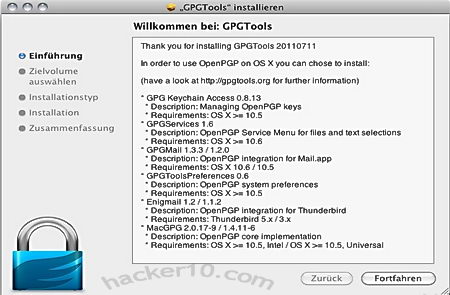
GPGTools is an open source free alternative to PGP, this OpenPGP port for Mac OS X computers includes MacGPG2, GPGMail, GPG Key Chain and Mozilla Enigmail for Thunderbird all in a single .dmg package, you can use the software to exchange encrypted messages with any computer user, including Windows and Linux users. A mobile version of GPGTools works in any mobile device which Internet browser is based on WebKit and has javascript enabled, this includes the iPhone&iPad (Safari) and Android (Chrome).
Like PGP, GPGTools encrypts and digitally signs your data before sending it over the Internet, if you know how public/private encryption key works it will only take you a couple of minutes to master GPGTools, it provides you with a nice front end for GnuPG and bells and whistles like the Enigmail plugin. You will need to understand the concepts behind digital signatures and public/private encryption keys before using it, a well worth time investment for anyone who cares about computer privacy and security.
GPGTools Apple Mac email encryption
You don’t have to use Thunderbird for encrypting emails, Apple Mail works with GPGMail to decrypt and encrypt messages, which one you use is up to you. GPGKey Chain Access lets you store and edit encryption keys, essential to create key pairs, GPGTools is very similar to GPG4Win, another open source OpenPGP implementation for Windows users only.
The expensive business focused PGP software sold by Symantec includes full disk encryption and secure data wiping, home users can get all of those features without spending a dime by using three different tools, GPGTools to encrypt/decrypt email, Truecrypt to fully encrypt your Mac computer hard disk and EdenWaith Permanent Eraser to securely shred your private files.
A torrent seedbox is a permanent 24/7 online high speed server dedicated to download and upload (aka seeding) a torrent for you, an average seedbox has a 100 Mbit/s line or more, which is considerably faster than any home ISP and gets around bandwidth throttling if there is one, after a torrent has been downloaded onto the seedbox the user gets it to his computer via S/FTP, this is the only bandwidth consumed by the user, seedbox bandwidth does not count towards your monthly download capping if you have one.
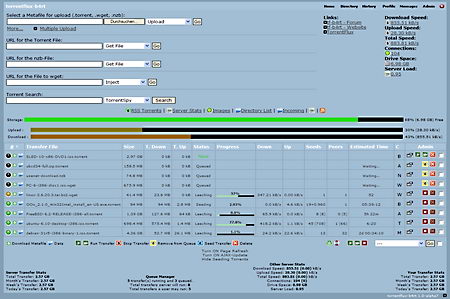
For a monthly fee a seedbox provider will give you an always on server with a dedicated 100Mbps line, dedicated IP, huge amount of bandwidth, an FTP account, allocated hard drive space and RAM with an easy to use interface like TorrentFlux-B4rt to seed your files.
Seedbox torrent interface
Private trackers require users to keep a good ratio to be able to download files from other members faster, instead of leaving your computer on all the time and slowing down your Internet connection, a seedbox will free up computer resources for other tasks, if you need to distribute a torrent file making sure that it is available at all times, a seedbox is the way to go.
The most expensive seedboxes can have a VNC (Virtual Network Computer) remote connection to a Windows machine allowing you to run any BitTorrent client you like, they should also offer torrent creation, unRaring, ZIPing, and firewall protection, the online space they offer is meant to be used for seeding the files but there is nothing stopping you from using it for storage, OpenVPN and Usenet access should be available in the costly high end servers.
Any computer can be converted into a seedbox, with a little knowledge of Linux command line you could easily set up your own seedbox on a VPS as long as their terms and conditions allow it (high bandwidth and resources needed). You would probably not save any money using a VPS compared with renting an specialist seedbox provider, the only advantage of setting up your own seedbox on a server is higher privacy because you are in control of everything, logs and configuration, it is possible to set up a seedbox at home but your ISP might ask you to upgrade to a business line when they detect high bandwidth usage.
Seedboxes and sharing copyrighted files
A seedbox IP can be tracked down just like your home computer, but instead of serving your ISP with a DMCA take down notice they will serve your seedbox provider and they have to comply with it, a seedbox it is not a way to bypass copyright laws, if you use an open tracker it will be found, when a seedbox provider gets a DMCA notice they forward it to you asking to remove the infringing content, DMCA notices are simple take down notices, not court orders requiring personal details, it is when a DMCA notice is ignored that courts can get involved.
Torrentflux seedbox interace
If you make sure that your seedbox is located in a country with weak filesharing copyright laws, one of the few left is Canada, it won’t be possible to serve them with any take down notice even if the customer lives in France (three strikes law), or the US (lawsuits). Anyone sharing extreme illegal files on a seedbox will be caught, in such hypothetic scenario the seedbox provider would be served with a law enforcement subpoena and not a DMCA notice, subpoenas ask for customer personal details and logs that will have to be provided.
What to look for in a seedbox
There are lots of seedbox providers, look for a well established company with good reputation, make sure the specs fit your needs, bandwidth is not normally a problem but seeding files could be as the cheapest seedbox plans impose a limit on the number of files you can seed, get a company with a money back guarantee, you will get discounts for paying for a year, the wise thing to do is to try them out for one month first before any long term commitment.
Why to get a seedbox?
To make a file available 24/7 on the torrent network, to avoid leaving your computer switched on all the time, to speed up uploading and downloading of files, to keep a good filesharing ratio, you are on an ISP that caps bandwidth or you are a member of a private tracker.
If you are getting a product and not paying for it then you are the product being sold, all ‘free’ VPN services I know of provide you with very limited speed and bandwidth, they advertise a barely usable VPN as if it was free when in reality it feels like a test VPN, their business model is to get users to upgrade to their paid for VPN, since their free one is full of restrictions it is highly likely that most people will upgrade, if nobody did they would go out of business very soon.
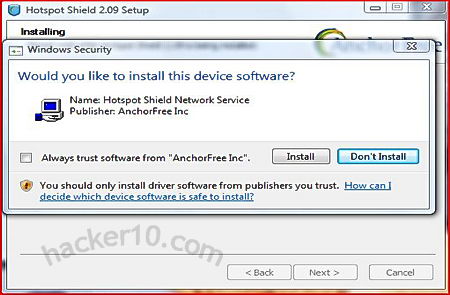
HotSpotShield is the most used free VPN service out there, browser independent, available for Windows and MAC, they claim to have over 10 millions of users, HotSpotShield finances its free VPN service injecting third party advertising banners on top of the browser in every single page you visit and trying to sell you an upgrade to their ‘elite’ ad-free VPN. HotSpotShield will attempt to install a toolbar and change your homepage when you install it, make sure to uncheck the boxes during installation, however you will have to agree to their terms and conditions and this means making your personal information available to a third party (advertising company).
HotSpotShield free VPN
HotSpotShield will give your computer a US IP, this will allow you to watch USA TV and listen to USA restricted music radio stations, it worked flawlessly with the most popular online TV and radio sites like Hulu, Crackle and Pandora, however Slacker Radio and Rdio.com both detected I was behind a proxy and did not allow me to play music, showing me a message saying that the service is only available in the US and Canada. If you ever pay for a VPN try to make sure they have more than one server, this way if a company blocks one of them a quick server switch solves the problem, with HotSpotShield free version there is not such luxury.
I was impressed with the VPN speed, I expected it to be overloaded since it is free, but it wasn’t, the ping is on the low side but acceptable, the New York server, measured from Europe it gave 3.5MB of available bandwidth and a 300ms ping rate, this is more than enough to stream online videos, the minimum bandwidth needed for video streaming is around 1MB.
I have been unable to see any kind of bandwidth restriction mentioned in HotSpotShield terms and conditions, what they do mention is that they can terminate your service wherever they feel like it, I would imagine that there is some kind of bandwidth limit but officially nothing is said about that on their website.
HotSpotShield will be fine for people living in countries that censor the Internet and can’t really afford to pay $5/month for a proper VPN, or for those on a weekend trip needing the occasional VPN, but I would not bother downloading this VPN service for anything else,frequent VPN users will end up paying for the service anyway, HotSpotShield banner can become quite annoying, it takes up part of the screen forcing you to scroll down and it slows down your Internet browsing waiting for the banner to load, the adverts can be stopped using the AdBlock Plus Firefox addon but even then I did not feel at ease knowing that my personal data was being sold to a third party.
There are two kind of hackers, malicious hackers who crack email accounts, distribute viruses, cause destruction and steal money from others, known as crackers or black hat hackers, and ethical hackers who tweak hardware and software to create things that nobody ever thought about, hackers are also programmers and security penetration testers whose job is to find a vulnerability, software bug or technical error before the bad guys do, warning the company/community, aka white hat hackers, this post is about how to become an ethical hacker.
To become a computer hacker requires intelligence, dedication and tenacity, problem solving abilities are a must have and above all you must like computer tinkering since you will spend lots of time working with them. Even thought most desktop computers run on Windows, most servers run some kind of Unix variant, i.e. Linux, FreeBSD, Solaris.
Knowing only Windows will get you nowhere, the first step you should do to become a hacker is to get used to a Unix based operating system where you get to see that not all is a point and click mouse and you can play with a program’s source code, unlike Windows or MAC, source code in Unix is free to modify and distribute, aka open source.
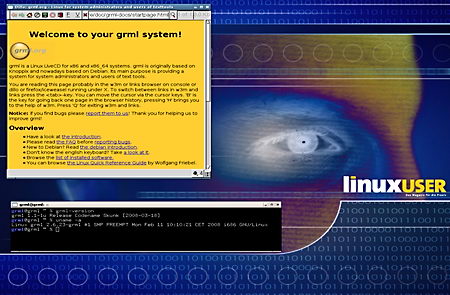
GRML Linux hackers distribution
Linux distributions for hackers:
GRML: A Debian based Linux distribution specially designed for system administrators and text tool users, capable of analyzing systems/networks, to be used as a rescue system or as a main desktop.
Kali Linux: Distribution intended for security professionals, with tools for hacking wireless access points, exploiting web servers and learning, an indispensable security penetration testing tool.
Tip: If you are a Linux beginner download something easier like Knoppix, if you do not want to install it in your computer it can be run as a live CD/DVD or USB thumbdrive, and do not forget that BSD distributions like OpenBSD are also appropriate for hackers.
Programming languages a hacker should learn
Python is a well designed and documented programming language ideal for beginners due to its power and friendliness, C is a +40 years old general purpose programming language still in use, C++ is related to C and knowing one of the languages will make learning the other easy, Perl is a Unix scripting language often used in network administration, you will need to know Perl in order to understand other people scripts rather than writing it yourself, LISP (LISt Processing) is an ancient programming language closely connected with artificial intelligence projects, reverse engineering and being able to disassemble software is a must have skill for software hackers, if you come across a trojan you will want to know how it works and what it does.
Python: Flexible intuitive programming language with clear and readable syntax, it uses standard libraries and third party modules.
Perl: Feature rich programming language that can be embedded into webservers and databases, also used in e-commerce.
Learn the English language
English is the main communication language in between people of different countries wherever you go, the ability to communicate verbally and in writing in English is an essential skill, if you have a different mother tongue, once you have mastered the English language you will be able to translate documentation and will be in a better position than monolingual people. English speaking people must also take care not to misspell or make grammatical errors as that makes you look illiterate, impressions count, nobody is going to hire someone who appears to be uneducated and can’t spell.
Reference Dictionary: A free online thesaurus and dictionary with words of the day and quotes to help you improve your reading and writing skills.
Social engineering
Information and communication technologies relies on humans one way or another, human resources, network administrators and security guards are all composed of humans, if a system is too hard to get into then hack the people in charge (aka social engineering). Some companies hire penetration testers to discover their own weak points and test staff security awareness before something happens for real.
How to become a hacker
You will want to learn human psychology, what makes people give up their password to strangers? How to get information out of people without knowing them? Can people be fooled into thinking a stranger works for the company just because he says so? All of that is used by hackers to learn of administrator passwords and much more.
Security Now podcast: Weekly podcast with computer security expert Steve Gibson, news and tutorials about hacking, security vulnerabilities and Internet privacy.
Learn HTML
Everything worthwhile to learn is on the Internet, tutorials, ebooks, software, is all served to you in websites, you should learn HTML language (not a programming language) this will be useful to understand how websites work and help you to create a blog/website or manage a forum where to interact with others.
W3Schools: Web developer portal for beginners and advanced users, you will learn how to develop a website and technologies being used to do that (HTML, XML, CSS, JavaScript, PHP, and SQL).
Hacking war games
Technology evolves quickly you need to keep learning and adapt to new challenges, security is not a target that can be reached, it is a process that you need to keep improving for ever, hackers never give up due to failure, they keep trying until they find a solution no matter how hard it is. Getting involved in an open source project will be a good way to be part of a community and keep your skills up to date, open source project take all kind of volunteers regardless of skills, if you can’t program yet maybe you can write documentation on how things work.
Another good way to keep your skills up to date and getting started in the hacking world is by joining a war game where the target is to hack other people, everything being legal and only being simulated, aka hacker games.
HackThisSite: A free legal website where to train your hacking skills, with tutorials and a forum where to discuss network security and anything related with computers.
Hacker-Project: Online hacking simulation game where you have to complete tasks like installing virii, hiding/encrypting files,recover logs, acquire computer IPs and collect profits of your hacking activities.
Get hacker status
If you help to test and debug open source software, keep the infrastructure working, write open source software, and publish useful information and submit it to conferences, you will soon come into contact with other hackers who will appreciate your help and dedication as well as admire you for your work, you will make a name for yourself and if you are good enough, get invited to conferences as a speaker, networking will help you be part of the community and maybe even find an employer or people with whom to work together in a project.
Defcon (DEFense CONdition): One of the oldest hackers conferences in the world where to meet like minded people and showcase new hacking tricks and tips.
BlackHat: A series of highly technical information security conferences that brings together hackers from government agencies, corporations and the underground world.
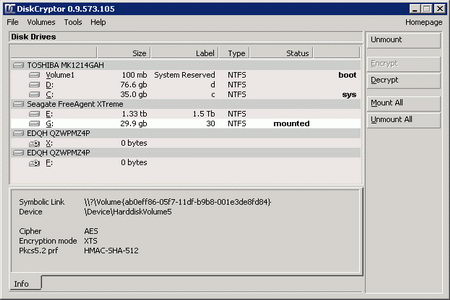
DiskCryptor download is a tiny 750Kb, after installing it you will need to reboot the computer, you might notice that its 64bit drivers come signed by the ReactOS foundation a non for profit organization assisting open source projects not able to acquire an expensive signing certificate to distribute Windows 64bit drivers.
Encrypting my Windows 7 Home Premium 64bit OS, with a fairly powerful Intel i5 2200Hz (quad core) absorbed very low CPU, a steady 7% of the available resources, it took me 20 hours to encrypt a 1TB hard drive, it would have been considerably quicker using just the AES algorithm instead of the cascade algorithm I selected.
DiskCryptor lets you know how long it will take to encrypt your operating system, you can still work with your computer while it is being encrypted, I advice you to temporarily disable power management in Windows and set it to always on, Windows will not notice the hard disk being encrypted and send the OS into hibernation mode believing the computer is inactive, if this happens full disk encryption will stop and only resume once you switch the computer back on, I have found this problem to occur with both DiskCryptor and Truecrypt, more of a Windows problem than to do with the full disk encryption software.
Diskcryptor lets you benchmark the encryption ciphers (Tools>Benchmark) if you have a low spec CPU and are in a hurry you can choose the cipher that performs best in your system, AES was the quickest for me, by quite a lot of difference in contrast with Twofish and Serpent, once the OS has been encrypted it doesn’t matter what cipher you used to encrypt it, performance will be the same. You can benchmark ciphers in Truecrypt too but since only AES can be used for full disk encryption there is no point in doing it.
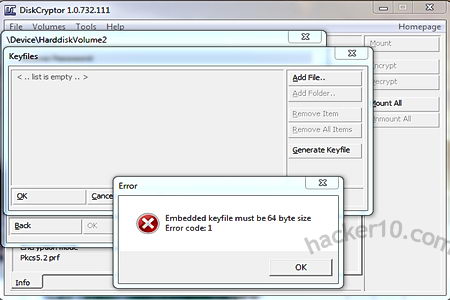
DiskCryptor encryption keyfile
Truecrypt will ask you to enter your password after rebooting your computer before encrypting your operating system, DiskCryptor will not, it assumes you entered the passphrase correctly twice as asked and did not make any mistake. When using special signs in your password be aware that in booting up your computer the keyboard has a US layout that will not correspond with a non US keyboard, I searched for a photograph of US keyboard layout on the Internet to make sure there would be no mistakes about what keys to pres.
Unlike Truecrypt, DiskCryptor bootloader is highly configurable, I have my own (Ascii) logo at logon and I instructed DiskCryptor to time out after 30 seconds of inactivity at which point the computer reboots, other options like halt and exit to BIOS are possible. Using DiskCryptor keyfile for full disk encryption is something possible and not supported by Truecrypt, a keyfile will thwart dictionary attacks on your passphrase but this keyfile can not consist of anything it has to be a 64 byte file generated by DiskCryptor.
Windows 7 FDE specific problem
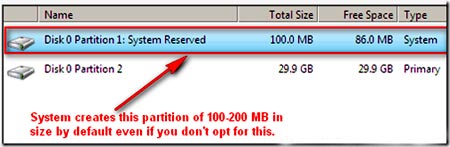
Unlike Vista, XP and lower Windows versions, when you use a whole disk encryption product on Windows 7, or installing a dual boot, you will notice that Windows 7 automatically creates a 100MB system reserved partition, 24MB contains actual data the rest is there for future use like Bitlocker or system restore, this partition is hidden by Windows and only visible using a live CD or through DiskCryptor or Truecrypt interface.
Windows 7 100MB hidden system partition
Windows 7 system reserved partition contains some necessary boot files, do not attempt to encrypt Windows 7 system reserved partition like I did because the computer will not boot! There are hacks around to merge that partition with the main Windows 7 operating system, I managed to do it partioning the hard disk with PartedMagic before installing Windows 7 and ignoring Windows installation DVD asking me to create the system reserved partition, everything worked fine until I fully encrypted Windows 7 without the system reserved space and the computer refused to boot.
If you would like to use whole disk encryption in Windows 7 there is no choice but to give in and allow Windows to create the unencrypted 100MB system partition, this shouldn’t be a problem regarding data leakage, you can view the files it contains with a live CD, I managed to see a bootsect.bak file, bootmgr, and System Volume Information folder and a few others with no obvious danger.
Truecrypt vs DiskCryptor comparison table
TRUECRYPT
DISKCRYPTOR
Open source license
Truecrypt own license
Standard Linux GPL license
Forces you to burn a recovery CD
YES
NO (optional)
Works with RAID volumes
YES
YES
Hidden operating system
YES
NO (pseudo)
Cross platform (Windows, Linux and MAC)
YES
NO
Option of cipher for full disk encryption
AES,Twofish,Serpent & cascades
AES,Twofish,Serpent & cascades
Supports keyfiles for full disk encryption
NO
YES
Can place bootloader on external device
NO
YES
Can create single encrypted containers
YES
NO
Portable mode
YES (admin rights)
NO
Encryption of external devices (USB,etc)
YES
YES
Plausible deniability
DiskCryptor does not support the hidden operating system feature that Truecrypt has but allows you to install the bootloader on an external device, ie. USB thumbdrive or CD-Rom, that is where the files giving away that the operating system has been encrypted and what software has been used for that are stored, if anyone seized your hard drive it would be possible to claim that it has been wiped clean as no identifiable information can be extracted from the HDD other than random data and there is no boot loader.
Plausible deniability appears more sound than Truecrypt hidden operating system, if you give away the password for the non hidden OS in Truecrypt, the timestamps and las activities could give away that the computer has not been used for a long time.
DiskCryptor full disk encryption
A computer with no operating system and a wiped hard disk will look very suspicious, claims that it was wiped the day before would be held with incredulity but hard to prove it didn’t happen. Even better, I came across a thread in DiskCryptor forums to have a dual OS system where one of the Windows OS will only boot with the USB thumbdrive plugged in and when not present the other OS will boot, this set up makes one of the partitions look like random data and not like 2 operating systems on one hard disk.
Conclusion Truecrypt vs Diskcryptor
If you have a tablet or netbook without a CD-drive go for DiskCryptor because Truecrypt forces you to burn a recovery CD (there is a work around using CD-drive virtualization software, i.e. Alcohol 120% or using the command line /noisocheck).
If you would like to be able to open encrypted external devices using Linux or MAC go for Truecrypt as DiskCryptor is a Windows only program, if you want to create single encrypted containers go for Truecrypt as DiskCryptor can’t do that.
Something in which Truecrypt beats DiskCryptor is in documentation, Truecrypt manual is very complete and DiskCryptor consists of an incomplete online Wiki, DiskCryptor can make up for this showing off the ‘Blue Screen’ feature, a way to quickly crash your fully encrypted computer allowing you to set the quick emergency shutdown to any hotkey shortcut you like.
Security wise, both Truecrypt and DiskCryptor have the same credentials with their source code open to scrutiny and none of them reviewed by any qualified cryptographer, overall, DiskCryptor has more configuration features than Truecrypt, and Truecrypt is better at cross platform compatibility.
Tor Mail is an anonymous email service running on the Electronics Frontiers Foundation Tor anonymity network, Tor Mail is an independent project and not endorsed by the EFF, it works as a hidden service inside the network, a hidden service protocol needs to advertise its existence before people can find it, it does so by sending its public encryption keys to introduction points, everything is proxied in a decentralized way which causes delays but secures your online anonymity, the advantage of a Tor hidden service is that the server location can not be found this makes it impossible to seize that server and keeps the user and the server operator identities safe.
After signing up for Tor Mail you will get a @tormail.org email address where people can reach you, messages can be accessed through Webmail, SMTP, POP3 and IMAP, Tor Mail is composed of several servers relaying email in and out of the anonymous Tor network, no logs or user information is stored, the developer claims that they will not help anyone to identify users and since they hold no data any subpoena forcing them to do that would be useless.
tor hidden service diagram network
How to access Tor Mail
The only way to sign up for a Tor Mail email address is through a .onion URL (http://jhiwjjlqpyawmpjx.onion/) , a .onion website is a 16 character long alpha numeric URL Base32 encoded 80 bits long automatically generated by a public encryption key, .onion has been designated by Tor to identify hidden services, you can only access it if you have Tor anonymity software installed in your computer, using the Tor network to browse the Internet not only will hide your IP but also get around ISP Internet filtering and monitoring, someone watching your activities online will not be able to see or log what you are doing other than connecting to a Tor network server.
If you do not want to install Tor in your computer you can use a live DVD like Tails. To find out about more Tor hidden services like IRC networks, Wiki, SSH server, Usenet and others, visit Anarchopedia list of Tor network links.
The easiest way to learn your computer IP address is by visiting one of the dozens of sites that perform an IP look up on the screen, the best websites will add extra information like browser language, installed plugins, ISP and even show a map with your approximate location in the world, this is the same information a webserver gets when you visit it, it is often used for targeted advertising purposes up to the point that US surfers from the West Coast will be shown different advertisements from those in the East Coast if Google or Bing feel like it.
NetIP.de: You are shown your IP, Hostname, country, region and city, with a big map and a pin indicating your geolocation, they offer a free widget that can be integrated on your website and a toolbar showing your computer IP for Internet Explorer and Firefox.
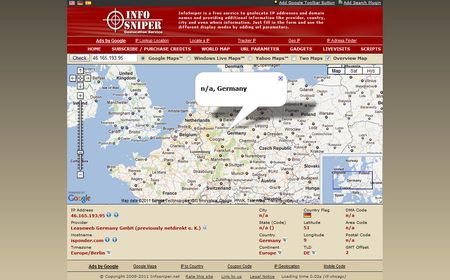
Infosniper.net: Infosniper shows your computer IP, country, region, city and if you don’t like Google Maps, Infosniper can be changed to show your geolocation using Yahoo Maps or Windows Live Maps instead, visiting this website with a VPN shows the ISP/Organization, this is useful to know what company the VPN service has rented its servers from.
InfoSniper find out computer IP address
IP.cc: A quick to type URL to learn your computer IP address, it takes less time to load than a map, it will also let you know your browser language settings which can be used to know your native language even if your are using a proxy, browser language set up is visible by all websites you visit, it can be changed using browser settings, IP.cc also tells you if Java and Javascript are enabled.
NOTE: You might be using a VPN proxy server physically located in for example Germany, and you could notice that some websites detect your computer IP as located somewhere else, like for example the Netherlands, this happens because although the server is located in Germany, the company that owns that server is located in the Netherlands. A web based look up tool will correctly identify your IP geolocation, but advertisers and music or video services might not, as far as they are concerned if the company is Dutch, they will show you Dutch adverts/services believing the company that owns that webserver is your local ISP.
Find your computer IP address in Windows
Go to the Start button (Windows logo), type the words cmd or command in the search box and click on enter to launch cmd (command line Windows), type netstat -n to see a list of active connections, these are all of your computer Internet activities, your IP is listed under foreign address, the number after the colon (:) is the port number your computer is connecting to, port 80 is for http traffic (web browsing), 21 for FTP, 143 for IMAP, etc.To see more information on what programs are connecting to the IP addresses shown type netstat -nabHow to find your IP address using Windows cmd
Go to Windows command prompt as explained above and type ipconfig, your computer IP address is listed where it says IPv4 (unless you are using IPv6), if you are using a wireless router you will notice that IPv4 is listed twice, one of them belongs to the Ethernet (wired) connection, and the other to the Wi-fi (wireless) connection, to find out advanced information like your hostname, DNS server and MAC address then type ipconfig /all
NOTE: If you are using a proxy server to connect to the Internet, Windows command prompt will show your real IP and not the VPN or proxy IP you are using, you will still be surfing anonymously on the Internet. You require administrator rights to launch Windows command prompt.
TIP: If you would like to know your network card physical address type getmac -v in Windows command prompt (cmd), this address is not visible to the websites you visit but your Internet Service Provider or Wifi Access Point will see it when you lease an IP from them, it can only be changed using special software (MAC changer).
Find out your IP address with Javascript
You could set up simple find your IP address website on your own webspace, a free webhost can do the trick, all you have to do is to upload a single HTML page with a small Javascript code inserted in between the <head></head> tags,right before the <body>, HTML code placed inside the <head> tags is not visible to visitors, it is used to instruct the browser where to find style sheets or to place scripts.
Most ISPs will use the Dynamic Host Configuration Protocol (DHCP) to assign you an IP address, the computer IP address will change with each connection/disconnection, the longer you stay disconnected from the Internet, the more chances there are that your former IP address will be given to someone else. A static IP address remains always the same, they are typically used for routers (corporate) and servers that need to have a permanent IP as this is linked to applications and hardware.
The most obvious way to find out if your ISP or network administrator has assigned you a static or dynamic IP address is by asking them, if you are unable to do this another way is by disconnecting your computer from the Internet and see if you are given the same IP address when you reconnect, make sure to allow some time in between disconnections so that the DHCP server can reassign the old IP to a different user if you are in a dynamic IP environment, if nobody else requests an IP from the server while you are disconnected you will be given the same IP address and it will look as if it is a static IP.
ipconfig all Windows command prompt
If you have administrator rights launch Windows command prompt (cmd) and type ipconfig /all you will see a line that says DHCP Enabled indicating Yes or No, if it says yes then you have a dynamic IP address.
You can force a DHCP server to give you a new IP by releasing the connection and typing ipconfig /release which will terminate your Internet connection, after a few minutes type ipconfig /renew to get a new IP.
If you do not have administrator rights, unplug your network cable from the computer, this will disconnect it from the Internet, wait for some minutes, and reconnect the network cable, now you can see if a new IP has been assigned or you keep the old one indicating it is a static IP address.