If you have a user password set up in Windows clicking on “Windows key +L” on the keyboard will quickly lock your computer but you will not see what is going on behind the screen lock. Clearlock is a free Windows utility to lock Windows while you are away, using a transparent layer that allows you to see what is going on in the background with just a quick look without the need to unlock the computer, ClearLock has a nice 3D like GUI and there is no need to install it.
ClearLock a transparent computer screen lock
After entering the wrong password three times there will be a five minutes delay before granting another attempt, the number of invalid password entries are logged, you would be aware of them once you come back to your computer. If you forget your password while the screen is unlocked delete the .ini file inside the program folder to reset it, if the screen is locked you will have to reboot your computer.
This screen locker is a low level protector designed to stop low skilled adversaries, like children, from accessing your computer while you are away, determined serious opponents could plug in a USB thumbdrive in your computer and use Windows autorun feature to run a malicious script to pull your RAM memory and your screenlock password with it or even image the whole hard disk without you knowing.
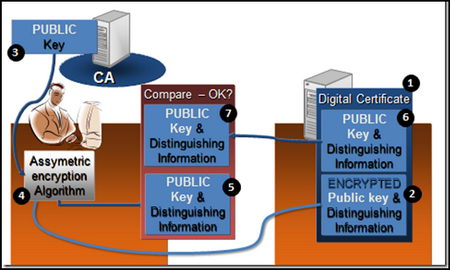
A digital or SSL certificate consists of two encryption keys, one public and one private, a very common use for digital certificates is to encrypt data exchanges in between a user Internet browser and any e-commerce website but it can also be used to sign documents, encrypt and digitally sign email messages and identify yourself online. Once a digital certificate has been installed in your Internet browser or email client, it is easier to use than encryption software, many users are not even aware they are using it, if the SSL certificate is personalized a password might be asked before using it.
Typical digital certificates will contain a serial number, signature algorithm, issuing authority, valid from and expiry date, public key and a hashed number to guarantee that the key has not been tampered with.
Places to obtain a free digital certificate
CAcert: To be issued an SSL X.509 standard certificate you are asked you to join the CAcert community filling in an online form, in between others you can use CAcert certificates to secure websites, digitally signing or encrypting emails and files.
GetaCert: Not a Certificate Authority (CA), GetaCert appears to be a website using OpenSSL to create a digital certificates online, they can be issued for use with email and websites, all of their certificates are valid for 10 years and wildcards are supported.
StartSSL: Issuing free Class 1 (for individuals) SSL certificates valid for one year, renewable after expiration, security is as good as StartSSL paid for digital certificates but with some limitations like no wildcards allowed and it doesn’t hold identification details.
InstantSSL: Fast and easy to obtain digital certificate from Comodo, it only takes seconds to install and can be used to encrypt and digitally sign your email messages. The private encryption key can be chosen in between high or medium grade depending on needs.
Types of basic digital certificates
Personal certificate: It works as a digital ID guaranteeing that the person is not someone else, a personal certificate can be used to identify yourself over the Internet with a company or Government agency, digitally sign an email message or a PDF file, a password will normally be asked when carrying out these tasks, using the something you have and something you know security model.
Diagram digital certificate encryption
Server certificate: It identifies a user when establishing a connection before transmitting any information, email and Usenet servers use a server certificate when authentication takes place via SSL.
Software certificate: It verifies software before installing it in your computer by checking the code digital signature making sure the program has not been replaced by malware having been signed by a genuine developer, useful when downloading software from the Internet.
Unrecognised digital certificates warnings
All Internet browsers come with digital certificates installed, these are issued by certification authorities like VeriSign or GeoTrust, when the browser comes across a website using a digital certificate which public key is not found in the browser you will get a not recognized certificate warning, this does not mean the site is not safe, it only means one of the key pairs has not been stored in the browser.
It is impossible to have every single company SSL certificate stored in the browser, when you get this kind of warning you should check the digital certificate making sure it is not a man in the middle attack by looking at its properties, when satisfied that everything looks correct, install it, after that you will not get any more security warnings when visiting that site.
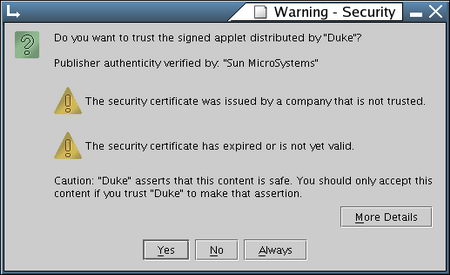
Digital certificate security warning
When you install software you could find Windows warning you that the driver has not been digitally signed, Microsoft charges a huge amount for this ‘”privilege” and not all developers can’t afford it, it doesn’t necessarily mean the software is dangerous, it only means it has not been approved by Microsoft.
How to make your own SSL certificate
An alternative to companies issuing free SSL certificates is to create your own Certificate Authority or self-signed digital certificate using OpenSSL, an open source implementation of SSL and TLS, any decent Linux distribution will come with OpenSSL installed, you will need some basic Unix knowledge, go to the command line generate an RSA private key, generate a Certificate Signing Request (CSR) and generate a self-signed certificate, for the necessary commands to do this type man openssl at the Linux command prompt.
You can use OpenSSL and other Unix utilities in Windows using Cygwin, a Unix framework for Windows, it is beyond the scope of this article to explain how Cygwin works.
If a computer has been infected with a virus and refuses to boot or when it does malware kicks in stopping you from running a virus scanner,using an antivirus live CD will bypass the need to boot the operating system helping you to remove any callous rootkit. There are various Linux based live CDs that allow for data recovery, the antivirus live CDs below have specifically been designed to remove persistent viruses and they are user friendly, meant to be used as a last resort when everything else fails or to save you time if you are a computer administrator.
To use an emergency recovery disk all you have to do is to burn the .iso to blank media, insert the CD rom inside the optical drive, reboot your computer making sure CD-drive is the first booting device in the BIOS and you are in, the live CD will scan your computer for viruses once it boots.
Dr Web live CD: When you boot the CD it detects all disk drives automatically without the need to mount them, you can select a folder or disk to be scanned, the included Midnight Commander file browser allows you to copy any file to an external device and help is available from Dr. Web by email. This live CD lets you check your RAM memory for errors with the Memtest86+ utility making sure that your problem is not a hardware fault.
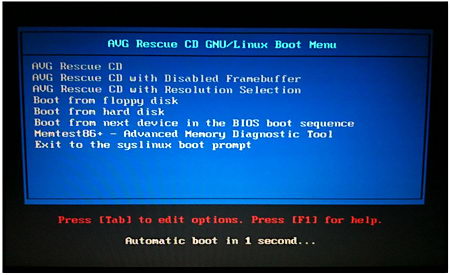
AVG Rescue CD: It comes with antivirus and antispyware, it defines itself as a portable version of AVG antivirus inside a Linux distribution, you can use it to move files to an external device, test RAM memory, edit registry keys and ping network devices to see if they are reachable, everything is free and it comes with the latest virus signatures database.
AVG antivirus live CD
PCTools live CD: Officially named Alternate Operating System Scanner, this antivirus live CD will detect and remove rootkits and other difficult to delete malware, it uses the Spyware Doctor antivirus engine to scan your files and Windows registry, if it finds something it cleans it up warning you of the location and the virus name.
F-Secure Rescue CD: A customized Knoppix Linux distribution made by F-Secure to remove persistent malware, any virus you have in your operating system will be useless against F-Secure Rescue CD, first of all because it runs on Linux and secondly because the operating system in your main hard drive will not be active, the live CD can be used for data recovery too.
F-Secure emergency recovery live CD
Avira Rescue System: Linux based live CD to scan your computer for viruses, Avira antivirus database is updated several times a day, this is a good live antivirus CD to catch the latest exploit, once malware has been detected the live CD will automatically remove it saving yourself time reinstalling the whole operating system.
Most trojans and malware are remotely controlled by opening a port in your computer, this can be a non used port number or a disguised port normally used for something else, e.g. FTP. Firewalls should protect you from applications opening undesired ports but in reality firewalls give so many warnings that it is easy for a user to mistakenly authorise a connection. Some sites like Shields Up can scan your computer online and report on open ports, this is a good way to test your firewall quality, CloseTheDoor could be used to detect malware after an online port scanner comparing results to make sure that nothing awkward is going on.
CloseTheDoor lists computer open ports
This lightweight open source network tool will help you detect computer backdoors if they already exist, and prevent remote attacks on your machine, CloseTheDoor will listen on UDP/TCP ports in IPv4 and IPv6 and list what programs are associated with each connection displaying the listening port, protocol, PID and associated service, a right click on one of the connections gives the choice to locate the executable file that has opened the port and terminate the process or search Wikipedia and Google for more information on what the process does.
Researchers from the University of Michigan (US) and Waterloo (Canada), have developed a new anti-censorship tool called Telex to stop Governments from blocking websites, it can help people to access the most commonly blocked websites, at the moment Facebook, Google, Youtube, Twitter and Telex.cc, the list can be expanded according to needs.
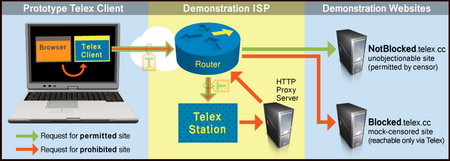
One of the main differences of Telex in comparison to a tor proxy is that it does not alert people watching traffic that a censorship circumventing tool is being used and unlike proxy sites, it can not be blocked. After a user has installed Telex software in his computer when he wants to visit a censored website a secure SSL connection is established to a non blacklisted server outside the censor’s network, that connection is secretly marked as a Telex request using a hidden cryptographic tag in the headers, data requests go through various ISPs routing traffic, if some of those ISPs implement Telex stations to detect hidden cryptographic messages in the headers, they can then serve banned content to a user without anyone knowing.
Telex stations are able to see what page you are requesting, this tool will not make you anonymous but it can be used in conjunction with a tor proxy or VPN. One possible counter attack against Telex would be for a censor country to run its own Telex station but because the requests use steganography with public/private encryption keys, without the real private encryption key they would be unable to detect or block Telex tagged requests, the idea would be to keep a central Telex authority banning certain ISPs or to change the private encryption key every 5 minutes only with those who have been whitelisted.
Telex anticensorship network
In order for Telex to work it is necessary the participation of ISPs which means some kind of state level support, at the moment there is a single ISP at the researchers lab that works and it can be easily blocked, no real ISP has implemented Telex as of yet, the software has only been released for testing and it is unsafe for real world use, the researchers have already managed to make it work from within China to stream banned YouTube videos.
Social media sharing buttons included in blogs allow companies to track your surfing habits even if you do not click on them, some of these buttons will insert a tracking cookie in your browser and when you visit other sites it will be notify them of other places you have been visiting, some companies will even create your online profile justifying it saying that they want to serve you targeted advertising, the problem with the scheme is that the user has never consented to Internet browsing habits tracking, many people do not realize that in order to have a cookie from site A they don’t really need to visit site A, third party cookies can be inserted in user’s browsers by visiting any site.
ShareMeNot Firefox privacy addon
Unlike other Firefox privacy addons like NoScript or Ghostery, ShareMeNot will not remove the social media sharing buttons, it keeps them usable while blocking their tracking cookies unless you specifically approve them in the settings. The supported social media buttons at the moment are Facebook, StumbleUpon, LinkedIn, Twitter,Google +1 and Digg, this addon is part of a research project from the University of Washington (US).
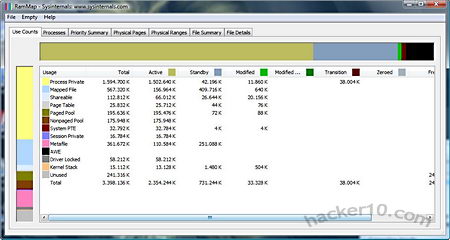
Knowing what is running on RAM memory when the system is live not only helps you find out computer load and what programs are taking up most of your expensive limited RAM memory, it also helps to spot malware, which often runs in RAM memory.
RAMMap RAM Memory Analyser
RAMMap is a 27Kb freeware from Microsoft Sysinternals that will give you exhaustive information on processes, priorities, physical pages and file details, everything is orderly displayed and classified in tabs, its advanced memory usage analysis is a little geeky, experts will love the detailed data reports that include memory load and path, newbies will benefit of this software by gaining a good understanding on how Windows manages and allocates RAM memory, if you are troubleshooting computer problems this program might be a convenient tool, memory snapshots can be saved as .rmp, a proprietary file extension unique to RAMMap.