Author: John Durret

  • Mobile phone private messaging with Schmoose App

    Mobile phone private messaging with Schmoose App

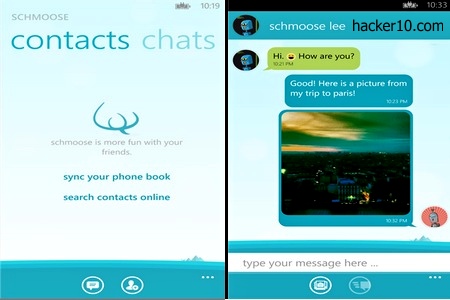
    Schmoose is a privacy messaging app for your mobile phone with end to end encryption, the ciphers used to secure your data are well known standards like AES256-bit, SHA-256 and RSA-2048-bits. Schmoose itself is not able to read what you send, a public/private encryption key is created in your phone during installation and data is encrypted before it leaves it, only the person you are sending the message to can decrypt it.

    When the sender and receiver both have the app installed they can chat like they would do in the popular WhatsApp and Kik without any messaging costs,the main difference is the strong privacy added to Schmoose. If anybody intercepted your messages, they would only be able to see meaningless random characters and the company can not be forced to decrypt them as they do not have the means to do that.

    You will be asked to verify your mobile phone number or email during installation and after that you are able to sync your contacts online, to keep contacts private, only hash values are sent to Schmoose servers in Germany, they don’t see names and addresses.
    Schmoose encrypted messaging app
    Schmoose encrypted messaging app

    The messaging program is very colourful, it can include embedded photos, custom backrgounds, avatars and fun chat features like in other chat messaging apps. If you choose to store the photos people send you in Schmoose make sure that it will not be something embarrassing, media storage is not encrypted and if you lose your phone there is potential for somebody to access the photo gallery.

    I did not like having to register to be able to use the app but it is possible to select email registration only, if you have an anonymous email account this should keep your identity hidden and it will not be as intrusive as using your mobile phone number linked to your real identity. I suspect that registration is necessary to assign you a Schmoose ID and to be found in the network.

    The good features are end to end public key encryption with no backdoor and easy of use. The bad part was that data was not being encrypted locally, to fix this your phone should be fully encrypted. Schmoose is a free app for a single device, a paid version increases the number of mobile phones in which it can run and lets you block other users and send videos (the free version only sends photos).

    I am glad to see more and more companies locking themselves out of customer’s encryption keys, this allows them to fight back against unreasonable legal requests asking for access to customer’s personal messages. The hard part, is that there is no interoperability in between similar privacy messaging apps and it is next to impossible to agree with all of your contacts to use the same app.

    Visit Schmoose homepage

  • Encrypted radio frequency communications with goTenna

    Encrypted radio frequency communications with goTenna

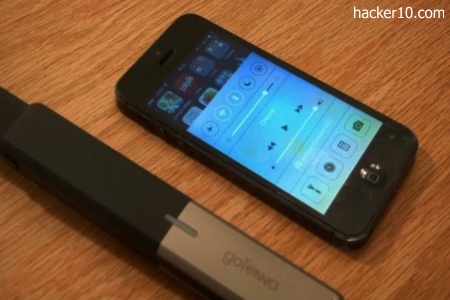
    Designed to be able to communicate without any Internet service provider, WiFi or mobile phone network, goTenna is a small autonomous hardware device that fits in your pocket and can be plugged into an iOS or Android smartphone to transmit low frequency 151-154 MHz radio waves to other goTenna users, pairing with them via Bluetooth LE (Low Energy). The device can not be used to make voice calls, but you can send text messages and share your location.

    Possible utilities for goTenna are communications in disaster zones with destroyed infrastructure, sending an emergency message if you are lost in the middle of a mountain that has no mobile network coverage, and, private communications. This device should get around Internet mass surveillance frameworks set up to monitor Internet and mobile phone networks, unless an operative is within goTenna radiowave range with bulky wiretapping equipment, they better forget about intercepting or detecting goTenna data transmissions, not to mention that you do not have to pay for a subscription to use it.

    goTenna radio frequency communications
    goTenna radio frequency communications

    With the device you get a custom goTenna app preloaded with offline maps to see your friend’s location without needing Google maps or an Internet connection,  however, if you don’t remove the mobile phone SIM card, your GPS coordinates and that of your associates will be revealed to the network provider even when you are not placing a call.

    Radio frequencies can be easily intercepted, to stop this goTenna secures your messages with 224-bit elliptic curve end to end encryption. There is no central server, messages are stored inside goTenna’s internal flash memory, it can hold 1000 messages. You communicate P2P with your friends, in group or individually, and it is possible to send self destructing messages to only one person, the message will be erased straight away after it has been read and not stored in the memory.

    Communications range is an awesome 1 to 50 miles, depending on obstacles and geography, according to one of the founders, Daniela Perdomo, the maximum 50 miles range is only achievable if you are on top of a mountain, on the ground in an open space you get around 9 miles communications range and in the city, without line of sight and many obstacles around, you should get from 0.5 up to 1 mile range. Data transmission at 9600 bps is too slow for sending rich media like selfies, but enough for text messages.

    Due to radio frequency regulations goTenna is not allowed to daisy chain a network in mesh, communications are point to point, but you can send a “shout” to all goTenna users in your vicinity or set up a private group chat.

    goTenna mobile app
    goTenna mobile app

    Other similar self-ruling communication schemes that don’t need of a provider are existing mobile phone apps that communicate with other users P2P but their range is very low, bounded by Bluetooth, a couple of dozen meters. And of course you have the walkie talkie, it doesn’t need of an Internet service provider or satellite to operate but it does not encrypt radio waves like goTenna, unless it is a very high end device of the kind used by law enforcement and emergency services.

    goTenna battery lasts up to 72 hours with low usage, the enclosure is weather and dust proof for you to take hiking inside your pocket or clipped to a rucksack band. I liked the small size, relatively long battery, it works autonomously without any state or corporation oversight of the data being transmitted, and the radio waves are encrypted with strong algorithms, the price is not so attractive. This device can work anywhere in the world, legally it needs a transmission license and right now it is only available in the US where they have FCC approval.

    Visit goTenna homepage

  • Mobile phone end to end encrypted chat with Sicher

    Mobile phone end to end encrypted chat with Sicher

    Sicher is a free Android, iPhone ($1) and Windows Mobile messaging up with end to end encryption and message self-destruction. It can be used to securely chat and exchange files in group or individually with anybody in your contact list. As usual in alike apps, Sicher will not work unless your friends also have it installed.

    The company developing Sicher is based in Germany and they can’t gain access to your private encryption key, generation takes place in your mobile phone and never leaves it, in addition all Sicher servers are located in Germany and they do not store the data you send, after an encrypted message has been delivered it is automatically erased from the server.

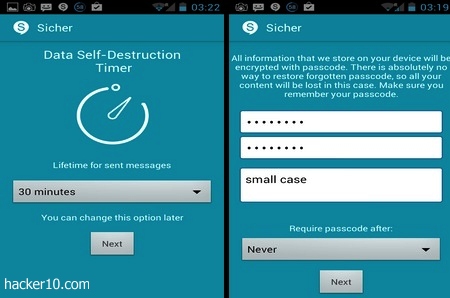
    To strengthen your security a self-destruction timer can be set with all messages or files you send, the lifetime of a message can be fixed from 30 minutes to up to 15 days. During the app set up you will be asked to enter a password used to encrypt data locally, this will block access to your account if your phone is lost or stolen, the company has no way to restore forgotten passwords, content will be lost if you forget about it. The app can be set to lock itself up after 15 minutes of inactivity, hourly or the more risky option of never asking for the password again while the phone is on, customize it to your security needs.

    Sicher encrypted chat messaging app
    Sicher encrypted chat messaging app

    I liked that Sicher has not been developed nor has servers in the USA, where the government is known for issuing gagging orders to technology companies forcing them to install a backdoor in their communication services. Sicher developers should also get bonus points for not sending crash logs, spy agencies are known to collect Windows logs sent over the Internet to learn more about a target’s computer, no such privacy risk here, and there is no social network integration, Facebook and Twitter apps don’t have access to Sicher, two companies that all privacy apps should block. Another nice feature is the settings allowing you to route Sicher communications through a proxy to hide your mobile phone IP.

    Besides the appalling app installation experience where I had to try multiple times before receiving the necessary SMS with a PIN code to activate the app, and besides Sicher’s freezing my screen when I finally entered the PIN number, forcing me to uninstall the app and reinstall again, security specs look fantastic.

    I would be willing to use this app if they did not enforce mobile phone number registration with them prior use, the requirement strips away your anonymity and I don’t understand why this is necessary. Even if the company can’t see the encrypted data being sent, Sicher servers, and anybody wiretapping them, should be able to see computer IPs connection length with timestamp and amount of data being transferred, what it is known as metadata, a very useful source of information for spy agencies.

    I trust that the developers will solve Sicher SMS registration problems, but as long as they insist that my mobile phone number must be registered with them, I will not use the app. If you don’t care about anonymity and all you long for is privacy, Sicher security far surpasses that of WhatsApp or Kik and it is preferable than those apps.

    Visit Sicher homepage

  • Anonymous torrent downloads with Tribler

    Anonymous torrent downloads with Tribler

    Tribler is an open source bitTorrent client developed by the Delft University of Technology, TU Delft, in the Netherlands. What makes this program different from the other dozen file sharing clients is that it includes a unique built-in peer proxy bouncing technology routing data across multiple peers before reaching its final destination. Just like in Tor, three different random nodes are used to stop a rogue node operator from finding out who is downloading a file.

    The first peer proxy encrypts data to block other nodes from seeing the content of what it is being forwarded, only the person requesting that file is able to decrypt it. The peer proxies don’t keep logs of anything, seizing them will be of no help to determine past usage.

    Another Tribler anti-censorship feature is that you don’t have to visit torrent sites to find files, the software is currently using central trackers and indexers but if they are ever taken down, Tribler can search the network to find user submitted .torrent files that don’t have to be uploaded to sites like The Pirate Bay or Demonoid.

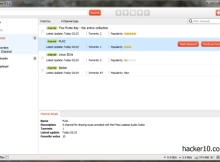
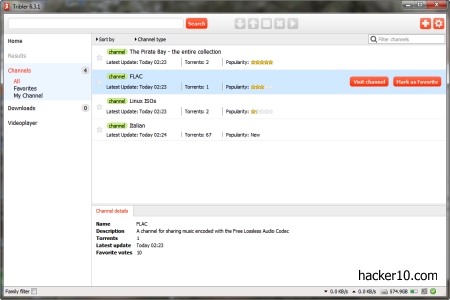
    Tribler torrent channels
    Tribler torrent channels

    Besides security, Tribler has dozens of attributes to help you manage torrent files. You can locate torrents using Tribler integrated search box or in what they call “Channels“, a collection of user generated files that can contain movies, ebooks, photos, games or music, anybody can create them. I was able to find new movie releases and TV series in no time and without any spam.  The program crowd sources filtering, channels have a “Spam” button next to them, when enough people are annoyed and click on the button, the channel gets buried, meanwhile good quality content can be boosted in search results clicking on a “Favorite” button next to the channel.

    You can give a descriptive name to Tribler channels you create, sadly many people are not bothered with this or don’t know how to do it and I found channels named “Grandma PC” or “ElderScrolls“. To know if the content is worthwhile watch out for the star rating next to each channel, it  lets you know how popular it is, saving you time by not having to click on each folder to see what is inside.

    Important things to be aware of: When you first start Tribler you will not see any channel, it took me ten minutes for the first 30 user generated channels with content to show up, this increased to 50 channels in another ten minutes, the longer you stay on the network, the more content will appear. Another thing is that the software will automatically create a folder with your Windows username on your desktop to store downloads, make sure that your Windows username is not your real name or change the folder name in settings.

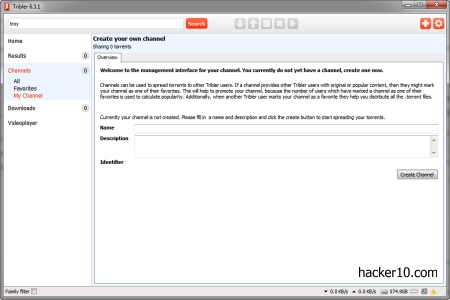
    Tribler channel creation
    Tribler channel creation

    If you are browsing the Internet at the same time as you download a torrent in the background, right click on the torrent and change the default unlimited bandwidth allocation to avoid slowing down your browsing, and before downloading a big movie, it is best to stream part of it with Trible integrated VLC media player. Tribler also allows you to copy the magnet link, see the number of seeders, list the trackers announcing the torrent and it has a family filter that will not stop you from seeing porn thumbnails in Tribler main window. I read in Tribler forums about other users having the same porn problem, the developers seem to be aware of this and are working to fix it.

    Regarding anonymous downloading, be extremely careful, the technology is in testing mode, not all downloads are anonymous. You can see a column next to the torrent file where it says “Anonymous yes/no“. My main concern is that I don’t know how willing are going to be the authorities to arrest somebody forwarding encrypted data in Tribler that happens to contain something illegal.

    Tribler proxy bouncing is too new to know for sure if it can stop abusive DMCA notices from landing at the door of those forwarding traffic, but anything that makes it more difficult to find a downloader’s computer IP should be welcome.

    Visit Tribler homepage

  • Free encrypted webmail service Tutanota

    Free encrypted webmail service Tutanota

    Tutanota, meaning secure message in Latin, is a German based free webmail service with end to end encryption. Your email messages, attachments and subject are all encrypted in your browser using Javascript with a cipher combination of RSA 2048-bit and AES-128-bit before uploading data to Tutanota mail servers in Germany. The encryption keys remain in your power at all times, the company can’t see anything in plain text, they can’t restore your password or reset your account, anybody forgetting their password loses access to the messages.

    If German authorities ever serve Tutanota with a court order to hand over a customer’s email inbox content, the company will of course comply with the warrant but all they will be able to deliver will be ciphered files with no decryption key. According to the email exchange I had with Matthias Pfau, one of Tutanota founders, they do not log IP addresses and only keep timestamps, the details are stored anonymously without any reference to your user account. Each mail in your inbox also contains the mail addresses of the recipients in clear text, kept until you delete the email, Tutanota has some ideas about how to hide the recipients address but it has not been implemented yet.

    Encryped webmail Tutanota
    Encryped webmail Tutanota

    You can open a Tutanota email account with minimal details, choose a username and password and that is it. During the very short registration you will find a link to a Wikipedia page with instructions on how to choose a strong password, a coloured meter on the page lets you know if your password is secure enough to withstand brute force attacks.

    I appreciated the clean smooth webmail interface giving one click access to the different tabs and folders, with a security tab where you can see a list of of the successful and failed account logins with timestamps, no computer IPs are associated with customer accounts since no IP logs are kept.

    Sending an encrypted email in Tutanota is effortless, it does not require customers to manage encryption keys or know much about security. The system is compatible with insecure email services like Gmail or Yahoo. When you send a secure email to somebody who is not on Tutanota, instead of receiving the full text, they receive a message with a link inviting that person to visit Tutanota servers to read the encrypted email, only readable with the correct password and decrypted locally in the browser.

    By not sending the email message body, any organisation monitoring Internet traffic will not be able to intercept a copy of the encrypted data. A terrific way to stop mass surveillance on the Internet is to never let the data out on the wild web. The same security system that CIA director General Petraeus was using to communicate for an extramarital affair, he used a dead drop email account and never allowed messages to travel the Internet.

    One can assume that the CIA director has classified knowledge to know how to best avoid surveillance, and presumably General Petraeus applied that privileged information to protect his own life, it is possible to learn a lot from observing the experts and copycat them.

    Tutanota encrypted email exchange
    Tutanota encrypted email exchange

    Tutanota free email service is a major improvement over the dead letter box communication system, the company adds an encryption layer, and the people you communicate with do not have to change anything, they can securely reply to you using the same window where they are reading the received message.

    Another important security fact about Tutanota is that they hired a German penetration testing company called SySS to try to find security vulnerabilities in their mail service, like cross site scripting. Tutanota was given an all clear certificate attesting that during the network scan and manual hacking that was attempted by security experts it was not possible for SySS to access any confidential data. If that is not reassuring enough, Tutanota source code is available for download released under the GPL license, you can use it to build your own email client or check it for bugs.

    The zero knowledge approach of this email service, their no logs no decryption keys available policy, located outside of the UK and USA, very easy registration and utilization make Tutanota one of the best alternatives to Hushmail.  If I have to complain about anything, is that, not being German myself, I do not like getting a .de email address (@tutanota.de), I prefer a .com domain to stop people from assuming I am German.

    This security model is the future, spy agencies are not going to stop monitoring data travelling across the Internet, so, you just don’t send it, leave it on the server for others to  fetch, superb.

    Visit Tutanota homepage

  • Best online hacking wargames

    Best online hacking wargames

    The following websites offer you a free and legal way to acquire practical hacking skills. If you are going to stop the bad guys, you need to know how they act to protect your own servers and wargames are the best way to be one of the bad guys without worrying about the FBI knocking at your door or harming anybody.

    The computers you will be hacking in wargames are virtual machines that can be easily reset, and if you get lost,  a community of white hackers will be willing to help you out teaming up with you or sharing experiences.

    Exploit Exercises: A site giving you access to various virtual machines to hack, you will be given challenges, like scanning a network to find what vulnerabilities exist and how to exploit them. This site is admirably structured with the servers separated in between different hacking skills and levels. You can download a .iso or .ova (Open Virtual Application) and run it locally in your computer to hack it as if it was online.

    Hacking Lab: An IT security portal with various hacking tests, it has its own custom live CD with a VPN connection that you can use for hacking. Just like in real life, where you have to scan a server to fingerprint them before launching an exploit, in hacking lab you will have to find the IP or DNS of the vulnerable server before a hacking attack can take place.

    Online hacking game hacking lab
    Online hacking game hacking lab

    Pen Tester Lab: Full of penetration training exercises for people interested in becoming a PEN tester. You are given weekly computer security exercises in the boot camp section, lessons will get more and more difficult as you complete them. Tasks are clearly explained with links to the files you have to download if necessary.

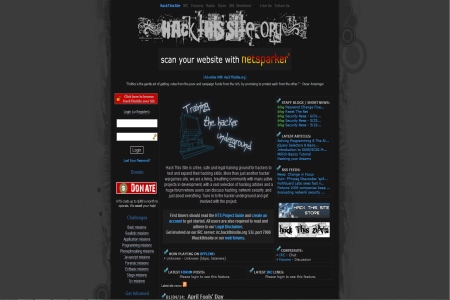
    HackThisSite: One of the wargame sites that has been the longest around, with a great hacking community that will help you expand your skills, you can chat with like minded people in HackThisSite forums or in the old school hacker’s communication tool IRC. This site stands out from the crowd with their extensive amount of free learning resources.

    cyberwar game HackThisSite
    cyberwar game HackThisSite

    Hacker Project: A fictional hacking game set in the future where governments have gone bankrupt and multinationals take over the World stopping free flow of information. Your job will be to return power to the people by infiltrating corporations and use their information technology network against them. This site is  for entertainment, you don’t hack anything for real, but the game is realistic.

    HackerForEver: Text based browser game revolving around the dark world of hackers, from the good white hackers up to the bad black hacker guys. You can choose what side you would like to be on, the game has various clans you can join and a community. You will not do real hacking here, just a simulation, games like this serve as introduction to the hacking slang world, suitable for people of any level.


  • Email providers connection logs table

    Email providers connection logs table

    Last week I emailed 14 different email providers and identifying myself as a blogger I asked them about their connection logs retention policy, here are the answers:

    Would it be possible for you to let me know for how long does your email service keep customer connection logs? (By connection logs I mean timestamp logs that contain computer IPs used to connect to the account) 

    Email provider Connection logs retention
    Countermail.com We keep a traffic log for 24h, the incoming external server IP-addresses are stored in this log, but the countermail users IP-addresses are never stored in this log
    Protonmail.ch The answer to your questions is fairly simple: we do not have connection logs where ip’s are matched with accounts and tracked
    Inbox.com We are sorry but we can not share this info with you because it is not considered a public information
    Hushmail.com They told me to read their privacy policy, I did and it says that Hushmail keeps connection logs for 18 months
    AnonymousSpeech.com For trial user we keep a connection log for 5 days. After this 5 days we delete them. For paid memberships we do not keep ANY log information
    Mailbox.org The specific logs you asked about are deleted after 7 days
    NeoMailbox.com Updated: It took them ONE MONTH to reply. “We keep email logs for 7 days after which they are securely wiped.”
    Cotse.net Did not reply
    MyKolab.com Unfortunately, I am not in the position to give you a concrete time frame for this. For example, deleted mails are not purged from our storage immediately but at regular intervals, usually every day at night time when there are less users on the systems. In addition to that, we keep backups for disaster recovery, but we only keep them for a limited amount of time and not forever
    Unseen.is We keep email server access logs for seven days. This is only to prevent abuse and spamming using our system
    OpenMailbox.org We keep logs 1 year to comply to local laws
    Posteo.de

    We only save IP addresses when an account is accessed using an external email client and in the process of sending or receiving emails. When an account is accessed via the webmail interface we generally do not save IP addresses.

    This data is automatically deleted after seven days. The data is only used to diagnose problems and can not be requested by authorities. Only in response to a judicial ruling in the case of a serious crime can this data be accessed.

    CryptoHeaven.org The logs are kept for anywhere from 8 to 48 hours, and that is only on the web server and not the mail system
    Fastmail.fm We normally keep logs of email and server activity for up to 6 months. This is for the purposes of diagnosing and fixing problems, which are often reported to us weeks or months after they occur. Backups and logs may be kept longer in special circumstances. For example, if a problem is taking a long time to resolve, logs relevant to that investigation may be retained. Or if a server that contains backups or logs is temporarily offline because of a fault, then those backups or logs may not be deleted until the server is brought back up. These situations are unusual, however, and when they do occur, they are temporary