Category: Security

Computer Security

  • Hide data inside JPEG images using SteganPEG

    Hide data inside JPEG images using SteganPEG

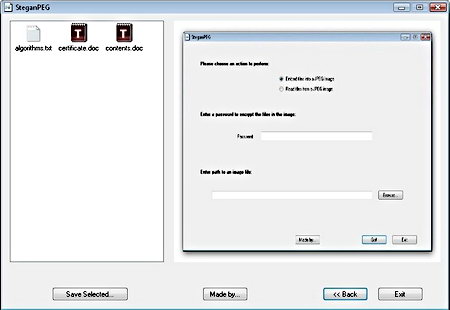
    With SteganPEG you can hide files inside JPEG images without altering them to the human eye, being JPEG one of the most common file formats that exist that will reduce suspicions when you upload it to a website, facilitating covert communications, flickr is an example of a website that can be used to share secret stego messages embedded in pictures with nobody noticing.

    You can password protect your files, even if someone analyses the image they will still need to know the passphrase to see the data although there is no mention of encryption being used to cipher the file, this is still better than nothing and enough for low security needs, another nifty feature of this open source stego software is that it shows you how much space remains available on a picture to hide data inside it.

    The hidden data you insert inside the JPEG is compressed first, you can hide any kind of file, text, images inside images or executables but the bigger the file the more difficult it will be to fit in inside the JPEG.

    This steganography software only supports DCT based Baseline Sequential JPEG images, the most widely used JPEG compression, when you download SteganPEG you also get the source code and can look at or modify it at your own discretion.


    SteganPEG open source steganography
    SteganPEG open source steganography


    Steganography vs. Cryptography

    While cryptography ciphers your data and makes it available to only those with the right passphrase, steganography hides your confidential files making it impossible for someone to investigate and try to extract something whose existence is not obvious.

    Steganography does not use cryptography per se, it uses the spare bits that files have and use them up to hide data inside them, it is possible to detect and extract that data with specialist steganography detection tools that is why high security steganography software will also include encryption.

    For those living under oppressive regimes and subjected to strict communications monitoring, and those living in places where they must hand over their encryption password to the authorities to avoid punishment, steganography is the ideal covert communication method, it has long been used by spies from worldwide agencies, Russian spies in the US in 2010 used steganography software to post photos on the Internet with embedded messages hidden in them.

    Get SteganPEG from Softpedia

  • List of programs to digitally sign PDF documents offline

    List of programs to digitally sign PDF documents offline

    A digital signature consists of a mathematical scheme to establish the authenticity of a digital message or document and protect it from tampering, it normally uses PKA (Public Key Algorithms) to digitally sign the message or document.

    A digital signature uses asymmetric cryptography and it provides with more security than a handwritten signature because it attests to the identity of the signer as well as the integrity of the document, the slightest change in the document will make the digital signature verification process to fail.

    Offline software to digitally sign documents

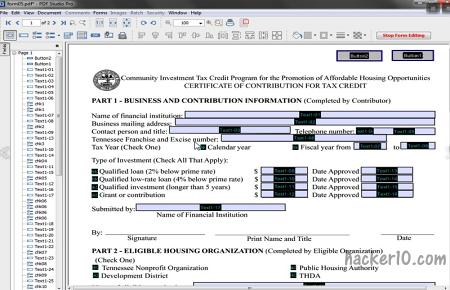
    PDFStudio Pro: Paid PDF managing software for Windows, Mac and Linux, the main function of this program is to create and interact with PDF documents but it has the capability of digitally signing them. Digital signatures can be created or imported from an existing stamp, PDFStudio can batch process multiple PDF, optimize, add watermarks, annotate and password protect in between many other things, and all round very complete PDF editing program.

    PDFStudio Pro digital signing documents
    PDFStudio Pro digital signing documents

    JSignPDF: Open source freeware program to digital sign pdf files with a visible a digital signature, image or description. It supports batch processing although only via command line, JSignPDF timestamps the document and allows you to choose the hash algorithm and certification level. JSignPDF can be used as a standalone application or as an add-on in OpenOffice.org, you will need Java installed in your computer to use it.

    JSignPDF free digital signature software
    JSignPDF free digital signature software

    Portable Signer: This free open source application based in Java, and platform independent (works in Linux, MAC and Windows) will digitally sign your PDF documents using standard X.509 certificates, the signed documents are read only. This program to digitally sign documents is made available by the Municipality of Vienna (Austria) and its signature block complies with Austrian e-government rules.

    PortableSigner-PDF-digital-signatures
    PortableSigner PDF digital signing software

    PDFsigner: Windows PDF signing software that creates digital signatures using standard X.509 certificates and it also verifies digital signatures to make sure that a document has not been tampered with. Its digital signatures are visible with most PDF readers and there is support for smartcards and signing documents in bulk, the interface is very intuitive and easy to use even for novices.

    PDFSigner digital signing software
    PDFSigner digital signing software
  • SpiderOak, online data back up with encryption

    SpiderOak, online data back up with encryption

    When computer disaster strikes you will want to be sure a back up copy of your data exists, forget about trying to recover data from a dead hard disk, drives do not last for ever and the most cost effective and trouble free way to be prepared for when your hard drive dies is by storing a data back up copy, at the very least in weekly intervals.

    At the moment the cheapest way to back up an operating system is offline using an external hard disk, the downside is that in case of a fire breaking out it would also destroy your offline data backup, that is why big corporations tend to keep their data backups stored at different buildings, the home user does not have this luxury but we can use online data storage.

    With SpiderOak you can backup, synchronize, and share data across all of your computers, there is a free and paid for option, the only difference between them being that in the free option storage space is much lower.

    SpiderOak encrypted online data storage
    SpiderOak encrypted online data storage

    The way I have been using SpiderOak until now is by creating a folder named “online backup” and pointing SpiderOak to upload and synchronize all of the data inside it. The initial backup takes quite a while, particularly if your upload speed is slow, once the initial backup has been done this back up utility runs in the background and automatically syncs any data changes inside that folder, which is much quicker, you can instruct SpiderOak to start automatically when you boot Windows, for what I have seen it runs on very low resources.

    Everything uploaded to SpiderOak is done via secure SSL, their servers keep all of the data encrypted with the unbreakable AES256 algorithm, even if someone managed to break into their server they would not be able to read the data. You create the encryption password in your computer, SpiderOak staff never has access to it, if you lose your password there is no way to recover your data, it has been made this way for privacy reasons, if a member of staff went rogue your data would still be safe.

    You can share your files stored online with others creating a local “Share room” marking chosen specific files as shared and SpiderOak will give you a link leading to that shared room/folder that can be protected with a password. Now you can send the link to whoever you want and share your files safely, your local “Share room” is automatically synchronized with any changes you make and SpiderOak software works in Windows, MAC and Linux.

    There are many online data backup solutions out there but very few of them use encryption and take security as seriously as SpiderOak does, up to the point that no even themselves can access the data they are storing. Being compatible across computers and running on very low resources makes this online backup service is one of the best for security conscientious people.

    Visit SpiderOak homepage

  • Automate software updates with Secunia Personal Software Inspector

    Automate software updates with Secunia Personal Software Inspector

    This free PC computer security tool comes from one of the World’s leading providers of computer vulnerability assessment companies, Secunia Personal Software Inspector (PSI) aka Secunia PSI.

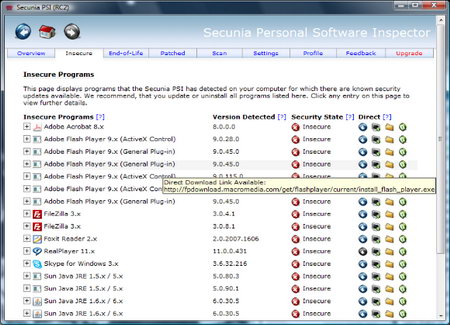
    After installing Secunia Personal Software Inspector it will scan your computer and provide you with a comprehensive list of all the software present checking if it can be updated to a newer more secure version, if possible, you will given direct links to patches and program updates.

    Secunia Personal Software Inspector runs in the background by default, constantly monitoring new applications and updates, its advanced interface displays all kind of information about your installed software, if this overwhelms you, it is possible to switch to an easier to use simple interface only listing easy to upgrade software.

    A “Secure Browsing” tab reports your browser version and plugins, ActiveX controls, Firefox addons installed in the browser, another tab called “End of Life” gives you quick access to Add/Remove Programs, the listed software’s folder, and online references, the whole process comes with complete instructions and explanations about how the software works giving you peace of mind.


    Secunia Personal Software Inspector
    Secunia Personal Software Inspector

    Trojans and viruses routinely exploit old unpatched software, make sure to run this free home computer vulnerability scanner and combine it with a good antivirus and firewall, it should be enough for the average computer user to avoid getting hacked, it makes for a nice alternative to CNET techtracker.

    Visit Secunia Personal Software Inspector

  • iSpy converts your computer webcam into surveillance CCTV

    iSpy converts your computer webcam into surveillance CCTV

    This free open source software will use your computer webcam and microphone for remote surveillance, you can use the built-in webserver on iSpy website to view captured media. If you need to monitor your home while you are away just leave your computer on and iSpy will stream live images to you of what is happening, including sound, if you wish so you can use your smartphone to monitor the live cam. All captured media is compressed to flash video.

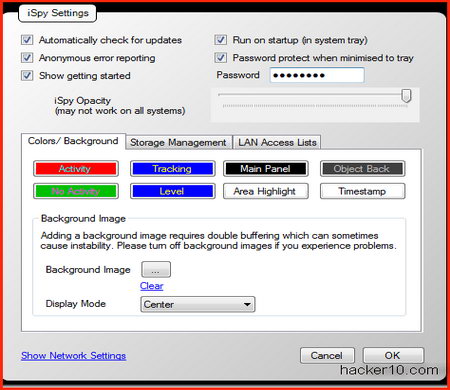
    iSpy webcam surveillance software
    iSpy webcam surveillance software

    iSpy will detect movement and send you and alert via SMS or email when that happens if you want to,webcam movement detection areas can be customized to point towards an specific location such as the frontdoor.

    iSpy latest supported features

    • Add unlimited number of active floor plans
    • Control PTZ enabled IP cameras
    • Listen to and monitor remote microphones live over the network
    • Pair video and audio sources for capturing movies with sound
    • Upload to YouTube – auto upload captured content

    Possible uses for iSpy are to watch over your family, pets, and business and set up a security system at your home when you go on holidays.

    Premium surveillance cam alternatives to iSpy

    If you need a premium alternative to iSpy, perhaps to secure your business, then check out VitaminD and GoToCamera. If you need a mobile phone applet that works the same like iSpy does, check out Spycam Lizard.

    Visit iSpy homepage

  • 4 location tracking software to stop laptop computer theft

    4 location tracking software to stop laptop computer theft

    How does antitheft laptop software works?

    After installing the location tracking software it will automatically start whenever you boot your computer. In some cases when someone attempts to steal your laptop either the power cord or a USB flash drive will get disconnected from the laptop and this will trigger a loud siren. The alarm can only be stopped when you unlock the laptop by entering your password, you can normally configure the alarm sound and include a recorded voice with a theft warning.

    Other anti mobile device theft software does not have an alarm and it will attempt to connect to the Internet and send out its location to a central server together with screenshots instead, the software will have learn the laptop location by using GPS if present or the IP the laptop is using, with these details the police should be able to get a search warrant for that location.

    Whatever solution you choose to protect your computer from theft, remember that this is a last resort solution, security is comprised of a multi layered approach, you should not rely on location tracking software to protect your data, use it in conjunction with physical security and encryption.

    Software to protect your laptop computer from theft

    LAlarm: This free laptop antitheft software is free for personal use and only requires to buy a license for business use, LAlarm consist of five alarms: theft alarm, perimeter alarm, inattention alarm, disk alarm and battery alarm, users should be careful with the file destruction feature in case they accidentally trip the alarm as it will automatically destroy selected files after the configured conditions are met.

    When the laptop is disconnected from the power outlet or removed from the table, LAlarm will emit your chosen loud alarm sound, you can download voice warnings to be played from LAlarm developer website.

    LAlarm free laptop antitheft software
    LAlarm free laptop antitheft software

    LoJack: Paid software able to locate a stolen laptop, lock your computer issuing a remote command with an optional customized message that will show on the screen for the person who has it, erasing the whole hard drive or selected files the next time the laptop connects to the monitoring centre and if you are certain that the laptop has been stolen LoJack will log everything needed to share that information with local law enforcement allowing them to locate the home where the computer IP came from.

    LoJack antitheft laptop software
    LoJack antitheft laptop software

    Prey: Open source antitheft software for PC, MAC, Linux and mobile phones. If you computer is stolen this laptop computer security software will use the nearest WiFi hotspot to triangulate its location, take a picture of the thief with your laptop’s webcam and lock down your PC.

    This free laptop protection software is free but it has a premium plan with extra features for more demanding users and business use.

    Prey laptop antitheft software
    Prey laptop antitheft software

    LockItTight: Free laptop protection software that can be installed in any computer or mobile device to track its location in case of theft, it can take screen captures using the mobile device webcam and log the keystrokes (in development), all of this data is sent to a central server.

    Like all the other antitheft laptop software on this list, LockItTight survives on the fremium model, where they offer a premium version of their services with more features next to their free version.

    LockItTight mobile device tracking software
    LockItTight mobile device tracking software
  • Hardware authentication systems: Swekey vs Yubikey

    Hardware authentication systems: Swekey vs Yubikey

    A double authentication login system using a hardware key is the best security system for people who travel and/or use public computers at Internet cafés and libraries, there is no absolute way to secure your personal data and privacy on a computer that isn’t yours, there are too many things that can wrong in a networked computer where you do not have administrator rights, outdated antivirus software, hardware keyloggers, network password sniffers, they are all dangers that could be there and you can not effectively protect against any of them.

    Using a hardware token to login into websites, together with a password, even if someone steals the passcode it will be useless for them, most passwords are stolen remotely without the user knowing about it, with a hardware authentication token you are likely to notice the pass key is missing and can then revoke it.

    Swekey double factor authentication system

    The Swekey is an authentication hardware token in the form of a USB thumbdrive, in order to access a web application such as webmail, Internet forum or online banking you need to have Swekey plugged in first and then enter the correct password for the service, this means that if anyone manages to steal your password they will not be able to login because they will still need to have your Swekey.

    The Swekey is not a regular USB key, it generates One Time Passwords, and it can’t be hacked because the private key that is used to generate the OTP scan not be read (physical protection).

    Swekey is operating system and browser independent, compatible with Windows, MacOS and Linux whether you use the Internet Explorer, Firefox or Opera browsers. For other more obscure operating systems like Solaris and FreeBSD, Swekey should also work if libusb is present.

    SweKey USB hardware token plugged in
    SweKey USB hardware token plugged in

    When you plug in the Swekey into the USB port your user name is automatically filled in and you are automatically logged out when you unplug your hardware token.

    Swekey is integrated in most popular open source projects like Drupal and Joomla, well known Content Management Systems that power community websites. Internet forums powered by vBulletin, phpBB also support it, and so do open source webmail platforms like RoundCube and Squirrel.

    There are specific plugins for Swekey but it can be used with any OpenID compliant web site, the main problem with hardware authentication tokens is that they need to be supported by the website you use, OpenID already has thousands of sites behind it.

    http://www.swekey.com

    Update 2015: Swekey is no longer in business, link erased.

    YubiKey double factor authentication system

    The YubiKey will calculate a new unique passcode each time it is used making it impossible to copy and illegitimately re-use a passcode.

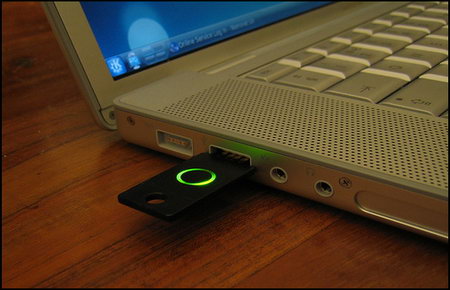
    To use this hardware token you just plug it into a USB port and it will act like a USB keyboard compatible with Windows, MacOS and Linux. YubiKey has one button on it, that when you press it will generate a one time 44 character password.


    YubiKey hardware token plugged in
    YubiKey hardware token plugged in

    In order to log into a website you must have the physical Yubikey token plugged into your machine and press the button on it to generate a new One Time Password. The generated one time password and can’t be reused or copied and pasted, this prevents malicious hacking attacks if someone captures your login credential. This hardware authentication system can also be used at OpenID websites with YubiKey support enabled.

    Why use hardware authentication security

    All of these three hardware security tokens are low cost and highly secure USB authentication that I would consider buying if I had to use multiple shared computers, if you only use your home computer for Internet access, having your antivirus and firewall updated daily and configured correctly together with a good online password manager should suffice enough people.

    The most paranoid can add double authentication for an extra layer of security, I can see its utility for home users too, if someone hacks your favourite website database and gets your username and password out of it they will not be able to do anything with the password without the physical hardware authentication token to login.

    These hardware authentication devices all have a way to revoke the key in case you lose it, none of them uses a battery which makes them highly reliable and they all use a random One Time Password to login.

    I could not see any major differences between these three hardware based authentication systems, prices and security are much the same, probably the most important deciding factor when picking one of them is to make sure that the websites you normally visit have support for the specific hardware authentication token of your liking.