Drobbox is an online cloud storage service with millions of users, they claim to keep the data encrypted but their terms and conditions state that (using slightly different wording) there is a backdoor to your private data to allow USA authorities to access it with a subpoena. Besides being unethical it is also a security risk because any backdoor that encryption has can be exploited by the bad guys, without one your data will be more secure from malicious hacking.
Computer hacking forensic investigator
In case using Dropbox back-doored cloud storage does not put you off, a command line computer forensics investigation tool targeting Dropbox users has been released by Architecture Technology Corporation, the tool takes advantage of Dropbox database files and it is meant to be used by computer forensic experts to aid them in their investigation. In real life, anyone with a little Python and Unix knowledge, bad and good people alike, can use this free tool to get data out of Dropbox user’s.
Dropbox Reader can get the user’s email address, Dropbox identifier, software version being used, a list of recently changed files stored in config.db, even without the actualy physical files, names many times reveal clues about the files content, Dropbox Reader can also get a list of files marked for synchronization and the shared directories, stored in filecache.db.
When Dropbox is installed it makes changes in the Windows registry, an investigator should be able to find out that Dropbox has been previously installed by just looking at the Windows registry keys and get some information out of Dropbox even when this has been uninstalled, when uninstalled Dropbox removes the database but keeps the installation directory in place.
Antispyware software should be used in conjunction with antivirus software and not as a replacement, antispyware and antivirus have different functions, antivirus software for example, does not warn you of tracking cookies, good antispyware software will not cause you any incompatibility when you run it alongside an antivirus the developers will have designed it with that in mind.
Free antimalware tools
SuperAntispyware: Light on system resources, it has been designed not to slow down your computer during spyware scanning, it works alongside anti-virus software without compatibility problems, a very thorough antispyware tool, scanning your files, computer memory and Registry, it’s custom scanning engine allows you to check external USB devices like thumbdrives for spyware and exclude folders you are known to be safe in order to speed up the antispyware scan.
SuperAntiSpyware menu screen
MalwareBytes: Multilingual antispyware software that can detect spyware before installation and remove it if the computer has already been infected, the free basic version is very limited, it has no real time protection and no heuristics against zero day threats.
SpywareBlaster: It prevents installation of spyware, adaware and other malware designed to get into your system and invade your privacy. It doesn’t use any significant CPU or computer memory and will not slow down your computer while it protects your Internet browsing session, capable of running along other antivirus and firewall software.
SpywareBlaster malware scan
Spybot Search&Destroy: This malware protection tool provides complete information on any spyware it finds, it works in the backgrouond protecting you against new threats not found by your antivirus software, in between others, it protects you against toolbars installing in your browser without your knowledge and homepage hijacking.
SpywareTerminator: Real time HIPS protection, after scanning your computer SpywareTerminator will show you a list with easy to understand information of all of the threats it has found, the entries are classified by risk level and the user can decide what has to be removed, integrated with ClamAV open source antivirus which is included with the antispyware software download.
Lavasoft Ad-Aware: The free version provides basic behaviour based heuristic technology able to detect zero day threats, rootkit removal, integrated with Windows Security Center, spyware scanning can be scheduled and customized pin-pointing Ad-Aware to single files or external hard drives, you can submit suspicious files to Lavasoft technicians for analysis with just a click.
Beware of fake antivirus and antispyware!
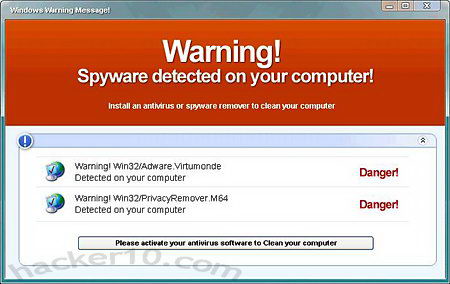
A well know multimillion scam is run by fake software pretending to be a legitimate spyware removal tool that is not able to detect anything and makes computer users believe that they have been infected by malware by showing them window replicating a computer scan with annoying popups and scary messages, in order to remove the non existent malware from the operating system the user must to buy an “upgraded” version of the software which then removes the fake malware warming message.
Fake spyware alert
Stay out of brands you know nothing about, if you believe your system has been infected by spyware do as much research as possible on the Internet about the kind of malware you have, before upgrading to any paid for software whose brand you know little about inquire around first and most important of all, never install any pirated antivirus software in your system or buy it from dodgy sources, not only the updates for counterfeit antivirus will eventually stop working, but most times warez cracked antivirus software also comes embedded with a virus.
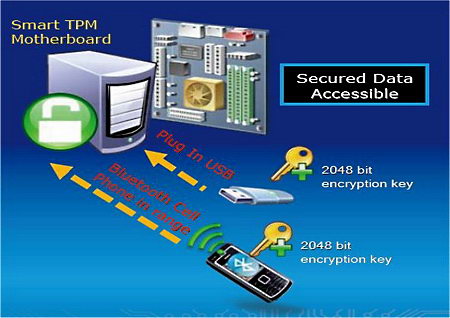
Trusted Platform Module hardware contains a built-in chip with cryptographic capabilities able to perform RSA 2048 bit public key encryption and decryption with its own internal hardware engine for SHA-1 hashing, the private encryption keys are created within the TPM chip and never exposed to outside elements, TPM chips are usually found in high end notebooks, many of the of laptops using a fingerprint reader to login are linked to the motherboard’s TPM security chip.
A Trusted Platform Module chip stores digital certificates some of which are file encryption and login authentication keys, the data can only be decrypted by the TPM chip itself, one of the requirements for a notebook to contain a TPM chip is that the chip has been permanently attached by soldering it down to the motherboard, tampering mechanisms, e.g. tampering proof tape, are recommended but not mandatory.
A TPM chip can optionally forge a key tied up to specific computer hardware, aka “sealing” a key, by creating a snapshop of the computer values and hashing them (aka checksum), where a TPM sealed key exists, every time the computer boots file hashes are compared and if they do not match the computer will not boot, removing the hard drive from the device and plugin it in somewhere else will make it unbootable.
Trusted Platform Module encryption diagram
How to enable a TPM security chip
Not all computers have a TPM chip, it is normally found in enterprise level laptops, most of them come with the Trusted Platform Module chip disabled by default, you will need to enable it in the BIOS.
To enter the BIOS click on Del or F2 (depending on BIOS brand) while rebooting the computer, the TPM chip settings are found under “Integrated Peripherals” or in a separate “Security Section” that some motherboards have, choose to enable it, save the BIOS settings and boot your operating system, you will now need to install the motherboard device driver for the TPM chip, the motherboard manufacturer provides you with it.
TPM chip security considerations
Full disk encryption software like Bitlocker and PGP Whole Disk Encryption can be used with a TPM chip, but some basic security measures must be taken, like establishing ownership of your TPM chip by setting up its own unique password totally independent of other passwords. Because the private encryption keys will be stored inside the TPM chip, if you replace the computer motherboard or reset it to factory settings you will no longer be able to access your fully encrypted operating system.
Embassy Trust Suite, a business security suite that comes with most Dell business computers and can implement full disk encryption, makes use of the TPM hardware chip to generate encryption keys.
This free open source application will quickly lock your Windows computer while you are away doing something else and do not want to switch off the computer.
WinLockr is an easy to use application that besides locking the screen, it will disable the mouse and keyboard for extra protection, a key combination enables it again. The locked screen is replete of appropriate details, informing the user at what time the computer screen was locked and the failed unlock and shutdown attempts, WinLockr also protects against computer shut-off. If someone discovers your password to unlock the computer it will not be enough, they will also need to know the key combination to activate the keyboard to enter it in the login screen.
WinLockr to lock Windows desktop
If you choose it, you can set up WinLockr to unlock and lock your computer using a USB key instead of a password this makes locking Windows very quick and impossible for others to see what password you typed in since there isn’t one. Windows accounts can be set up with a password and lock the screen while you go away but it doesn’t have all of the features that WinLockr has, if you work in an office environment you will be better off protected using it instead of the default Windows lock screen.
With hard disks getting bigger in size and thousands of files in our computers it is easy to leave behind personal data that could be used for identity theft, Identity Finder renamed Identity Sweeper stops the risk of data leakage by finding and securing private information, it would be a good idea to run something like this on your hard disk before taking your laptop to the repair shop or allowing anyone who is not your family access to your computer.
Identity Sweeper will scan your computer files searching credit card numbers, dates of birth, passwords, bank account numbers, driver license, phone numbers and other personal data that is often used by identity thieves, it can be used to search for country specific data like the Canadian SIN numbers, British NHS identification and Australian TFN account numbers.
After the scan the software will show you all of the data it has found on a detailed preview pane with statistics and it will offer to securely wipe it using US Department of Defense standards (DOD 5220.22-M), any wrongly classified data can be filtered out from future scans by marking it as ignore, if you need to have the data in your computer you don’t necessarily have to erase it and can use Identity Sweeper to encrypt it, the applications integrates with Windows Explorer creating context menu options for easy access.
Some of the locations that will be scanned for sensitive data include the Internet browser temporary files (IE and Firefox), cookies, messenger logs, text documents (.docx, .pdf, .txt, .rtf, .html), compressed files (.zip, .gzip, .rar, .bzip), email messages (Windows Mail, Thunderbird, Outlook Express) and others.
Identity Sweeper credit card protection
Identity theft contains all of the tools that are needed by those not using full disk encryption, a secure data wiper, file encryption and a password manager with the ice on the cake being the hard disk scanning for unsecured data useful to identity thieves. The free edition of this software is pretty basic, it comes with a data shredder and it only scans for credit card numbers and passwords, if you want the whole suite with all of the features you will have to buy it.
A VPN tunnel sets up an encrypted data connection in between your computer and a remote server, any request you make to download or upload data, like viewing a website or making an FTP transfer, will be routed through an encrypted tunnel stopping third parties from eavesdropping on the content, your own ISP will not be able to log and find out what sites you have visited, all they will see it is the address of the remote VPN server your are connecting to and the port used.
Virtual Private Networks are often used by remote workers to connect to their company server and by home users who want to stop third parties monitoring them, VPNs get around Internet censorship, protect your Wifi connection at public computers and give you a different computer IP located where the VPN server resides.
A Virtual Private Network can not speed up your Internet connection, it will limit the available bandwidth to that of the server, you will never get more bandwidth that the one the VPN server has available, if the VPN is located far away from your country the ping rate will suffer, for best performance, always try to use a VPN as close as possible to your home.
Some insecure VPN protocols are used in conjunction with IPSec, a protocol to secure traffic on IP networks, IPSec will implement encryption and authentication in VPN protocols that lack it.
Virtual Private Network different protocols
Point-to-Point Tunneling Protocol (PPTP): Commonly used in Microsoft products, the PPTP protocol specification does not describe encryption and authentication, it simply tunnels the traffic. Microsoft runs an improved version of the PPTP protocol with encryption, supporting 40-bit and 128-bit, but numerous vulnerabilities have been found and PPTP it is not considered secure, this protocol should be used as a last resort.
Layer Two Tunneling Protocol (L2TP): An improved version of PPTP, not secure by itself but often implemented with IPsec, L2TP/IPsec encrypts the data transmission and also provides integrity. Some smartphones like the iPhone will not work with OpenVPN unless it has been jailbroken, you can use L2TP in those cases.
VPN tunnel encryption
Layer 2 Forwarding (L2F): Developed by Cisco, this tunnelling protocol does not provide encryption, L2F was designed to tunnel PPP traffic.
Secure Socket Tunneling Protocol (SSTP): It encapsulates PPP or L2TP traffic through an SSL connection, supporting AES encryption, this protocol is only available in Windows since Windows Vista SP 1 version, it has been integrated into the remote access architecture of Windows, SSTP VPN tunnels can be established on top of IPv6 based networks.
What is OpenVPN?
OpenVPN is not a VPN protocol, it is an open source application to establish a VPN tunnel, it uses SSL/TLS encryption and it can get through firewalls.
OpenVPN software uses a preshared key or digital certificate to authenticate with the VPN server, many VPN providers provide their own VPN client, this customized VPN software is based on the original open source OpenVPN program, the typical VPN provider adds some extra features, e.g. server location map, brands it with its name and makes an eye candy interface, the security and inner workings principles remain the same.
Virtual Private Network and Email
Because many VPN services provide a no logs service, some spammers take advantage of it to send mass emails, many VPN providers block sending of SMPT email through the tunnel.
To stop spammers, VPN services allowing sending of email will limit the number of messages that can be sent in a given time, other VPN services will whitelist your chosen SMTP to allow that specific customer to send email through an specific service that it is not an open relay which is what spammers use most, a solution to send email through a VPN is to use webmail.
Nobody knows their exact date of death, as we invest time and money online storing digital data you should write a will including details on how to access your online account IDs and passwords alongside any offline financial bequeaths.
There are dozens of free services offered by third party companies, blogs, social networks, photo sharing, etc, nobody ever thinks about what will happen to that when you die, name in your will what social networks you belong to as this sometimes has sentimental value for family members, they might also have monetary value, email addresses used to recover a password could open the door to a Paypal or Alertpay account.
Hotmail: If you provide a death certificate and proof of power of attorney with a photocopy of your Government issued ID, Hotmail allows relatives to order a CD with all of the messages in the deceased user’s account, the email password account will not be provided.
Gmail: To get a copy of all of the messages in the user’s account you will need a death certificate, proof of power of attorney, photocopy of you Government issued ID and a copy of an e-mail the deceased has sent to the person making the request.
Yahoo Mail: Yahoo’s policy states that they will not grant access to a deceased users’ accounts unless there is a court order from a judge but the deceased user’s next of kin can ask for the account to be closed emailing them the death certificate.
Facebook: It will follow a family’s wishes to take down a deceased user’s profile or keep it in a memorial state removing status updates and only allowing those whom he/she had befriended to view the profile and post comments on it.
Flickr: If the account is open to the public Flickr will keep it up, any photos marked private will remain that way and family or friends will not be allowed to access them.
Gold treasure legacy
Many companies do not have a policy for when someone dies, it is always best that you always write in your will details of your valuable online assets, for example, if you have an online Casino account with money inside, or a Paypal account make sure your relatives know about it and they will be able to access the funds when you pass away.
To find more information about what requirements companies ask to access an online account of someone who has died visit the site below.