Category: Security

Computer Security

  • Share self-destructing files and notes with dstrux

    Share self-destructing files and notes with dstrux

    Dstrux is an online platform to share notes and files that will self-destruct on the date you specify and tracks when somebody has seen the message you sent to them. The files and notes you share are encrypted in your browser before uploading them to dstrux servers with SSL, the system stops everybody, including dstrux, from seeing what you are sharing.

    This service can be used to share messages with other people while not exposing the data to Internet wire-tapping, but the main idea is to be able to exchange personal data in social media like Facebook or by email without having to upload photos and messages to websites that will archive your messages for years and share it with third parties.

    Self-destructing files dstrux
    Self-destructing files dstrux

    Signing up for a dstrux account can be done with your Facebook account or entering an email address and password, linking your Facebook account with this service means revealing your identity so I selected email signup instead.

    After login in you will see a simple interface with “Received“, “Shared” and “Forwarded” tabs and a notification alarm bell on top that tells you the date and time a contact has seen a message you sent to them with the date it was destroyed. If you wish to share a file or note with somebody upload it from your computer, set the timer to days,hours or minutes and optionally add blurring to the photo. Blurring stops the receiver from being able to capture a full screenshot of the picture you are sharing, when turned on, the photo will only be visible by sections as you hoover your mouse over it.

    The receiver does not need an account with dstrux to be able to read the messages but dstrux encourages them to open one to reply to you in the same fashion. Note that destroyed files will still be available in your “Shared” tab, clicking on them will show metadata about who has seen them, you can delete obsolete files clicking on the trash can.

    This is an easy to use service, my only criticism is that sharing integration has been made with Facebook and email, I would have appreciated an open link that I can post in Usenet or an online chatroom to share with a group of people that don’t know me.

    Dstrux appears designed for one to one data sharing and privacy in mind, I would not suggest this service for anonymity or sharing files in between groups.

    Visit dstrux homepage

  • Free encrypted webmail service Tutanota

    Free encrypted webmail service Tutanota

    Tutanota, meaning secure message in Latin, is a German based free webmail service with end to end encryption. Your email messages, attachments and subject are all encrypted in your browser using Javascript with a cipher combination of RSA 2048-bit and AES-128-bit before uploading data to Tutanota mail servers in Germany. The encryption keys remain in your power at all times, the company can’t see anything in plain text, they can’t restore your password or reset your account, anybody forgetting their password loses access to the messages.

    If German authorities ever serve Tutanota with a court order to hand over a customer’s email inbox content, the company will of course comply with the warrant but all they will be able to deliver will be ciphered files with no decryption key. According to the email exchange I had with Matthias Pfau, one of Tutanota founders, they do not log IP addresses and only keep timestamps, the details are stored anonymously without any reference to your user account. Each mail in your inbox also contains the mail addresses of the recipients in clear text, kept until you delete the email, Tutanota has some ideas about how to hide the recipients address but it has not been implemented yet.

    Encryped webmail Tutanota
    Encryped webmail Tutanota

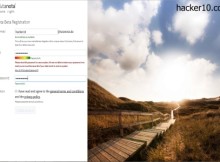
    You can open a Tutanota email account with minimal details, choose a username and password and that is it. During the very short registration you will find a link to a Wikipedia page with instructions on how to choose a strong password, a coloured meter on the page lets you know if your password is secure enough to withstand brute force attacks.

    I appreciated the clean smooth webmail interface giving one click access to the different tabs and folders, with a security tab where you can see a list of of the successful and failed account logins with timestamps, no computer IPs are associated with customer accounts since no IP logs are kept.

    Sending an encrypted email in Tutanota is effortless, it does not require customers to manage encryption keys or know much about security. The system is compatible with insecure email services like Gmail or Yahoo. When you send a secure email to somebody who is not on Tutanota, instead of receiving the full text, they receive a message with a link inviting that person to visit Tutanota servers to read the encrypted email, only readable with the correct password and decrypted locally in the browser.

    By not sending the email message body, any organisation monitoring Internet traffic will not be able to intercept a copy of the encrypted data. A terrific way to stop mass surveillance on the Internet is to never let the data out on the wild web. The same security system that CIA director General Petraeus was using to communicate for an extramarital affair, he used a dead drop email account and never allowed messages to travel the Internet.

    One can assume that the CIA director has classified knowledge to know how to best avoid surveillance, and presumably General Petraeus applied that privileged information to protect his own life, it is possible to learn a lot from observing the experts and copycat them.

    Tutanota encrypted email exchange
    Tutanota encrypted email exchange

    Tutanota free email service is a major improvement over the dead letter box communication system, the company adds an encryption layer, and the people you communicate with do not have to change anything, they can securely reply to you using the same window where they are reading the received message.

    Another important security fact about Tutanota is that they hired a German penetration testing company called SySS to try to find security vulnerabilities in their mail service, like cross site scripting. Tutanota was given an all clear certificate attesting that during the network scan and manual hacking that was attempted by security experts it was not possible for SySS to access any confidential data. If that is not reassuring enough, Tutanota source code is available for download released under the GPL license, you can use it to build your own email client or check it for bugs.

    The zero knowledge approach of this email service, their no logs no decryption keys available policy, located outside of the UK and USA, very easy registration and utilization make Tutanota one of the best alternatives to Hushmail.  If I have to complain about anything, is that, not being German myself, I do not like getting a .de email address (@tutanota.de), I prefer a .com domain to stop people from assuming I am German.

    This security model is the future, spy agencies are not going to stop monitoring data travelling across the Internet, so, you just don’t send it, leave it on the server for others to  fetch, superb.

    Visit Tutanota homepage

  • The best XMPP/Jabber servers for anonymous chat

    The best XMPP/Jabber servers for anonymous chat

    Jabber/XMPP is a decentralised instant messenger using the open source XMPP protocol, there is no central server that could be compromised, the multiple nodes construct a resilient and hard to monitor infrastructure. Dozens of XMPP servers, encryption and its open source nature make XMPP much harder to wiretap or shut down than cloud based Google Hangouts, Yahoo Messenger or Skype, all USA companies known to have a NSA backdoor.

    One of Jabber/XMPP main vulnerabilities is that the server you are connected to is not trustworthy, this is a list of XMPP servers with the best privacy policies:

    5th July XMPP: Swedish privacy foundation promoting free speech worldwide, in between other services they provide an open XMPP server with Off-The-Record Messaging (OTR) support, hosted in Sweden and with logs tuned off. They warn you that file transfers are not encrypted, only text conversations are.

    Calyx Institute: A not for profit privacy and cyber-security foundation running a public Jabber/XMPP server that does not create any records of who you communicate with or keep logs of the content of any communications, this server forces you to use OTR, Off-the-Record Messaging, a cryptographic plugin that stops the server administrator from accessing plain text of your communications.

    Dismail.de: Free public server located in Germany, you can register for an account using the web interface or your Jabber client. The privacy policy is very clear about how long for each one of your details are stored, metadata has to be saved for Jabber to work, it would be impossible to communicate with your contacts without saving who they are and your Jabber ID is of course also saved. Personal details like the IP address used to create the account and the files you upload are erased after a month.

    Pidgin Jabber XMPP setup
    Pidgin Jabber XMPP setup

    Neko IM: Running a public XMPP server located in Norway, they claim that no more information is collected and stored than what is absolutely necessary, TLS everywhere is enforced and Jabber clients need to support a strong cipher or they will not be able to connect to the network. Being a free volunteer run project, this server uptime comes accordingly to this and no guarantees are made about uptime other than “as much as possible“.

    XMPP Gajim Jabber chat
    XMPP Gajim Jabber chat

    Countermail: This is a paid for service from a Sweden based email privacy company that provides the XMPP server xmpp.counternet.com with TLS and SSL encryption only available to email account holders. The username and password are randomly generated, you can not create your own, however, all XMPP clients supports “alias” or “display name” that you can manually set up and this is what other Jabber users will see.

    SystemLi: Jabber server managed by an anti-capitalist tech collective. They do not retain any kind of data and a .onion link is available for those using Tor. To avoid spam accounts registration is only possible with an Internet browser.

    About Jabber/XMPP security

    Any IM client that supports the XMPP protocol can interact with other Jabber users, a few of the best know Jabber compatible clients are Pidgin, Thunderbird and Jitsi, they can be used for videocalls and sending files, but always remember that encryption and end to end  does not mean that your computer IP is hidden. Jabber will help you protect from wiretapping with encryption but the server you use could log what you do and your contact could find out your home IP if you are not on a proxy or VPN.

    Another benefit of Jabber is that the same username and password can be used to connect with the social network Jappix, unlike Facebook, you don’t have to provide your real identity to take part in Jappix. Another way to protect your online privacy is running your own Jabber/XMPP server with a custom logs policy, it is not hard to set up an XMPP server with basic understanding of Unix, search for Prosody or Tigase to find XMPP server software to run.

    I included XMPP servers with a clear privacy policy of minimum logging or being offshore, those are the claims that the server administrators make, there is no way to verify any of them. If you are social activist RiseUp and Austici provide anonymous Jabber chat servers for people fighting for world change but they are not on the list because they are strictly for political activists.

    Sometimes privacy minded individuals set up their own XMPP server and open them to everybody, due to the nature of one man operations, instead of including here privacy servers that have little backing and less chances of long term survival it is best that you check out an updated list of all public XMMP servers at https://list.jabber.at/

  • Cold boot attack protection with YoNTMA

    Cold boot attack protection with YoNTMA

    YoNTMA (You’ll Never Take Me Alive!) is an open source tool to enhance Windows Bitlocker and Mac FileVault full disk encryption. It has been designed to protect the user from cold boot attacks. A side channel attack where an intruder with physical access to a machine retrieves the encryption keys from RAM memory.

    Cold boot attacks can be used to get access to a fully encrypted hard drive. They are very difficult to achieve once the computer has been shut down, data remanence lasts less than a minute after you power off your computer. In that time an attacker would have to open up the computer case, extract the RAM memory modules and cool them down with liquid nitrogen before extracting the keys.

    Cold boot attacks are not normally carried out by law enforcement because of the complexity and timing needed, but a cold boot attack can be easily completed if a computer is only secured with a screen lock by a user that has gone for a quick bathroom break or cup of coffee, a self executable .bat forensics file, like Mandiant Memorize, could be executed to extract the RAM memory of a fully encrypted laptop plugging in a USB thumbdrive into the locked computer, YoNTMA aims to protect you from this.

    cold boot attack RAM memory liquid nitrogen
    cold boot attack RAM memory liquid nitrogen

    You’ll Never Take Me Alive! runs in the background monitoring when your screen locks, if it detects that the power or Ethernet cable is disconnected while the machine is locked, YoNTMA immediately puts the computer into hibernation mode to remove the encryption keys from RAM, sending them to the page file on the hard drive to protect you from a thief stealing your fully encrypted laptop and extract the keys a while later. When a computer is hibernating it is not possible to execute a program from a CD drive USB port, it needs to wake up first.

    I personally feel that, if your data is so important that you need full disk encryption, it doesn’t matter if you leave the computer for ten minutes or ten seconds, you should never leave it on with the screen lock and it should be you sending it to hibernation when you need a two minutes bathroom break. But if you are the forgetful kind of person, there is no harm running YoNTMA in your computer, small things sometimes save the day when you expect it less.

    This tool will likely be the most useful for companies enforcing rules to lazy employees and not private citizens with discipline and attention to details when dealing with encrypted data.

    Visit YoNTMA homepage

  • Best programs to change your DNS settings

    Best programs to change your DNS settings

    Every time you enter a URL in your computer browser a DNS query takes places and asks your Internet Service Provider to translate the typed in letters into an IP address so that you can visit the website, this is what is called a DNS query and if you happen to be in a country that censors the Internet or practises mass surveillance the sites you visit can be watched in real time. It is also possible for a spy agency or malicious hacker to sit in the middle of DNS queries and show you a fake website when you try to visit certain URL, then proceed to capture your login and password or serve malware to your computer.

    The most common use for DNS monitoring it is Internet filtering, schools and companies do this to fend off adult material and the Chinese Great Firewall does this to block news websites about the Tibet.

    The programs below come preconfigured with dozens of free DNS servers, a few of them have built-in parental controls to protect your kids, others offer censorship free DNS queries and do not log any activity, with the most security conscious offering encrypted DNS queries. The advantage of using one of these programs to change your ISP DNS servers, over doing it manually, is that it only takes one click and you don’t have to search DuckDuckGo for free public DNS providers.

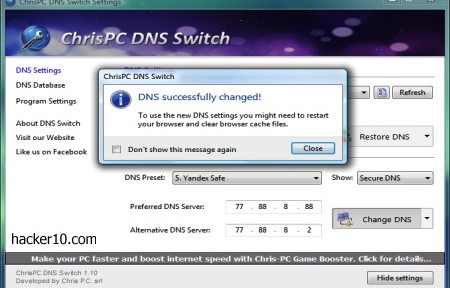
    ChrisPC DNS Switch: It comes with more than two dozen free DNS providers, one drop down menu allows you to select the network adaptor and another drop down menu classifies the DNS providers into “Anonymous” (no logs), “Family Safe DNS” (URL filtering), “Secure DNS” (malware filtering), “Regular DNS” and “Custom DNS” where you can manually enter the name server you would like to use.

    ChrisPC DNS Switch
    ChrisPC DNS Switch

    DNSCrypt Windows Service Manager: A DNS encryption only DNS changer, it helps you configure your network adaptor with one of their supported DNS encryption providers. At the moment consisting of DNSCrypt.eu in Europe and claiming to keep no logs, OpenDNS in the USA, CloudNS in Australia and OpenNIC in Japan. You are also given the option to choose UDP/TCP and IPv4 or IPv6.

    DNSCrypt Windows Service Manager
    DNSCrypt Windows Service Manager

    QuickSet DNS: A minimalist Windows utility to change the DNS settings of your computer or router. This is one of the few DNS changing utilities that allows you to change your router DNS using a graphical interface. Optionally you can also use QuickDNS from the command line.

    QuickSetDNS
    QuickSetDNS

    DNSJumper: Windows DNS graphical interface where you can select the DNS of your choice out of a long list of public DNS servers (Comodo DNS, Norton DNS, Google DNS, etc). To change DNS settings often the program lets you flush the previously applied name servers with the click of a button.Clicking on the “Fastest DNS” button will automatically find the most expeditious name servers for you.

    Name Server changer DNSJumper
    Name Server changer DNSJumper

    If you are using a VPN to encrypt your connection your ISP could still be able to see what sites you visit monitoring the DNS servers, this is know as DNS leak. To avoid this risk you should change the default DNS servers in your router or computer. For extra security you should select a DNS provider that encrypts queries, it is the equivalent of HTTPS for DNS.

    Note: If the DNS program does not have a DNS flushing button you can flush your DNS cache manually in Windows with: ipconfig /flushdns

  • Encrypted Voice over IP chat Mumble works with Tor

    Encrypted Voice over IP chat Mumble works with Tor

    Mumble is an open source VoIP program for group or P2P chat that runs in Windows, Mac and Linux, with iPhone and Android versions in beta. Mumble encryption is implemented with public/private key authentication and unlike Microsoft owned Skype, which supposedly also encrypts calls, in Mumble cryptography experts can scrutinise the code to make sure that the NSA has not inserted a backdoor or weakened the algorithm.

    Mumble is widely used by gamers due to its low latency and background noise reduction resulting in superb audio quality, but you can use it for any kind of communication. Ninety per cent of the public chatrooms I visited where gaming clans and I had to manually add activist related Mumble servers like occupytalk. For high privacy group calls you have got to manage everything yourself, including the server, otherwise a rogue operator could carry out a man-in-the-middle attack to eavesdrop on you.

    Mumble server encryption details
    Mumble server encryption details

    When you first install Mumble you will be prompted if you would like to run your own server (called Murmur) this will give you total control over who can access the chatroom but it requires staff and time. The other option is to join one of the dozens of public Mumble servers classified by countries and create there your own chatroom or rent a Mumble server from a specialist provider, they can be easily found with an Internet search for Mumble server hosting.

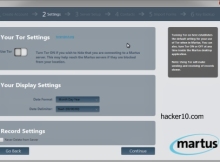
    The Mumble client Audio Tuning Wizard helps you correctly set input levels for your sound card with voice activity detection and sound quality as well as optional text to speech to read typed in messages. Messages are read with a metallic voice but you have the option of buying a professional text to speech package from a third party and add it if you are going to use the feature a lot. The second Mumble client step creates a digital certificate to authenticate with servers. The most likely is that the servers you visit will have a free self-signed digital certificate poping up a warning window that you will have to accept before joining, this is not a huge security risk if you examine the certificate before accepting it and it only has to be done once.

    Besides AES256-bit encryption Mumble has the edge over other VoIP tools because it can communicate with the TCP protocol, this is absolutely necessary for any program to be tunnelled in Tor and most VoIP programs only work with UDP, Mumble also has very low bandwidth needs, it will not clog Tor nodes and it works as Push to talk (PTT), you need to push a button to transmit voice, instead of an always on call connection.

    You can either connect directly to Tor running it in your computer and configure Mumble by going to Configuration>Network tick the checkbox that says “Force TCP Mode” and fill in the SOCKS5 proxy settings with localhost and 9050 for the port, or roll your own anonymous Mumble server for your friends renting a VPS, installing the Mumble server software in the VPS, configuring the server firewall to accept incoming connections in Mumble’s default port 64738, installing Tor in the VPS and from then on all voice calls made using that server will be encrypted and anonymous.

    Visit Mumble homepage

  • Jam Wifi signals using your wireless card with wifijammer

    Jam Wifi signals using your wireless card with wifijammer

    Originally named wifijammer is a python script to interfere with Wifi access points and disrupt the network. This can be useful for penetration testing of your own network or if you suspect that spy wireless cams are around in your premises. There are online shops selling hardware wireless jammers too but they cost additional dollars, wifijammer is a simple application that anyone with a laptop and basic Linux knowledge can use. This kind of applications must be used with caution, you need to be careful not to interfere with a network that is not yours or risk arrest.

    For this jammer program to work your wireless card needs to be able to inject packets to the network. You will have to learn your wireless card chipset, running the dmesg command in Linux will often show this information, or run lsusb if you are using a wireless USB dongle. With the obtained information you can then search on the Internet to find out if the card is suitable to run aircrack-ng or any other WPA cracking utility, if the wireless chipset can run a WPA cracking tool it means it is able to inject packets on a live network and it will work with wifijammer.

    Wireless Access Point hacking
    Wireless Access Point hacking

    The jammer will automatically hop in between channels every second to determine all possible targets, after initial identification it will start jamming the signal sending constant deauthincation packets to the access point. This is a way to disassociate connected computers from the access point, cutting off their wireless access. wifijammer does not perform any denial service attack but a disconnection, the client is able to reconnect but as long as the attacks runs wifijammer keeps telling the access point to disconnect the client, with the same result than a denial of service attack without neededing that much bandwidth or resources. A benefit of getting a client to constantly re-authenticate to the access point is that it might be possible to capture the WPA2 handshake and gain access to the network.

    There is another application to jam Wifi access points found in the WebSploit framework, wifijammer has the advantage of being a very small script that should run in any operating system where you can install Python.

    If an access point has MAC filtering enabled you would have to spoof the MAC address of a client first before deauthentication packets are accepted. Having said that, expensive enterprise level wireless access points are able to detect continuous death requests and they will block you.

    Visit wifijammer homepage