Category: Security

Computer Security

  • Freeware screen lock Eusing Maze Lock

    Freeware screen lock Eusing Maze Lock

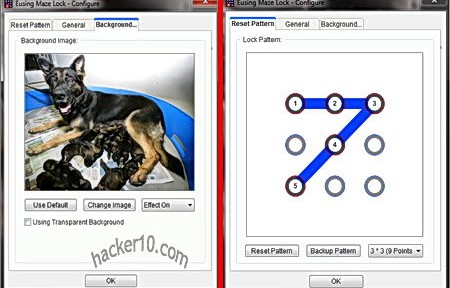
    Eusing Maze Lock is a free pattern based screen lock to stop people from accessing your computer while you are away, the unlocking mechanism consists of nine dots inside a grid that have to be connected in a certain order with the mouse to unlock the screen. This type of screen lock is often found in smartphones, it is commendable for this company to bring a security tool that does not require you to remember yet another password. The unlocking pattern is easy to remember if you use it daily, otherwise a back up copy can be kept in a safe place, or uploaded to your email account so that if you forget the unlocking pattern diagram you can restart your computer or look at the online back up copy using another device.

    The program will autolock the computer when idle, the background lock can be transparent or set to any image of your choice, the configuration tab allows you to specify the inactivity period before the computer screen locks, and optionally lock the keyboard or disconnect the computer from the Internet when the screen lock is activated, this stops people from messing around with your data if you have a document open in the background. If anyone attempts to get into your computer using the wrong pattern code a loud alarm siren sounds displaying a custom message on the screen and the computer will go into lock down for in between one and three minutes before any other unlocking attempt can be made, or alternatively the machine will shut down, the choices can all be set inside the configuration tab.

    Free screenlock Eusing Maze Lock
    Free screenlock Eusing Maze Lock

    This is an excellent screen lock that does all you need to protect a computer located in a shared room, but if your adversary is a state or corporation entity they will have the resources to acquire professional computer forensics software, like Passware Kit Forensics, able to get through any screen lock in a matter of seconds using your USB port and the autorun feature to execute a script mirroring your hard drive data or extract RAM memory even with the computer screen locked. If you adversary is low level, Eusing Maze Lock is hard to beat as a free and secure screen locker.

    Visit Eusing Maze Lock homepage

  • Dooble privacy Internet browser encrypts browsing data

    Dooble privacy Internet browser encrypts browsing data

    Dooble is an open source platform independent (Windows,Mac and Linux) Internet browser designed for privacy that comes with a secure P2P email client and serverless messenger called Interface, the browser rendering engine is based on WebKit, the same that Apple Safari uses, pages should look the same in both browsers. Dooble doesn’t need installation, it can run from a USB thumbdrive.

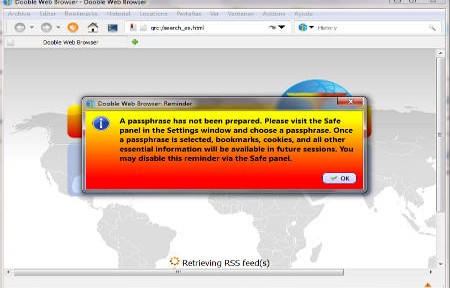
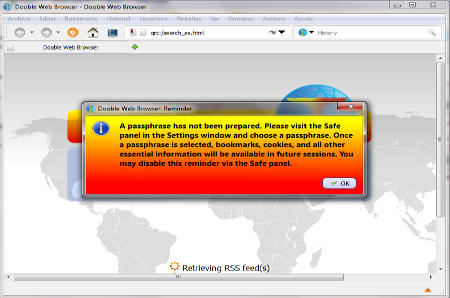
    After launching this privacy browser for the first time you will be asked to enter a passphrase to secure your Internet session, the passphrase must be composed of a minimum of 16 characters or it won’t be accepted. Once it has been set up your Internet browsing history, cookies, cache, bookmarks, favicons and downloads will be encrypted using AES256 and SHA512 by default, itirations, encryption algorithm and salt length can all be changed in the Settings tab.

    The security tab allows you to choose always HTTPS for websites when available, see  the website IP address, hide your referrer, set the browser to Do Not Track, suppress redirections and automatically sweep cookies every hour. Creating a new profile is done with a GnuPG encryption key, you can have various browsing profiles each one of them containing own preferences.

    Dooble privacy Internet browser
    Dooble privacy Internet browser

    With the same browser you will be able to access I2P websites, an anonymous network routing traffic like tor does. I2P anonymously hosted websites are known by the extension .i2p and called eepsites, not accessible through regular Internet without installing special anonymizing software first, Dooble browser search box in the toolbar includes alternative search engines like Blekko, YaCy and WolframAlpha.

    There are proxy configuration settings for HTTP and the integrated FTP client supporting Socks proxy. Dooble has a clean but simple interface, it needs 80MB free space to run and it loads quickly with low CPU usage, there are not many functional extras but it does all you need an Internet browser to do and its main selling point is obviously security, if you need to move in between computers with a portable browser Dooble will protect you in case of losing your thumbdrive but it will do nothing against trojan horses installed in a public computer and some countries make it a criminal offense to refuse to disclosure your password to law enforcement when requested, in those cases Dooble encrypted Internet browsing cache will not be of much help.

    Visit Dooble browser homepage

  • OpenPGP encrypted Instant Messenger SafetyJabber

    OpenPGP encrypted Instant Messenger SafetyJabber

    SafetyJabber is a Jabber instant messenger with integrated encryption for Windows, Mac OS, iOS and Android. The messenger uses the XMPP transmission control protocol (TCP), an open standard developed by the Jabber open source community and compatible with any other of the bountiful IM clients supporting XMPP, this includes Google Talk, Jitsi, Pidgin, Trillian and Gibberbot, but not ICQ, Yahoo Messenger or Skype.

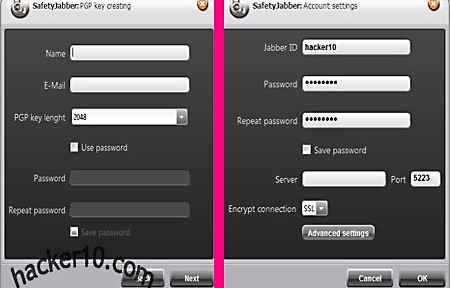
    After the installation you will be asked to create a new PGP keypair or to import your own, key length can be up to 2048 bit and the encryption keys password is optional. If you are familiar with PGP encryption everything will be intuitive, otherwise you can watch one of the video tutorials in the developer’s site or read the included help manual with screenshots, there is a user support forum too but everything appears to be in Russian.

    Before you can start chatting you will need to create a Jabber account first in any Jabber public server, a list can be found with a quick Internet search. Once you have registered for an account enter the given server settings in Accounts>Add, specifying to encrypt the connection with SSL or StartTLS, those details should be given to you during registration. The Advanced Setings button allows you to enter proxy details to connect to the server, this will hide your real computer IP from the Jabber server.

    Encryption OpenPGP messenger SafetyJabber
    Encryption OpenPGP messenger SafetyJabber

    The premium version version of this program removes an advertising banner, allows for bigger encryption keys of up to 4096 bit, comes with a portable version and a screensaver utility with hotkeys to lock your computer while you are away and to quickly shut it down during an emergency using the hotkey. The program features are simple but enough for all one needs, you get notified when contacts come online, conversations can be logged and there are smilies and a system tray icon with sound notifications, all of this can be configured within the settings. You can download SafetyJabber source code from the official website, checking that there is no backdoor and freely modify the code to add anything you want were you to have the skills for that.

    The most appealing thing from SafetyJabber for me is that you can look at the source code, very important for a security product, and they use an encryption standard like OpenPGP. This messenger will make sure that nobody can read the IM conversations with your friends, the private encryption keys always remain in your power and are not stored anywhere else, the only downside is that if you would like to send encrypted files you will have to pay for the premium version.

    Visit SafetyJabber homepage

  • Create your own Virtual Private Network with NeoRouter

    Create your own Virtual Private Network with NeoRouter

    Neorouter is a free application designed to remotely connect to other computers securely with just a couple of clicks and little configuration, it can be used to help a friend or family member troubleshoot computer problems giving you remote access to their machine or you can use it to connect to your home server or computer from work, to save in electrical bills the home computer can be left on standby and Neorouter will instruct it to wake up when you connect for the first time.

    This VPN software allows you to bypass corporate firewalls that block P2P traffic, similar applications (e.g. Hamachi) get around firewalls routing traffic through a central server that can be at times slow depending on the number of users, Neorouter improves VPN speed relaying traffic through your router instead of a central server, it can be set up to use an HTTP or socks4/5 proxy server if necessary.

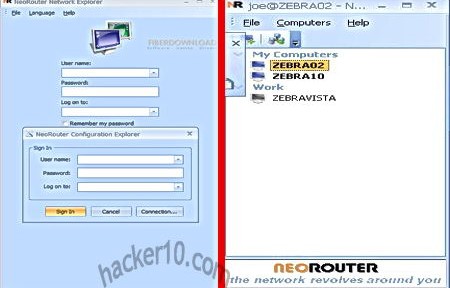
    Private VPN network NeoRouter
    Private VPN network NeoRouter

    The application is available for Windows, Mac, Linux, FreeBSD and Android, consisting of a client and a server that will work as a central hub creating a virtual LAN, the server can be set up on any router using open source firmware, like OpenWRT and Tomano. There is no limit to how many computers can be networked with this application creating a P2P friends only network where to share files, play games and communicate with each other in private, the connection will always be encrypted. Capabilities can be expanded with its built-in add-ons including VNC client, Telnet/SSH and SFTP, there is also a built-in firewall.

    Travellers will be happy to know that you can download a portable Neorouter VPN client that can be run from within a USB thumbdrive and does not need administrator rights.

    Visit Neorouter homepage

  • Securely wipe free space, folders and files with xShredder

    Securely wipe free space, folders and files with xShredder

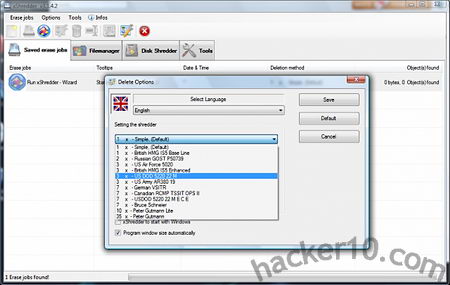
    xShredder is a free open source tool to securely wipe hard drive free space and files, the program has numerous standard data wiping algorithms available, these include US Air Force 5020, British HMG IS5 Enhanced, Canadian RCMP TSSIT OPS II, US DOD 5220 22MECE, Russian GOST P50739 and others. If a file is found locked, which often happens when in use by Windows, it will be wiped after a computer reboot

    You can create automated tasks and schedule data wiping, xShredder includes a tool called xExplorer that lets you see all files in your hard drive, including system files stored in the system32 folder hidden by Windows, selecting a folder you can add it to a shredding job or use the “Tools” menu to start a Wizard guiding you through the data wiping process. The wizard will show a series of tick boxes pointing to locations where Windows stores temporary data, like the Prefetch folder, hybernation file pagefile.sys, recently opened documents and Internet browser history, cookies and cache, it was all pretty basic and it did not include .sol Flash player cookies stored in the /Macromedia/Flash Player/#SharedObjects folder.

    xShredder data wiping algorithm options
    xShredder data wiping algorithm options

    This software should thwart elemental data recovery tools but there is nothing guaranteeing you that there are copies of the file you are destroying in other Windows temp and backup directories and a computer forensics expert will know where to look for. xShredder includes additional system maintenance tools, like format drive, HDD and MFT boot defragmenter with a complete system information viewer showing hardware details.

    I found this data shredder very difficult to use due to its complicated interface and lack of help manual, I also found it easy to erase files by mistake with no confirmation option given before starting the erasing process. I like the features that xShredder offers, specially the ability to write your own addons to erase data left behind by specific software, but in my opinion the developer should get rid of non data wiping utilities, like the defragmenter, and focus on creating a top data wiping tool that any beginner can use without having to go through a dozen of clicks and hidden options.

    Visit xShredder homepage

  • MonkeySphere OpenPGP Web of Trust Certificate Authority

    MonkeySphere OpenPGP Web of Trust Certificate Authority

    MonkeySphere is a set of tools to securely exchange digital OpenPGP certifications, when faced with having to buy digital certificates from a expensive Certificate Authority with its own rules or offering non recognised digital certificates that will trigger a security warning, MonkeySphere allows administrators to create their own OpenPGP certificates, publish them to the web of trust for validation and certify it themselves. It can be used for https websites or SSH server authentication, it comes included with the Tails operating system set up to use Indymedia’s key server .onion hidden service (hkp://2eghzlv2wwcq7u7y.onion) using hkps:// and available through the internet on keys.indymedia.org, users can verify TLS certificates using MonkeySphere Firefox addon, compatible with other Mozilla based browsers like IceWeasel in Linux.

    Digital certificate browser warning
    Digital certificate browser warning

    Monkeysphere currently supports ssh and https and can be used for certificate revocation, expiration, ease of rekeying, etc.

    One problem with traditional Certificate Authorities is that their target is to make money and some companies are willing to cut in security and relax verification rules to achieve this, CAs also run in similar fashion to a cartel with the big Certificate Authorities recognised by major browsers charge exorbitant fees that only corporations can afford. The web of trust P2P model can provide an alternative but it is not extended enough to be reliable, therefore the best choice is a hybrid system and this is how MonkeySphere works, when you visit an https site with the Monkeysphere plugin installed in your browser if the X.509 digital certificate presented to you is not recognised by the browser validation will then be passed to MonkeySphere’s own validation agent avoiding a scary security warning.

    Visit MonkeySphere homepage

  • Send anonymous email through tor with TorBirdy

    Send anonymous email through tor with TorBirdy

    Using Thunderbird, a free open source email and Usenet client made by Mozilla, and the addon TorBirdy you can now send emails through the tor network, the addon will automatically connect to the tor proxy before login in and out of your email account to send SMTP email and retrieve new POP messages, as long as the chosen email provider does not block tor proxies. For extra security you might want to encrypt the email message, Torbirdy won’t do that for you.

    The addon uses SSL/TLS by default for both outgoing and incoming servers setting default server ports, IMAP push email, often used by advertisers, is disabled as it could expose your real IP. The email client itself is cross platform and has versions for Windows, Mac and Linux, forked Thunderbird versions like Ice Dove should also work with the Torbirdy addon, the anonymous live CD Tails has added Torbirdy to their list of future additions.

    TorBirdy Thunderbird anonymous email
    TorBirdy Thunderbird anonymous email

    The developers advice that users do not install any other Thunderbird addon that has not been reviewed by them together with Torbirdy as it could endanger anonymity. Since Thunderbird has a portable version that runs from a USB thumbdrive there is no reason why you should not be able to use Torbirdy as a portable email client to send anonymous messages, it might even get around public computer networks that block port 995 (POP) and 25 (SMTP). There are many free email services offering free SMTP but the sign up normally still has to be done using the web interface, needless to say that you should use tor for that.

    Note: This addon is still in development and might not be stable.

    Visit TorBirdy Thunderbird addon