Category: Other

Other computing tips

  • HIPAA compliant email service Protected Trust

    HIPAA compliant email service Protected Trust

    Protected Trust email encryption allows for real time email traceability with auditing logs recording who read the email and what they did with it, messages can be set to expire after a certain date so that they are no longer available or cancelled if they have been sent to the wrong person. Emails are encrypted with a unique symmetric key using AES256 then sent to Protected Trust servers, data never leaves the organisation computers unencrypted. If you email anybody not using the Protected Trust email service they will receive a link to read the message securely stored in the server.

    The content is made available to the recipient until expiration, retrieved with a shared secret that can consist of a known password or receiving a PIN to your phone number. Cryptographic hashing makes sure that emails have not been tampered with or damaged in transit.

    Protected Trust email HIPAA compliant
    Protected Trust email HIPAA compliant

    This email service is directed towards companies that need to comply with data privacy laws, it will cover legal liabilities if anything goes wrong and allows for accurate message tracking in case of security incidents. You can keep your current email provider and address, emails are easily sent using a Microsoft Outlook plugin that adds an encryption button to the interface, via Protected Trust web based portal supporting all major browsers (IE, Chrome, Firefox) or from a mobile device (BlackBerry, Android, iPhone, Windows Mobile).

    Protected Trust complies with the Health Insurance Portability and Accountability Act (HIPAA) regulating how patient data must be protected, financial institutions also need to comply with Government regulations regarding non-public data. The free version of Protected Trust is limited to just a few messages per month and requires phone verification of your account.

    Visit Protected Trust homepage

  • How the FBI used computer MAC addresses against Lulzsec hackers

    Five people connected with LulzSec (Lulz Security), a hacking group loosely affiliated with Anonymous responsible for defacing websites and stealing credit card details from numerous companies have been arrested today thanks to one of their leaders turning FBI informant.

    Their ringleader, Hector Xavier Monsegur, aka “Sabu“, was raided by the police last year and has been working for them since then. According to Fox news Monsegur was tracked down after he logged into an IRC chat server using his home IP by mistake (he normally used tor), it just happened once, enough for the FBI to track him down get a court order and convince him to work for law enforcement gathering evidence against the other members of his malicious hacking group.

    LulzSec had security mechanisms to detect if a member’s identity was being usurped by law enforcement after arrest, they would ask personal questions over Jabber or IRC from past activities only known by them, not of much use when one of your own is voluntarily working for the FBI.

    According to the complaint against Jeremy Hammond, aka “sup_g” his physical residence in Chicago (US), was under continuous surveillance after being identified as a LulzSec member, FBI agents measured his wireless router signal strength and determined that it was located towards the rear of his home.They then applied for a court order to monitor all traffic coming in and out of that router with a trap and trace device identifying all unique MAC addresses connected to the router, an FBI expert then linked the suspect’s computer MAC address with an IP connected to the tor network (first node).

    Although the FBI was unable to read traffic over tor, e.g. visited sites, thanks to physically surveillance of the suspect home they observed that activity in between the MAC address belonging to the suspect’s computer and the tor network only occurred while Jeremy Hammond was inside the house. The FBI used connection times to link him with IRC online chats conducted behind a tor proxy with their informant, “Sabu“, on IRC channels at that very same time.

    Combined with personal information the suspect willingly gave away on the chat, the FBI managed to establish that a bunch different aliases like “yohoho“, “credibethreat“, “POW“, “burn“, “tylerknowsthis” or “Anarchaos” all belonged to the same person.

  • Encrypted chat software Bitwise IM

    Encrypted chat software Bitwise IM

    Bitwise Instant Messenger offers encrypted P2P chat communications, you can use this tool for voice over IP chat, group tab conversations, talking with multiple people at once, whitelisting users able to contact you and offline messaging where everything is forwarded to your email (accessible with a mobile phone?), skinning, emoticons and even a whiteboard that can be shared in between users to draw and paint diagrams in real time, the whiteboard will automatically open up when someone starts drawing.

    Encryption can not be turned off, this is good practise as it stops irresponsible users, when creating the password Bitwise will reject it if someone chooses a common dictionary word, often used by password crackers. Encryption consists of 128bit Blowfish and a RSA key of 512bits in the free version, the paid version adds key strength, people with serious opponents will have to upgrade, encryption defaults are a little poor. File transfers and voice over IP calls are also encrypted, VoIP works on dial-up thanks to a compression algorithm called Speex reducing bandwidth usage. Calls are not routed through any third party server they run via a direct connection, you can create conferences for multiple people, they will be able to join by invitation only and the chat can be logged to your hard drive.

    Bitwise IM settings
    Bitwise IM settings

    The part I would watch out for privacy wise is that you are using Bitwise own server to login, this means access logs (no contents), and the people you are talking with can get your IP address, you can’t have a P2P chat without an IP as the software wouldn’t know where to send the data, you will need a valid email address to open an account with Bitwise. This tool is not an anonymous IM but a private one. All other mainstream messengers also fall foul of these problems with central server logs recording who is logging in with timestamps and exposing the user IP in P2P. The main advantage of this messenger is encryption stopping third party eavesdroppers, the paid version allows you to use your own RSA encryption keys.

    The software is available in multiple languages for Windows, Mac and Linux, there isn’t a portable version of Bitwise IM but there are instructions on the help pages on how to easily create it by copying settings and Windows files to an external memory card or drive. There are no public chatrooms, you can only communicate with people you already know or those who have chosen to make their information public in the directory, there is no webcam support either and you won’t be able to chat with MSN, ICQ or Yahoo messenger users, Bitwise has its own protocol.

    I can see this IM being fine for a small business setting up a no distractions secure messenger, specially indicated for those who only want an IM for sensitive work and do not need anonymity in between members. If you would like to rescind from a third party central server for IM then use Hamachi or Comodo Unite.

    Visit Bitwise IM homepage

  • PirateBox wireless network for private file sharing

    PirateBox wireless network for private file sharing

    Piratebox is a self-contained hardware device providing file sharing services to anyone who connects to the network, it includes shoutbox for communication in between users. A Piratebox is not connected to the Internet, it creates an ad-hoc wireless network acting as access point broadcasting its signal to anyone around to share files, there is no need to login, for privacy reasons activities aren’t logged. The software can run on any router supporting Openwrt and dd-wrt Linux firmware,or a laptop, there are initiatives to run Piratebox on an Android phone.

    When a Piratebox is switched on it will broadcast the wireless SSID (Service Set Identifier) “Pirate Box- Share Freely” after someone connects to the network the Internet browser is launched with a minimalistic interface allowing people to upload/download files, browse available files or chat over the network.

    Piratebox anonymous filesharing hardware
    Piratebox  file sharing hardware

    By not being connected to the Internet the number of users are reduced to Piratebox’s broadcasting range, around 30 meters, on the other hand this tool can not be taken down like a server, it is portable, easy to set up, and it only needs an Internet browser to work, there is no need to download any software, smartphones with Wi-fi can access it too.

    Tools like the Piratebox can be useful in countries where there is no Internet due to a Government cutting it off or lack of material resources, but the location of a Piratebox could be pinpointed using radio triangulation and there is no encryption making it possible to eavesdrop on users, besides the fact that someone could set up a rogue Piratebox to entrap people, the greatness of Piratebox resides on its portability and not needing an Internet connection. It is a good tool to share low level risk files and to quickly set up a filesharing network without Internet access, but not a a serious privacy tool that will protect you from state sponsored opponents.

    Visit Piratebox DIY homepage

  • Unlock and delete blocked files with LockHunter

    Unlock and delete blocked files with LockHunter

    Lockhunter can unblock and erase files or folders blocked for no reason, like malware protecting files against user deletion. LockHunter can be used through the interface or with the integrated Windows right click context menu, after selecting a file you will see a choice reading “What is blocking this file?” that will give you information on the process that is holding it up, instantly knowing if the file is in use or it is maliciously prevented from deletion.

    It is not necessary to erase a blocked file, you can choose to unlock and rename or unlock and copy it somewhere else, the program can be used from the command line, useful in case you can’t launch software due to computer problems. LockHunter can unload DLLs (Dynamic Link Library) from processes without terminating the process, a DLL is a  a Windows executable shared library with the extension .dll , .ocx , .cpl or .drv and can cause files to lock.

    Lockhunter unlocks blocked files
    Lockhunter unlocks blocked files

    In my experience specialist data wiping tools like Eraser can also get rid of blocked files or folders, but LockHunter adds many more options, it gives you information on what process is using the file or folder and it sends it to the Recycle Bin making it possible to restore it if necessary, greatly reducing the possibilities of erasing something by mistake, just because a file is locked it doesn’t mean it is malware. A portable version of Lockhunter is planned for the future.

    Visit LockHunter homepage

  • FBI software specifications to monitor social networks

    The Federal Bureau of Investigation is calling on IT companies to submit a “white paper” on how to build a software tool to monitor social networks like Facebook and Twitter, they want to use the information collected to predict and respond to crisis. The system should be able to work in real time, with search capabilities of social networks and news sites like the CNN and MSNBC, using keywords and parameters defined by FBI agents, with automated filtering of collected data. Other specifications include instant notifications of breaking events triggered by keywords and the alerts being shown colour coded on a geospatial map with the ability to save and archive warnings, they even mention their preferred maps, which are Google Maps, Google 3D Maps and Yahoo Maps.

    The application should help view domestic terrorist threats and worldwide, classifying terror groups, being able to quickly locate US embassies and Government installations around the globe including details like the weather forecast and displaying video feeds of traffic cameras in real time to spot traffic patterns like bottlenecks, obstructions and flash mobs. Twitter is specifically mentioned and the FBI asks for the ability to instantly search and monitor all publicly available tweets across the whole Twitter site, the application must be able to translate foreign language tweets into English, using a minimum of 12 different languages, attaching a reference document of “tweet” lingo for officers to be able to understand the data. Vendors able to build that kind of mass surveillance software must include their estimated pricing to the FBI.

    A quick reminder that if you don’t want your Facebook postings to be read and stored by the FBI, the only privacy workarounds are not to use a social network, use something more anonymous like Unseen.is, or to only post in private not allowing public view. Besides the Government, employers and enemies alike can find the information you post in Facebook useful too.

    Reference: Federal Business Opportunities (fbo.gov)
  • Private hosting in Iceland with 1984 hosting

    Private hosting in Iceland with 1984 hosting

    Powered by free software and green energy with their headquarters and equipment in Iceland, 1984 hosting offers private hosting, VPS, domain registration, email and free DNS services, the company claims that they will go the extra mile to protect their customers right of freedom of speech, privacy and anonymity, they will not reply to threatening emails and will only obey a valid Icelandic court order, if they become aware of any investigation by the authorities 1984 hosting will warn the customer unless there is a gagging order, one of the two founders is a member of the Icelandic IMM (International Modern Media Institute), a foundation working for free speech.

    Control panel 1984 hosting
    Control panel 1984 hosting

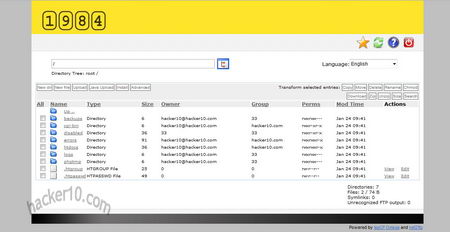
    I was given a test account to see what their services are like, 1984 shared hosting has a custom hosting panel based on ispCP, simple and easy to use, you will not get lost or wonder where things are, functions can be accessed within a couple of clicks, the panel default language is Icelandic, it can be changed to English, Hungarian, Spanish, Danish and others. On the main tab there are statistics about space and bandwidth, number of SQL databases, FTP accounts and subdomains, backups are perfomed daily and they can be restored using the control panel, custom 404, 401, etc pages can be created too, websites status, like number of visitors, can be measured with awstats. Files can be uploaded using FTP or FTPS (FTP Over Explicit TLS/SSL) with SFTP support being planned for the future, alternatively you can use net2ftp, web based FTP, to upload files via browser, with the hosting account you also get an IMAP/POP3 email account, email can be retrieved with an email client or webmail (SquirrelMail).

    If you go for a VPS there is a list of the most common Linux and BSD distros to choose from or you can ask 1984 hosting to install a particular distribution that isn’t there, payments are made with Paypal or credit card.

    1984 hosting net2FTP
    1984 hosting net2FTP

    The Icelandic Parliament will soon introduce a new legislative freedom of expression framework enshrining protection for whistle blowers, information sources, communications, publication restraint orders and others, this makes the hosting company location ideal, but I was baffled by their free speech policy, while claiming to go the extra mile to protect customers civil rights, and hosting many politically sensitive websites they apparently have speech limits, set by what they called in the email exchange “sense of decency“, and made it clear to me that disagreeing with a website will not have an account terminated but they will not allow racist propaganda or pro-pedophile websites on their network as they say they would not sleep at night if they were serving them, and as for warez and copyrighted material, Iceland has the same laws than any other western country and they have to comply with them.

    My impression is that 1984 hosting could be a good place to publish whistle-blowing or corporate data leaks and count with strong investigative journalism protection out of the reach of US trigger happy libel laws, or you could use it as an offshore webmail account since their hosting prices are reasonable, but don’t push it too hard towards extreme websites not covered by this host so called “free speech” sense of decency.

    Visit 1984 hosting homepage