Category: Other

Other computing tips

  • Internet Relay Chat encryption with Dirt

    Internet Relay Chat encryption with Dirt

    Dirt is an open source project adding FiSH compatible chat encryption to any IRC client, it can be used as Socks4 proxy or bouncer. Dirt only allows localhost (127.0.0.1) connections, this is to make sure that encrypted text will not leak out of your machine, the listening port for Socks4 is 1088 and the 6666 port is used when acting as a bouncer, settings can be changed modifying “dirt.ini” with a text editor.

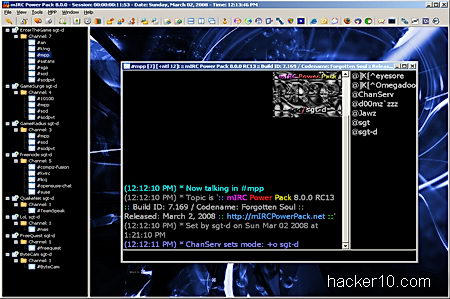
    After installation you will notice a Dirt icon in your system tray, to use Dirt in mIRC, a popular Windows IRC chat client, you need to access Tools>Options>Connect>Firewall and enter the appropriate hostname (127.0.0.1) and port number. Once connected you can type /dirt to see a list of all possible commands,
    mIRC dirt encryption IRC chat
    mIRC dirt encryption IRC chat

    For those not aware, FiSH is a widely available IRC plugin providing Blowfish encryption grade to IRC chat, you can find it in the Linux command line irssi IRC client and many others. If you use a Mac computer or Debian Linux you could try FiSHLiM, a plugin for FiSH IRC encryption working in XChat and HexChat IRC chat clients.

    Dirt works in Windows, Linux and BSD but it is still in development, another alternative could be using psyBNC, an IRC bouncer that replaces your computer IP with a virtual host (vHost) and supports channel encryption with Blowfish and IDEA algorithm, you will need a shell account to manage psyBNC, there are many companies offering them at cut-prize with easy configuration instructions, they are normally used by channel administrators to handle abuse.

    Visit Dirt IRC encryption homepage

  • Free online image forensic analysis at Fotoforensics

    Free online image forensic analysis at Fotoforensics

    Fotoforensics is a website for advance photo analysis, you can check whether a photo has been modified or not and see embedded metadata that could contain private details, the photos can be uploaded from your PC or directly linked from a URL, there is an optional Firefox browser plugin to make image forensic analysis easier, any image that can be displayed on your browser can be analysed, the plugin gets around sites like Facebook requiring login to view a photograph.

    The service supports .jpeg and .png image formats, the most common image file extensions found on the Internet, the metadata analysis can find out if a graphics editor has been used to modify the image, ACD See for example will embed the program name on the photos it saves, metadata also shows how many times the image has been edited, identity attributes and how the image was managed.

    Image computer forensics Fotoforensics
    Image computer forensics Fotoforensics

    To determine if a photograph has been forged Fotoforensics will use Error Level Analysis to see the image modification percentage, the image will be saved at different compression levels and then compared with a computational algorithm to see the amount of change, this is not an 100% accurate method to detect fake photos, it is possible to defeat image computer forensics algorithms looking at high frequency decomposition by reducing colour, brightness or contrast but there are other photo attributes that can be analysed.

    The website has a very detailed tutorial and FAQ explaining what results you can expect and how to interpret them, you should read it to understand what you are seeing, this is not a tool that will tell you a “Yes” or “No” answer, it is up to you to interpret the results which could turn up to be inconclusive.

    You could use this tool to check that your EXIF image cleaner is working properly but do not upload anything private because the results are saved in a public URL on the server, uploading pornography is not allowed,  to check if an X-rated celebrity photo is real or not you will need to find another place or they will ban your computer IP.

    Visit Fotoforensics homepage

  • Hide data inside sound files with DeepSound

    Hide data inside sound files with DeepSound

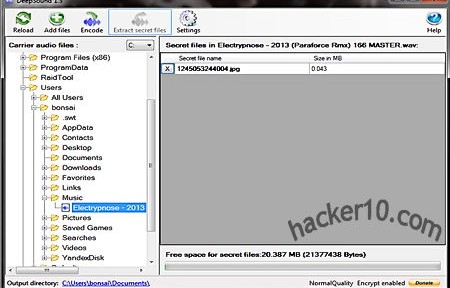
    DeepSound is a steganography tool to hide any kind of data, from text to photos, inside sound files, for extra security everything can be encrypted using AES256-bit and only available with the correct password, the modified audio file will play as normal and nobody should notice it contains hidden data inside. The program interface is very simple, it comes with a file browser to manually peruse the directory where a suitable carrier sound file can be found, when password protecting the data you will not be asked to confirm the black dot covered password twice, if you make a typo you will not notice it until it is too late, it will be best if you test the file after creating it to make sure everything works as expected.

    Encoding or extracting data can be quickly executed using shortcuts, the program settings allow you to graduate output quality ratio from low to high. If you are going to create an audio CD with hidden data the developer advises to disable volume normalization in the CD burning software to prevent data corruption that would stop hidden files recovery, a one page help manual with screenshots is included, you are not likely to have to read it.

    DeepSound hides data inside audio files
    DeepSound hides data inside audio files

    This tool can only hide data inside Waveform Audio File Format .wav and Free Lossless Audio Codec .flac sound files, these are not very common files, .wav is normally uncompressed, perfect to hide files inside, but the files are very large and not usually used for music, only small sounds.

    FLAC is a royalty free open source alternative to proprietary .mp3, .flac files are compressed and suitable for music albums, supporting metadata and album covert art, if you are going to hide data it will probably look less suspicious inside a .flac than the inadequate .wav file format, and it will be easier to distribute a .flac file given its smaller size. This application could also be used to watermark copyrighted music and track down the source if it is later found leaked in file sharing networks, but converting the file audio format to something else would get rid of the hidden watermark.

    Visit DeepSound homepage

  • Set up your own whistleblowing platform with Globaleaks

    Set up your own whistleblowing platform with Globaleaks

    Globaleaks is an open source framework allowing any activist group to set up their own anonymous whistle-blowing platform, using Globaleaks software the whistle blower will be kept anonymous by default. The tool conceives a javascript HTML Globaleaks client that can be provided as a browser addon or invoked through a content delivery network. On the server side tor hidden services give protection against legal liabilities, not only for the sender but also the receiver who will not be able to find out who sent the documents.

    You should not confuse this software platform with Wikileaks, Globaleaks does not provide a service, only the necessary software. When you set up a Globaleaks node you don’t become a part of any network, you own the node, with the responsibility of managing submitted leaked information falling on your side.

    Globaleaks whistleblowing platform
    Globaleaks whistleblowing platform

    Activists on the field can use a mobile phone to instantly submit photos, audio and video using GLDroid, a GlobaLeaks submission client for Android integrated with a tor proxy tool called Orbot.For those who can not use tor, Globaleaks allows Internet users to publish information via tor2web, a proxy service that can access hidden .onion sites through a web browser and does not require installing any extra software in the computer. Communication with the server is always encrypted end-to-end, a configurable time delay is introduced to stop a submission events being linked with an instant post on the website, document metadata clean up is optional and it will be up to each node administrator to turn it on.

    A nifty feature I liked is the coloured badge that sites running Globaleaks display to the user, pointing out anonymity, encryption and browser security level. A downside to the high security tor layered proxy approach is that the server will manifest high latency issues and it will take several seconds or minutes for the site to respond, during that waiting period Globaleaks will provide information to the user about safe whistleblowing procedures, reassuring the submitter that everything is working.

    Visit Globaleaks homepage

  • Facebook Privacy Watcher browser addon

    Facebook Privacy Watcher browser addon

    Facebook Privacy Watcher is a Firefox addon to help you manage Facebook privacy settings using colour codes. Instead of having to pay attention to checkboxes and tiny text in Account Settings> Security hoping that you got everything right, Facebook Privacy Watcher will visualize public posts in green, friends only posts in orange, red posts only visible to you and blue coloured posts only visible to a subset of friends.

    You can change any post privacy setting with a couple of clicks, colouring also works in your profile and photo albums. The addon runs in your browser no data is sent to the developer.

    Facebook Privacy Watcher
    Facebook Privacy Watcher

    This addon is not yet available in the official Mozilla addons repository but it is partly developed by the Technical Univeristy of Darmstadt which should give some peace of mind about malware.

    Other security measures you might want to take to secure your Facebook account are linking it to a mobile device, enabling always on secure HTTPS browsing, choose a strong password and set up login notifications where Facebook warns you when your account is accessed from a device not previously used.

    Visit Facebook Privacy Watcher homepage

  • Encrypted cloud storage with TeamDrive

    Encrypted cloud storage with TeamDrive

    TeamDrive is a cross platform (Windows, Mac, Linux) cloud storage service with uncrackable encryption, using AES256bit and RSA-2048 public/private key, data is encrypted in your computer before it reaches their cloud servers, Teamdrive has no way to access the files, limiting their legal liabilities since you can’t be compelled to decrypt something that you don’t have the key for, the encryption key remains in the user computer at all times.

    To set up a Teamdrive account you are only required a valid email address, I liked that they have a portable version that can be carried in a USB thumbdrive or kept inside an encrypted virtual container (e.g. Truecrypt), but you will need to configure the default settings to make sure that there is no data leakage in the host computer, luckily Teamdrive software settings display the file path for data back ups and cache, a quick look will tell you where in the drive it is kept.

    Encrypted cloud storage TeamDrive
    Encrypted cloud storage TeamDrive

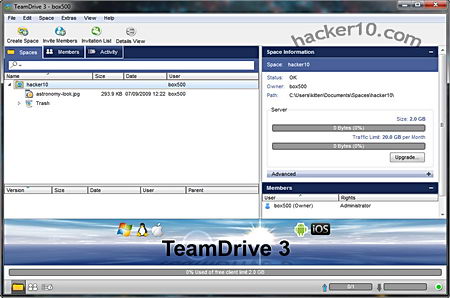
    The program is divided intro three tabs, “Spaces“, where you can create folders, organise your files and set access permissions for other members and with a right click send an invitation via email revealing the URL for the data you would like to share with others, optionally, spaces can be password protected. Another tab called “Members” lets you see who has access to a particular space and a third tab called “Activity” contains a very detailed log of file movements, like uploads and downloads with timestamps. To add files, manually select them or drag and drop inside the window, everything is quickly sync when there are changes, a trash can will save erased files that can be restored if you change your mind.

    Inside settings you can configure a proxy if you are using it to access Teamdrive cloud storage space, the paid for version allows you to assign roles to other people, setting up administration rights, like being able to publish and delete files or remove other members from a shared space. There is support for smartphones, you can run the application in  Android or iPhone  The free version has limited storage space and bandwidth, indicated inside the application with a graph bar, enough for light file sharing.

    Teamdrive is a decent alternative to SpiderOak and definitely better than Dropbox, where the company can decrypt your data, if you care about privacy drop Dropbox now.

    Visit TeamDrive homepage

  • OnlineVNC: Remotely access your computer on the browser

    OnlineVNC: Remotely access your computer on the browser

    OnlineVNC is a service that allows you to remotely control a computer using a web browser running on any operating sytem, wherever you are, work, hotels, etc. The service can also be used tor provide online IT support, the only thing needed for it to work is installing the Windows only software on the server side and that Adobe Flash is present on the client side. The application can also grant access to your home computer to friends or work colleages to share huge files with the built-in FTP client or show presentations.

    The server control panel allows you to see who is connected and what they are doing in real time, being able to restrict or give viewing, keyboard or mouse access. There is no limit to the number of people who can connect to the computer, communication takes place using the Remote Framebuffer (RFB)  protocol, compatible with offline Virtual Network Computing viewers like TightVNC, RealVNC and UltraVNC, you can log off or lock the remote computer without breaking the connection, the remote desktop picture can be scaled, with a fit to screen mode and the network speed can be changed to slow, reducing the quality of graphics optimizing bandwidth in slow networks.

    Remote desktop access OnlineVPN
    Remote desktop access OnlineVPN

    The connection port number can be configured, this should help getting around firewalls and making your server harder to spot on the Internet by adopting a non usual port, if you notice anyone scanning your computer adding their IP to the Host Filter will blacklist it.

    There are trust based downsides to this uncomplicated solution for remote computer access, if you are not using your own computer it would be a security risk accessing OnlineVNC because you have no guarantee against keyloggers in an Internet cafe, but with your own tablet or laptop it is not a problem. Another downside is that the RFB protocol is not very secure and it is possible to crack the password if someone on the network captures the encryption key, but you can tunnel OnlineVNC over a VPN adding an extra security layer with strong encryption, a third downside is that you have to trust the company managing the service to respect your privacy and be responsable, beyond that, OnlineVNC is acceptable for those looking for an effortless way to remotely access computer files.

    Visit OnlineVNC homepage