Month: June 2013

  • Encrypted Disk Detector for live computer forensics

    Encrypted Disk Detector for live computer forensics

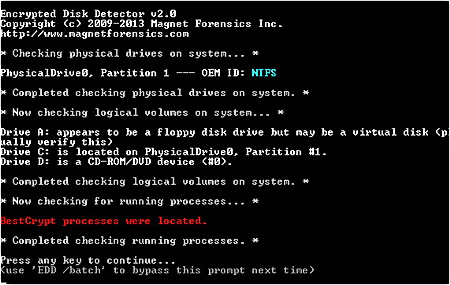
    Encrypted Disk Detector is a free Windows command line tool for computer forensics that can detect Truecrypt, PGP, Bitlocker, Safeboot, Sophos Safeguard, Endpoint Security FDE, Symantec Endpoint FDE and Bestcrypt encrypted volumes. The software checks for encryption signatures in the Master Boot Record and Volume Boot Records, where encryption tools store the authentication hashing mechanism that decrypt data, it also displays OEM ID and volume label partition where applicable, when the encryption software hasn’t got any identifiable signature Encrypted Disk Detector scans for running processes indicative of disk encryption.

    This tool is useful to incident response practitioners to quickly determine if encryption is being used in any of the company or network computers before deciding what steps to take next, e.g. mirror drives, prior to pulling the plug. Encrypted Disk Detector runs in read mode and does not make any file changes, its intuitive coloured notification arrangement makes it effortless to interpret the results.
    Encrypted Disk Detector finds BestCrypt volume
    Encrypted Disk Detector finds BestCrypt volume

    Encrypted Disk Detector is not a threat to home users, the software does not attempt to guess what drives are encrypted, it only checks for volumes that are already mounted on live systems, it will not detect encryption in unmounted disks, TCHunt is more appropriate for that task, this is a time saving tool that can be deployed in a matter of seconds in a large network.
    Visit Encrypted Disk Detector homepage

  • Post self-destructing Twitter messages with Efemr

    Post self-destructing Twitter messages with Efemr

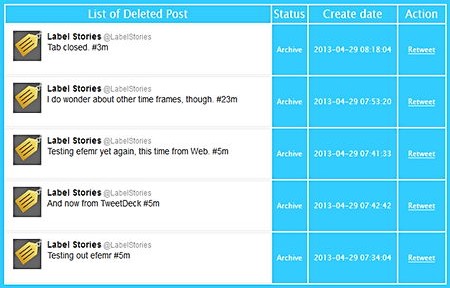
    Efemr is a free web and mobile app to post time limited messages on Twitter, it works by adding a timestamp hashtag at the end of your message, for example adding #8m at the end of a post would erase your Twitter message in eight minutes, time can be set to a few hours too but no more than that. The app backups all messages keepimng a private list of deleted posts next to a retweet button in case you change your mind and to remember you what you have posted in the past even if it is no longer visible.

    Efemr self-destructing Twitter messages
    Efemr self-destructing Twitter messages

    Being able to limit how long for something will remain on the Internet it is a step in the right direction to protect people’s privacy but it will not replace common sense, there is still the possibility of someone taking a screenshot of the Tweet, the time frame is not perfect either, Twitter feeds take longer than the specified limit to be erased and anyone could copy and paste or retweet your message, if you truly want to keep your Tweets private then encrypt them with AnonTwi  or any text encryption utility and make them only available to people you know, if anyone takes a screenshot it will only show cihphered text.

    Another way to achieve Twitter privacy is by never using your real name when opening an account, never post personal identifying data when posting and always use Tor or a VPN to log into Twitter.

    Visit Efemr homepage

  • Online password manager Intuitive Password

    Online password manager Intuitive Password

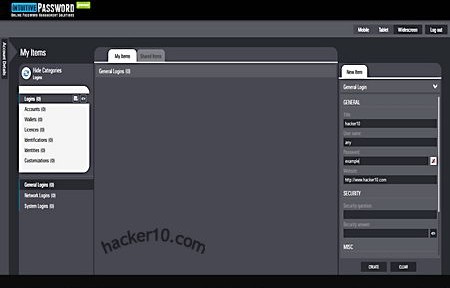
    Intuitive Password is a free cloud based password management service, communication in between your browser and their server is encrypted with SSL, the servers are hosted inside an enterprise grade data centre protected with a firewall, audited and constantly scanned with antivirus software to quickly detect security breaches. To open an account with Intuitive Password you only need an email address that has to be verified clicking on a link, and setting up a security question, any other personal details are optional.

    The security question is very important, I accessed the password manager using a VPN, that changed my computer IP and a message popped up saying that my current location had not been registered with the account and I was challenged to answer with the security question before I could log in, this will happen every time you change geolocation, i.e. travelling. Another security feature that is to be implemented soon is a two factor authentication, after marking a field with “Advanced Protection” you will be sent and asked for an SMS (Short Message Service) code before being able to view that field.

    Intuitive Password online password manager
    Intuitive Password online password manager

    The password manager has an easy to navigate clean lay out, with a single click you can switch from a wide screen desktop view to tablet or smartphone view,  it will work with any operating system and nearly all smartphones, data is synchronized on the cloud without the need to download any application.

    There are pre-made templates to store credit card and bank details, the fields include input boxes specific to the data, like Swift code and expiration date, if you need a particular box Intuitive Password lets you create your own template and customize all fields, passwords can be shared in between colleagues accessing a “Shared Items” tab from where securely send secret passwords and view those sent to you by other Intuitive Password users.

    The only thing that disappointed me is that the main page said it was compatible with the Opera browser but I could not manage to make it work with Opera and I had to switch to Firefox instead, overall, assuming server security is as good as they say, this could be a good alternative to more established online password manager services, Intuitive Password had one of the best user interfaces I have seen, it should help boost productive time.

    Visit Intuitive Password homepage