Author: John Durret

  • Post anonymous encrypted Twitter messages with AnonTwi

    Post anonymous encrypted Twitter messages with AnonTwi

    AnonTwi is an open source project to encrypt Twitter and Identi.ca public and private messages hiding the poster’s computer IP. The program interacts with Twitter API using SSL, which stops ISP eavesdropping for certain keywords, connection to Twitter servers can be anonymised with a socks or tor proxy and sending random HTTP header values. Long messages that do not fit in a single Tweet will be split, decryption of URLs and raw data is automatic for anyone using AnonTwi client, messages can be stored in your hard drive, even if Twitter deletes the account you would still be able to read the messages.

    Encryption is performed with AES and SHA1, meant to be uncrackable if implemented correctly, since AnonTwi source code is available for download it can be checked for hidden backdoors and coding quality.

    AnonTwi anonymous encrypted Twitter messages
    AnonTwi anonymous encrypted Twitter messages

    Other privacy options include the possibility of sending fake GPS geolocation to appear that you tweeting from a different country, the client can be instructed to insert a random GPS value with each tweet, another choice called “suicide” will attempt to delete all of your tweets, private messages and close your account. AnonTwi supports UTF-8 and Unicode characters to write in Arabic or Chinese and post symbols with detailed colourful outputs, it works in Windows, Mac OS and Linux. Originally released as a command line only tool, it now has an interface that goes with it. You will need to get a Twitter API before you can use AnonTwi, this is not difficult, anyone can open a Twitter developers account and retrieve the API tokens with tor.

    Normally you would want as many people as possible to read your Twitter messages, it is probably best to use this tool to simply hide your computer IP when posting public Tweets and keep the encrypted option for private messages only. The other part will need to know a previously agreed password before he can read encrypted communication.

    Visit AnonTwi homepage

  • Remove Gmail advertisements with Gmelius

    Remove Gmail advertisements with Gmelius

    Gmelius is a cross browser (Opera,Firefox,Chrome,IE) extension to enhance your Gmail interface, after installing it you will be presented with a long list of settings with check boxes to easily decide what your webmail should look like. Other customizable options are removing chat and status of chat contacts, colourize navigation icons, remove People Widget, make header autoexpandable, apply the same font to all inbox messages and add attachment icons, to tweak these settings you just need to check or uncheck a tickbox.

    Gmelius removes Gmail adverts
    Gmelius removes Gmail adverts

    This extension will not stop Google email scanning your messages but by removing the advertisements, besides getting a better Gmail experience, you can get back at Google by depriving them of revenue earned invading your personal privacy. Nearly all free email services display advertisements of some kind but only the most busybody services like Gmail go to the extra length of scanning people’s personal messages.

    If you care about privacy it’s best to use a different email service but if you are going to use Gmail because it has features you can not find elsewhere and you are not encrypting your messages removing advertisement will send Google a strong message about how relevant people think their adverts are.

     Visit Gmelius homepage

  • Create your own Virtual Private Network with NeoRouter

    Create your own Virtual Private Network with NeoRouter

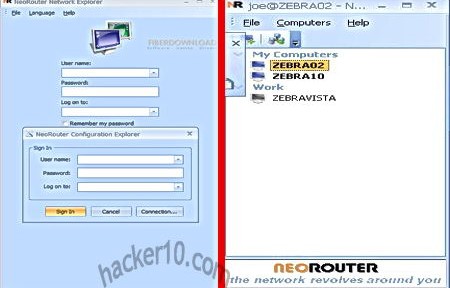
    Neorouter is a free application designed to remotely connect to other computers securely with just a couple of clicks and little configuration, it can be used to help a friend or family member troubleshoot computer problems giving you remote access to their machine or you can use it to connect to your home server or computer from work, to save in electrical bills the home computer can be left on standby and Neorouter will instruct it to wake up when you connect for the first time.

    This VPN software allows you to bypass corporate firewalls that block P2P traffic, similar applications (e.g. Hamachi) get around firewalls routing traffic through a central server that can be at times slow depending on the number of users, Neorouter improves VPN speed relaying traffic through your router instead of a central server, it can be set up to use an HTTP or socks4/5 proxy server if necessary.

    Private VPN network NeoRouter
    Private VPN network NeoRouter

    The application is available for Windows, Mac, Linux, FreeBSD and Android, consisting of a client and a server that will work as a central hub creating a virtual LAN, the server can be set up on any router using open source firmware, like OpenWRT and Tomano. There is no limit to how many computers can be networked with this application creating a P2P friends only network where to share files, play games and communicate with each other in private, the connection will always be encrypted. Capabilities can be expanded with its built-in add-ons including VNC client, Telnet/SSH and SFTP, there is also a built-in firewall.

    Travellers will be happy to know that you can download a portable Neorouter VPN client that can be run from within a USB thumbdrive and does not need administrator rights.

    Visit Neorouter homepage

  • Securely wipe free space, folders and files with xShredder

    Securely wipe free space, folders and files with xShredder

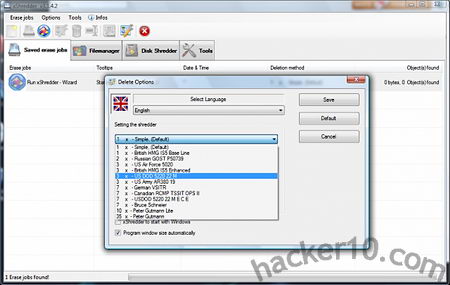
    xShredder is a free open source tool to securely wipe hard drive free space and files, the program has numerous standard data wiping algorithms available, these include US Air Force 5020, British HMG IS5 Enhanced, Canadian RCMP TSSIT OPS II, US DOD 5220 22MECE, Russian GOST P50739 and others. If a file is found locked, which often happens when in use by Windows, it will be wiped after a computer reboot

    You can create automated tasks and schedule data wiping, xShredder includes a tool called xExplorer that lets you see all files in your hard drive, including system files stored in the system32 folder hidden by Windows, selecting a folder you can add it to a shredding job or use the “Tools” menu to start a Wizard guiding you through the data wiping process. The wizard will show a series of tick boxes pointing to locations where Windows stores temporary data, like the Prefetch folder, hybernation file pagefile.sys, recently opened documents and Internet browser history, cookies and cache, it was all pretty basic and it did not include .sol Flash player cookies stored in the /Macromedia/Flash Player/#SharedObjects folder.

    xShredder data wiping algorithm options
    xShredder data wiping algorithm options

    This software should thwart elemental data recovery tools but there is nothing guaranteeing you that there are copies of the file you are destroying in other Windows temp and backup directories and a computer forensics expert will know where to look for. xShredder includes additional system maintenance tools, like format drive, HDD and MFT boot defragmenter with a complete system information viewer showing hardware details.

    I found this data shredder very difficult to use due to its complicated interface and lack of help manual, I also found it easy to erase files by mistake with no confirmation option given before starting the erasing process. I like the features that xShredder offers, specially the ability to write your own addons to erase data left behind by specific software, but in my opinion the developer should get rid of non data wiping utilities, like the defragmenter, and focus on creating a top data wiping tool that any beginner can use without having to go through a dozen of clicks and hidden options.

    Visit xShredder homepage

  • Computer forensics Linux distribution CAINE

    Computer forensics Linux distribution CAINE

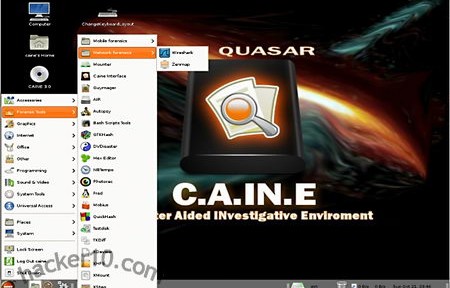
    CAINE (Computer Aided INvestigative Environment) is an Ubuntu based Linux distribution targeted at computer forensic investigators, from law enforcement to private digital investigators. It comes with friendly graphical interfaces for most forensic tools making this OS a good choice for students and computer forensic amateurs, as well as professionals. There is a front end called XSteg for Stegdetect, a tool to detect messages hidden in  images (steganography), dd, a command tool to mirror and restore files can be used with a front end called AIR (Automated Image & Rescue) supporting dc3dd an enhanced dd version that includes features like hashing and zeroing files specially developed for digital forensics by the US Department of Defense Cyber Crime Center. The Sleuth Kit, a set of command line tools can be used in CAINE through Autopsy, a graphical front end that looks like a browser, a command based network scanner called nmap can be used with point and click thanks to zenmap.

    CAINE computer forensics distribution
    CAINE computer forensics distribution

    Once you have finished your work CAINE makes it easy to create a written report as .rtf or HTML. For those who don’t know, unlike .docx or .odf (Open Document Fortmat), .rtf (Rich Text Format), files, although Microsoft proprietary, they are widely supported by most software and do not include metadata.

    Computer forensics live CDs are widely used during investigations because they do not write anything to the host computer, however you should use a widely tested distribution to make sure that it works as expected and do not trust what a community or vendor distribution claims because only wide testing can find out unexpected bugs.

    When you boot this live CD you will be given the choice to install the OS in your hard drive, I would not advise you to use CAINE as your everyday operating system because it comes with very few applications that are not computer related and it won’t be of much for a home user daily entertainment activities. You should not confuse this distribution with a penetration testing operating system like BackTrack, there are no offensive tools included in CAINE and only a few network related tools (WireShark, Cryptcat and Zenmap), CAINE purpose is to perform a post-mortem of a machine after an incident and gather data.

    Home users can use this live DVD to reset a user’s password on a Windows machine with chntpw , recover corrupted data with ddrescue, partition a disk with Gparted, or monitor a hard drive health and temperature with HDSentinel.

    Visit CAINE homepage

  • MonkeySphere OpenPGP Web of Trust Certificate Authority

    MonkeySphere OpenPGP Web of Trust Certificate Authority

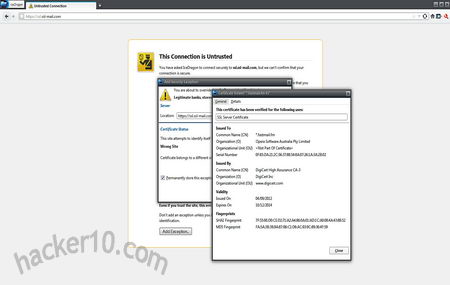
    MonkeySphere is a set of tools to securely exchange digital OpenPGP certifications, when faced with having to buy digital certificates from a expensive Certificate Authority with its own rules or offering non recognised digital certificates that will trigger a security warning, MonkeySphere allows administrators to create their own OpenPGP certificates, publish them to the web of trust for validation and certify it themselves. It can be used for https websites or SSH server authentication, it comes included with the Tails operating system set up to use Indymedia’s key server .onion hidden service (hkp://2eghzlv2wwcq7u7y.onion) using hkps:// and available through the internet on keys.indymedia.org, users can verify TLS certificates using MonkeySphere Firefox addon, compatible with other Mozilla based browsers like IceWeasel in Linux.

    Digital certificate browser warning
    Digital certificate browser warning

    Monkeysphere currently supports ssh and https and can be used for certificate revocation, expiration, ease of rekeying, etc.

    One problem with traditional Certificate Authorities is that their target is to make money and some companies are willing to cut in security and relax verification rules to achieve this, CAs also run in similar fashion to a cartel with the big Certificate Authorities recognised by major browsers charge exorbitant fees that only corporations can afford. The web of trust P2P model can provide an alternative but it is not extended enough to be reliable, therefore the best choice is a hybrid system and this is how MonkeySphere works, when you visit an https site with the Monkeysphere plugin installed in your browser if the X.509 digital certificate presented to you is not recognised by the browser validation will then be passed to MonkeySphere’s own validation agent avoiding a scary security warning.

    Visit MonkeySphere homepage

  • Review of VPN provider Kepard

    Review of VPN provider Kepard

    Kepard is a new comer to the crowded VPN arena, they have not been around for long but show some commitment to their business having invested in an easy to navigate website, various VPN locations across continents and an user friendly VPN client that works in Windows, Linux, Mac, Android and iOS supporting PPTP; L2TP and OpenVPN protocols in UDP or TCP (to bypass firewalls) mode.

    Kepard has server locations in the USA, Canada, Netherlands, UK and Germany I tested their speed a few times and I got an average of 5Mbps, this is plenty to stream high definition video, I had no problem watching US TV websites like ABC and Hulu from abroad. The Netherlands server can be used for filesharing and there are no bandwidth restrictions, you can connect up to two devices at the same time with a single account.

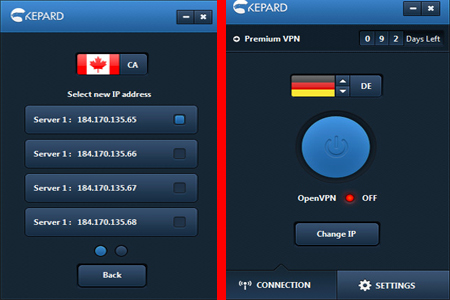
    I really loved their lightweight VPN software, you should be able to appreciate in the screenshot below that it is very easy to configure and set up and it has a very clear layout that allows you to see at all times what country you are connected to and change your computer IP using a single click. I was disconnected a couple of times while using L2TP and my computer IP did not leak, when this happened I would get page not found message while trying to surf the Internet. If you can’t make the VPN client work in your computer if necessary the support team will use Teamviewer to help you out, support tickets are logged and replied to in around 24 hours or less,

    Kepard OpenVPN software
    Kepard OpenVPN software

    Kepard can be used during 30 minutes everyday for free allowing you test their services at no risk. The websites you visit aren’t logged and connection IP logs are kept for 3 days to deal with spammers and abuse, after this they are gone for ever. The VPN headquarters are located in the Republic of Moldova, a non EU country, making it difficult for US authorities to abuse their power and issue a malicious international subpoena before the logs have been erased.

    All I could find against Kepard is that pseudo-anonymous payment systems like Bitcoin are not available, they only accept Paypal and credit card and they do not have as many server locations as some of the big VPN companies but how many people really use all of those locations? I have been before with a VPN service that had over two dozen servers spread worldwide and I found myself always using the same three countries and unable to use any of their Asian servers because the ping rate to my home country in Europe was too high and it slowed down my internet browsing.

    This can be a good VPN for those who value privacy, due to their clear low retention log policy found in their FAQ, and their high speed servers with unlimited bandwidth, with no outsourced support team able to give you a personal reply to your problems instead of a copy and paste answer and they also have a refer a friend program rewarding customers with a 1 month free VPN service for each of your friends signing up with them.

    Visit Kepard homepage