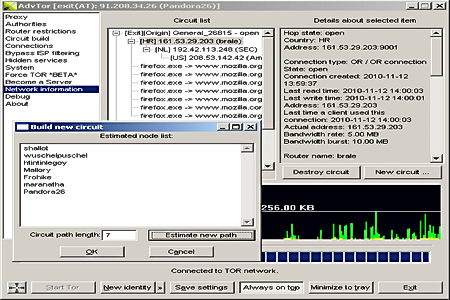
Advanced Onion Router is a free portable tor proxy server and client for the Onion Routing network, a distributed proxy network run by volunteers designed to anonymize traffic and bypass Internet filters. Advanced Onion Router is meant to be an all in one application replacement for the classic Tor+Vidalia+Privoxy Windows bundle, highly configurable, it can fake your browser headers and operating system, as well as the computer regional settings which can be used to pinpoint your location by looking at something like local time.
There is support for encrypted SSL connections, Socks4/5, corporate NTLM (NT Lan Manager) proxies, banning of addresses and routers, plugin support, hotkeys, multilingual, circuit length can be determined from 1 up to a chain of 10 proxies with priorities set, separate browsing profiles can be set by erasing identities cookies and creating new fake browser and operating system headers. You can use this tool to help the onion routing network donating some bandwidth for others or host your own hidden service, it only requires some easy re-configuration to make sure that your real location is not revealed and create your own .onion address. A tor hidden service is a way to host your own content making it impossible for a Government or powerful enemy to take it down.
Advanced Onion Router tor proxy
Advanced Onion Router lets you add your favourite program to a list making sure that when you start it all traffic will be forced through a tor proxy tunnel, each program can have its own separate settings running inside a sandbox. Configuration files can be encrypted using AES, adding another layer of security against noisy people, even better is the read only mode, where you can run this portable tor proxy from read only media, like a CD-Rom, and no personal data (history, cookies, etc) will be stored anywhere.
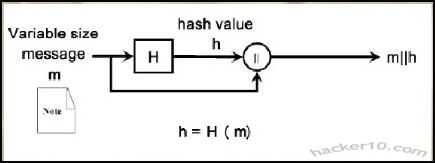
A cryptographic hash function is a one-way computational mathematical operation (aka checksum or digest) that takes a stream of data and returns a fix sized bit string known as cryptographic hash value, this value is unique, any small modification to the file will change it, for example, modifying a single pixel on a photograph will not be noticeable by the human eye but a cryptographic hashing of the picture will return value differing from the original.
Cryptographic hashing algorithms are widely used in computer forensics to guarantee that files have not been tampered with, it can be compared to a digital fingerprint, security related software and Linux distributions normally come with a hash value, the user is meant to use a special program to calculate a hash value resulting from file he has just downloaded and make sure that it coincides with the string listed by the developer, if it doesn’t it means that the file been changed by someone or accidental data corruption occurred during the download, when two files have the same cryptographic hash value it is guaranteed that they are identical.
Hash function diagram
Hashing a file does not mean to encrypt it, cryptographic algorithms used for encryption are totally different from those used for hashing files, encryption software like Truecrypt, gives two algorithm choices, one for encrypting the data and another to hash the user keyfile or password. Another use of cryptographic hashes is password storage, encryption software does not store user passwords in plain text, it creates a cryptographic function of a password, when the user wants to decrypt the data the software performs that operation again, if the cryptographic hashes coincide it then decrypts everything.
SSL certificates contain a cryptographic hash to show its uniqueness, certification authorities use a hash algorithm to generate a certificate signature. Hashing algorithms can also be used to compare text, if the values coincide it assures content integrity this guarantees the receiver that the message has not been tampered with, in addition it is impossible to recreate the original message out of a hash string.
Note: Flaws have been found in the MD5 algorithm, The United States Computer Emergency Readiness Team (US-CERT) considers the MD5 algorithm broken and unsuitable for use, the MD5 hashing algorithm should not be used in SSL certificates and digital signatures. Most U.S. government applications require SHA-2 hash functions (SHA-224, SHA-256, SHA-384, SHA-512), SHA-2 has been designed by the National Security Agency (NSA) and stands for Secure Hashing Algorithm.
Cryptographic hashes and law enforcement
Law enforcement agencies and RIAA sponsored investigators use hashing algorithms to track down those sharing illegal files in P2P networks, in the case of law enforcement, when they seize child pornography images, they automatically hash photos and videos storing the hash strings on a database,these unique values are compared with the cryptohashes of other previously seized files to see if it matches any of them.
There are USB thumbdrives that can be plugged into a computer to scan its hard disk in search of files whose unique hashing algorithm matches one of the child pornography files previously seized, in a matter of minutes and without visually looking at the content law enforcement personnel can detect this kind of material, the same automatic software helps law enforcement to classify these images, when a new image not in the hashing database is found the software marks it for manual inspection to assess it.
Law enforcement also owns specialist software that analyses P2P networks attempting to match a cryptographic hash file to one of those in their database of banned child pornography images, with very little supervision it is possible to detect child pornography, once a file has been flagged it is brought to the attention of an officer to start the process of tracking down the IP and gathering further evidence, the only flaw this has is that if someone modifies one of those photos using a graphics editor giving it a little more/less brightness, then the cryptographic files will not coincide. Software like ssdeep attempts to plug that gap by using a technique known as fuzzy hashing, this method can match cryptographic hashes of very similar files, if someone changes a single bit on a file, it would still pick it up, extreme file changes would not, the same technique can be used to detect similar malware files.
RIAA sponsored companies can use cryptographic files to track down people sharing copyrighted material on P2P networks too, during their evidence gathering they will include a file hash value, if the case ever goes to court, after seizing the user’s computer, that unique hash string compared with the files in the computer will be solid evidence of guilt. Computer forensics software like Encase can create a cryptographic function of a computer hard disk as proof that the data not been tampered with when that hard disk gets to court or defence attorney.
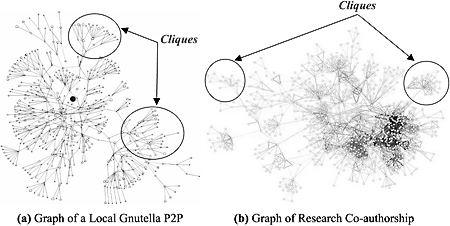
P2P network diagram
In order to make it more difficult for intellectual rights owners to prosecute violators, a new peer to peer system using Distributed Hash Table (DHT) to defeat automatic tracking systems has been implemented in BitTorrent and eMule (changing default settings is needed), instead of names, DHT uses hashing algorithms to index files, it makes it harder for the user to find the files he wants but adds an extra layer of privacy to filesharing, although not enough to make it impossible to track the infringer, DHT does not hide an individual’s identity.
List of free hash and checksum calculators
To cryptographically hash a file you will need to obtain special software to do that, select the file you would like to hash, from a 1bit file up to a full hard disk, choose the algorithm of your choice and hash it, the same software can also allow you to verify that hashing algorithms coincide (aka integrity check). If you do not want to download software, websites like Hashemall allow you to compute hashes online.
FeeBooti: This free cryptographic hash value generator can computer all the common hashing algorithms (CRC32, MD5, Whirlpool, RipeMD160, SHA512, etc), simple to use interface, file integrity checksum for files of unlimited sizes, simultaneous checksum calculation using different algorithms, it copies hash values to Windows clipboard and integrates into windows property pages.
Multihasher: Portable hash value calculator supporting CRC32, MD5, SHA1,SHA256,SHA384 and SHA512. It can be used for hash file verification and upload files to VirusTotal querying its database to find out if the file is malware. Multihasher integrates with Windows Explorer context menu, supports Unicode characters, file drag and drop and much more.
Free checksum tool MultiHasher
HashGenerator: Beginner friendly application that can be installed or used as portable, to generate a hash file you simply right click on it using the context menu options or use the drag and drop feature. It computes 14 different type of checksums and can export a list of hashes to an HTML or .txt file.
MD5Deep: Command line open source hashing tool for Windows, it can be compiled for other systems like Linux and BSD, MD5Deep can compute MD5, SHA-1, SHA256, Tiger and Whirlpool message digests, it can process regular files or block devices, it can recursively dig through the directory structure. This tool is best avoided by beginners.
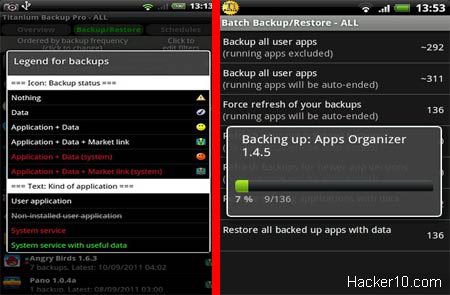
Titanium Android backup app, unlike the Google Backup feature that comes with all Android phones, can copy and restore your apps including user data within each app, general data and Market links to an external SD card, including protected and system apps, after setting it up Titanium backup will automatically copy your data as scheduled with zero clicks. Apps can be backed up individually or in group, to restore the data you can choose to only recover settings, app, data or everything at once.
This is a very powerful app, before you click on anything, make sure to read what it says, Titanium backup has access to your system files and it is easy to wreck something if you are not careful, if you are not sure refer to Titanium online Wiki. The whole backup process can take up to 15min depending on the amount of data and your Android phone processing power, once the backup has finished you can browse where everything is kept, inside the SD card in a folder named /TitaniumBackup/, you might want to copy that data online or to your desktop computer using a USB cable or Bluetooth.
Titanium Android backup app
This app is suitable for advanced/power users as it has lots of configuration options, for complex operations, like restoring data to your Android phone after it has been updated with a custom ROM, check out the online Titanium backup Wiki. The paid Pro version of this app can encrypt your backups (using RSA&AES), copy apps without closing them, freeze an app without uninstalling it, convert system apps into user apps (or vice-versa), batch verify backup integrity, sync backups online with Dropbox, and much more.
Note: This app requires root which will invalidate the phone warranty, rooting is necessary to access system files.
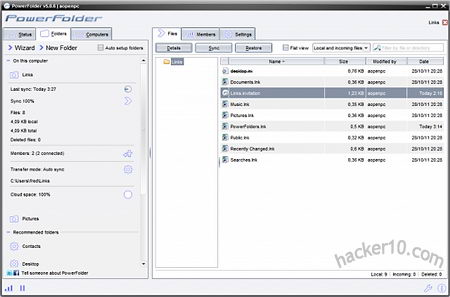
Powerfolder is a free program for Windows, Mac and Linux to securely share, sync and backup your computer files, locally or in the cloud, if you choose to backup your data online you will be offered a free account with 1GB of free space, this is not necessary as the program can be used to do offline backups, if you decide to use the cloud option all data transfers will be encrypted using SSL (transfer) and AES (storage), to open an online account only requires entering an email address, which does not need to be verified, and the password of your choice.
Powerfolder interface is easy to use, skinnable and with lots of configuration options, the software can be used to synchronize data in between computers on a LAN (Local Area Network) with real time data sync status showed on the screen, you can choose what to backup with a simple tick on a checkbox next to each folder.
PowerFolder encrypted data backup
To share files online you just need to go to the Folders tab and follow the wizard where you will be offered what files to share and where to send an invitation key, in order for someone to access your data they will need to enter that secret key first. PowerFolder cloud storage can be accessed through the iPhone or Android through a specially made mobile portal (m.powerfolder.com), browser file downloads are made using an encrypted SSL connection, you can view and play audio files online too. Powerfolder software scans local folders for changes and uploads/erases the data as necessary, bandwidth taken by PowerFolder can be limited, a proxy and specific ports chosen, the plugins tab lets you configure advanced settings, like adopting UDT connections instead of TCP, encryption security level and setting up a dynamic DNS.
I would have preferred it if the help manual wasn’t only available online, and the free 1GB online space is not enough to hold all of my important data, I could not find any other flaw to this very fine secure data backup software.
SecureID: Password manager and data vault for your Windows phone, it encrypts all data using AES256, it can encrypt any kind of data, including audio recordings. The passwords can be classified into categories and searched, a password generator indicating password strength is included.
7pass: Non official version of open source Keepass password manager for Windows mobile phones, it is compatible with Keepass desktop edition in your PC, it can securely store usernames and passwords as well as credit card details and notes, you will need a master password to access the encrypted database. It includes a password generator just like the original Keepass for PC.
Message Encryption: It can encrypt text messages using the encryption key of your choice, after encryption it will send the message to the person you choose, using the same window you can decrypt received messages, lean on configuration settings and features, but easy to use.
Password Vault: Windows Phone 7 app to securely store passwords, financial information and images, the application encrypts and groups data as Financial, Internet, Personal and Others. Instant search helps you to find out what you want when you need it, stored notes have a preview and can be edited, all you need to access your data is the master password.
Secure Keys: Secure configurable password generator, it creates a hard to crack password with numbers, letters and special characters all based on the passphrase you entered, making it easy for you to remember your password yet hard for others to guess. The created password isn’t saved on the phone or sent over the Internet making it impossible for someone to know it other than looking at the screen on the phone.
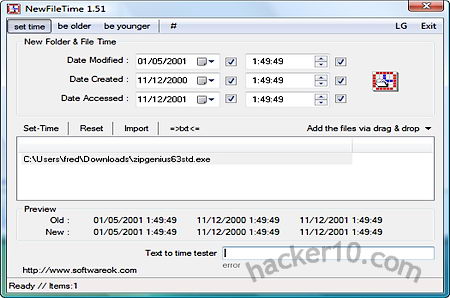
NewFileTime is a small Windows utility to easily change files and folders timestamps, the application doesn’t need any installation, it can be run from a USB thumbdrive in portable mode and lets you change the Modified, Created and Accessed timestamps (day,month,year and time). To change a file or folder Created and Accessed date it is as easy as dragging and dropping the file inside NewFileTime main window or manually selecting the files using the import button. Its best feature is that you can add multiple files and folders and change all dates at once.
NewFileTime change file folder timestamp
The menu lets you to quickly add and subtract hours or days to the file timestamps using one of the preset values, timestamps can also be exported or imported using the txt button. Overall this program does what it says on the tin with and you won’t need any administrator rights to run it. There are other free utilities to change a Windows file timestamp like Mooo TimeStamp or Timestamp modifier but I have found NewFileTime to be the easiest to use.
YaCy is an open source community based search engine written in Java with no central server indexing the results, search queries are produced using a worldwide peer to peer computer network, in the same way that torrent downloads work, the quantity and quality of the results will depend on the number of peers connected at the time, on top of the search results YaCy lets you know how many peers are providing them, it can be used to search text or images. Unlike Google or Bing, where the company managing the search results is open to subpoenas and censoring links (e.g. DMCA complaint, offensive images, etc), YaCy results can not be censoredas no single central authority is responsible for them and there are thousands of servers (personal computers) in multiple countries providing results, with some seed list servers including accurate p2p node information to be found in the source code.
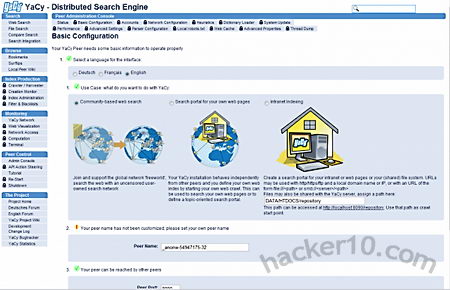
You will need to download YaCy software to your computer to use it, during installation Windows default firewall will be configured to allow YaCy queries pass through, if you are using a different firewall you will have to set it up manually to allow YaCy to connect to the Internet. The search engine will be accessed in your browser clicking on YaCy’s logo or visiting http://localhost:8090 (default port can be changed), YaCy can be set up to crawl an specific website or FTP server creating your own search index, the crawling can be scheduled to as often as you like or limited to a single time to save computer resources.
yaCy anonymous search engine
To protect your privacy after performing a search the words used are sent to a peer in the form of distributed hash tables, peers store crawled search results as cryptographic hashes and these are all mixed in between peers, making it impossible to pinpoint search queries to a certain host. Search is not limited to the public Internet, YaCy can be used in Intranets, the configuration settings had so many options that it can take a long time to understand what everything is for, the best is to leave the defaults.
In my experience YaCy Internet results were not very good, with a tendency to link to deep pages instead of the main portal, my main predicament is that it did not have too many pages indexed and it took a couple of seconds to finish each search query, this can be improved once YaCy manages to reach a sizable number of users/peers. Until then, this search engine will be better suited for Intranets or custom crawling of forums and wikis, admittedly, their plan is not to beat Google results, but to provide a truly private search engine experience. There is no need to erase logs, because there are no logs and companies do not have to rely on a third party server to run their private search queries. In the future the developers plan on indexing tor node pages and Freenet sites.