Author: John Durret

  • Decentralised group communications with matrix

    Decentralised group communications with matrix

    Matrix is a new open source standard for secure real time communications using end to end encryption, it can be used for video calls, voice, text, file transfers and anything that developers want to build on top of it. Matrix server infrastructure is made up of multiple nodes talking to each other, it ends with the current fragmentation of messaging apps forcing people to have the same software installed to be able to talk with each other.

    Unlike WhatsApp/Viber/LINE/Kik and similar apps needing sovereign installation, matrix is identity agnostic, the ecosystem runs an open federation model where anybody can run their own matrix server and join the network.

    Identity servers track which emails and messages belong to which matrix ID, chat rooms do not exist on any single server, they are shared across multiple participating servers and each participating server can choose to publish their own alias, several different aliases can lead to the same room depending on what server you are using.

    Decentralised private chatroom Matrix
    Decentralised private chatroom matrix


    I joined a matrix test server, it was only necessary to pick a username and a password, there is no obligation to provide any email address, although specifying one lets other users find you on Matrix more easily and gives you a way to reset your password in the future. If you opt for email registration a verification code is sent to your address, the registration process took me less than a minute.

    After logging in you can see multiple public chat rooms, this is nothing like IRC, matrix is more multimedia centric and it lets you call and post inline photos to the whole chatroom, you can have an avatar, notification settings that are triggered when somebody types a keyword in the chatroom and sending SMS messages to a phone number using the web gateway, currently free during beta testing but a Paypal account must be linked for security to stop abuse.

    The interface was fairly easy to use and it certainly looks better than the old IRC but I am just happy using a jabber instant messenger to communicate, I don’t see a special need for a matrix network. I favour the idea of not having to adopt multiple providers to communicate with other people and not relying on a single cloud server for communications but as a user I don’t care if it is a matrix or XMPP server, I couldn’t see that many differences in between them, most of things that matrix can do can also be achieved with a jabber client.
    Visit matrix homepage

  • Android encrypted video recording app Strongbox

    Android encrypted video recording app Strongbox

    Strongbox is a free open source app for human rights and privacy activists to be able to record video with their phones without having to worry about the device being lost or seized, although in some countries you can be charged for not revealing your password to law enforcement.

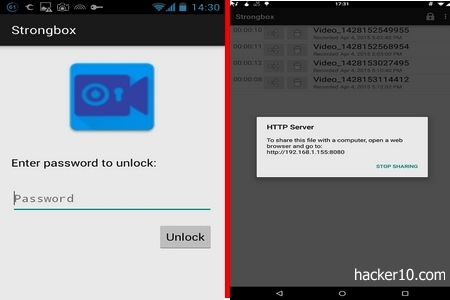
    The app is really simple to use, when you launch it for the first time you will be prompted to compose a passphrase to locally encrypt the videos, if you forget the passphrase, all data will be unrecoverable and lost.

    Straight away after login you enter the video mode with two big buttons at the bottom of the screen, the one represented by a camera logo starts the recording when tapped, the other button represented by a memory card logo gives you access to the video library.

    Stored videos have timestamps next to them, you can view the video on your phone, delete it or upload it to a server. Strongbox gives an internal IP address where the video should he uploaded, I found it confusing, being an internal IP many people will not realise it is their own computer IP, another thing is that when you erase a video no confirmation is asked for and files can be deleted by mistake.

    Android encrypted video recorder Strongbox
    Android encrypted video recorder Strongbox


    Footage is encrypted on the fly as you film, files never touch the memory card, videos are stored inside the encrypted container in Strongbox. The encryption algorithm used is AES256bit in GCM mode, this provides confidentiality and integrity, a lock allows you to instantly close down the app preventing access to the videos with one tap.

    I would use this app to keep my own videos private and not much more, I found the sharing options lacking, that is a problem if your phone is seized. An oppressive law enforcement agency will not be able to view the recordings but you will have lost access to what could be indispensable footage of abuse, I wish there was an easy way to quickly get the videos out of the phone.

    This is a basic app with basic functions using standard encryption that can be checked for bugs and backdoors, probably useful to keep video clips of your girlfriend intended for personal viewing encrypted.

    Visit Strongbox in Google Play

  • Top anonymous digital currencies for untraceable payments

    Top anonymous digital currencies for untraceable payments

    The aim of the currencies below is to make it impossible for an investigator to analyze a public ledger, known as block chain in Bitcoin, and to hide the identities of those making and receiving payments. Other advantages are that the money can not be seized and transaction fees are very low or non existent.

    WARNING! The world of cryptocurrencies contain elaborate scams, pump and dump and pyramid schemes. I am not endorsing any of the currencies below, it is your duty to double check claims about anonymity and trust.

    Dash (DASH): One of the most popular, Digital Cash is a Bitcoin based electronic currency focused in privacy. The wallet contains a coin mixer, you have the choice to make your financial operations public or anonymous, using a decentralized network of servers called masternodes that anonymize the transaction, the level of anonymity can be configured to in between 2 or 8 node hops. Digital Cash coins can be earned if you help the network running a masternode but this is not necessary.

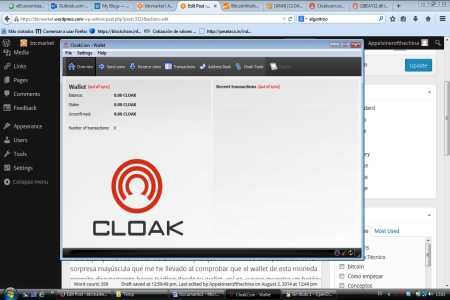
    CloakCoin (CLOAK): Every CloakCoin user becomes part of the network which increases anonymity, in exchange for keeping your wallet open and helping others be anonymous, you earn interest on the CloakCoins you hold. A built in decentralized market called OneMarket can be used to spend your currency anonymously, anybody can advertise and buy services or goods in OneMarket, or you can exchange your coins in CloackTrade.

    anonymous cryptocurrency cloakcoin
    anonymous cryptocurrency cloakcoin

    ShadowCash (SDC): Decentralised cryptocurrency with the choice of making public or private anonymous payments. When you open your wallet it will help run the peer to peer network and you will be compensated with electronic cash. ShadowCash comes with an embedded private messenger that encrypts communications and allows you to talk with other users on the network.

    LEOCoin (LEO): The Learning Enterprise Organisation coin has a focus on being user friendly, it has a decentralized peer to peer payment system with proof of work and proof of stake validation. The public ledger is encrypted. An article in Coindesk has scam accusations against the developers of this currency, I would be very careful with it, the accusations are somehow substantiated with real facts.

    AnonCoin (ANC): Anonymous cryptocurrency with native support for the I2P network, it can also be used over Tor, AnonCoin will not only decentralized operations but it also anonymizes computer IPs when you connect to a client. This currency has been around for two years and development is very active, with good documentation, a Wiki and discussion forum, it can be traded in various exchanges.

    Anoncoin wallet
    Anoncoin wallet

    Monero (XMR): Open source untraceable currency using peer to peer transactions and a distributed public ledger, receipts and money transfers remain private by default. Ring signatures add a degree of ambiguity to make it harder to link a transaction with an individual computer. This currency can be integrated in the I2P anonymous network and you can run a full node if you want to, another choice is to use a web based Monero account.

    BitcoinDark (BTCD): It has a very novel unproven approach to currency anonymity, BitcoinDark uses what they call Teleport to clone and exchange currency denominations out of the block chain. A hard to understand technology, first generation cryptocurrency. BitcoinDark is part of SuperNET, a decentralized currency exchange that makes it very difficult to steal digital currency by storing it in multiple nodes.

  • Zendo a One Time Pad encryption messaging app

    Zendo a One Time Pad encryption messaging app

    Zendo is a free iPhone and Android app for encrypted chat, users communicate directly with each other using One Time Pad encryption keys that will have previously exchanged in person.

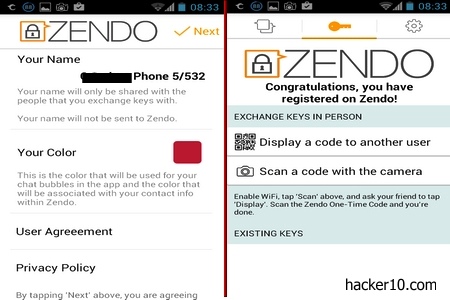
    After installing the app you will see two options on the screen, one displaying a QR code and a second button to scan other people’s codes. Pointing your camera phone to the QR code seen on the screen of your friend’s phone authenticates both devices via Wi-fi direct and encrypts the connection with AES256, it then exchanges multiple One Time Pad encryption keys (o.5MB). If anybody listened nearby and captured the exchange you would not have to worry as the connection was initially encrypted.

    The strength of One Time Pad encryption is that a new key is used for each one of your messages, this is why you need multiple keys, and why if anybody managed to crack one of the keys they would only be able to read a single message, to be able to decipher a whole conversation taking place your adversary would have to crack hundreds or thousands of encryptions keys.

    smartphone encrypted chat Zendo
    smartphone encrypted chat Zendo

    Another security feature is that the messages and photos you send are encrypted before they leave your phone, to extend the longevity of One Time Pad encryption keys, photos are encrypted with AES256bit.

    In advanced settings an “Out-of-Band Messaging” option enables you to send encrypted Zendo messages via email or SMS, you are not required to use Zendo servers to deliver messages to other users you have exchanged keys with, another option deletes all messages on close, ticking the box will automatically erase all messages and photos when you close the app while keeping your contacts and encryption keys you have exchanged, and a third option steps up security to paranoid level allowing you to exchange large encryption keys, this choice will reduce phone performance in low end devices.

    For privacy, Zendo servers do not log any IP, they are quickly erased, and you never facilitate the company any email address or phone number, contact list, messages and photos remain in your phone and not in Zendo servers. The company can’t spy or help anybody spy on you with the information and capabilities they have.

    One Time Pad encryption app Zendo
    One Time Pad encryption app Zendo

    When you run out of One Time Pad encryption keys you will have to meet again in person and top up, this will seem annoying to many people but it is a good excuse to have a face to face meeting with somebody, there is a certain social element in Zendo. This is an app to communicate with people you know in real life and are close to you. The biggest downside of high security is usability as Zendo proves, you can’t use this app to chat with people you just met, keys can not be sent over the Internet.

    Zendo is a niche app where the person you are chatting with will be as overtly suspicious about privacy and security as you are, I see next to zero options to convince my friends to use it otherwise. The app is not open source but the code was opened for an independent audit. The developers say that Zendo will always be free, monetization will be made in the form of premium features to be added in the future.

    Before using this app remember that, no matter how secure your messaging app is, if somebody manages to introduce a virus in your smartphone, they will be able to read everything, security has to be implemented all over the device.

    Visit Zendo in the Apple Store or Visit Zendo in Google play

  • List of the best encrypted chatroom services

    List of the best encrypted chatroom services

    When your access to secure communication tools is limited in a shared environment or your are on the go, the services below can be used to set up a makeshift secure chat without any technical knowledge

    These websites can create an encrypted chatroom with minimal registration details and they can be accessed by anybody with a web browser in their computer or mobile device, but the websites also require you to trust the server operator, hence, you should not use them for high security unless you host the chat software.

    I have used a few of the sites below with a VPN proxy to hide my computer IP and I didn’t have any kind of problem to do this, the only condition is that javascript always has to be enabled since this is what is used to encrypt the messages in your browser.

    Otr: Peer to peer chat in your browser with no central server and no need to register or install anything, you simply open a chatroom and send or post the link somewhere for your contacts to access it, but remember that once everybody leaves the chatroom it ceases to exist.

    Cyph: Encrypted group messenger and video calling that works in the browser and smartphone with encrypted cloud storage. Cypth uses quantum resistant cyphers and has been independently audited by Cure 53 a German cybersecurity firm.

    Teleguard: Swiss based instant messenger that does not require you to register a phone number to use ti, Teleguard can be used in smartphones, Linux, Windows and Mac computers but you have to download their application it won´t work in the browser.

    Brave Talk: From the makers of the privacy focused Brave browser, Brave talk allows you for free encrypted video chats right in your browser, one of the callers needs to be using the Brave browser to create the chatroom but the others can use any browser they want and connect by clicking on a link.

    ChatCrypt: It allows you to create an encrypted chatroom entering a name for the room, a username and a password. People who want to join in will have to visit ChatCrypt and enter the room name and password you have given them. ChatCrypt rooms are not listed anywhere, they can only be found if you let other people know that they have been created. All messages are encrypted in your browser with AES256 bit in CTR mode before transmission.

    ChatCrypt is funded with advertising and you will see a banner on top of the chatroom, Google and their NSA friends, perhaps can’t read the messages but they should still be able to track the IP of people in the chatroom using the advertising banner.

  • Open source mobile phone app SureSpot for encrypted chat

    Open source mobile phone app SureSpot for encrypted chat

    SureSpot is an Android and iPhone open source app for encrypted end to end chat, you can send pictures and text,nobody can decrypt the messages, not even the app delelopers. AES256 bit encryption keys are created in your phone and the Diffie-Hellman key agreement protocol is used to exchange them securely without having to grant private keys access to a third party, only the person you are communicating with is able to read the messages and view the photos you send.

    An spy agency attempting to wiretap Surespot will find that there is not a single server they can attack for mass surveillance, they would have to hack all the end point phones to listen in, this would be impossible to do if Surespot became popular. For further privacy, Surespot can create multiple identities to chat with different contacts, your identity can be backed up, restored or permanently erased and the paranoid person can create new encryption keys as often as needed.

    Another nifty feature is that you can delete the messages you have sent from the receiver’s inbox and lock attached images to stop them from being saved outside the app,  Surespot also locks itself after a few minutes of inactivity to stop impersonation in case your phone is taken while still on.

    SureSpot encrypted mobile phone chat
    SureSpot encrypted mobile phone chat

    Unlike WhatsApp and other privacy invasive chat apps, people in your contact list will not get automatically notified when you install Surespot, before a chat can take place you need to know the nickname of the person you would like to communicate with and that person will have to accept the invitation. The app is free for chat, paying a small fee will add voice messaging so that instead of typing in you can talk to your mic, record a message and send it encrypted to your contact, another tab in the app allows you for an optional Paypal or Bitcoin donation.

    This privacy app earned of the highest marks in the Electronic Frontiers Foundation score card, the only downside the EFF highlighted were that Surespot code has not been audited and the possibility of somebody getting access to your phone. The common auditing problem comes down to raising enough money, it is not the developers fault, and the danger of having your phone stolen, it can be partially fixed fully encrypting the phone.

    I liked this app a lot, it has all I want from a secure mobile chat app, the most important factors being that Surespot is based on trusted encryption algorithms, it is open source which allows experts to peek in and check for bugs or backdoors, and the app does not use your phone number as a contact, the person you are chatting will not find it out unless you tell him, the only missing feature is that you can’t set up a group chat, which I don’t currently use. I am adding Surespot to my list of favourite apps.

    Visit Surespot homepage

  • Encrypted cloud storage with messaging Peerio

    Encrypted cloud storage with messaging Peerio

    Peerio is a company providing encrypted file storage with integrated instant messager in the cloud. Available for Windows, Mac and Linux (if using the Chrome browser), smartphone apps are on the way, it is being developed by the makers of Cryptocat and miniLock, two other cloud based encryption utilities.

    Before you can use Peerio you will have to register for an account selecting a username, the email address you provide will receive a verification link for you to click on, after that you can create a short PIN code to pair devices with Peerio. A long passphrase is generated during account creation to stop users from picking a weak one, this is very important as encryption keys are derived from that passphrase.

    Although I see why the developers do this, I am not a fervent supporter of having something as important as the passphrase picked by a third party app instead of my trusted offline password manager, and most likely people without a password manager will write it down anyway.

    encrypted file storage Peerio
    encrypted file storage Peerio

    Peerio interface is clean and easy to use, you will see three tabs “Messages“, “Files” and “Contacts“, and a column allowing you to classify uploaded documents by file type (Photos, Videos, PDF, etc), everything is automatically synchronizing.  After you have added a contact, that person will be able to talk with you in real time, to send him a large file, drag and drop the files you wish to share inside the window to upload them to the cloud, another button lets you destroy those files from your account and the account of the people it is being shared with.

    This platform is comparable to Mega, a more established encrypted cloud storage with messenger that offers far more space. Peerio developers have no way to know what you are sharing, only users hold the private key to decrypt data downloaded from Peerio Canadian cloud servers, the company can’t read anything but they admit that timestamps and login IPs are kept, that is all they can hand over if they are forced to.

    A substitute method to send large files with end to end encryption is using an instant messenger and encrypting the files with PeaZip before the transfer. Peerio’s main leverage is that it does all the encryption work in the background but it also has the disadvantage that to send big files you will be asked to upgrade to their upcoming paid for plans, and, the part that bugs me the most, is that you have to convince your friends to open an account with Peerio.

    Peerio erasing shared cloud files
    Peerio erasing shared cloud files

    If you are small company and your employees need to share files often, perhaps Peerio will work, but for the individual, it is best that you encrypt a file and upload it with a proxy to a cyberlocker or use NeoRouter to avoid the metada treasure trove that cloud servers are, with the extra benefit of always having the data available in your hard drive.

    Other secure ways to share large files without a cloud server involved are Bittorrent Sync and Infinit.

    Visit Peerio homepage