Author: John Durret

  • Freeware text encryption program BCTextEncoder

    Freeware text encryption program BCTextEncoder

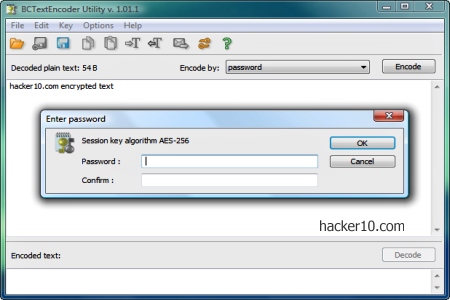
    BCTextEncoder from Jetico is a free small portable application to encode and decode text, password protecting it with AES256-bit symmetric encryption or public encryption keys that can be either imported from a file or generated for you with the included BestCrypt Key Manager from where you can manage key pairs with the standard PKCS-12/X.509 format.

    Encrypted text can be easily copied to the clipboard or saved as .txt file, the toolbar also has an envelope logo to directly send encrypted text by email opening your email client, but during my test this function did not work for me and clicking on “Send encoded text by email now” would pop up an error window. I could not fix this problem but you can still copy and paste the text anywhere you like, from Usenet clients to webmail. The only detail is that encrypted text will be appended with the line “Version: BCTextEncoder Utility“, giving away the software and version that you have used to scramble the text but it is not a security risk if the encryption is sound.
    Text encryption program BCTextEncoder
    Text encryption program BCTextEncoder

    The program comes with a help file and it is very well documented at user and technical level, with a diagram explaining the encryption process. First the text is compressed with zlib, a software library for data compression, then you decide whether to use symmetric AES256 or asymmetric RSA for encryption, a third step converts the text to readable Base64, an encoding scheme to represent binary data as text, and after that you are ready to securely send the ciphered message wherever you like. Just note that BCTextEncoder only works for text, if you would like to cipher files, like images or videos, you will need a different program.

    It is impressive that such a tiny program packs so many powerful features and although it is closed source, Jetico is a Finnish company that has been around for many years developing security products, which gives more peace of mind than a one man hobby program.

    As usual the only challenge will be to convince the receiver to download BCTextEncoder to be able to decrypt the messages you send, this can be done with your best friend but when you have a group of people with a different operating system you are not very close to, it gets harder to agree on an encryption standard. BCTextEncoder only works in Windows.
    Visit BCTextEncoder homepage

  • Intrusion Detection Linux distribution Security Onion

    Intrusion Detection Linux distribution Security Onion

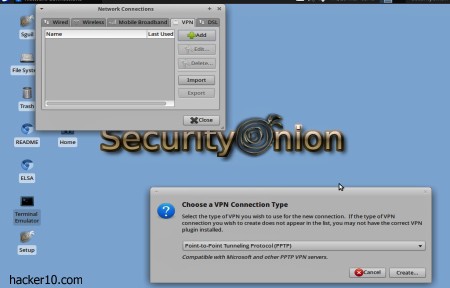
    Security Onion is a Ubuntu based Intrusion Detection and Network Security Linux distribution for professionals. It can run as a live DVD or installed in your hard drive with just a few clicks. The distribution comes with well known offensive and defensive digital tools that are not very beginner friendly, you need to have a computer security background to understand what the tools do.

    Fortunately Security Onion developers have uploaded a series of YouTube tutorials explaining how to search DNS traffic, how to use Sguil, Squert, Snorby and tcpreplay, there is also a well documented Wiki, a mailing list and Freenode IRC channel where you can post questions. If you wish to learn about digital forensics and hacking this will be a good place to start.

    Intrusion Detection Linux distribution Security Oniion
    Intrusion Detection Linux distribution Security Onion

    Security Onion default window manager is XFCE, a minimalist lightweight desktop environment. You will find a basic Xubuntu software base, like the Synaptic package manager, text editor Abiword, graphic editor the Gimp and a couple of Solitaire games with a considerable bundle of network inspection software, the expected WireShark packet sniffer, Suricata, Xplico and Network Miner for network forensic analysis, Snorby, ELSA, Snort and a long etc of tools that security professionals will quickly recognise.

    There is no root password in Security Onion, a default Ubuntu based distribution setting. Your account already has sudo permissions and you can add a new user with sudo adduser

    This is an actively supported distribution, one of the developers is a SANS Institute GSE Community Instructor and other seasoned security professionals are also involved, a two training class about Security Onion has already taken place, with enough demand there is no reason why this should not happen more often.

    Security Onion is a proper alternative to BackTrack that has all the tools a pen tester and digital forensics professional needs to detect network intrusion and test network defences before and attack happens. Security Onion is well documented with community based online support.

    Definitely a distribution to look at if you work in the IDS field or if you would like to learn more about real computer security that actually needs some skill and it is not a point and click script kiddie cyberweapon.

    Visit Security Onion homepage

  • Bypass ISP Internet censorship with ShadowSocks

    Bypass ISP Internet censorship with ShadowSocks

    ShadowSocks is a cross platform socks 5 proxy available for Windows, Mac, Linux, Android and iPhone, the proxy can pierce corporate or ISP firewalls and access censored sites. If you find yourself in a situation where OpenVPN traffic is blocked or throttled, ShadowSocks is a good alternative to a VPN and it can be installed in OpenWRT routers to tunnel the entire network traffic.

    The software tunnels and encrypts your Internet browsing, if you want to use an Instant Messenger or BitTorrent, you will have to configure those programs settings to use the applicable Socks 5 proxy and port.

    Socks 5 proxy ShadowSocks
    Socks 5 proxy ShadowSocks

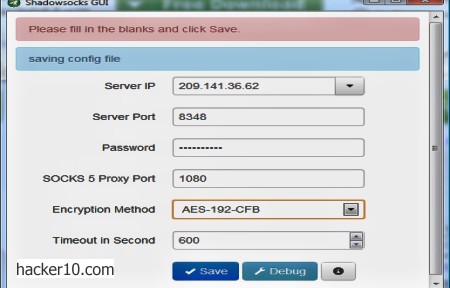
    The program comes with a graphical interface from where to select a server IP, if you have your own server, or choose one of the available ShadowSocks public server IPs, port, password if needed, socks 5 proxy, encryption method and time out for requests.  It would be moderately difficult for somebody who is not familiar with proxies to use ShadowSocks, the online help manual is clear but it contains technical terminology.

    ShadowSocks Android version has a configuration option to bypass tunnelling for all sites located in China so that the proxy is only used for foreign sites which are the ones blocked by the Great Firewall of China. Unfortunately you need a rooted device to use ShadowSocks in Android and it only works with Wi-fi, the developers aim to add G4/LTE support in the future.

    ShadowSocks asynchronous I/O technology makes browsing the Internet faster than OpenVPN but that in the end speed will depend on the server load and ping even if the protocol is light on resources. The greatest benefit of using ShadowSocks is that it is easy to set up your own ShadowSocks server on a cheap VPS, I personally would prefer surfing the Internet with OpenVPN or an SSH tunnel unless OpenVPN did not work and SSH ports were blocked.

    Notice that this program has been designed as an anticensorship tool and not to make you anonymous on the Internet.

    Visit ShadowSocks homepage

  • Tor proxy anonymous Instant Messenger

    Tor proxy anonymous Instant Messenger

    Torsion IM (renamed Ricochet in June 2014) is a decentralized real time instant messenger alternative to TorChat that runs on the Tor network. Available for Windows, Mac and Linux, during installation you will be given the option to connect directly to the Tor network or if you are behind a restrictive firewall or in a country that filters the Internet and blocks Tor nodes, you can arrange your network settings.

    Inside Torsion Ricochet network settings you can specify any open port that is not blocked by your firewall, or, enter a Tor bridge address that will get around ISP censorship. Tor bridge relays are not listed anywhere, you can only get them via email following the instructions described in the Tor project website.

    Tor proxy instant messenger Torsion
    Tor proxy instant messenger Torsion

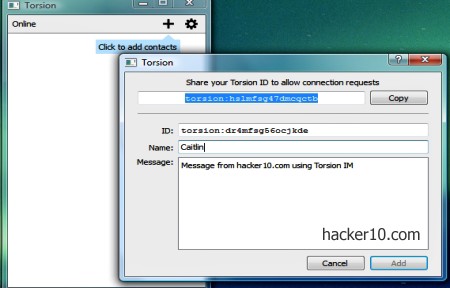
    There is no need to create an account, a Torsion IM Ricochet contact address will be automatically created for you when you install the software, in the form of “ricochet:hslmfsg47dmcqctb“, this will also be your login credentials, no need for a password, registration details are virtually zero, no email, no nothing, just a cryptic torsion: address (changed to ricochet: in June 2014) and the nick of your choice. The messenger interface is easy as pie, it has two buttons, a plus sign where you add a torsion ID contact address to chat with that person and a settings button that lets you see your list of contacts and remove them.

    You will not have to separately install Tor software to get the Torsion IM Ricochet running, the program automatically connects to the Tor network. You can browse the Internet with your real computer IP while the messenger chat is anonymously routed through Tor. I tried to run Torsion IM Ricochet from behind a VPN (LT2P) and it worked smoothly, with no lagging time and no network trouble.

    This is a marvellous metadata free instant messenger that gets the job done, no emoticons or sounds or distractions of any kind, just plain text to get to the point when planning the next revolutionary action over the Tor network, without any central server that could be compromised and with data encrypted over the wire, it can resist censorship and monitoring.

    Torsion IM Ricochet has not been audited by anybody but it is open source and fairly well documented. The messenger will not interoperate with other protocols and both parts need to be using the same program, to convince your friends to stop using insecure Windows Live Messenger and Yahoo, you count with the wonderful benefit of not having to explain to them what Tor is, Torsion IM Ricochet will configure itself to use the Tor network during installation and it will enable people to use it straight away without reading any manual and not affecting their browser settings.

    Note: Experimental and not endorsed by the Tor project.

    Visit Ricochet IM homepage

  • Conceal secret messages inside text with SNOW steganography

    Conceal secret messages inside text with SNOW steganography

    SNOW is a free program to hide messages inside ASCII text, for those who don’t know ASCII stands for American Standard Code for Information Interchange, a binary scheme to represent English characters in computer language that can be read by nearly all text editors although UTF-8 is replacing ASCII as the world wide web language, ASCII is the default format to save text in Unix and DOS operating systems.

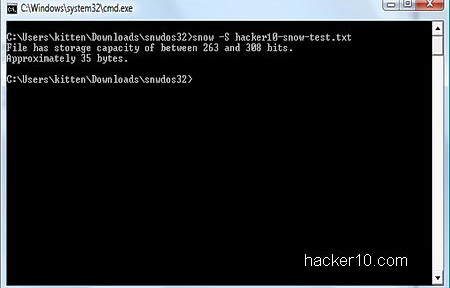
    The program is a tiny command line based utility of just 60Kb, downloadable as Windows executable or Java applet to work with other operating systems like Linux. SNOW comes with a manual listing the available commands and real examples. Do not be scared of the command line, it is not hard to use. The source code is also available for download so that others can review it.

    SNOW ASCII text steganography tool
    SNOW ASCII text steganography tool

    SNOW steganography takes advantage of white spaces found in text messages and hides invisible text inside them, this keeps the visual embodiment and does not raise any suspicious to watchful eyes. Security is heightened with compression to fit more text inside the white spaces and text encrypted with ICE, an open source symmetric 64-bit block cipher designed by the same author to withstand cryptanalysis and guard from detection.

    This is a superb unexpected way to send secret messages to other people with the only downside being that, unlike messages hidden in photos that can be distributed uploading them to public online photo albums, you can not copy and paste steganographic SNOW text messages on a website because the data is hidden inside the white spaces. You will have to necessarily send the full ASCII file text to your contact, revealing metadata, like who is talking with who. But you could upload an innocuous compressed file, e.g. video, with ASCII text instructions included and hide the message inside the text white spaces, this would waive the need of emailing anybody and it would not ascent mistrust.

    SNOW has been around since the nineties and has recently been released under the Apache license, it is a very well documented tool with technical cryptanalysis information about its design as well as benchmarks.

    Visit SNOW stego homepage

  • Best smartphone apps to exchange secret messages

    Best smartphone apps to exchange secret messages

    Even if you take care of your personal privacy the people you are communicating with might not be as privacy conscious or knowledgeable. If one of your contacts misplaces their phone with your private pictures and messages you would also be compromised, or if they stop being your friends and become your enemies anything you have previously sent, could be used against you.

    The following smartphone apps will make it hard for others to permanently store text, photos and videos you send to them.

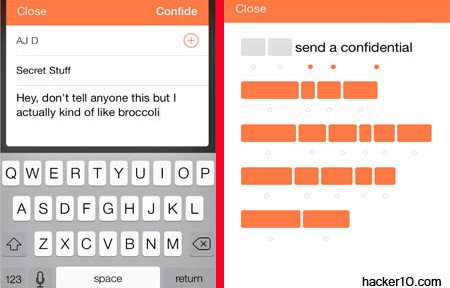
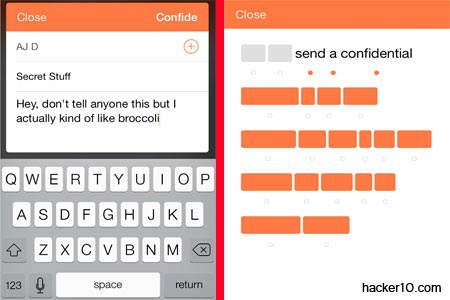
    Confide: It sends end to end encrypted messages that will disappear after reading and you will get a receipt once the message has been opened. There is built-in screenshot protection that makes it difficult to take a screenshot by concealing the message until somebody swipes the screen.

    Confide smartphone app
    Confide smartphone app

    Telegram: Cloud based encrypted self-destructing messages, you can create private group chats to share files and store data on the cloud that is available across devices. For higher security is best to adopt Telegram “Secret Chats” option, where encryption is end to end without going across any intermediary server.

    Whisper: This app will post messages and photos to your social network without revealing who you are. The idea is to allow people to share thoughts and information with people they known through a nickname. Whisper provides a huge amount of photos you can customize with your own feelings before posting, you can use it to vent frustration, people reading the messages can then choose to have a one to one private chat with you.

    Wickr: This is an app targeted at those really serious about security, it encrypts all communications, you can send texts, videos, photos and make calls in total privacy, with an expiration date. The app has security audit to make sure there are no flaws, and it is used by businesses to hide their trade secrets as well as people who want a private life, the app allows you to choose who has access to your messages and how long for.

    Self-destructing messages app Wickr
    Self-destructing messages app Wickr

    Dust: Available for Android and iPhone, this app can send messages that will self-destruct after a set number of days or hours, no data touches the memory card, nothing can be recovered and it warns you if anybody takes a screenshot of a message you sent. You can create discussion groups and invite other Dust users.

    DontTalk: If you make a mistake sending something the app allows you to recall messages before your friends see them, set up group chats, whispers and self-destructing pop messages. This app is appropriate for those trying to protect from pseudofriends leaking the information you send, but it will not serve as protection from a law enforcement agency although no doubt it will make their job harder.

  • Encrypted Voice over IP chat Mumble works with Tor

    Encrypted Voice over IP chat Mumble works with Tor

    Mumble is an open source VoIP program for group or P2P chat that runs in Windows, Mac and Linux, with iPhone and Android versions in beta. Mumble encryption is implemented with public/private key authentication and unlike Microsoft owned Skype, which supposedly also encrypts calls, in Mumble cryptography experts can scrutinise the code to make sure that the NSA has not inserted a backdoor or weakened the algorithm.

    Mumble is widely used by gamers due to its low latency and background noise reduction resulting in superb audio quality, but you can use it for any kind of communication. Ninety per cent of the public chatrooms I visited where gaming clans and I had to manually add activist related Mumble servers like occupytalk. For high privacy group calls you have got to manage everything yourself, including the server, otherwise a rogue operator could carry out a man-in-the-middle attack to eavesdrop on you.

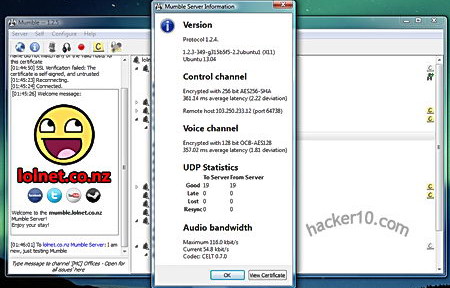
    Mumble server encryption details
    Mumble server encryption details

    When you first install Mumble you will be prompted if you would like to run your own server (called Murmur) this will give you total control over who can access the chatroom but it requires staff and time. The other option is to join one of the dozens of public Mumble servers classified by countries and create there your own chatroom or rent a Mumble server from a specialist provider, they can be easily found with an Internet search for Mumble server hosting.

    The Mumble client Audio Tuning Wizard helps you correctly set input levels for your sound card with voice activity detection and sound quality as well as optional text to speech to read typed in messages. Messages are read with a metallic voice but you have the option of buying a professional text to speech package from a third party and add it if you are going to use the feature a lot. The second Mumble client step creates a digital certificate to authenticate with servers. The most likely is that the servers you visit will have a free self-signed digital certificate poping up a warning window that you will have to accept before joining, this is not a huge security risk if you examine the certificate before accepting it and it only has to be done once.

    Besides AES256-bit encryption Mumble has the edge over other VoIP tools because it can communicate with the TCP protocol, this is absolutely necessary for any program to be tunnelled in Tor and most VoIP programs only work with UDP, Mumble also has very low bandwidth needs, it will not clog Tor nodes and it works as Push to talk (PTT), you need to push a button to transmit voice, instead of an always on call connection.

    You can either connect directly to Tor running it in your computer and configure Mumble by going to Configuration>Network tick the checkbox that says “Force TCP Mode” and fill in the SOCKS5 proxy settings with localhost and 9050 for the port, or roll your own anonymous Mumble server for your friends renting a VPS, installing the Mumble server software in the VPS, configuring the server firewall to accept incoming connections in Mumble’s default port 64738, installing Tor in the VPS and from then on all voice calls made using that server will be encrypted and anonymous.

    Visit Mumble homepage