Category: Security

Computer Security

  • Digitally sign your documents with SignNow

    Digitally sign your documents with SignNow

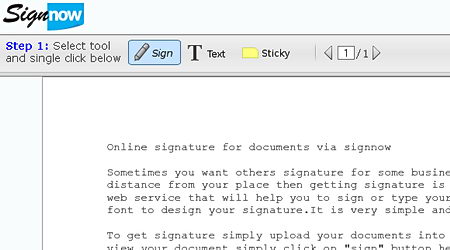
    SignNow is a free service allowing you to digitally sign a document online, it doesn’t require any registration or download making the process quick, it works with all major browsers, you can digitally sign a document using the iPhone and Android phone too, the site uses a SSL digital certificate for encrypted communication with the browser stopping third parties from eavesdropping on the uploaded document, documents are not stored and automatically erased after 30 minutes once they have been digitally signed.

    When you have uploaded the document you would like sign, PDF preferred, you will be able to create a signature with your mouse or touch screen and select the font to be used (typeface mimicking handwriting), the date will be added to the signature. If you need someone else to add a signature to the document you can choose to “Invite a signer”, that person will receive an email with the document for them to follow the same process, a sticky note with instructions can be added to the signed document.

    Are digital signatures legally binding? 

    Electronic signatures are legally binding at the very least in the US and European Union, as far as the courts are concerned there is no difference in between between a digital signature and a handwritten signature with ink on paper, with some exceptions, the US Electronic Signatures Act of 2000 mentions that the creation of wills, testamentary trusts, divorce, adoption, family papers and the like are not acceptable signed on its digital signed form.

    SignNow digital signature online
    SignNow digital signature online

    Digitally signed documents will save you money in the form of time and help the environment, document management and storage will be easier, SignNow offers extra features paying a fee, there are other similar companies offering paid for digital signing of documents, like echosign and docusign, they are more appropriate for business dealings, a digitally signed document includes the date it was signed and it is tamper proof, most services allow for timestamp settings where you can specify the organization and add some company logo or watermark.

    Visit SignNow homepage

  • How to detect and remove rootkits with Gmer

    How to detect and remove rootkits with Gmer

    A rootkit is a collection of malicious programs that allows a cracker access to your computer with administrative rights, typical rootkits consist of spyware and trojans that monitor your computer traffic and log keystrokes, sophisticated rootkits can alter log files, erasing traces, combined with other malware, rootkits have the ability to attack other computers in the same network and the Internet.

    Rootkits can hide inside the operating system kernel, a bridge that is used to process data in between software applications and computer hardware, being very hard to remove using conventional antivirus software, the best way to prevent rootkits is to run an updated antivirus and good firewall to prevent them from installing in the first place.

    NOTE: Not all rootkits are malware, a small number of legitimate applications use rootkits, like for example DVD driver emulation software that allows the user to play a game without the physical DVD-rom inside the optical drive.

    How to uninstall a rootkit

    When a malicious rookit has already been installed in your computer, there is no guarantee that it can be removed without formatting and reinstalling the operating system, the only way to try and delete a rootkit is by scanning the operating system with a specialist rootkit removal utility and hope it will be picked up.

    A rootkit detector compares different parts of the operating system (files, processes and kernel hooks), hoping to find a mismatch, after discounting files legitimately hidden by the operating system it narrows down the list of the possible rootkits.

    Gmer rootkit removal software
    Gmer rootkit removal software

    How to use Gmer

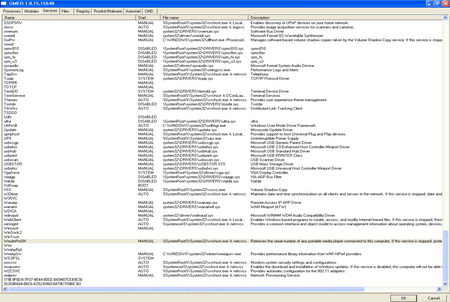
    This free rootkit removal tool will scan your computer and list running processes attempting to find hidden processes, threads, modules, services, files, disk sectors (MBR), Alternate Data Stream, registry keys, hooking SSDT, hooking IDT, hooking IRP calls and inline hooks.

    Suspected rootkits will be highlighted in red colour, when one is found, you right click on it, choose “Delete” and reboot your computer, if the red item is a service you will have to disable it first using right click, reboot your computer, detete the disabled service and reboot the computer again.

    NOTE: Read Gmer instructions carefully, this is not a click and go program, you need to know what you are doing.

    Visit Gmer homepage

  • How to report spam Emails to ISPs and police

    How to report spam Emails to ISPs and police

    There isn’t a single worldwide organization dealing with spam and fraud email, each case has to be reported to the specific local authorities, if the spam has traveled through various countries it will take the collaboration of various law enforcement agencies to track down its origins, it will be time consuming.

    The number of people that respond to spam and fraud is tiny but even a very small percentage of shoppers out of millions of emails can make money to the scammers, social media is a new opportunity for spammers and they are not missing on it, hacked Facebook and Twitter accounts are regularly used to send spam to everyone on the contact list, spam coming from a trusted friend, whose identity has been stolen unbeknown to them, is more likely to yield results with the victim ending up clicking on any link the message contains.

    Something else with what scammers count is that most people never report a small loss of under $50, they know that it will cost them more money to follow up the case that whatever they can get back, online scams schemes that want want to survive keep themselves under police radar by only stealing small amounts of money, done thousands of times it represents good income, even if they have to refund a couple of people pursuing action in court.

    Report spam emails directly to the ISP

    Spamcop is an effective and well established antispam service, all you have to do is to open an account with them, copy and paste the email you receive on an online form and Spamcop software will find out from the headers where it was sent from getting through the hub of proxies used to disguise the original computer IP that spammers used, Spamcop will also find out the abuse contact email address for the ISP and the website where the spam is being hosted then send an automatic report in a matter of seconds.

    Spamcop report spam email
    Spamcop report spam email

    Inside your Spamcop personal account you can check personal and global spam statistics, like reporting time, country of origin and past reports with dates.

    Visit Spamcop to report email spam

    Reporting fraud and spam email for US residents

    In the United States you can report emails containing fraudulent medical products or services to the Food and Drug Administration: FDA Consumer Protection.

    To report fraudulent investment emails you can do so at the U.S. Securities and Exchange Commission website clicking on the SEC website Tips and Complaints or use the StopFraud website to find the email address where to send a report of more specific financial scams like mortgage or bankruptcy fraud.

    To complaint about general email spam, like lottery scams, use the Federal trade Commission Complaint Assistant to forward them the deceptive email messages, they will store the spam in their database for future legal action, to help the FTC stop people calling you register your phone or file a complaint against companies disregarding the National Do Not Call registry at the DoNotCall website , the FTC also has an FTC Spam tips section with tips about how to avoid online scams and unsolicited email.

    The FBI, National White Collar Crime Center and the Bureau of Justice Assistant have put together the Internet Crime Complaint Center where identity theft, phishing emails and other general cybercrime can be reported, a partnership in between law enforcement agencies and regulatory agencies makes sure online complaints go to the right hands.

    The StopFakes website gives information on Intellectual Property theft and provides with a contact email address where to send questions about what to do when a product is being counterfeited, scroll down and click where on a small button that says “Report IP theft” to go to the US Immigration and Customs Enforcement IP theft online report form.

    To report online crime across borders outside the US use eConsumer and initiative made up of over two dozen consumer associations from all over the world in charge of enforcing fair trade practises.

    Non US residents reporting email scams

    Paypal has set up an antifraud department where you can report suspicious email and start an unauthorized transaction claim.

    The Anti-Phishing Working Group (APWG)  is an organization composed of businesses and law enforcement organisations focused on eliminating identity theft online resulting from email phishing scams, they have a report a suspected phishing website page, all of the emails are compiled into a list and analysed to spot trends and plan countermeasures.

    Free money online scam
    Free money online scam

    Netcraft runs a very complete free antiphishing toolbar that warns you of suspected scam sites giving you vital information about every site you visit like country where the site is hosted, site popularity and risk rating, using the same toolbar you can report a phishing site with just one click.

    Links to report spam (non US)

    • Australians can report spam at the SCAMwatch

    When you report email fraud and spam online do not expect automatic results or even a response, that will depend on the organization taking your report, how serious the case is and how easy it is to follow the trail, many spammers are based abroad and they send emails using compromised computers, the best method to stop spam still is to never buy anything from them.

  • Learn if a site is virus free with Web of Trust (WoT)

    Learn if a site is virus free with Web of Trust (WoT)

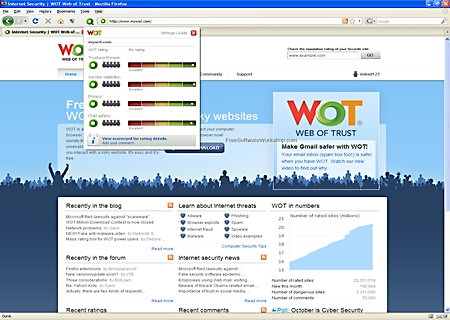
    This free malware detection browser addon similar to McAfee SiteAdvisor is a community based website reputation rating system for Firefox, Safari, Opera, Chrome and Internet Explorer with more than 5 millions of users, WoT uses the collective data to detect websites that contain malware. An icon using green, yellow and red colours in the browser indicates the overall website approval rating, you can customize it to reflect the way you surf the Internet, if you don’t care about adult content related sites for example, you can disable child safety warnings.

    To establish if a site is safe, besides the online community ratings, WoT has access to a list of databases containing phishing and malware websites, to stop spammers using the system to mislead users WoT uses a complex algorithm tracking each user’s rating behaviour allocating trust to the individual user rating a site, thus eliminating manipulation.

    Web of Trust (WoT) ratings

    • Trustworthiness: It marks with a red light all sites containing spyware and Internet scams.
    • Vendor reliability: Returning products problems, shipping delays and customer service are rated here.
    • Privacy: Websites that can not be trusted not to send spam to your email address will be given a very low privacy rating.
    • Child Safety: Adult materials like violence related content is highlighted within this setting.

    When you search the Internet with the security WoT browser addon installed Google, Bing, Yahoo (over 20 search engines), Wikipedia, Windows Live Hotmail, Gmail and other sites will show a WoT rating next to each external link allowing you to decide if a site is safe to go to before clicking on it, there is no need to register in order to use WoT but registration allows users to make comments on websites, that is where it gets tricky because like all user generated content, the comments do not necessarily reflect reality, the more people contribute reviewing a site the more trustworthy it will be, in many cases you will be left wondering about the accuracy of the comments.

    Web of trust (WoT) security addon
    Web of trust (WoT) security addon

    The Web of Trust (WoT) plugin makes for a good complementary tool for your online security needs but it should not be the only application you rely on, colour blind people can benefit from this Internet security addon too by changing the settings to a mode that does not rely on a colour code warning system.

    Visit Web of Trust (WoT) homepage

  • Recover erased files or folders with Power Data Recovery

    Recover erased files or folders with Power Data Recovery

    Minitool Power Data Recovery is an easy to use data recovery tool, you don’t need to have any technical background to use it, a clear interface helps you choose the best data recovery method for your situation, besides recovering erased files which many other tools can do, this software can recover data from damaged and formatted hard drives, scratched CD/DVDs (ISO9600, Joliet, UDF format) and memory cards (SD, USB, MMC, iPod,etc).

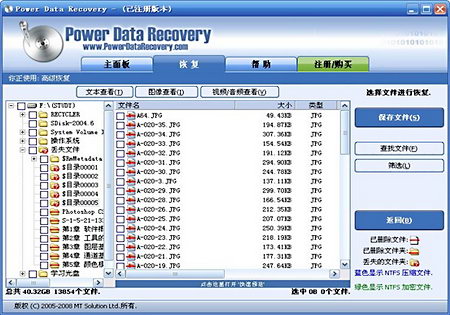
    After installing Minitool Power Data Recovery you are shown five different data recovery modules with different scanning depths:

    1. Undelete Recovery (erased files and folders)
    2. Damaged Partition Recovery (damaged and formatted partitions)
    3. Lost Partition Recovery (lost or erased HDD partition)
    4. Digital Media Recovery (flash drive, memory card, memory stick, iPod)
    5. CD/DVD Recovery (CD and DVD)
    Power Data Recovery file recovery
    Power Data Recovery file recovery

    A preview window will show what files can be recovered once the program has finished scanning the media, the data recovery process can be paused and resumed, there are search and filtering capabilities to exclude results with memory cards being automatically detected. An annoying nagging screen asks you to upgrade to a business license everytime you start the software, the home edition is free for non-commercial use, unless you want to recover data off a RAID configured hard disk, which is not supported by the free version, there is little reason for you to upgrade.

    How does data recovery work?

    Data is stored inside sectors in a computer hard drive, HDD plates are made of a combination of metal, glass and ceramics with magnetizing coating, when you instruct your operating system to delete a file that sector will be marked as empty and will no longer be visible to the user, the sector will now be available to store data on it once again, until something is written on the sector the old data will still be recoverable as it has never actually been deleted only marked as available free space and made invisible to the user, data recovery software can unmark those available sectors making visible the data they contain to the user.

    For damaged hard drives a commonly used data recovery methods is consistency checking, data recovery software checks the main directory of a hard drive and compares with its internal logical structure making sure it coincides, if it detects inconsistencies it lists them and they can be amended.

    Data carving is another data recovery method, data carving checks for files that have no file system allocation information, i.e. corrupted or deleted files, after the user manually adjusts the block size (carve), the file can be recovered, this method is heavily used in computer forensics, it relies in a lot of trial an error work and it needs good technical knowledge.

    Hard drive clicking noise explained “Click of Death”

    If your hard drive does not start and you hear it clicking as it spins this probably means the drive has defective read and write heads. When a hard drive is first powered up it always checks that it has enough speed before placing the read/write heads over the magnetic drive plates, if the necessary speed isn’t reached the hard drive will restart the whole process again causing the clicking noise.

    If you hear your damaged hard drive clicking and you run recovery software you will strain the drive heads with read/write (I/O) errors being written on the disk making data recovery more difficult for an expert were you to turn over that HDD to a technician later on.

    Note: Do not attempt to recover data off a damaged hard drive by placing it inside the freezer (Internet myth), although it could be helpful solving internal HDD metal contraction problems, it will create condensation on the hard drive plates making data recovery troublesome.

    Visit MiniTool Power Data Recovery homepage

  • Website checks if your email address has been compromised

    Website checks if your email address has been compromised

    Even if you are very careful with your computer security other sites are not and your email address can be hacked through no fault of your own if a third party where you were using the same password for multiple accounts is compromised, the first thing malicious hackers do when they get hold of someone’s username and login details is to try the same combination of username and password at Facebook, Twitter and online banking accounts. While readers of this blog will be intelligent enough to use a password manager and create unique passwords for every single site they register with, most Internet surfers still don’t do it.

    ShouldIChangeMyPassword
    ShouldIChangeMyPassword

    ShouldIChangeMyPassword is a website that checks your email address against a large database of stolen online accounts released on the Internet by criminals, if it finds your email address in the database you get a warning, it is not a perfect system because the website is only as good as their database of compromised accounts is and some malicious hackers never release to the Internet stolen data, they rather steal money off them first.

    Last year I had myself my email address and password leaked on the Internet when the Gawker website database was stolen with my email inside, ShouldIChangeMyPassword has successfully detected it providing me with the date on which the details were leaked onto the Internet. Whenever a new database of leaked passwords is made public the site is updated, as of right it can be checked against the hacked databases belonging to Mt. Gox, Pron, Infragard Atlanta, Sony, PBS, Fox.com, Gawker, and others.

    Visit ShouldIChangeMyPassword homepage

  • Steganography, hiding text inside photos and sound files

    Steganography, hiding text inside photos and sound files

    The word steganography has Greek origins, it means concealed writing, in the digital world steganography (aka steg or stego) consists in hiding data inside data, it is mostly used to hide text inside pictures or sound files but any kind of data can be hidden and any kind of file can be used as a carrier file.

    Steganographic software takes advantage of the way binary works where the bits towards the right of a file are the ones with less significance, changing them results in little distortion for the file, an example of  this would be changing the red colour of a few pixels on a digital photography for a different tone of red that it is not noticeable to the human eye, since a photography can have millions of pixels slightly changing a thousand of them would be very hard to notice without the the original picture to compare with.

    Another use for steganography is digital watermarking, the film industry is known to embed an invisible watermark in their preview films, before release, if one of these copies is leaked and found in a file sharing site they can track down who the person responsible for that copy was. Steganographic software is commonly used in conjunction with encryption, the data is encrypted before hiding it to add an extra layer of security, if the hidden data is ever found it would still be protected by a password.

    Steganography advantages over encryption

    It does not attract attention: Encrypting a message gives away that there is something of value and this will attract unwanted attention.

    Packet sniffing barrier: Encrypted PGP email messages start with a line identifying them as an encrypted PGP message, making it easy for a packet sniffer on an ISP to flag encrypted PGP emails by just scanning for the word PGP or GnuPG, this can not be used against steganography.

    Makes Internet surveillance difficult: If someone’s Internet activities are being monitored visiting Flickr and uploading personal family photos with hidden messages will not trigger any alarm but sending encrypted messages and visiting a political discussion forum will.

    Difficult to prove it exists: In some countries like the United Kingdom you can be required by the police to provide the password to your encrypted files, refusing to do so carries a prison sentence, if the data has been hidden inside a photograph the police would first have to show beyond reasonable doubt that there is definitely something hidden inside the file.

    Methods to detect steganography

    Steganalysis is the art of discovering hidden steganographic messages, this science is not perfect, it is possible for steganalysis not to detect steganographic files if the data has been very well concealed and the original file, before data has been hidden within it, is not available for analysis.

    Image steganalysis
    Image steganalysis

    Steganographic software embeds information in front of the hidden message, this information contains details about the length of the message, compression method, and anything else the developer chooses, after all the data has to be readable at some point, if the software used to hide the information (aka payload) inserts some unique characteristic in the header then it can be proved the file has been tampered with.

    A good method to find hidden messages inside pictures is by using an hexadecimal editor and read the image header first bytes, for example a GIF image seen by an hexadecimal editor will always read “47 49 46 38”, it means “GIF” in ASCII code, if a GIF image has been used to hide a message within it when viewed with an hex editor the first identifying bytes will be different from the standard ones.

    There are automated tools to detect steganography, one such tool is Stegdetect, capable of detecting messages in jpeg images, after a hidden message has been found a brute force attack can be launched, with dictionary words attempting to guess the password and expose the data.

    Highly compressed data like .rar, .mp3 or .jpeg files make it more difficult to hide data inside because they have less “spare” bits available, if you want to make it tough for someone to find your hidden data use an uncompressed carrier file, like .bmp for images and .wav for sound.

    How to hide text in pictures and other files

    There are various steganography programs available to hide text or files inside photographs, sound files and executable files, you can even hide data inside documents and HTML code, any kind of electronic file can be used to hide data within it.

    StegHide: Open source project, it can hide data inside images (.jpeg, .bmp) and audio files (.wav, .au)

    MSU StegoVideo: It hides any kind of file inside a video and protects it with a password.

    Steganos Privacy Suite (Not free): It hides data inside pictures and sound files and encrypts is with AES256.

    Mp3Stego: It encrypts and hides data inside .mp3 files, free program with source code available to look at.