Category: Security

Computer Security

  • The best emergency antivirus recovery live CDs

    The best emergency antivirus recovery live CDs

    If a computer has been infected with a virus and refuses to boot or when it does malware kicks in stopping you from running a virus scanner,using an antivirus live CD will bypass the need to boot the operating system helping you to remove any callous rootkit. There are various Linux based live CDs that allow for data recovery, the antivirus live CDs below have specifically been designed to remove persistent viruses and they are user friendly, meant to be used as a last resort when everything else fails or to save you time if you are a computer administrator.

    To use an emergency recovery disk all you have to do is to burn the .iso to blank media, insert the CD rom inside the optical drive, reboot your computer making sure CD-drive is the first booting device in the BIOS and you are in, the live CD will scan your computer for viruses once it boots.

    Dr Web live CD: When you boot the CD it detects all disk drives automatically without the need to mount them, you can select a folder or disk to be scanned, the included Midnight Commander file browser allows you to copy any file to an external device and help is available from Dr. Web by email. This live CD lets you check your RAM memory for errors with the Memtest86+ utility making sure that your problem is not a hardware fault.

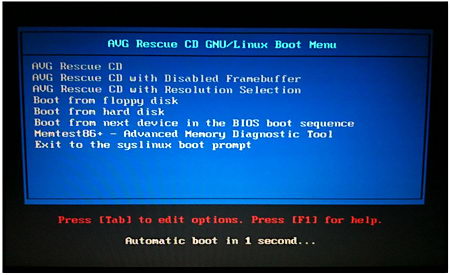
    AVG Rescue CD: It comes with antivirus and antispyware, it defines itself as a portable version of AVG antivirus inside a Linux distribution, you can use it to move files to an external device, test RAM memory, edit registry keys and ping network devices to see if they are reachable, everything is free and it comes with the latest virus signatures database.

    AVG antivirus live CD
    AVG antivirus live CD

    PCTools live CD: Officially named Alternate Operating System Scanner, this antivirus live CD will detect and remove rootkits and other difficult to delete malware, it uses the Spyware Doctor antivirus engine to scan your files and Windows registry, if it finds something it cleans it up warning you of the location and the virus name.

    F-Secure Rescue CD: A customized Knoppix Linux distribution made by F-Secure to remove persistent malware, any virus you have in your operating system will be useless against F-Secure Rescue CD, first of all because it runs on Linux and secondly because the operating system in your main hard drive will not be active, the live CD can be used for data recovery too.

    F-Secure emergency recovery live CD
    F-Secure emergency recovery live CD

    Avira Rescue System: Linux based live CD to scan your computer for viruses, Avira antivirus database is updated several times a day, this is a good live antivirus CD to catch the latest exploit, once malware has been detected the live CD will automatically remove it saving yourself  time reinstalling the whole operating system.

  • CloseTheDoor lists all UDP/TCP open ports

    CloseTheDoor lists all UDP/TCP open ports

    Most trojans and malware are remotely controlled by opening a port in your computer, this can be a non used port number or a disguised port normally used for something else,  e.g. FTP. Firewalls should protect you from applications opening undesired ports but in reality firewalls give so many warnings that it is easy for a user to mistakenly authorise a connection. Some sites like Shields Up can scan your computer online and report on open ports, this is a good way to test your firewall quality, CloseTheDoor could be used to detect malware after an online port scanner comparing results to make sure that nothing awkward is going on.

    CloseTheDoor lists computer open ports
    CloseTheDoor lists computer open ports

    This lightweight open source network tool will help you detect computer backdoors if they already exist, and prevent remote attacks on your machine, CloseTheDoor will listen on UDP/TCP ports in IPv4 and IPv6 and list what programs are associated with each connection displaying the listening port, protocol, PID and associated service, a right click on one of the connections gives the choice to locate the executable file that has opened the port and terminate the process or search Wikipedia and Google for more information on what the process does.

    Visit CloseTheDoor homepage

  • RAMMap lists RAM memory processes

    RAMMap lists RAM memory processes

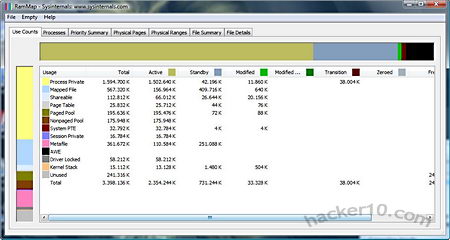
    Knowing what is running on RAM memory when the system is live not only helps you find out computer load and what programs are taking up most of your expensive limited RAM memory, it also helps to spot malware, which often runs in RAM memory.

    RAMMap RAM Memory Analyzer
    RAMMap RAM Memory Analyser

    RAMMap is a 27Kb  freeware from Microsoft Sysinternals that will give you exhaustive information on processes, priorities, physical pages and file details, everything is orderly displayed and classified in tabs, its advanced memory usage analysis is a little geeky, experts will love the detailed data reports that include memory load and path, newbies will benefit of this software by gaining a good understanding on how Windows manages and allocates RAM memory, if you are troubleshooting computer problems this program might be a convenient tool, memory snapshots can be saved as .rmp, a proprietary file extension unique to RAMMap.

    Visit RAMMap Sysinternals homepage

    Note: It only works in Windows Vista and higher.

  • Remotely monitor your home with a webcam using UGOlog

    Remotely monitor your home with a webcam using UGOlog

    You can use a remote webcam to watch your pets at home, set up a virtual baby monitoring system or just for home surveillance while you are away, this is a good and cheap way to secure your house setting up a spy webcam and have it to activate on motion detection without the need for expensive cabled CCTV that can be spotted a mile away.

    After signing up for a UGOlog account you will need to register your webcam with them, this is easy to do, any brand will work even IP webcams, there is no need for software downloads the setup process is carried out in UGOlog servers, once it is done you will be able to monitor your home or business in real time and record everything or schedule your webcam to start recording at a certain time or if the webcam has a motion sensor set it up to detect intruders, its RSS feed able to notify you of webcam changes can be the alarm warning you that someone just entered your home.

    UGOlog provides you with a simple to use web browser interface to access the webcam broadcasting, recording and settings, the interface can manage more than one webcam and it includes a timeline and history archive which is stored at UGOlog servers, this can be accessed from any PC with internet access all you need is your UGOlog username and password.

    Remote webcam surveillance UGOlog
    Remote webcam surveillance UGOlog

    It is possible to take webcam screenshots instead of continuous video surveillance recording, taking screenshots will save hard disk space when storing them. The free service is capped in data storage, with paid for options giving you more space allowing for more webcam snapshots to be taken per hour and more cameras to be connected.

    Visit UGOlog homepage

  • 3 methods to renew your computer IP Address

    3 methods to renew your computer IP Address

    The most common way to access the Internet for home users is through DHCP (Dynamic Host Configuration Protocol) a standard protocol ( RFC 1531 ) that assigns dynamic (changing) IP addresses to the host, this is done automatically and saves the ISP the need for human intervention, a computer can get a new IP address every time it reconnects to the network, DHCP keeps a central database with the IPs that have been assigned to avoid giving the same IP to different devices which would cause network problems with data packets not knowing what way to go.

    Just because your old IP has been given away to someone else this doesn’t mean that your activities have not been logged and you are not traceable, a database with the customer ID linking him to the leased IP with times and dates at which that particular IP was assigned to the customer will be kept, either for troubleshooting or legal reasons, some ISPs could keep this information for years, possibly no more than two as data retention laws, where they exist, do not go that far.

    Renew a computer IP disconnecting your router 

    A DHCP allocated address can be renewed wherever your ISP configuration servers decide it needs to be renewed, even while you surf the Internet (unconventional), or you can force your ISP to give you a new IP. Disconnecting the router (on/off button) for a couple of minutes will finish the IP lease,you are likely to get a new IP when you reconnect to the network and your old IP will have been assigned to someone else.

    If you do not get a new IP address after disconnecting and reconnecting your router from the network, try to leave your router disconnected for longer, a few hours to make sure, best done overnight, your chances of being given a new IP by your ISP (DHCP) will improve the longer your device has been disconnected.

    Renew a computer IP to using Windows cmd 

    To renew your computer’s IP address in Windows launch cmd, go to Windows search and type in cmd or command.com, make sure to run cmd as administrator otherwise you won’t be able to get a new IP.

    Windows cmd command launch
    Windows cmd command launch

    At the command prompt type:  ipconfig  (click Enter)  if you have more than one device connected to your router (wireless and Ethernet) type ipconfig /all  (Optional step to see your current IP address)

    ipconfig /all shows all connected media
    ipconfig /all shows all connected media

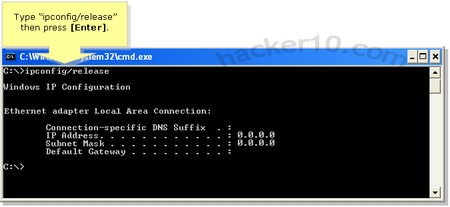
    At the command prompt type:  ipconfig /release   (click Enter)>>>>This step will disconnect you from the network and your computer IP address will show as “Media disconnected”

    ipconfig release disconnect IP
    ipconfig release disconnect IP

    At the command prompt type:  ipconfig /renew      (click Enter) >>>>Now exit (type exit and click Enter) wait a couple of minutes for a new IP to be assigned to your computer

    Windows ipconfig /renew gets new IP
    Windows ipconfig /renew gets new IP

    Renew computer IP using the router interface 

    Login into router administration launching your browser and typing in the router IP (normally http://192.168.1.1/), the router user and password could be admin:admin or something else depending on brand, enter your router brand on an Internet searcher to find out the default password.

    Once inside the router management interface release your IP, every manufacturer has a different way to do this, there is no golden rule about where to find this setting, when you have found it, turn off the router, switches and all network cards, leave it off overnight and switch it back on the next day remembering to enter the router management interface once again to renew your computer IP.

    Renew computer IP troubleshooting

    Some ISPs assign IPs based on a device MAC address, in those cases the only for you to get a new IP will be changing your network card or using special software to fake your computer MAC address.

    If you type ipconfig at the command prompt and see that your IP starts with 169.254.*.* then you are not connected to the Internet, Windows will assign you a 168.254.*.* IP when the computer can not connect to a DHCP server, this IP is called an APIPA address (Automatic Private IP Addressing).

    If after disconnecting your router from the network overnight and reconnecting next day in the morning you still get the same IP call your ISP and ask them how long do you need to be disconnected in order to renew the computer IP.

    Try disabling your firewall and antivirus if ipconfig /renew does not work as it can cause problems renewing your IP by blocking ports, in rare occasions it could also be that your network card drivers need to be updated.

  • Disable Windows autorun with BitDefender USB Immunizer

    Disable Windows autorun with BitDefender USB Immunizer

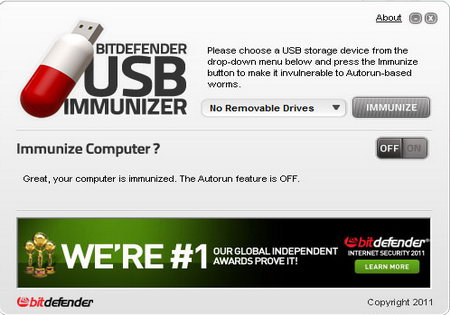
    Autorun is a Windows feature that indicates the operating system what action must be carried out when a drive is mounted, i.e. USB external drive, thumbdrive, CD-Rom, according to the latest BitDefender report autorun is also one of the most exploited methods to insert malware in computers, the Conficker worm for example created an autorun trojan on removable drives attached to the infected machine, autorun command, i.e. view, play file menu options, is executed without user intervention which is meant to be helpful but it carries a security risk being able to execute malware too.

    BitDefender USB Immunizer
    BitDefender USB Immunizer

    BitDefender USB Immunizer will warn you if autorun is enabled in your computer offering you to disable it with a single click, it will then create an Autorun.inf  folder on your chosen drive (thumbdrive, SD card, etc) this file will stop malware from auto launching and will prevent itself from being overwritten by another program storing a hidden folder and other files inside Autorun.inf  (where autorun commands are) making it hard for malware to locate and erasing it, if you ever need to erase the file yourself you can do so booting from a Linux live CD which will override windows file permissions.

    An alternative to USB Immunizer preventing malware from launching exploiting Windows autorun feature is the open source project “No Autorun” which locks the default Autorun.inf file as opposed to creating its own like BitDefender does.

    Visit USB Immunizer homepage

  • ETXT, a portable tool that encrypts text notes

    ETXT, a portable tool that encrypts text notes

    ETXT is an open source program of only 97Kb in size, it doesn’t need installation, it can be executed from within a USB thumbdrive making it ideal for use at public computers, the software doesn’t need administrator rights to run either.

    This free encryption notepad tool is very simple to use, the text can not be formatted with bold, colouring or any other fancy features, you simple write your message, click on Save and a .etxt (encrypted text) file will be created. To read the ciphered text message all that it is needed is to use the program to select the file and it immediately be decrypted as soon as you open it up, there is no password to be used.

    ETXT encrypted text notes
    ETXT encrypted text notes

    I was very disappointed with this software, it claims to encrypt text messages but I could not find anywhere what algorithm they are using for that which makes me think that it could be some kind of untested home brew encryption algorithm, a bigger disappointment was the lack of password protection, anyone who comes across your encrypted text message can read it by just downloading the program and opening it up, all they need to do is guessing what software you used for encryption, if you really need that kind of weak protection you could encrypt and decrypt your messages online with the weak ROT13 or Base64 ciphers, there are plenty of websites for that.

    Visit ETXT homepage