Author: John Durret

  • Portable text encryption software CTI Encryption

    Portable text encryption software CTI Encryption

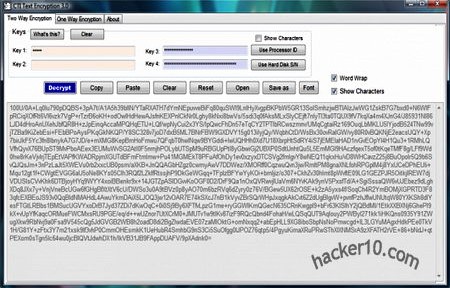
    Open source CTI Text Encryption is a small (290Kb) portable application to secure your text messages, there is no need for administrator rights and it should work in any public computer, I found a few of the default settings confusing, like for example naming the password fields “Key” and having everything hidden with asterisks by default, you will have to tick the  “Show Characters” checkbox to see what you are doing, on a public computer is best to keep everything hidden obviously. It took me a couple of minutes looking around to familiarize with the software.

    The program has two encryption tabs, “Two way Encryption” and “One Way Encryption“, the later is not reversible and can not be decrypted, the only possible use seems to be hashing a text message (creating a number generated from a string of text), it can be useful as anti-tampering measure to ensure message integrity, the output result can be copied and pasted with the a message.

    CTI Text Encryption software
    CTI Text Encryption software

    The software allows you to use your computer processor ID or hard drive serial number as a password with a single click but anyone with access to your computer could find those out, I did not find the feature too secure for that reason and there is no particular advantage that I know of by using them instead of a traditional password.

    CTI Text Encryption could be useful for travellers, assuming you convince the receiving end to download and use the same software to be able to read your messages. If you travel often it’s best to sign up with an email service that offers encryption by default, but unless you have your own computer security is easy to compromise, and if you use your laptop with a Wifi connection, PGP or GPG encryption would be the best option.

    I couldn’t find much information about CTI Text Encryption inner workings other than some change logs mentioning SHA256, Twofish and the Rijndael Algorithm (AES) .

    Visit CTI Encryption homepage

  • Best Firefox addons for computer privacy and security

    Best Firefox addons for computer privacy and security

    Security Sanitizer: It will securely wipe your Internet browser cache, history, cookies, download&search list and saved passwords using the US DoD 5220 algorithm (3 passes) or a single pass overwriting.

    Encrypted Communication: It encrypts text messages password protecting them, the receiver will need to have the same addon installed and know the password. And easy way for low security email communications.

    Click&Clean: A one click Firefox browser addon to erase all temporary files, remove download files history, clean cookies, typed URLs, Flash Local Shared Objects and support for external erasers like Wise Cleaner and BleachBit.

    Tamper Data: For advanced Internet users wanting to view and modify HTTP/HTTPS headers and post parameters. Very useful to monitor traffic and see what data is being sent and received through Firefox.

    TamperData Firefox addon
    TamperData Firefox addon

    Ghostery: It reveals the companies that track you around the web when you visit a website and allows you to block the trackers giving the user ultimate control on what company cookies are blocked and which ones are allowed to prevail.

    Certificate Patrol: Shows what digital certificates have recently been updated to help the user decide if the change is legitimate. Helpful to stop websites with fake digital certificates, the user should have knowledge on how digital certificates work.

    BitDefender QuickScan: Online tool using cloud based antivirus services to quickly determine if a file is infected with malware, useful for a second antivirus opinion without having to install it in your computer.

    Browser Protect: Anti-hijacking extension to protect your browser from home page changes and  toolbars/search engine additions, protection level can be customized from high to low and URLs can be whitelisted.

    Stealthy: Fast proxy finder to hide your computer IP, it can be useful to access services only available in the US (Slacker Radio, CWTV), access banned websites like Facebook or fake your geolocation.

    Stealthy Firefox addon
    Stealthy Firefox addon

    LeetKey: It can encode plain text into L337, ROT13, BASE64, HEX, URL, BIN, DES, AES, Morse or DVORAK keyboard layout, it could be used to maintain private conversations on social networks or forums posting ciphered messages.

    KeeFox: A companion addon for KeePass password manager, KeeFox will connect to the password manager database and automatically fill in forms and password fields, automatically adding new entries to KeePass.

  • Review US anti-censorship proxy FreeGate

    Review US anti-censorship proxy FreeGate

    Freegate is a proxy software to enable people living in a country that censors the Internet to circumvent ISP filtering, it is one of the most used proxies in China and it is  hosted in hundreds of dynamic mirrors to outsmart the Chinese authorities, you can also request a download link emailed to you as FreeGate website is obviously blocked in China. The proxy was initially created by Falung Gong followers (a spiritual discipline banned in China), developed and maintained by Dynamic Internet Technology Inc. and it receives funding from non-profit American organizations, including the US Government.

    The project uses Hurricane Electric servers in California, you will get an US IP in that state when you use it, I had no problems watching Hulu (restricted to US residents) and listening to Pandora radio with FreeGate, at the time of my testing I was getting 1.5Mbp/s download speed, enough for video streaming, there are various servers available, all of them in the US, it is easy to switch in between them. The software interface looks outdated but is easy to manage, it contains a few extra options like erasing Internet Explorer history when the program exits and setting up a list of websites to connect directly without using FreeGate, it comes preconfigured to connect to some of the most popular Chinese websites like Baidu, Taobao and any .cn site without a proxy, a hotkey can be set up to hide/show FreeGate.

    Free US anti-censorship proxy FreeGate
    Free US anti-censorship proxy FreeGate

    The program automatically opens up Internet Explorer after executing it, it is possible to configure it with other browsers but it requires some manual tweaking changing the browser network settings, or you could download Gproxy Firefox addon to help you manage and switch proxy settings. There is no need to install FreeGate in your computer, the software will run from inside a thumbdrive with a double click but I was asked for administrator rights to allow FreeGate to pass through the Windows firewall and execute Java.

    Using FreeGate will not offer you the same degree of anonymity that the tor proxy does but it is considerably faster, if all you care about is bypassing an Internet filter FreeGate works very well, just remember that it has been designed for users in China, while it works elsewhere the developers are developing this proxy as a China centred circumvention tool and I doubt they will attend feedback from someone in Europe complaining that the can’t watch a US only TV film, this is also not a VPN, the only connection that will go through the proxy is the Internet browsing, all other applications (IM, torrents,SMTP) will be using your home computer IP.

    Some people report that the software is flagged by their antivirus, I use AVG antivirus and I did not get any malware warning, the software does not contain any trojan but it works similarly like trojan horses do penetrating firewalls, just make sure you download it from an official link. FreeGate is a good tool to have if you are going to travel to China or any other country with Internet censorship, like Iran and Vietnam.

    Visit FreeGate homepage

  • Quick text encryption with ImmediateCrypt

    Quick text encryption with ImmediateCrypt

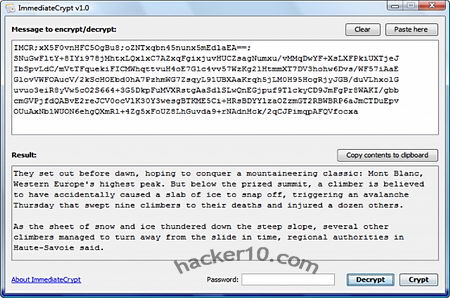
    ImmediateCrypt is a free open source utility written in Java to encrypt text messages, it uses cryptographic standards like the AES256bit cipher, CBC block chaining and PKCS#5 padding, ImmediateCrypt can be installed on a USB thumbdrive, there is no need to have administrator rights to execute it in your computer, something that should be appreciated by those using public computers. In order to decrypt messages both parties will need to have ImmediateCrypt installed, it doesn’t matter what operating system they are using as long as Java is present, the software will work in Windows, Mac OS X and Linux/BSD.

    To encrypt text simply copy and paste it inside the box, enter a password and click on “Crypt“, the receiver will reproduce the same steps using the “Decrypt” button, the password should have previously been given using secure channels like an encrypted VoIP call or in person.

    ImmediateCrypt portable text encryption
    ImmediateCrypt portable text encryption

    ImmediateCrypt does not have any configuration settings or extra features like a password meter, this is not a high security encryption program in the sense that it would be possible for a virus to read your clipboard text and there is no virtual keyboard making it possible for a trojan to capture keystrokes, but if you are convinced that your computer is 100% secure and your main concern is only stopping man in the middle attacks when you email someone a text message it should be impossible for a third party intercepting the garbled text to decipher what it says.

    Immediatecrypt is much easier to use than PGP encrypted email, it is a good way to convince your beginner computer friends to start using encryption as they will not have to spend time learning how it works since everything can be explained in under a minute and it is intuitive.

    Visit ImmediateCrypt homepage

  • Brute force a Truecrypt volume with TrueCrack

    Brute force a Truecrypt volume with TrueCrack

    Truecrack is an open source Linux only tool optimized with Nvidia Cuda (Compute Unified Device Architecture ) technology, a computing platform able to process queries in parallel that can be used to crack Truecrypt volumes greatly speeding up brute force attacks, Truecrack will only work if the volume has been encrypted with the default Truecrypt settings RIPEMD160 and XTS block cipher mode based on AES. The software can read a list of passwords from a text file or generate a list of possible passwords from a charset of symbols defined by the user, a dictionary attack of 10,000 possible passwords with a length of 10 characters each will take 11 minutes to execute on an Intel Core i7 computer CPU, the same list of possible passwords in GPU mode (Nvidia Cuda technology) only takes 30 seconds to execute.

    Truecrack will open a Truecrypt volume and retrieve the masterkey from its header section checking the success of the deciphering operation, if the password is right or wrong, querying the true and crc32 fields.

    Truecrack brute force Truecrypt
    Truecrack brute force Truecrypt

    This is not the first tool designed to crack Truecrypt, while Truecrypt default settings are safe, for what I have seen in other similar tools they are all optimized to crack Truecrypt encryption having into account that the user did not change the default cipher (AES) or key derivation (RIPEMD160) and they do not work when keyfiles have been used. Choosing a strong passphrase should stop any brute force attack on your Truecrypt volume but if you would like to play the paranoid card it would be a good idea to change the default settings to something else, like a cascade algorithm, and add a keyfile.

    Visit TrueCrack homepage

  • Anti-forensics mobile phone app Wickr

    Anti-forensics mobile phone app Wickr

    Wickr is an all-round free smartphone app for the iPhone with an Android version coming soon, it provides text, image, audio and video encryption with AES256bit, self-destructing messages with a timer regulating who can read text, photo or video messages and how long for they are available for retrieval but its best feature is possibly Wickr destroying files metadata erasing all attached personal information identifying the author and file creation details with a data shredder making sure that when you erase something it is really gone beyond recovery. The service also hides usernames and phone serial number by adding several random digits to each value and salting and hashing it to make it undecipherable.

    Even thought you need an account with Wickr you can still use this app anonymously, you are not asked for any identifiable information, minimal connection logs are kept and they do not contain anything that could be linked to a user, the messages stored in Wickr servers are all encrypted, it would not be possible to force the company to reveal its content, the password to decipher the data is only kept in your own phone. Your mobile phone provider will see that your are connecting Wickr servers but they will not be able to read your messages or learn who you are communicating with, any logging from their part to spy on you would be unproductive.

    Wickr antiforensics mobile app
    Wickr antiforensics mobile app

    The only weak spot Wickr has is that the phone screen capture utility can be used to copy a time restricted message, Apple does not allow developers to disable screen capture on their iPhones and there is nothing that can be done about this. The app complies with HIPAA requirements for encryption and privacy and encryption is FIPS 140-3 compliant, a U.S. government computer security standard issued by NIST, standing for Federal Information Processing Standards. The app is the brainchild of a former defense contractor and a former forensics investigator, these are people with the know how, not some some CEO expert in marketing learning about a product on the go as it often is, the antiforensics expertise of the people behind the app shows in the end product quality.

    To secure your communications the app will have to be installed in both phones, sender and receiver, home users can use all features for free but if you would like to send a message to multiple people at once, a typical corporate use, you will be asked to upgrade. This app can punch a big hole in data retention laws.

    Visit Wickr homepage

  • Free speech hosting in Iceland with OrangeWebsite

    Free speech hosting in Iceland with OrangeWebsite

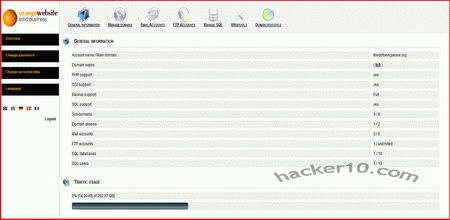
    OrangeWebsite is a hosting company specialised in free speech hosting with its headquarters and servers based in Iceland, their terms and conditions allow you to host any controversial material with the only exception of neonazi websites because ethnic agitation is a crime in Iceland and sites that promote potential harm to minors or link to child pornography. You are also allowed to run a tor proxy or VPN using one of their servers, their range of services embrace private whois domain registration (outside the USA), shared hosting for small businesses or personal websites, virtual servers and dedicated servers. Customers can sign up for hosting, affiliate program and domain registration anonymously, you will only be asked for your email address and Bitcoins will be used for payments.

    I was given a package to test their services and I was quite pleased with everything, I have been using cPanel for years but I had not problem getting used to their ispCP (Internet Service Provider Control Panel) administration panel used to manage domains and files, it is more simple than cPanel and has less features but enough to get the job done, if you would like to install WordPress or a similar platform and do not know how to do it, you can request to have it installed for you at no extra cost when you order the hosting plan. The welcome email will include all the details you need to set your website, host IP to FTP files, DNS server for your domain and a URL to access webmail (RoundCube), one of the addresses is indicated as special access without leaving any logs.

    OrangeWebsite hosting control panel
    OrangeWebsite hosting control panel

    Backups are performed daily but the SQL database will have to be downloaded manually using using phpMyAdmin where the username is your database user and password is the database user password, one main difference to have into account in comparison with cPanel.

    OrangeWebsite should fulfill the needs of those longing for reasonably priced offshore free speech hosting and/or privacy email service (hosted or forwarded) located outside the EU and USA, the best part is that they accept Bitcoin payments making anonymity easier to achieve cutting payment processing companies and their silly terms and conditions out of the equation, this hosting company should also be suitable for people in need of personalised in-house support as opposed to big hosting companies where customers are just a ticket number to the staff. It should not be difficult for a customer to contact OrangeWebsite CEO if you have to.

    UPDATE 2013: OrangeWebsite is now using cPanel for webhosting.

    Visit OrangeWebsite hosting