You can use a remote webcam to watch your pets at home, set up a virtual baby monitoring system or just for home surveillance while you are away, this is a good and cheap way to secure your house setting up a spy webcam and have it to activate on motion detection without the need for expensive cabled CCTV that can be spotted a mile away.
After signing up for a UGOlog account you will need to register your webcam with them, this is easy to do, any brand will work even IP webcams, there is no need for software downloads the setup process is carried out in UGOlog servers, once it is done you will be able to monitor your home or business in real time and record everything or schedule your webcam to start recording at a certain time or if the webcam has a motion sensor set it up to detect intruders, its RSS feed able to notify you of webcam changes can be the alarm warning you that someone just entered your home.
UGOlog provides you with a simple to use web browser interface to access the webcam broadcasting, recording and settings, the interface can manage more than one webcam and it includes a timeline and history archive which is stored at UGOlog servers, this can be accessed from any PC with internet access all you need is your UGOlog username and password.
Remote webcam surveillance UGOlog
It is possible to take webcam screenshots instead of continuous video surveillance recording, taking screenshots will save hard disk space when storing them. The free service is capped in data storage, with paid for options giving you more space allowing for more webcam snapshots to be taken per hour and more cameras to be connected.
The most common way to access the Internet for home users is through DHCP (Dynamic Host Configuration Protocol) a standard protocol ( RFC 1531 ) that assigns dynamic (changing) IP addresses to the host, this is done automatically and saves the ISP the need for human intervention, a computer can get a new IP address every time it reconnects to the network, DHCP keeps a central database with the IPs that have been assigned to avoid giving the same IP to different devices which would cause network problems with data packets not knowing what way to go.
Just because your old IP has been given away to someone else this doesn’t mean that your activities have not been logged and you are not traceable, a database with the customer ID linking him to the leased IP with times and dates at which that particular IP was assigned to the customer will be kept, either for troubleshooting or legal reasons, some ISPs could keep this information for years, possibly no more than two as data retention laws, where they exist, do not go that far.
Renew a computer IP disconnecting your router
A DHCP allocated address can be renewed wherever your ISP configuration servers decide it needs to be renewed, even while you surf the Internet (unconventional), or you can force your ISP to give you a new IP. Disconnecting the router (on/off button) for a couple of minutes will finish the IP lease,you are likely to get a new IP when you reconnect to the network and your old IP will have been assigned to someone else.
If you do not get a new IP address after disconnecting and reconnecting your router from the network, try to leave your router disconnected for longer, a few hours to make sure, best done overnight, your chances of being given a new IP by your ISP (DHCP) will improve the longer your device has been disconnected.
Renew a computer IP to using Windows cmd
To renew your computer’s IP address in Windows launch cmd, go to Windows search and type in cmd or command.com, make sure to run cmd as administrator otherwise you won’t be able to get a new IP.
Windows cmd command launch
At the command prompt type: ipconfig (click Enter) if you have more than one device connected to your router (wireless and Ethernet) type ipconfig /all (Optional step to see your current IP address)
ipconfig /all shows all connected media
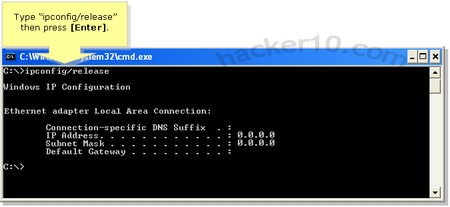
At the command prompt type: ipconfig /release (click Enter)>>>>This step will disconnect you from the network and your computer IP address will show as “Media disconnected”
ipconfig release disconnect IP
At the command prompt type: ipconfig /renew (click Enter) >>>>Now exit (type exit and click Enter) wait a couple of minutes for a new IP to be assigned to your computer
Windows ipconfig /renew gets new IP
Renew computer IP using the router interface
Login into router administration launching your browser and typing in the router IP (normally http://192.168.1.1/), the router user and password could be admin:admin or something else depending on brand, enter your router brand on an Internet searcher to find out the default password.
Once inside the router management interface release your IP, every manufacturer has a different way to do this, there is no golden rule about where to find this setting, when you have found it, turn off the router, switches and all network cards, leave it off overnight and switch it back on the next day remembering to enter the router management interface once again to renew your computer IP.
Renew computer IP troubleshooting
Some ISPs assign IPs based on a device MAC address, in those cases the only for you to get a new IP will be changing your network card or using special software to fake your computer MAC address.
If you type ipconfig at the command prompt and see that your IP starts with 169.254.*.* then you are not connected to the Internet, Windows will assign you a 168.254.*.* IP when the computer can not connect to a DHCP server, this IP is called an APIPA address (Automatic Private IP Addressing).
If after disconnecting your router from the network overnight and reconnecting next day in the morning you still get the same IP call your ISP and ask them how long do you need to be disconnected in order to renew the computer IP.
Try disabling your firewall and antivirus if ipconfig /renew does not work as it can cause problems renewing your IP by blocking ports, in rare occasions it could also be that your network card drivers need to be updated.
Autorun is a Windows feature that indicates the operating system what action must be carried out when a drive is mounted, i.e. USB external drive, thumbdrive, CD-Rom, according to the latest BitDefender report autorun is also one of the most exploited methods to insert malware in computers, the Conficker worm for example created an autorun trojan on removable drives attached to the infected machine, autorun command, i.e. view, play file menu options, is executed without user intervention which is meant to be helpful but it carries a security risk being able to execute malware too.
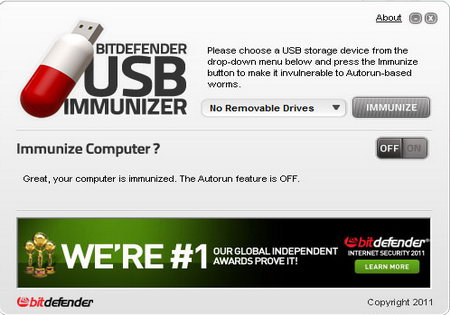
BitDefender USB Immunizer
BitDefender USB Immunizer will warn you if autorun is enabled in your computer offering you to disable it with a single click, it will then create an Autorun.inf folder on your chosen drive (thumbdrive, SD card, etc) this file will stop malware from auto launching and will prevent itself from being overwritten by another program storing a hidden folder and other files inside Autorun.inf (where autorun commands are) making it hard for malware to locate and erasing it, if you ever need to erase the file yourself you can do so booting from a Linux live CD which will override windows file permissions.
An alternative to USB Immunizer preventing malware from launching exploiting Windows autorun feature is the open source project “No Autorun” which locks the default Autorun.inf file as opposed to creating its own like BitDefender does.
ETXT is an open source program of only 97Kb in size, it doesn’t need installation, it can be executed from within a USB thumbdrive making it ideal for use at public computers, the software doesn’t need administrator rights to run either.
This free encryption notepad tool is very simple to use, the text can not be formatted with bold, colouring or any other fancy features, you simple write your message, click on Save and a .etxt (encrypted text) file will be created. To read the ciphered text message all that it is needed is to use the program to select the file and it immediately be decrypted as soon as you open it up, there is no password to be used.
ETXT encrypted text notes
I was very disappointed with this software, it claims to encrypt text messages but I could not find anywhere what algorithm they are using for that which makes me think that it could be some kind of untested home brew encryption algorithm, a bigger disappointment was the lack of password protection, anyone who comes across your encrypted text message can read it by just downloading the program and opening it up, all they need to do is guessing what software you used for encryption, if you really need that kind of weak protection you could encrypt and decrypt your messages online with the weak ROT13 or Base64 ciphers, there are plenty of websites for that.
The most common way to find out who is hosting a website is by doing a whois on the domain name and looking at the Domain Name System (DNS) which often leads to the hosting provider, but in occasions some webhost do not use an obvious NS name making it difficult to find out who the host is, it is also possible for those on a dedicated server to create their own custom DNS name throwing off the trail anyone investigating them, or to use a free DNS provider that helps hide the real hosting company.
HostLogr.com: This free service will show you a website data centre physical location, can be useful to troubleshoot ping rates and latency as well, it will also the website IP with a list of websites sharing the same IP, a common happening in shared hosting, but this does not mean that all those sites belong to the same owner, just that they are on the same server.
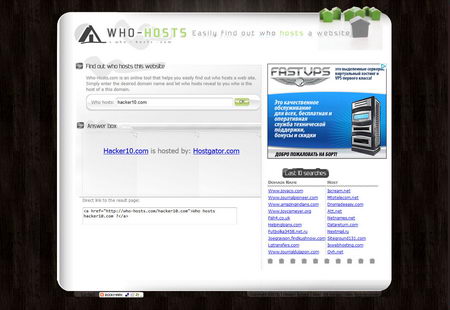
Who-Hosts.com: This service will name the webhosting company behind a website. If you are going to report abuse this is much more useful than finding out about the data centre since abuse reports should be send to the hosting company and not the data centre.
Who-Hosts finds out who is hosting a website
Whois.Domaintools.com: A very complete domain name information tool, with details about domain name registrar changes, IP history, whois history changes and DNS changes. This data will not tell you who is hosting a domain name but domain ownership and registration dates can help you work out what a website has been up to in the past. You will need the paid for version of Domaintools to get access to the most advanced features..
Ishostedby.com: A simple report tool showing a map with the exact geographical location of the server, the IP and the data centre where the server resides, a data centre is also the ISP for that server/website, if a hosting company ignores an abuse report it might be worthwhile try to send an abuse complaint to the data centre as a last resort.
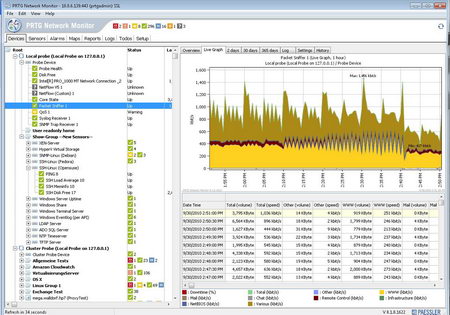
PRTG (Paessler Router Traffic Grapher) Network Monitor is a Windows only free monitoring tool to scrutiny network traffic and evaluate performance (i.e. availability and usage), it enables network administrators to find out the CPU and memory load providing live readings. This network tool displays very detailed information with easy to understand graphs allowing you to see what traffic is roaming through your network, PRTG Network Monitor comes preconfigured with templates for various devices, it can analyze any device attached to your computer network, including routers, servers and firewalls.
PRTG Network Monitor software
Understanding network usage is fundamental to optimize it and avoid bandwidth bottlenecks, network monitoring software helps you discover traffic jams and troubleshoot network problems. The software is comprehensive, it has an intuitive multilingual interface that can be password protected, access is possible using an Internet browser locally or over the Internet, using an iPhone/iPad app (called iPRTG) or using a Windows GUI. A system tray balloon will immediately notify you of problems when they occur, if you are away from your computer just set up notifications to your email or mobile phone via SMS, the free version comes with 10 sensor types (over 100 sensors in the commercial version) looking at TCP/IP connectivity, HTTP, SMTP, FTP, SSH, etc.
PRTG Network monitor includes a packet sniffer that makes for a good alternative to Wireshark, it can monitor network users capturing packets and find out what websites they visit in real time, if you suspect an unauthorized person is using your wireless network this home network software will help you find out their hardware MAC address and what they are doing, once you choose the network adapter you would like to monitor (i.e. wireless or Ethernet) you can instruct PRTG to log all captured traffic to review it later on.You will need some basic understanding of network protocols before using this tool, other than that, it is very easy to manage.
Link Password is a Firefox addon to encrypt your Firefox browser bookmarks using the symmetric AES cipher, you could combine Firefox Private Browsing mode that runs in RAM memory and does not save anything to your hard disk, with this privacy Firefox addon that will hide what your favourite sites are, it can be useful for those sharing computer at home or an Internet cafe, library, etc.
If you already have bookmarked link you can choose to encrypt them, Link Password can encrypt individual links or the folders containing them, it uses its own protocol “linkpassword“, the links can be renamed and rolled back if necesary, when you click on a link you will be asked for the password before it can be opened, decryption and encryption of bookmarks can be done with using a right click.
Link Password Firefox privacy addon
An alternative to Link Password would be to create an encrypted container and store Firefox Portable inside (including bookmarks), but encryption software like Truecrypt requires administrator rights and can not be used at libraries and Internet cafes where you are logged in as a user.