Category: Anonymity

Internet anonymity

  • Islamic State guide to remain anonymous online

    Islamic State guide to remain anonymous online

    Posted in Twitter by an Islamic State ideological supporter with thousands of followers using the handle @AmreekiWitness, a new online guide explains to jihadists how to remain anonymous online. The manual comes with intercalated Quranic verses in between and a quotation of General’s Sunt-Zu that reads “War is deceipt“, found in the ancient book “The Art of War“, a mandatory reading for CIA intelligence officers, and also a quotation of the Islamic Hadith.

    The anonymity manual is linked to a JustPasteIt page, one of the tools of choice for Islamic State supporters to post their propaganda. Online jihadist are using JustPasteIt to spread their ideas because you don’t have to register or open any account to upload photos and documents and it can be quickly done with Tor even if many of the pages are taken down by the company when someone reports them.

    The manual recommended VPN provider is CyberGhostVPN (referred to as Ghost VPN). Trying to guess why this would be a good VPN for a jihadist I would say that it is free to use, no payment details can be traced back, the company claims no logs are kept and CyberGhost headquarters are located offshore in Romania. For extra security another security measure advised in the manual is to combine Tor and CyberGhostVPN at the same time. An excellent choice, it will slow down your Internet browsing but it adds an extra security layer, something that it is worth to do when your enemy is a country with lots of resources at their disposal to track you down. One more great tip given in the manual is to never check your real Facebook page or email account with the VPN or Tor, doing that would expose your real identity to anybody monitoring the traffic.

    The live operating system Tails is also advised for online anonymity, Tails being my favourite tool for posting comments against the NSA on various forums, I believe it to be an accomplished tool. Specially as it leaves no recoverable traces on the hard drive, other than the BIOS being set up to boot from a CD first, and all settings in Tails are good to go by default, even people who don’t understand much about technology should be safe with it.

    For email communications the anonymity manual suggests Bitmessage, a P2P email system that has no central server, optionally accessed using a Tor hidden node and which account can be nuked if it is compromised.

    For instant messenger the manual recommends, Cryptocat and ChatSecure, I would agree with ChatSecure, an open source mobile app with Off The Record. Cryptocat doesn’t appear to be a bad but I don’t feel it is suitable for paranoid privacy because they have a central server. I would only feel safe with Cryptocat if I am behind Tor, and they warn you of this on their website.

    The last part of the manual covers legal advice and it cautions people that if they use social media to avoid arrest a disclaimer should be added saying that they do not support violence and “study the radical Muslim community for recreational purposes“.

    This Jihadist guide to remain anonymous online is fairly good. I could only see minor mistakes, the first one is that the manual capitalizes The Onion Router acronym, naming it TOR. This denotes that the author does not follow Tor development too close because the official name is Tor and everybody on the Tor mailing list knows this.

    One big hole is that there is no mention of full disk or file encryption at all, DiskCryptor or similar software is very useful for anybody who wants to keep files locked out from unauthorized eyes, and they should have also mentioned steganography. As leaked Snowden’s document reveal, the use of encryption and Tor raises red flags in the security services, steganography on the other hand needs to be found first, it is extremely difficult to detect a hidden message inside a photo or MP3 posted on plain view in Flickr, unless it is known that the target is using steganography, they won’t search for it, and spy agencies would have to extract the data before decryption,it adds to their troubles.

    Islamic State fighters
    Islamic State fighters

    The manual also does not include any warning about the trojan horses that security agencies are known to email or force download in target computers using Flash, Windows and Adobe updates, trojan horses that are not detected by any antivirus software. The only way around is being cautious, not using Windows if possible, or, the best choice, to only browse the Internet with a live CD for activism.

    What the USA has in its favour is that Muslim terrorists are using USA companies like Twitter for their propaganda, giving the NSA easy monitoring of their accounts, knowing who their contacts are, what PMs they send to each other, what email addresses they have used to register, this facilitates wire-tapping and trying to download a trojan horse in the user’s computer to know more about them (it could thwarted if they use a live CD).

    Other good news for the USA government is that a quick search of real life news show that although anonymity technologies have been around for over a decade, the number of terrorists and child pornographers bothering to learn about them are a rare exception. Apparently, although Tor and encryption can keep their asses out of 20 years in prison,targets are extremely foolish and don’t learn about computer security, if they did they would not post photos with blurred faces, they can be unblurred, this has been done in the past by German law enforcement, it is necessary to use opaque black colour squares to hide faces and stop experts from making them visible again.
  • Anonymous radio communications with AirChat

    Anonymous radio communications with AirChat

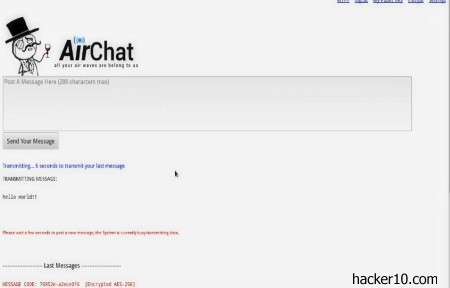
    AirChat is a free open source program developed by the Anonymous hacking group to anonymously communicate with other people over the air waves. To be able to use it you will need a ham radio with the open source Fldigi modem controller connected to your laptop or desktop computer.

    AirChat transmits data using a radio connection, there is no need for Internet infrastructure or mobile phone network coverage. Sending data over the air waves has been possible since the invention of radio, as the Morse code pulses over the airwaves proved. Amateur radio operators send each other data messages daily with just their radio equipment, the Anonymous collective is not devising any new technology, what they do is to add privacy and security to something that already existed.

    AirChat encrypted ham communication
    AirChat encrypted ham communication

    The main problem of sending data packets over the airwaves is lack of bandwidth, that makes this technology slow and only suitable for low bandwidth voice, text chat and low resolution photos, the developers admit that they have traded bandwidth for greater security.

    AirChat encodes data inside air waves with Anonymous own Lulzpacket protocol handling integrity and encryption. Due that in some countries encrypted airwaves over specific frequencies are banned, you are given the choice of sending the data unencrypted to avoid breaking the law. Other legal considerations are that ham radio operators must be licensed to operate on amateur radio frequencies, that will put you on a government list but this is not necessary if you only plan on listening in.

    When you transmit data with AirChat there is the option to send it to nearby contacts unencrypted or broadcast it encrypted with a public key encryption that only the receiver will be able to decrypt with his personal private key.

    The reason for Airchat is to stop a government switching off the the Internet to stop a protest group, like it has happened in the past during the Arab Spring revolution. An added benefit is that, as far as the top secret documents leaked by Snowden reveal, the NSA spying scheme only monitors the flow of data over the Internet and not the airwaves.

    There are other similar projects that allow you to exchange data with other people without an Internet connection, like Commotion Wireless, but their data transmission range is limited. AirChat developers claim to have used their software to send photos 180 miles away through the airwaves without any Internet connection. And you don’t have to worry about hardware MAC addresses identification, that ID is not passed on to any access point like it happens when you use Wi-Fi.

    Something to know about amateur radio (aka ham radio), is that it is illegal to broadcast over licensed frequencies, if you did you could interfere with commercial radio stations, airports and emergency services. Broadcasting on licensed frequencies will attract the authorities attention, they will track you down like they do with pirate radio stations and charge you. Only use AirChat over unlicensed frequencies.

    Visit AirChat homepage

    Update 2016: Project appears dead, it has not been updated for the last 3 years.

  • Tor proxy anonymous Instant Messenger

    Tor proxy anonymous Instant Messenger

    Torsion IM (renamed Ricochet in June 2014) is a decentralized real time instant messenger alternative to TorChat that runs on the Tor network. Available for Windows, Mac and Linux, during installation you will be given the option to connect directly to the Tor network or if you are behind a restrictive firewall or in a country that filters the Internet and blocks Tor nodes, you can arrange your network settings.

    Inside Torsion Ricochet network settings you can specify any open port that is not blocked by your firewall, or, enter a Tor bridge address that will get around ISP censorship. Tor bridge relays are not listed anywhere, you can only get them via email following the instructions described in the Tor project website.

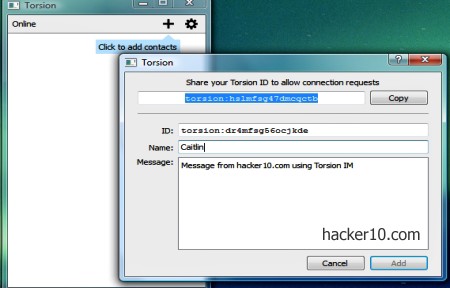
    Tor proxy instant messenger Torsion
    Tor proxy instant messenger Torsion

    There is no need to create an account, a Torsion IM Ricochet contact address will be automatically created for you when you install the software, in the form of “ricochet:hslmfsg47dmcqctb“, this will also be your login credentials, no need for a password, registration details are virtually zero, no email, no nothing, just a cryptic torsion: address (changed to ricochet: in June 2014) and the nick of your choice. The messenger interface is easy as pie, it has two buttons, a plus sign where you add a torsion ID contact address to chat with that person and a settings button that lets you see your list of contacts and remove them.

    You will not have to separately install Tor software to get the Torsion IM Ricochet running, the program automatically connects to the Tor network. You can browse the Internet with your real computer IP while the messenger chat is anonymously routed through Tor. I tried to run Torsion IM Ricochet from behind a VPN (LT2P) and it worked smoothly, with no lagging time and no network trouble.

    This is a marvellous metadata free instant messenger that gets the job done, no emoticons or sounds or distractions of any kind, just plain text to get to the point when planning the next revolutionary action over the Tor network, without any central server that could be compromised and with data encrypted over the wire, it can resist censorship and monitoring.

    Torsion IM Ricochet has not been audited by anybody but it is open source and fairly well documented. The messenger will not interoperate with other protocols and both parts need to be using the same program, to convince your friends to stop using insecure Windows Live Messenger and Yahoo, you count with the wonderful benefit of not having to explain to them what Tor is, Torsion IM Ricochet will configure itself to use the Tor network during installation and it will enable people to use it straight away without reading any manual and not affecting their browser settings.

    Note: Experimental and not endorsed by the Tor project.

    Visit Ricochet IM homepage

  • Anonymous Tor browser Snowden Tribute released

    Anonymous Tor browser Snowden Tribute released

    Snowden Tribute is a stand alone browser inside a bootable Linux USB thumbdrive designed for anonymous Internet browsing. Inside the distribution you will not any find any text editor, picture viewer, video player or tools that come with desktop operating systems. Snowden Tribute concocts a simple Internet browser with Tor and Vidalia, it can only be used from a USB thumbdrive and not as a live CD.

    To burn the .img file to a bootable USB thumbdrive in Windows you will need to download Win32DiskImager, there are clear instructions in Snowden’s Tribute homepage about how to do this, it is not difficult, it took me a minute to do it.

    To launch the browser you will need to instruct the BIOS or UEFI to boot from a USB, menu boot up is accessed in my computer clicking F11, it is not the same for everybody, enter into your own BIOS or UEFI to learn how to do this. Furthermore, Windows 8 computers will need to disable UEFI Secure Boot to be able to boot Linux from a USB.

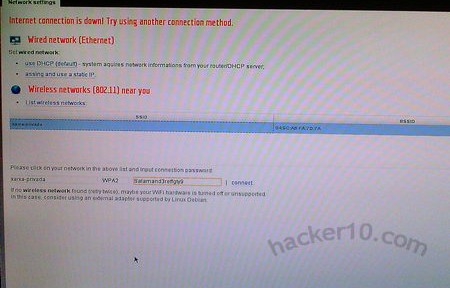
    After booting Snowden Tribute you will be presented with a network configuration screen that auto detects wired and wireless routers, you have to enter the password for the wireless network and you will see Tor establishing a connection and Firefox ESR (Extended Support Release) will take the full screen in Kiosk mode, you can then start browsing the Internet anonymously with Tor.

    Anonymous Internet browsing Snowden Tribute
    Anonymous Internet browsing Snowden Tribute

    Digging into the browser configuration options it shows that it has NoScript enabled, blocking browser plugins like Flash and third parties cookies, with Startpage set as the default search engine. The browser has also been set up to run in Private browsing mode to avoid leaving history and cache in the thumbdrive, with HTTPS Everywhere forcing pages to serve you an HTTPS version of the website where it exists.

    Clicking on the Escape key will take you to Vidalia where Tor configurations can be tweaked and information about consumed bandwidth, logs and Tor nodes can be seen, just like anybody else who has Vidalia installed.

    This is not a very sophisticated distribution, it can all be summed up with having the Tor browser bundle running from inside a USB thumbdrive, I found it unnecessary when you have distributions like Tails that can do the same thing and have a community supporting the project.

    I hold issue with Snowden Tribute for riding on the back of Snowden’s name, I did not think it was right as it might look as if he endorses the project which he obviously doesn’t. I also have a problem with the browser running on a thumbdrive, even in Privacy mode, I am not convinced that your Tor browsing session held in RAM could not be dumped to the thumbdrive  memory in case of a computer crash.

    Best to avoid this distribution and stick to Tails, Parrot OS or iPredia. I would only consider Snowden Tribute as an alternative if it could be booted from a live CD, the uncertainty of data leaking out to the thumbdrive is too high for me to trust it.

    Visit Snowden Tribute homepage

  • One year review of anonymous email service Countermail

    One year review of anonymous email service Countermail

    I have been using Countermail for over a year on a weekly basis and this review is based on my experience with them during this time. The service is free to try for a few days, after that you will be asked for payment which can be done with credit card, Paypal, wire transfer or Bitcoin.

    Credit card corporations force businesses to keep payment details stored for two weeks, Countermail claims to automatically destroy the records after that length of time but the credit card company and Paypal will likely preserve payment details for years although they will not be able to link them to any specific Countermail account or nick. If you pay with Bitcoin you will make tracing payment origin much more difficult but there is a surcharge.

    Signing up is simple, not requiring any personal information other than choosing a username and password, you only need Java installed in your computer, after account creation you can get rid of Java and use IMAP and SMTP with Thunderbird and Enigmail. There is a tutorial in Countermail help pages explaining how to set it up. It took me a few hours, demanding lots of reading and testing, it wasn’t very easy to do.

    Be very careful to remember your password because if you lose it, it can not be recovered and your data will be lost for ever.

    Anonymous email provider Countermail
    Anonymous email provider Countermail

    Countermail webservers are live CD powered web servers, there is no hard drive, powering it off to install monitoring software will eliminate all data held in RAM, including encryption keys, and without any hard drive present computer forensics would be a waste of time. For further surety, encryption is executed in the user’s computer, Countermail does not store any password. By default it will keep your private encryption key (although the encrypted version only!) but not the password and you need bot of them to decrypt messages. If you are not comfortable with having your private keys in the server, you can delete them and store the keys in your computer or send Countermail your public encryption key. A second mail server with a hard drive stores messages and files but this is only accessible using the diskless webserver and no IPs are leaked.

    The email service is based on a custom Squirrel email interface. You have the ability to automatically sign and encrypt email messages in your browser within webmail, including attachments, with the standard OpenPGP.

    In Countermail settings you can import and export encryption keys, when you email someone Countermail will automatically encrypt the message with the key found in your keyring and if none is found you will be notified. Communicating with other Countermail or Hushmail users does not require you to have the receiver’s key, it will be automatically fetched for you.

    You can create aliases under the countermail.com or cmail.nu domain name and distribute these disposable email addresses without never revealing your main inbox, it is best to do this from day one and if you receive spam you can delete the address. I advice you to choose a cryptic alias because after you erase it someone can register it straight away and any emails meant for you will go to that other person, it happened to me that I registered a very common alias @countermail.com address and I received messages meant to be for someone else, I never abused the content but I could have done.

    The company claims to keep no logs of when you log in and out, email back ups are kept encrypted in Countermail servers for 7 days and rotated, the company headquarters and mail servers are all based in Sweden, your usage of their service is subjected to Swedish law.

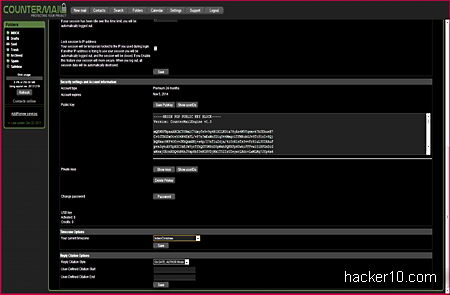
    Countermail webmail encryption keys
    Countermail webmail encryption keys

    When you send a webmail message your computer IP will be stripped from the headers and swapped by 127.0.0.1, if you use SMTP an anonymous German or Swiss tunnel IP will show in the headers. Other Countermail security practises include disabling HTML messages by default, you have to click on view HTML if someone sends embedded images.

    If you click on a URL inside an email message  it will be automatically deferred to stop the website server from seeing how you got there and clicking on the escape key on your keyboard will log you out of Countermail and take you to the page of your choice, this is meant to be an emergency log out key.

    I wanted to play the paranoid card and I did not want Countermail to hold my encryption keys and it is necessary to note here that my Countermail private keys are created in my own computer and only send to their servers after they have been encrypted, but it did not feel right to trust someone else with something as important.

    I communicated with other people deploying my own keys and it reduced webmail functionality, if the private encryption key is not uploaded to Countermail server you will get a Java error and you will not be able to view the message, you will have to download as attachment to your hard drive and save as text before decrypting it locally.

    I contacted Countermail staff a couple of times about a problem I had importing a PGP public key and they replied to my support email in under 24 hours with helpful advice about how to get copy and paste right.

    There are non email features included with the package, a bookmark and notes storage inside what they call “Safebox“, I found it very basic but no harm being there. You also get a calendar and an XMPP chat server compatible with Jabber clients like Jitsi and you can use Countermail portable downloading the prebuild Firefox Portable browser with Java from Countermail servers or set the email service with your own domain name for a one time fee.

    Countermail.com Java login screen
    Countermail.com Java login screen

    Another option is to buy a USB key from Countermail that will be used as keyfile to login into your account, if your password is stolen nobody will be able to login unless they physically have the USB key in their power. I only used the email service during all this time, I can’t comment too much about the rest, I only glanced at it.

    Overall, I think that this is one of the very few email services that not only protects your privacy with encryption but also makes your IP untraceable by not keeping logs. There are a dozen other encryption email services out there in the market and Countermail is one of the very few being very clear about not keeping any logs.

    If you don’t need high level anonymity and are only concerned about email encryption (privacy), you might find cheaper and simple to use email services, but if you care about how long for your email provider keeps logs, about being able to pay in Bitcoins, and about your email service taking proactive measures to stop state surveillance as well as your email provider being located outside the USA, I don’t think there are too many competitors to choose from, it is either Countermail or Anonymous Speech, and I think that Countermail has better security with their diskless servers and by only keeping your private encryption keys after they have been first encrypted in your computer before they are uploaded to the server.

    Assuming Countermail does everything as they say, it seems to be good value for money for those after a high degree of email privacy and anonymity.

    And if you want a free anonymous email alternative, download Tor, OpenPGP Studio and combine it with any email provider, it will also get the job done.

    Visit Countermail homepage

  • List of the best Tor email hidden services updated 2025

    List of the best Tor email hidden services updated 2025

    The following is a list of email services hosted in hidden services to send and receive anonymous email through Tor. A few of them can only be accessed using the Tor browser and have a Clearnet address only for information purposes.

    If you are serious about security you must install the official Tor browser but if you are not paranoid about anonymity, you can download the Brave browser, this privacy browser is able to access .onion sites and Tor offering less security than the official browser, it has JavaScript enabled.

    Cock.li (http://rurcblzhmdk22kttfkel2zduhyu3r6to7knyc7wiorzrx5gw4c3lftad.onion/): A free email and XMPP anonymous service funded with donations that allows registration with Tor , VPN and proxies. There are over a dozen domains to choose from when you sign up for a cock.li email address, other known domains used by this provider are Airmail.cc and firemail.cc

    Morke (http://6n5nbusxgyw46juqo3nt5v4zuivdbc7mzm74wlhg7arggetaui4yp4id.onion/): Using the domain names Morke.ru and Morke.org with a SquirrelMail interface, registration is free but it can only be done using the Tor browser.

    ProtonMail (https://protonmailrmez3lotccipshtkleegetolb73fuirgj7r4o4vfu7ozyd.onion): Fully encrypted Switzerland based privacy email provider that allows registration using Tor, the free version of ProtonMail provides for a decent service and includes extra features like an encrypted calendar, and cloud storage.

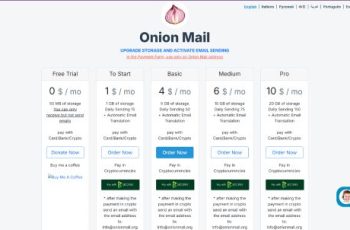
    OnionMail.org (http://pflujznptk5lmuf6xwadfqy6nffykdvahfbljh7liljailjbxrgvhfid.onion/): Anonymous email provider that encrypts email with your own key, they have a multi language free service where you can test it and upgrade to a paid plan with more storage space, cryptocurrency is accepted and there is support live chat in their website.

    OnionMail.info: Clearner directory listing OnionMail email providers, you have to be careful who you pick, nobody knows who is running the service and a few of them that I checked had the mail server misconfigured.

    DanWin1210 (http://danielas3rtn54uwmofdo3x2bsdifr47huasnmbgqzfrec5ubupvtpid.onion/): Personal website providing free anonymous Jabber and email account that can be accessed in the clearnet or Tor.

    CS email (http://csmail3thcskmzvjicww3qdkvrhb6pb5s7zjqtb3gdst6guby2stsiqd.onion/): Disposable email address with v3 Tor hidden access, ideal to receive registration email details or brief communications, you can reply using the interface but emails are only kept for one hour. Sponsored by VPN provider CryptoStorm.

    Email providers that can be accessed with Tor

    The following email providers do not have a .onion email address but are privacy and Tor friendly, you should be able to sign up for their webmail service using the Tor browser which will provide with nearly as much a privacy as accessing them using a hidden service.

    MailFence: Based in Belgium, with support for PGP encryption and free plan. It is impossible for the email provider to read your emails if you use your own PGP encryption key.

    Tuta: German email provider specialised in privacy, it has implemented quantum resistant encryption to future proof your privacy and metadata scrubbing.

  • Lelantos, a secure, anonymous email provider through Tor

    Lelantos, a secure, anonymous email provider through Tor

    Lelantos is a privacy email provider only accessible through Tor but able to communicate and receive messages from any Internet wide email services like Gmail or Yahoo. The owners, a small unidentied group of people, claim that all data in the server is encrypted, with data back ups located in different countries.

    When you open a Lelantos email account you will initially get a @lelantos.org address, currently that domain name is registered to someone called Ryan Harris living in Canada and the DNS servers are set to Domains4Bitcoins, the little information one can gather from that is that Lelantos is paying the domain registration with Bitcoins, registration details in Canada might be fake or might not.

    To stop other people from knowing that you are using a Tor email service Lelantos gives you a choice of multiple private clean domain names that are not listed anywhere and not linked to the Tor network. Lelantos obviously doesn’t have access to your computer IP since the only way for you to read and send messages is using Tor.

    Anonymous Tor email provider Lelantos
    Anonymous Tor email provider Lelantos

    Lelantos webmail has two interfaces, a SquirrelMail layout that does not need Javascript enabled to login and a RoundCube interface that needs Javascript. I have used both interfaces and there isn’t too much difference in between them, RoundCube, looks more modern and has drag and drop but the main functions work the same. If you are serious about privacy go for the SquirrelMail interface with no Javascript.

    Another way to protect yourself against browser exploits is by using Lelando’s IMAP and SMTP .onion servers with TLS, for this you have to set up your email program with a socks proxy and run Tor in your computer. Unfortunately few email programs support socks proxies, I suggest the free open source Thunderbird email client from the Mozilla Foundation.

    Lelando’s terms and conditions forbid using their email service to transmit child pornography, spam or sending violent threats, if you breach their Acceptable Use Policy your account could be terminated.

    This is not a free email provider, you have to pay some Bitcoins to fund service maintenance, I think that it is not unreasonable since they also provide support, with a public PGP encryption key available to communicate with Lelantos staff. For extra security is best to anonymize your bitcoins with a laundering service like Bitlaundry, but, as long as bitcoin payments can not be linked to an specific email account it should be fine.

    Lelantos Tor address: http://lelantoss7bcnwbv.onion