Hacker10

  • Securely wipe free space, folders and files with xShredder

    Securely wipe free space, folders and files with xShredder

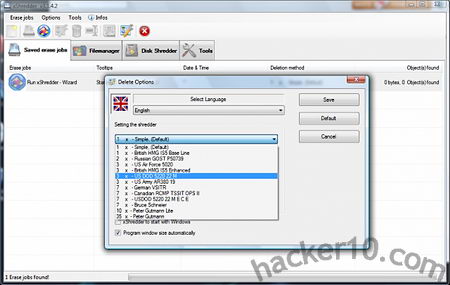
    xShredder is a free open source tool to securely wipe hard drive free space and files, the program has numerous standard data wiping algorithms available, these include US Air Force 5020, British HMG IS5 Enhanced, Canadian RCMP TSSIT OPS II, US DOD 5220 22MECE, Russian GOST P50739 and others. If a file is found locked, which often happens when in use by Windows, it will be wiped after a computer reboot

    You can create automated tasks and schedule data wiping, xShredder includes a tool called xExplorer that lets you see all files in your hard drive, including system files stored in the system32 folder hidden by Windows, selecting a folder you can add it to a shredding job or use the “Tools” menu to start a Wizard guiding you through the data wiping process. The wizard will show a series of tick boxes pointing to locations where Windows stores temporary data, like the Prefetch folder, hybernation file pagefile.sys, recently opened documents and Internet browser history, cookies and cache, it was all pretty basic and it did not include .sol Flash player cookies stored in the /Macromedia/Flash Player/#SharedObjects folder.

    xShredder data wiping algorithm options
    xShredder data wiping algorithm options

    This software should thwart elemental data recovery tools but there is nothing guaranteeing you that there are copies of the file you are destroying in other Windows temp and backup directories and a computer forensics expert will know where to look for. xShredder includes additional system maintenance tools, like format drive, HDD and MFT boot defragmenter with a complete system information viewer showing hardware details.

    I found this data shredder very difficult to use due to its complicated interface and lack of help manual, I also found it easy to erase files by mistake with no confirmation option given before starting the erasing process. I like the features that xShredder offers, specially the ability to write your own addons to erase data left behind by specific software, but in my opinion the developer should get rid of non data wiping utilities, like the defragmenter, and focus on creating a top data wiping tool that any beginner can use without having to go through a dozen of clicks and hidden options.
    Visit xShredder homepage

  • Computer forensics Linux distribution CAINE

    Computer forensics Linux distribution CAINE

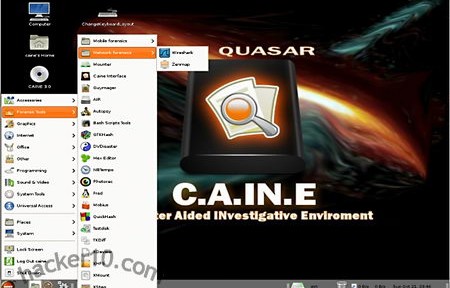
    CAINE (Computer Aided INvestigative Environment) is an Ubuntu based Linux distribution targeted at computer forensic investigators, from law enforcement to private digital investigators. It comes with friendly graphical interfaces for most forensic tools making this OS a good choice for students and computer forensic amateurs, as well as professionals. There is a front end called XSteg for Stegdetect, a tool to detect messages hidden in  images (steganography), dd, a command tool to mirror and restore files can be used with a front end called AIR (Automated Image & Rescue) supporting dc3dd an enhanced dd version that includes features like hashing and zeroing files specially developed for digital forensics by the US Department of Defense Cyber Crime Center. The Sleuth Kit, a set of command line tools can be used in CAINE through Autopsy, a graphical front end that looks like a browser, a command based network scanner called nmap can be used with point and click thanks to zenmap.

    CAINE computer forensics distribution
    CAINE computer forensics distribution

    Once you have finished your work CAINE makes it easy to create a written report as .rtf or HTML. For those who don’t know, unlike .docx or .odf (Open Document Fortmat), .rtf (Rich Text Format), files, although Microsoft proprietary, they are widely supported by most software and do not include metadata.

    Computer forensics live CDs are widely used during investigations because they do not write anything to the host computer, however you should use a widely tested distribution to make sure that it works as expected and do not trust what a community or vendor distribution claims because only wide testing can find out unexpected bugs.

    When you boot this live CD you will be given the choice to install the OS in your hard drive, I would not advise you to use CAINE as your everyday operating system because it comes with very few applications that are not computer related and it won’t be of much for a home user daily entertainment activities. You should not confuse this distribution with a penetration testing operating system like BackTrack, there are no offensive tools included in CAINE and only a few network related tools (WireShark, Cryptcat and Zenmap), CAINE purpose is to perform a post-mortem of a machine after an incident and gather data.

    Home users can use this live DVD to reset a user’s password on a Windows machine with chntpw , recover corrupted data with ddrescue, partition a disk with Gparted, or monitor a hard drive health and temperature with HDSentinel.

    Visit CAINE homepage

  • MonkeySphere OpenPGP Web of Trust Certificate Authority

    MonkeySphere OpenPGP Web of Trust Certificate Authority

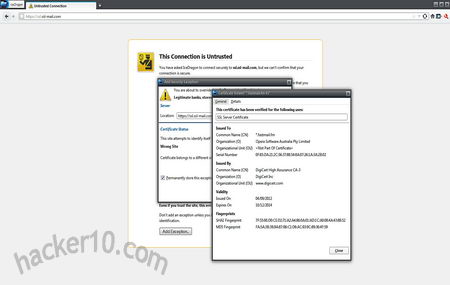
    MonkeySphere is a set of tools to securely exchange digital OpenPGP certifications, when faced with having to buy digital certificates from a expensive Certificate Authority with its own rules or offering non recognised digital certificates that will trigger a security warning, MonkeySphere allows administrators to create their own OpenPGP certificates, publish them to the web of trust for validation and certify it themselves. It can be used for https websites or SSH server authentication, it comes included with the Tails operating system set up to use Indymedia’s key server .onion hidden service (hkp://2eghzlv2wwcq7u7y.onion) using hkps:// and available through the internet on keys.indymedia.org, users can verify TLS certificates using MonkeySphere Firefox addon, compatible with other Mozilla based browsers like IceWeasel in Linux.

    Digital certificate browser warning
    Digital certificate browser warning

    Monkeysphere currently supports ssh and https and can be used for certificate revocation, expiration, ease of rekeying, etc.

    One problem with traditional Certificate Authorities is that their target is to make money and some companies are willing to cut in security and relax verification rules to achieve this, CAs also run in similar fashion to a cartel with the big Certificate Authorities recognised by major browsers charge exorbitant fees that only corporations can afford. The web of trust P2P model can provide an alternative but it is not extended enough to be reliable, therefore the best choice is a hybrid system and this is how MonkeySphere works, when you visit an https site with the Monkeysphere plugin installed in your browser if the X.509 digital certificate presented to you is not recognised by the browser validation will then be passed to MonkeySphere’s own validation agent avoiding a scary security warning.

    Visit MonkeySphere homepage

  • Anonymous operating system Whonix

    Anonymous operating system Whonix

    Whonix is an anonymous operating system based on Virtual Box, Debian Linux and tor proxy, Whonix consists of two virtual machines, one dedicated to run a tor proxy acting as a gateway and the second one called Whonix-Workstation located in a completely isolated network.

    The system has been designed to make IP and DNS leaks impossible, not even malware with root access will be able to find out your computer IP, all Internet connections are forced through tor, including applications that do not support proxy settings, this is done using the firewall settings. It is possible to use Whonix with a VPN or SSH tunnel if needed, hardware serial numbers are also hidden. Any operating system able to run VirtualBox can run Whonix, this includes Windows, Mac, Linux, BSD and Solaris.

    Disadvantages of running Whonix are that it will be very slow to update your operating system though tor, it is more difficult to set up than the tor browser bundle and your computer should have a good amount of RAM and modern CPU to run VirtualBox. Whonix advantages are that unlike an anonymous live CD like Tails or Liberté Linux data will be available after reboot due to persistent storage, you can install your favourite software packages using Debian’s packaging tool apt-get, the applications will be torified straight away, you can also save virtual machine snapshots saving a clean one for data recovery if needed.

    VirtualBox setting up Whonix operating system
    VirtualBox setting up Whonix operating system

    Many Whonix default applications come configured to avoid fingerprinting, GPG software for example will not reveal your operating system version and XChat comes with the default torified set up as described in the tor project Wiki.

    In countries where you can be forced to disclosure your full encryption password Whonix can help with plausible deniability if you hide the .ova virtual machine file inside a hidden encrypted container with Truecrypt or store the virtual machine inside a fully encrypted USB thumbdrive that will look like random data to forensics software.

    Visit Whonix homepage

  • Steganography and encryption with StegHide UI

    Steganography and encryption with StegHide UI

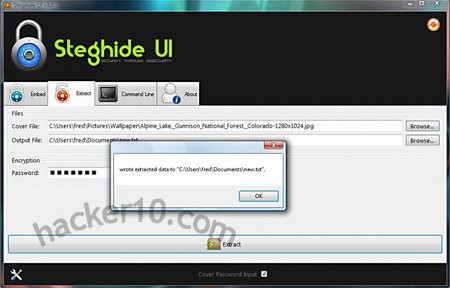
    StegHide UI is a GUI interface for Steghide, an open source steganography program to encrypt and hide data inside images (.jpeg, .bmp) and audio files (.wav, .au), it allows users to do everything Stegide can do with a point and click mouse saving you the command line learning curve. There is a tab where you can use this steganography tool in command line mode were you to feel inclined to do so, StegHide UI offers you the best of both worlds, a GUI and command line all in one program.

    There is no need for installation, administrator rights are only needed to change the program settings. You can change the default encryption method, an already secure AES128-bit in CBC mode, set the default output folder or change the command line background colour, font and font colour. The only included help manual consists of the command line tab where you can type “help” and get a list of possible commands. GUI operation is fairly easy, to hide and encrypt files go to the “Embed” tab, select the carrier image or sound where to hide the data and the file you would like to hide, enter a password and choose the encryption algorithm and method using a drop down menu.

    Steganography and encryption StegHide UI
    Steganography and encryption StegHide UI

    To decrypt an steganographic message reverse the process using the “Extract” tab, enter the password and choose the output file with resulting extension, you will need to know what type of file is hidden (.txt, .mp3, .jpg, etc) to get the extension right and be able to view it with the correct program. There is a wide range of encryption algorithms available, the safest are AES Rijndael 128/192/256, Blowfish, TripeDES, Twofish and Serpent, other low strength ciphers like Enigma, Gost, CAST128/256 and Arcfour are included too.

    If you would like to defeat steganalysis, the art of detecting hidden data inside files, make sure to securely erase the original file, comparing two files side by side and looking at their differences it is possible to see that data has been embedded in one of them making the extraction easier for an attacker, but encryption with a strong password should still stop adversaries.

    Visit StegHide UI homepage

  • Send anonymous email through tor with TorBirdy

    Send anonymous email through tor with TorBirdy

    Using Thunderbird, a free open source email and Usenet client made by Mozilla, and the addon TorBirdy you can now send emails through the tor network, the addon will automatically connect to the tor proxy before login in and out of your email account to send SMTP email and retrieve new POP messages, as long as the chosen email provider does not block tor proxies. For extra security you might want to encrypt the email message, Torbirdy won’t do that for you.

    The addon uses SSL/TLS by default for both outgoing and incoming servers setting default server ports, IMAP push email, often used by advertisers, is disabled as it could expose your real IP. The email client itself is cross platform and has versions for Windows, Mac and Linux, forked Thunderbird versions like Ice Dove should also work with the Torbirdy addon, the anonymous live CD Tails has added Torbirdy to their list of future additions.

    TorBirdy Thunderbird anonymous email
    TorBirdy Thunderbird anonymous email

    The developers advice that users do not install any other Thunderbird addon that has not been reviewed by them together with Torbirdy as it could endanger anonymity. Since Thunderbird has a portable version that runs from a USB thumbdrive there is no reason why you should not be able to use Torbirdy as a portable email client to send anonymous messages, it might even get around public computer networks that block port 995 (POP) and 25 (SMTP). There are many free email services offering free SMTP but the sign up normally still has to be done using the web interface, needless to say that you should use tor for that.

    Note: This addon is still in development and might not be stable.

    Visit TorBirdy Thunderbird addon

  • iPhone & iPad steganography app Spy Pix

    iPhone & iPad steganography app Spy Pix

    Spy Pix is an steganographic tool to hide images inside others, the advantage over encryption is that while encrypted data indicates something of value being protected, by hiding data in plain sight an attacker would have to know first what he is looking for. This tool can be used to send secret messages to your friends, they will need to have SpyPix installed to reveal the hidden message.

    The images are saved as .png (Portable Network Graphics), they could be uploaded to flickr or photobucket and your contact download it from anywhere in the world to decode it, the  hidden image can contain a written message with instructions. This system avoids compromising your contacts, if your iPhone is seized by hostile authorities they could work out who you have been emailing with and follow the trail, uploading the image to a public website with thousands of visitors needs some guess work to find out who the receiver is.

    iPhone steganography app SpyPix
    iPhone steganography app SpyPix

    Supporting for the built-in camera Spy Pix can use photographs you take as a carrier to hide other images, use a photo from your album or copy an image from another app, the photos can be easily blended using a slider that allows you to control end image quality, you can send them by email using a single button, the options aren’t amazing but they do everything you need and keeping it simple makes operating this app easy.

    Spy Pix could be greatly improved if encryption was used and a password was asked to decipher the hidden image/message.

    Note: This app is not free, priced at $1.

    Visit Spy Pix homepage