Category: Security

Computer Security

  • List of free online antivirus scanners

    List of free online antivirus scanners

    Once malware has entered in your computer the first thing it might try to do is to disable your antivirus and firewall, online antivirus scanners can scan all of your hard disk, not just a single file, the great advantage of online antivirus scanners is that you will be sure that it has been updated and it can not be disabled because it resides on a server, the disadvantages are privacy concerns as you will have to allow access to your computer files and having to install ActiveX or Java.

    It is recommended that you temporarily disable your offline antivirus software before scanning your computer online with a second antivirus, it will not harm your operating system running both antivirus but it will slow down the scan.

    List of online antivirus scanners 

    ESET antivirus online scanner: Using the same ThreatSense® scanning technology and signatures than ESET Smart Security and NOD32 Antivirus to detect well known Trojans, viruses and warms, it detects zero day Internet threats through heuristics (a way to detect software malicious behavior), it requires administration rights and ActiveX enabled in Internet Explorer to run, supported browsers include Firefox, Opera, Safari and Chrome.

    It includes rootkit detection and you will not have to register any details to use this online antivirus scanner, one click is all that is needed after installing the components, they can be easily uninstalled once finished, a log file will be stored locally indicating what actions have been performed by ESET antivirus in your computer. You can select specific folders or files for virus scanning, when it detects malware it will delete or quarantine them in a special folder, quarantined files can be restored later on if you are convinced it is a false positive.

    ESET online antivirus scanner
    ESET online antivirus scanner


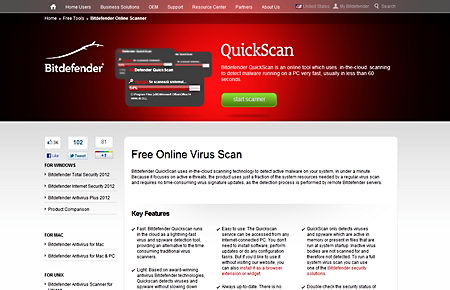
    BitDefender antivirus online scanner: Bitdefender Quickscan runs in the cloud and detects malware and spyware, it uses very low Computer Power Processor as most of the action happens in the server where the antivirus software is hosted, you can scan your PC by visiting Bitdefender online antivirus website or installing a browser extension or widget, bear in mind that this antivirus will only detect malware that is active already in memory, inactive virus bodies are not scanned.

    Bitdefender is a paid for antivirus software and you can now scan your computer online for free using the same antivirus signatures that their paid product uses, however there are no configuration options like the offline version has.

    Bitdefender antivirus online
    Bitdefender antivirus online


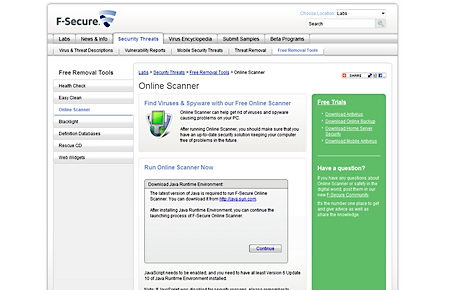
    F-Secure antivirus online scanner: It needs Java installed in your computer to run, it will flag tracking cookies as spyware, and they actually are, just do not be scared when you see the word spyware next to a cookie as it is easy to remove.  You can run this online antivirus in multiple languages, just choose your preference before starting the scan, there is no need to install anything as everything runs in Java.

    F-Secure online antivirus scanner
    F-Secure online antivirus scanner


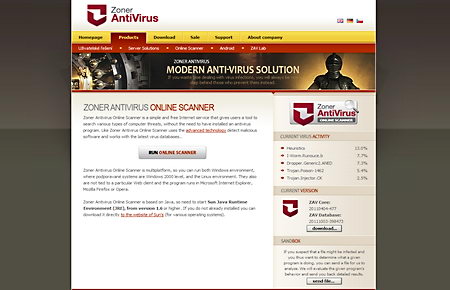
    Zoner antivirus online scanner: It can scan Windows or Linux computers for viruses using Internet Explorer, Firefox and Opera, it only needs Java to run. It uses signature based virus detection, an appropriate system to detect well known malware by comparing file contents with their database, complex and new viruses are detected using dynamic code emulation which simulates the execution of a program to see what it does, dynamic and static heuristic analysis is used by Zoner AV to detect malware, compressed files (.zip, .rar, .7z, .gz, etc) will be automatically unpacked to scan them for viruses.

    Zoner antivirus online scanner
    Zoner antivirus online scanner
  • Free personal firewall Privatefirewall review

    Free personal firewall Privatefirewall review

    Privatefirewall is an all purpose firewall with real time monitoring and intrusion detection, unlike Windows firewall that only monitors incoming connections, PrivateFirewall checks and blocks outgoing malicious trojans, in addition to monitoring computer processes and the registry which Windows firewall also leaves out. Privatefirewall is very easy to install working right out of the box after a computer reboot, it integrates tightly in the Windows Security Center disabling the built-in Windows firewall.

    Running two firewalls at once could block some applications inadvertently, it is good practice to only use one, if firewalls rules were to conflict in between them there is no saying on what the network would do, to secure your computer a single firewall and a single antivirus is enough, you could run a hardware and a software firewall but once again, rules could conflict and it would not keep you much safer on the Internet.


    Windows firewall alternative Privatefirewall
    Windows firewall alternative Privatefirewall

    Privatefirewall allows you to create a list to blacklist or whitelist (trusted) websites, everything that happens is logged in case you want to look up suspicious activities or just learn what certain installed application is connecting to on the Internet, emails are monitored to detect anomalies, like sending 100 emails in under 5 minutes, a strong indication that some kind of bot is doing that, the firewall rules based filtering allows for customization of individual software blocking Internet access to selected  programs while letting others through.

    Privatefirewall main features

    • Packet filtering supports IPv4 and the new IPv6 addresses
    • Antihacker protection checks software behavior to identify malware activities
    • Email anomaly protection protects against own computer being used for sending spam
    • Advanced application management restricts programs rights, like executing code

    Privatefirewall has a multilayered approach to computer security, it controls the way applications and processes operate in your computer, it detects Windows registry key value changes and stops untrusted executables being launched by camouflaged malware, popping up an alert when that happens, the firewall is lighter in resources than Comodo and ZoneAlarm, very easy to use for newbies, it comes with three preset profiles (home,work, on the road) with semi advanced control management for experienced users, definitely much better than the built-in Windows firewall and free for personal and commercial use, it seems like a bargain, specially indicated for those wanting a firewall for their tablet or notebook due to the few resources it uses and the “on the road” profile for mobile users.

    Visit Privatefirewall homepage

  • Test for intrusion detection with Patriot NG

    Test for intrusion detection with Patriot NG

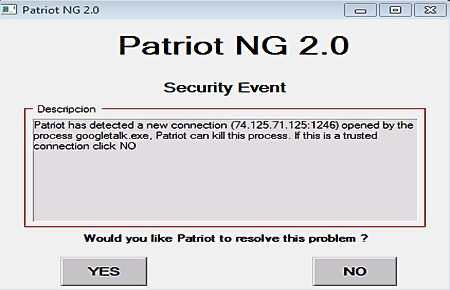
    Patriot NG is a real time monitoring tool keeping an eye on changes in your Windows operating system and network, the program warns you of registry changes, new files in the Startup directory, new users being added, new services, changes in Windows host file, new scheduled jobs, Internet Explorer alteration(toolbars,configuration changes), changes in the ARP table (used for man in the middle attacks), opening of ports by new processes and anomalous network traffic.

    This is a good tool to catch zero day threats, Patriot NG relies on software behaviour to predict if malware is changing files instead of using signature files like antivirus software without heuristics does.

    Patriot NG IDS system
    Patriot NG IDS system

    If you suspect your computer has been infected by a trojan the first thing to do should be detaching your router to stop all Internet access, if someone has managed to infect your computer they can disable intrusion detection tools and send you updated malware via the Internet. After you have disconnected your router an antivirus, anti-spyware and anti-rootkit software should be run in the computer until something is found.

    An Intrusion Detection System (IDS) tool is best used by people with good computer knowledge, newbies might not realise that they are giving access to a trojan horse since malware is normally disguised and named as something else, the user will need to know some basic operating system files (locations&names) to understand what is going on.

    Visit Patriot NG homepage

  • Cloud forensics tool OWADE pulls online services data

    Cloud forensics tool OWADE pulls online services data

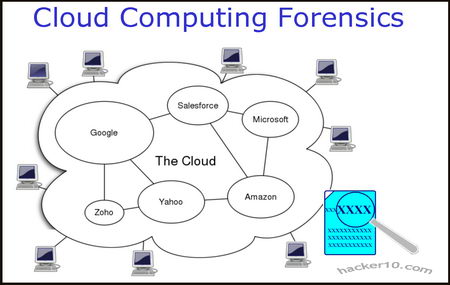
    One of the problems that traditional computer forensics has is that lots of information is stored on the cloud, MSN, Yahoo, Skype, Dropbox, GoogleDocs, Facebook, etc, online data is accessible with a court order but that involves lots of paperwork making the investigation more complex with the physical data still unsecured and in some cases with the server located offshore out of local authorities jurisdiction. OWADE (Offline Windows Analysis and Data Extraction), is an open source cloud forensics tool developed by a Stanford University team and launched at the BlackHat 2011 security conference able to extract information from cloud services that a user has accessed in his computer.

    Cloud computer forensics diagram
    Cloud computer forensics diagram

    OWADE can reconstruct Internet activities and search for the online identities that have been used, Encase and FTK (The Forensics ToolKit) can already do this, OWADE advantage is its ability to decrypt files ciphered using the various Microsoft built-in encryption schemes, like Syskey and DPAPI (Data Protection API), OWADE combines its ability to decrypt Microsoft encryption algorithm with traditional data extracting techniques in order to access Skype chat history, decrypt Internet Explorer stored logins & passwords, by cracking the Windows user password, or access  historical Wi-Fi location data stored by Windows, providing a list of access points with dates and times.

    Traditional computer forensics software has a hard time reconstructing cloud services data stored in the hard disk due to Windows scattering everything across multiple files and encrypting some portions. OWADE does not pull data from the servers, the data was downloaded on the hard disk when the user accessed the service, what OWADE does is to search, decrypt and put together all of the cloud personal accounts, logs, logins and passwords that have been accessed.

    This tool is still being developed, an Alpha version (not stable) has been released, and it can only analyse the Windows operating system.

    Visit OWADE homepage

  • Jitsi the encrypted chat software with VoIP and video

    Jitsi the encrypted chat software with VoIP and video

    Jitsi is an instant messenger with VoIP and videochat compatible with any other IM software supporting SIP (Session Initiation Protocol), an application layer protocol for voice over IP, XMMP/Jabber (Extensible Messaging and Presence Protocol), an open standard communications protocol used by Google Talk and most open source instant messengers, MSN/Windows Live Messenger, AIM, Bonjour, ICQ, Yahoo Messenger and Facebook chat, one of the few not supported IM is Skype.

    Call encryption is implemented with SRTP (Secure Real-time Transport Protocol), a protocol with no effect on voice quality providing encryption using the AES cipher as default, authentication and message integrity, together with ZRTP, an open source protocol from Zfone for public key encryption in VoIP chats that can also be found in secure Linux instant messengers like SFLphone.

    Jitsi encryption chat software
    Jitsi encryption instant messenger

    Jitsi IM main features

    • Encrypted audio and video calls
    • Support for most instant messenger software
    • Call recording in SIP and XMPP (MSN in progress)
    • File transfer preview, small photo thumbnail preview before accepting file

    This secure instant messenger will encrypt video and voice calls across all services, including group chats, besides that, feature wise is pretty basic with little to show other than emoticons, text formatting, file transfer preview and avatars, this is a useful chat software with IPv6 support for those who care about privacy and security in VoIP and video conferences with no interest in playing songs while chatting or changing the IM skin/looks, a great IM for businesses due to its security and lack of bells and whistles that tend to reduce productivity while chatting, the messenger itself can be password protected and passwords are stored encrypted.

    Visit Jitsi IM homepage

  • Lock a computer screen with ClearLock

    Lock a computer screen with ClearLock

    If you have a user password set up in Windows clicking on “Windows key +L” on the keyboard will quickly lock your computer but you will not see what is going on behind the screen lock. Clearlock is a free Windows utility to lock Windows while you are away, using a transparent layer that allows you to see what is going on in the background with just a quick look without the need to unlock the computer, ClearLock has a nice 3D like GUI and there is no need to install it.

    ClearLock a transparent computer screen lock
    ClearLock a transparent computer screen lock

    After entering the wrong password three times there will be a five minutes delay before granting another attempt, the number of  invalid password entries are logged, you would be aware of them once you come back to your computer. If you forget your password while the screen is unlocked delete the .ini file inside the program folder to reset it, if the screen is locked you will have to reboot your computer.

    This screen locker is a low level protector designed to stop low skilled adversaries, like children, from accessing your computer while you are away, determined serious opponents could plug in a USB thumbdrive in your computer and use Windows autorun feature to run a malicious script to pull your RAM memory and your screenlock password with it or even image the whole hard disk without you knowing.

    Visit ClearLock homepage

  • How to obtain a digital certificate for free

    How to obtain a digital certificate for free

    A digital or SSL certificate consists of two encryption keys, one public and one private, a very common use for digital certificates is to encrypt data exchanges in between a user Internet browser and any e-commerce website but it can also be used to sign documents, encrypt and digitally sign email messages and identify yourself online. Once a digital certificate has been installed in your Internet browser or email client, it is easier to use than encryption software, many users are not even aware they are using it, if the SSL certificate is personalized a password might be asked before using it.

    Typical digital certificates will contain a serial number, signature algorithm, issuing authority, valid from and expiry date, public key and a hashed number to guarantee that the key has not been tampered with.

    Places to obtain a free digital certificate

    CAcert: To be issued an SSL  X.509 standard certificate you are asked you to join the CAcert community filling in an online form, in between others you can use CAcert certificates to secure websites, digitally signing or encrypting emails and files.

    GetaCert: Not a Certificate Authority (CA), GetaCert appears to be a website using OpenSSL to create a digital certificates online, they can be issued for use with email and websites, all of their certificates are valid for 10 years and wildcards are supported.

    StartSSL: Issuing free Class 1 (for individuals) SSL certificates valid for one year, renewable after expiration, security is as good as StartSSL paid for digital certificates but with some limitations like no wildcards allowed and it doesn’t hold identification details.

    InstantSSL: Fast and easy to obtain digital certificate from Comodo, it only takes seconds to install and can be used to encrypt and digitally sign your email messages. The private encryption key can be chosen in between high or medium grade depending on needs.

    Types of basic digital certificates

    • Personal certificate: It works as a digital ID guaranteeing that the person is not someone else, a personal certificate can be used to identify yourself over the Internet with a company or Government agency, digitally sign an email message or a PDF file, a password will normally be asked when carrying out these tasks, using the something you have and something you know security model.
    Diagram digital certificate encryption
    Diagram digital certificate encryption
    • Server certificate: It identifies a user when establishing a connection before transmitting any information, email and Usenet servers use a server certificate when authentication takes place via SSL.
    • Software certificate: It verifies software before installing it in your computer by checking the code digital signature making sure the program has not been replaced by malware having been signed by a genuine developer, useful when downloading software from the Internet.

    Unrecognised digital certificates warnings 

    All Internet browsers come with digital certificates installed, these are issued by certification authorities like VeriSign or GeoTrust, when the browser comes across a website using a digital certificate which public key is not found in the browser you will get a not recognized certificate warning, this does not mean the site is not safe, it only means one of the key pairs has not been stored in the browser.

    It is impossible to have every single company SSL certificate stored in the browser, when you get this kind of warning you should check the digital certificate making sure it is not a man in the middle attack by looking at its properties, when satisfied that everything looks correct, install it, after that you will not get any more security warnings when visiting that site.

    Digital certificate security warning
    Digital certificate security warning

    When you install software you could find Windows warning you that the driver has not been digitally signed, Microsoft charges a huge amount for this ‘”privilege” and not all developers can’t afford it, it doesn’t necessarily mean the software is dangerous, it only means it has not been approved by Microsoft.

    How to make your own SSL certificate 

    An alternative to companies issuing free SSL certificates is to create your own Certificate Authority or self-signed digital certificate using OpenSSL, an open source implementation of SSL and TLS, any decent Linux distribution will come with OpenSSL installed, you will need some basic Unix knowledge, go to the command line generate an RSA private key, generate a Certificate Signing Request (CSR) and generate a self-signed certificate, for the necessary commands to do this type man openssl at the Linux command prompt.

    You can use OpenSSL and other Unix utilities in Windows using Cygwin, a Unix framework for Windows, it is beyond the scope of this article to explain how Cygwin works.