Category: Security

Computer Security

  • How cryptographic hashing functions work

    How cryptographic hashing functions work

    A cryptographic hash function is a one-way computational mathematical operation (aka checksum or digest) that takes a stream of data and returns a fix sized bit string known as cryptographic hash value, this value is unique, any small modification to the file will change it, for example, modifying a single pixel on a photograph will not be noticeable by the human eye but a cryptographic hashing of the picture will return value differing from the original.

    Cryptographic hashing algorithms are widely used in computer forensics to guarantee that files have not been tampered with, it can be compared to a digital fingerprint, security related software and Linux distributions normally come with a hash value, the user is meant to use a special program to calculate a hash value resulting from file he has just downloaded and make sure that it coincides with the string listed by the developer, if it doesn’t it means that the file been changed by someone or accidental data corruption occurred during the download, when two files have the same cryptographic hash value it is guaranteed that they are identical.
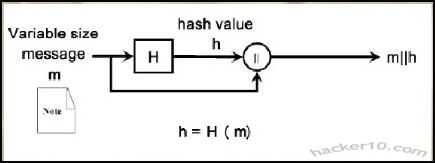
    Hash function diagram
    Hash function diagram

    Hashing a file does not mean to encrypt it, cryptographic algorithms used for encryption are totally different from those used for hashing files, encryption software like Truecrypt, gives two algorithm choices, one for encrypting the data and another to hash the user keyfile or password. Another use of cryptographic hashes is password storage, encryption software does not store user passwords in plain text, it creates a cryptographic function of a password, when the user wants to decrypt the data the software performs that operation again, if the cryptographic hashes coincide it then decrypts everything.

    SSL certificates contain a cryptographic hash to show its uniqueness, certification authorities use a hash algorithm to generate a certificate signature. Hashing algorithms can also be used to compare text, if the values coincide it assures content integrity this guarantees the receiver that the message has not been tampered with, in addition it is impossible to recreate the original message out of a hash string.

    Note: Flaws have been found in the MD5 algorithm, The United States Computer Emergency Readiness Team (US-CERT) considers the MD5 algorithm broken and unsuitable for use, the MD5 hashing algorithm should not be used in SSL certificates and digital signatures. Most U.S. government applications require SHA-2 hash functions (SHA-224, SHA-256, SHA-384, SHA-512), SHA-2 has been designed by the National Security Agency (NSA) and stands for Secure Hashing Algorithm.

    Cryptographic hashes and law enforcement

    Law enforcement agencies and RIAA sponsored investigators use hashing algorithms to track down those sharing illegal files in P2P networks, in the case of law enforcement, when they seize child pornography images, they automatically hash photos and videos storing the hash strings on a database,these unique values are compared with the cryptohashes of other previously seized files to see if it matches any of them.

    There are USB thumbdrives that can be plugged into a computer to scan its hard disk in search of files whose unique hashing algorithm matches one of the child pornography files previously seized, in a matter of minutes and without visually looking at the content law enforcement personnel can detect this kind of material, the same automatic software helps law enforcement to classify these images, when a new image not in the hashing database is found the software marks it for manual inspection to assess it.

    Law enforcement also owns specialist software that analyses P2P networks attempting to match a cryptographic hash file to one of those in their database of banned child pornography images, with very little supervision it is possible to detect child pornography, once a file has been flagged it is brought to the attention of an officer to start the process of tracking down the IP and gathering further evidence, the only flaw this has is that if someone modifies one of those photos using a graphics editor giving it a little more/less brightness, then the cryptographic files will not coincide. Software like ssdeep attempts to plug that gap by using a technique known as fuzzy hashing, this method can match cryptographic hashes of very similar files, if someone changes a single bit on a file, it would still pick it up, extreme file changes would not, the same technique can be used to detect similar malware files.

    RIAA sponsored companies can use cryptographic files to track down people sharing copyrighted material on P2P networks too, during their evidence gathering they will include a file hash value, if the case ever goes to court, after seizing the user’s computer, that unique hash string compared with the files in the computer will be solid evidence of guilt. Computer forensics software like Encase can create a cryptographic function of a computer hard disk as proof that the data not been tampered with when that hard disk gets to court or defence attorney.
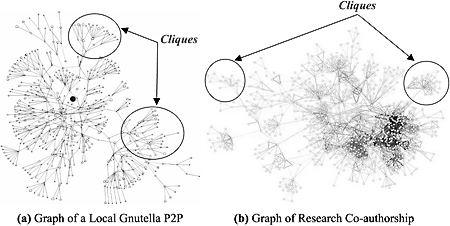
    P2P network diagram
    P2P network diagram

    In order to make it more difficult for intellectual rights owners to prosecute violators, a new peer to peer system using Distributed Hash Table (DHT) to defeat automatic tracking systems has been implemented in BitTorrent and eMule (changing default settings is needed), instead of names, DHT uses hashing algorithms to index files, it makes it harder for the user to find the files he wants but adds an extra layer of privacy to filesharing, although not enough to make it impossible to track the infringer, DHT does not hide an individual’s identity.

    List of free hash and checksum calculators

    To cryptographically hash a file you will need to obtain special software to do that, select the file you would like to hash, from a 1bit file up to a full hard disk, choose the algorithm of your choice and hash it, the same software can also allow you to verify that hashing algorithms coincide (aka integrity check). If you do not want to download software, websites like Hashemall allow you to compute hashes online.

    FeeBooti: This free cryptographic hash value generator can computer all the common hashing algorithms (CRC32, MD5, Whirlpool, RipeMD160, SHA512, etc), simple to use interface, file integrity checksum for files of unlimited sizes, simultaneous checksum calculation using different algorithms, it copies hash values to Windows clipboard and integrates into windows property pages.

    Multihasher: Portable hash value calculator supporting CRC32, MD5, SHA1,SHA256,SHA384 and SHA512. It can be used for hash file verification and upload files to VirusTotal querying its database to find out if the file is malware. Multihasher integrates with Windows Explorer context menu, supports Unicode characters, file drag and drop and much more.

    Free checksum tool MultiHasher
    Free checksum tool MultiHasher

    HashGenerator: Beginner friendly application that can be installed or used as portable, to generate a hash file you simply right click on it using the context menu options or use the drag and drop feature. It computes 14 different type of checksums and can export a list of hashes to an HTML or .txt file.

    MD5Deep: Command line open source hashing tool for Windows, it can be compiled for other systems like Linux and BSD, MD5Deep can compute MD5, SHA-1, SHA256, Tiger and Whirlpool message digests, it can process regular files or block devices, it can recursively dig through the directory structure. This tool is best avoided by beginners.
  • Encrypted data backup with Powerfolder

    Encrypted data backup with Powerfolder

    Powerfolder is a free program for Windows, Mac and Linux to securely share, sync and backup your computer files, locally or in the cloud, if you choose to backup your data online you will be offered a free account with 1GB of free space, this is not necessary as the program can be used to do offline backups, if you decide to use the cloud option all data transfers will be encrypted using SSL (transfer) and AES (storage), to open an online account only requires entering an email address, which does not need to be verified, and the password of your choice.

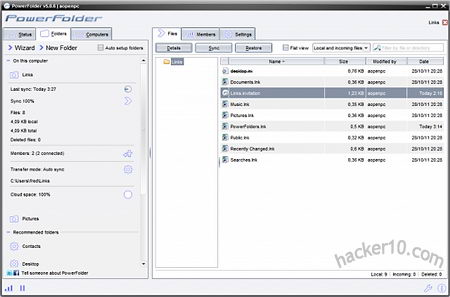
    Powerfolder interface is easy to use, skinnable and with lots of configuration options, the software can be used to synchronize data in between computers on a LAN (Local Area Network) with real time data sync status showed on the screen, you can choose what to backup with a simple tick on a checkbox next to each folder.

    PowerFolder encrypted data backup
    PowerFolder encrypted data backup

    To share files online you just need to go to the Folders tab and follow the wizard where you will be offered what files to share and where to send an invitation key, in order for someone to access your data they will need to enter that secret key first. PowerFolder cloud storage can be accessed through the iPhone or Android through a specially made mobile portal (m.powerfolder.com), browser file downloads are made using an encrypted SSL connection, you can view and play audio files online too. Powerfolder software scans local folders for changes and uploads/erases the data as necessary, bandwidth taken by PowerFolder can be limited, a proxy and specific ports chosen, the plugins tab lets you configure advanced settings, like adopting UDT connections instead of TCP, encryption security level and setting up a dynamic DNS.

    I would have preferred it if the help manual wasn’t only available online, and the free 1GB online space is not enough to hold all of my important data, I could not find any other flaw to this very fine secure data backup software.

    Visit Powerfolder homepage

  • Modify files and folders timestamps with NewFileTime

    Modify files and folders timestamps with NewFileTime

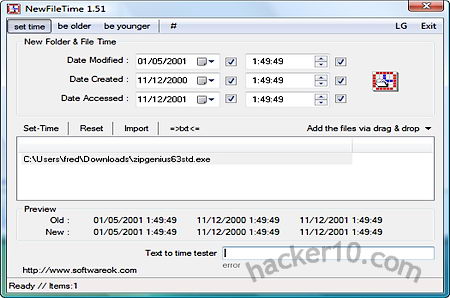
    NewFileTime is a small Windows utility to easily change files and folders timestamps, the application doesn’t need any installation, it can be run from a USB thumbdrive in portable mode and lets you change the Modified, Created and Accessed timestamps (day,month,year and time). To change a file or folder Created and Accessed date it is as easy as dragging and dropping the file inside NewFileTime main window or manually selecting the files using the import button. Its best feature is that you can add multiple files and folders and change all dates at once.

    NewFileTime change file folder timestamp
    NewFileTime change file folder timestamp

    The menu lets you to quickly add and subtract hours or days to the file timestamps using one of the preset values, timestamps can also be exported or imported using the txt button. Overall this program does what it says on the tin with and you won’t need any administrator rights to run it. There are other free utilities to change a Windows file timestamp like Mooo TimeStamp or Timestamp modifier but I have found NewFileTime to be the easiest to use.

    Visit NewFileTime homepage

  • Brute force advanced password recovery with HashCat

    Brute force advanced password recovery with HashCat

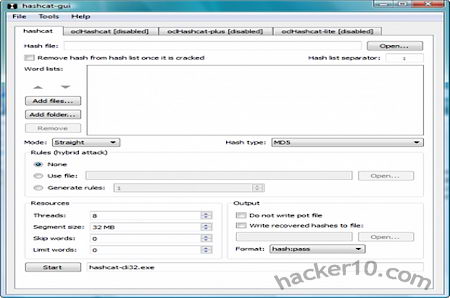
    Hashcat is a free brute force attack tool (aka password cracker) to perform security audits on database password hashes or recover forgotten passwords, it is available for Linux and Windows, unlike the better known command line only dictionary attack tool John The Ripper, HashCat comes with an interface (aka GUI, Graphical User Interface). After downloading Hashcat you will need a password list (aka wordlist), you can download one from OpenWall. A common approach to recover a forgotten password is to try and guess it using dictionary words, the time to crack the password is linked to its length in bits, the most difficult to crack passwords will have been made up using a lump of special characters, punctuation signs and capital/small letters.

    Brute force tool HashCat
    Brute force tool HashCat

    HashCat is not only a dictionary attack tool, it can use precomputed hashes, using a pre-computed dictionary made up of hashes saves time when cracking passwords because the the words have already been converted into hashing algorithms which is how passwords are stored. This kind of brute force attack can be slowed down when cryptography uses a technique to force all password entries to be recomputed at each try, in cryptography this is called salt.

    The more you know about the the password constitution the quicker it will be to crack it, HashCat lets you specify password length, you will also want to determine the hash mode, encryption software use different hashing algorithms for password storage, the algorithm used is normally found within the software technical specifications. Computer graphic cards with a processor (Graphics Processing Unit, GPU) can notably speed up password cracking efforts, HashCat takes advantage of them being able to use up to 16 GPUs. Finding out a hard to guess password out of a hashing algorithm is not easy with just a single desktop computer, when the opponent has access to supercomputers or botnets, if the passwords is weak, a couple of days might be all one needs.

    Visit Hashcat homepage

  • Real time antispyware protection Spyware Terminator

    Real time antispyware protection Spyware Terminator

    Spyware Terminator is a small memory footprint real time anti spyware scanner, it can be configured to do a quick, full or custom scan excluding trusted selected folders which will speed up the scan. You are likely to get lots of hits after the first scan as all Internet browser tracking cookies will be flagged as spyware, tracking cookies are not an extreme privacy concern like real malware that hijacks your computer, but they are better off erased. The software interface is clean and easy to use, with its main window showing only three tabs from where you can perform everything you need besides options configuration that is only used once in a while.

    Scanner reports are stored for reference and easy to understand, threats are rated and classified, helping the user get an idea of what steps to take next, antispyware scanning can be scheduled, it is probably best to set it up once a week, this is a reasonable timeframe for a home user to get rid of tracking artefacts acquired during normal Internet browsing.

    Free antispyware Spyware Terminator
    Free antispyware Spyware Terminator

    Before uninstalling something SpywareTerminator will create a restore point, if you make a mistake by going to Tools>System Restore the system can be restored to what it was before, if you have doubts about a file already in your computer you can manually select it and force a hard scanner, if you come across a locked file that can not be erased SpywareTerminator lets you select it through the interface. A common trick used by spyware is to change file permissions to lock the file so that users can not erase them, permissions can be changed using Windows right-click but this is not easy to find for the average user.

    During installation you will offered to install a toolbar called Web Security Guard Toolbar, similar to Web Of Trust, allowing users to rate websites and warning you of sites flagged by people as dangerous, this is a nice addition but can be easily rejected, the default is to install it, you will have to uncheck the box. The paid for version of Spyware Terminator can be integrated with F-Prot antivirus engine, has high priority updates and other tools like junk file scanner, start up fine tuning to speed up the boot up process and an Internet browser addon scanner, support is provided by phone and email.

    Visit SpywareTerminator homepage

  • List of hacking and surveillance techniques used by Governments

    List of hacking and surveillance techniques used by Governments

    A list of normally secretive companies and products used by over 150 Governments from around the world to spy and hack into people’s computers has come to light thanks to the Wall Street Journal Surveillance Catalog project, these confidential brochures explain what products are used by Governments for mass surveillance, some of the prospectuses have been partially blacked out as specific technical information is only available to authorised law enforcement personnel.

    The surveillance tools are sold to law enforcement agencies and some corporations, its legality depend on the laws of the country where they are being applied, the tools have often been found in the hands of repressive regimes like China or Iran, since censoring of the web and mass spying is allowed in those countries, it is perfectly legal.

    Note: In addition to these private contractors products, well resourced countries also develop their own custom hacking tools in-house.

    Software for Internet surveillance

    Mobile phone tracking: Septier Location Tracking provides mobile phone tracking, lawful interception and intelligence gathering analyzing and retaining location data from mobile phone networks, it uses triangulation to find out where a mobile phone is, a technique that looks at the signal strength in between a phone and a mobile phone tower to determine its location, the system can handle all modern mobile networks like 3G, GSM, Wi-Fi, WiMax, etc.

    Linguistic  Analysis: A company called Expert System Semantic Intelligence has semantic software called Cogito that is capable of searching linguistic data using strict parameters, categorize data and extract entities like people and organizations, after data has been sifted through events are flagged, further parsed for early warning indications, ranked and then extracted and categorized.

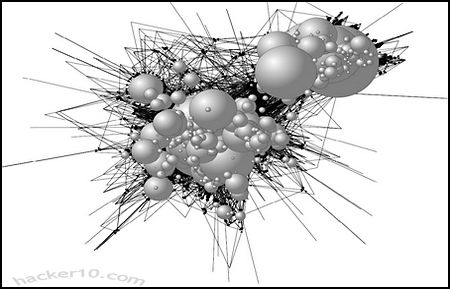
    Social network analysis: Intellego studies the relationships in social networks, representing emails, websites and targets as nodes then interlink them with other nodes showing a graphic of all the links. The diagram shows a clear picture of the network communication. This kind of analysis does not necessarily involve public data in Facebook, it can involve private data analysis, it allows the investigators to easily spot target’s relationships.

    Social network analysis
    Social network analysis

    Installing trojan horses: FinFly ISP can disguise a trojan horse in the form of popular software like updates for the Firefox browser, Adobe Flash or Java, once the user agrees to update this as he often does, a trojan horse that sends private data to a surveillance agency and is not detected by any antivirus is downloaded to his computer. This British company (Gamma Group) claims that it can work with an ISP to distribute a trojan horse to users. Its latest product, FinFly Web, can infect targets with a trojan on-the-fly by just visiting a website.

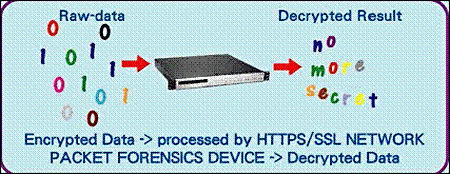
    Deep packet inspection: OnPath technologies claims to provide “lawful interception” of Internet communications taking all the traffic from the Internet backbone (ie. ISP) and funnelling it through hardware devices that inspect data packets, determine what’s inside them and decides if it is necessary to forward the data to a law enforcement agency for inspection.

    Deep packet inspection device
    Deep packet inspection device

    Hide computer IP: A company called ION (Internet Operations Network) solutions claims to provide random rotating IP addresses that look ordinary and are untraceable. Even law enforcement agencies need to hide their computer IPs, if someone is posing as a bad guy online he does not want his IP to reveal that his computer is located inside the FBI Headquarters, hiding a law enforcement agency computer IP is also useful to avoid warning a target that he is under investigation by visiting their potentially illegal website for research (servers log visitors IPs).

    Trojan horse on a USB: When physical access to a computer is possible, a solution called FinFly USB can install remote monitoring software (aka trojan) on a target machine by just inserting a USB thumbdrive, it does not require any IT trained agent to do this. They claim that it has been used by surveillance teams to install “remote monitoring” on target computers that where switched off (booting the computer from the USB thumbdrive).

    Interception of encrypted traffic: Using a man in the middle attack approach a company called Packet Forensics can intercept encrypted SSL  & TLS connections and decrypt its content, with this technique they can listen in to Voice over IP encrypted calls and read email messages sent through SSL tunnels. The company textually claims on its brochure “users are lured into a false sense of security” which allows staff to obtain the best evidence. Packet Forensics devices can easily be placed at an ISP or private network without causing any noticeable interruption in the service.

    Visit WSJ Surveillance Catalogue ( scroll down)

  • Scan for other wireless connections with NetSurveyor

    Scan for other wireless connections with NetSurveyor

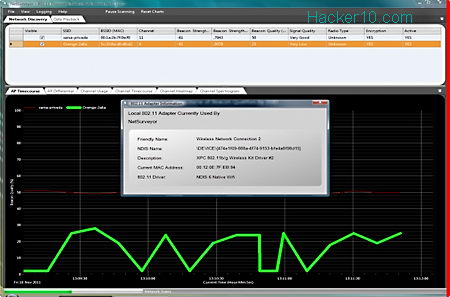
    NetSurveyor is a free wireless network discovery an analysis tool showing real time information on wireless access points around you, various charts and graphics display Access Point, Channel Timecourse and usage, Wi-Fi channel heatmap and a 3D Spectogram. Data can be logged for later analysis and exported to a PDF file including a full report with screenshots or playing back the recorded data on an included application called NetPlayer.

    Physical barriers weakening wireless signals are impossible to spot if the Access Point is not in view (e.g. multiple floors), that is when the graph of the beacon strength (signal quality) of each access point updated every few seconds comes in handy, allowing you to position your laptop in the best possible place. A single click  (View>Adapter information) can show wireless card properties, like NDIS name, description, MAC address and 802.11 driver in use.

    NetSurveyor wireless network scanner
    NetSurveyor wireless network scanner

    Access Point signal data is nicely presented in colors, if you have various access points it can get confusing with so many lines, selecting one of the Access Point names highlights its own graph in bold and unchecking a box next to the Access Point name makes it visible or invisible on the grid, using these tools you can tailor NetSurveyor to only monitor the Access Point you are interested in.

    As soon as NetSurveyor is launched a snapshot of the beacon strength is taken, refreshed later on, a chart shows each access point beacon qualities, displaying a comparison using colored bars. The heatmap is useful to spot which are the most used Wi-Fi channels by just looking at the colors it is easy to work it out, alternatively you can look at the Channel Spectogram displaying a 3D representation of channel usage in relation to time.

    If you do not have a wireless adapter you can still use NetSurveyor in “Demo” mode to experiment with it and learn how it works, all of the features are available in “Demo” mode with the data being generated by a built-in simulation module. NetSurveyor is a must have tool for professionals troubleshooting wireless networks or home users who want to learn and see a wealth of information about their own Wi-Fi network and surroundings, a complete easy to understand NetSurveyor help manual with screenshots is available but only accessible online.

    Visit NetSurveyor Wi-Fi scanner