Category: Other

Other computing tips

  • Intercept communications with data tampering tool HookME

    Intercept communications with data tampering tool HookME

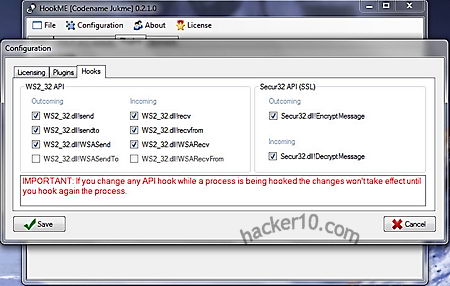
    HookME is a free open source Windows tool to intercept network communications hooking up desired processes and API calls, including SSL clear data, the unencrypted SSL headers.

    The software download is initially tiny (125Kb), when you try to install it you will get a message saying it requires supplemental .dll and .db files to work, over 30MB of files will be automatically downloaded by HookME from a third party site, you will also be asked to register the new .dll dependencies giving administrative rights to Windows Command Processor, the installation process could make some people feel uneasy about this tool containing malware, the only guarantee you have is that HookME is developed by well known OSINT FOCA creators.

    Every time you start the software you will be shown a small Netkra Deviare unregistered license splash screen, you don’t have to buy a license but it will get rid of the initial screen if you do.

    TCP data tampering tool HookME
    TCP data tampering tool HookME

    The software has a tabbed user interface that can be used to intercept any hooked API call and read the data that is being sent and received, you can change intercepted packets in real time, dropping or forwarding them, a Python plugin system allows for anyone to create their own custom addon, there are some templates for that. HookME developer showed in BlackHat Europe 2013 conference how to easily intercept MySQL data and inject a backdoor on the fly with a few clicks executing remote commands.

    Real time intercepted data can be seen in the user interface Hex editor showing you hexadecimal numbers and their corresponding text meaning, you can highlight data packets and click on the “Drop” or “Forward” buttons, a small window below the program lets you know what process is hooked, for example it will show firefox.exe if you are eavesdropping on a Firefox browser session.

    This tool can be used for penetration testing creating malware and backdoors in network protocols or to uncover rootkits hooking up API calls, the main challenge for an attacker to use HookME against you would be getting access to your network first.
    Visit HookME homepage

  • Moscrack wireless WPA cracking with cluster computers

    Moscrack wireless WPA cracking with cluster computers

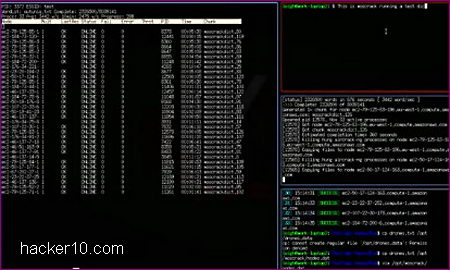
    The Multifarious On-demand Systems Cracker is a Perl application based on Aircrack-NG to crack wireless WPA keys using cluster computers, it can be deployed in Mosix, an operating system distributed across multiple Linux machines taking advantage of conglomerated computer processors or run in collective SSH nodes, clusters can be build up with any Unix operating system, including the iPhone, MacOSX, or Windows and Cygwin, it has also been tested on an Android phone running as a SSH node, best of all you can run Moscrack on the cheap from the Amazon EC2 cloud computing platform.

    The program splits a word list into chunks and processes them in parallel in between all of the nodes. If you don’t have access to a computer cluster it is possible to use Moscrack with CUDA,  an NVIDIA parallel computing platform implemented in graphics cards, you will need to install  aircrack-ng-cuda and adjust moscrack.conf (configuration file).

    Moscrack cloud wireless WPA cracking
    Moscrack cloud wireless WPA cracking

    Moscrack command line interface shows a word list progress expressed in percentage, estimated completion time, running time, server status, cluster speed and other very complete verbose data, GUI interface is optional, it will be more suitable that you run the command line version to feel comfortable from the shell helping you to understand how concepts work, the GUI is pretty basic.

    The program has been designed to run for weeks or months, you can leave it on and forget about the program until the job is done, functions go beyond WPA cracking, adding the Dehasher plugin will compare SHA256/512, DES, MD5 and Blowfish hashes to crack them, if you don’t wish to install this tool in your computer, a Moscrack Live CD running Suse Linux is available for download.

    Visit Moscrack homepage

  • Internet Relay Chat encryption with Dirt

    Internet Relay Chat encryption with Dirt

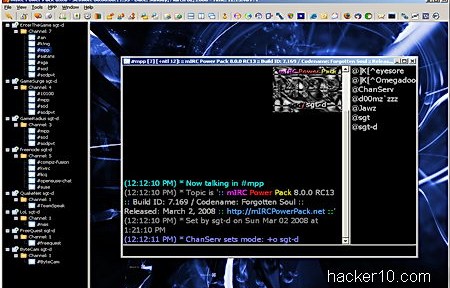
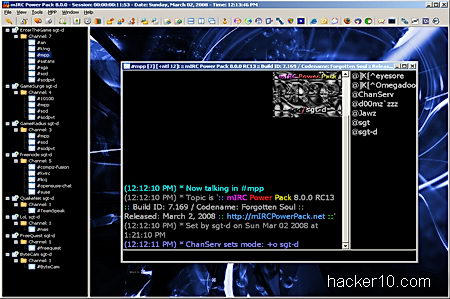
    Dirt is an open source project adding FiSH compatible chat encryption to any IRC client, it can be used as Socks4 proxy or bouncer. Dirt only allows localhost (127.0.0.1) connections, this is to make sure that encrypted text will not leak out of your machine, the listening port for Socks4 is 1088 and the 6666 port is used when acting as a bouncer, settings can be changed modifying “dirt.ini” with a text editor.

    After installation you will notice a Dirt icon in your system tray, to use Dirt in mIRC, a popular Windows IRC chat client, you need to access Tools>Options>Connect>Firewall and enter the appropriate hostname (127.0.0.1) and port number. Once connected you can type /dirt to see a list of all possible commands,

    mIRC dirt encryption IRC chat
    mIRC dirt encryption IRC chat

    For those not aware, FiSH is a widely available IRC plugin providing Blowfish encryption grade to IRC chat, you can find it in the Linux command line irssi IRC client and many others. If you use a Mac computer or Debian Linux you could try FiSHLiM, a plugin for FiSH IRC encryption working in XChat and HexChat IRC chat clients.

    Dirt works in Windows, Linux and BSD but it is still in development, another alternative could be using psyBNC, an IRC bouncer that replaces your computer IP with a virtual host (vHost) and supports channel encryption with Blowfish and IDEA algorithm, you will need a shell account to manage psyBNC, there are many companies offering them at cut-prize with easy configuration instructions, they are normally used by channel administrators to handle abuse.

    Visit Dirt IRC encryption homepage

  • Free online image forensic analysis at Fotoforensics

    Free online image forensic analysis at Fotoforensics

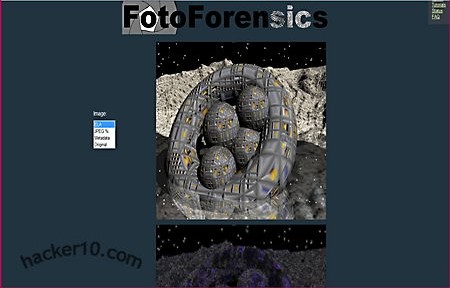
    Fotoforensics is a website for advance photo analysis, you can check whether a photo has been modified or not and see embedded metadata that could contain private details, the photos can be uploaded from your PC or directly linked from a URL, there is an optional Firefox browser plugin to make image forensic analysis easier, any image that can be displayed on your browser can be analysed, the plugin gets around sites like Facebook requiring login to view a photograph.

    The service supports .jpeg and .png image formats, the most common image file extensions found on the Internet, the metadata analysis can find out if a graphics editor has been used to modify the image, ACD See for example will embed the program name on the photos it saves, metadata also shows how many times the image has been edited, identity attributes and how the image was managed.

    Image computer forensics Fotoforensics
    Image computer forensics Fotoforensics

    To determine if a photograph has been forged Fotoforensics will use Error Level Analysis to see the image modification percentage, the image will be saved at different compression levels and then compared with a computational algorithm to see the amount of change, this is not an 100% accurate method to detect fake photos, it is possible to defeat image computer forensics algorithms looking at high frequency decomposition by reducing colour, brightness or contrast but there are other photo attributes that can be analysed.

    The website has a very detailed tutorial and FAQ explaining what results you can expect and how to interpret them, you should read it to understand what you are seeing, this is not a tool that will tell you a “Yes” or “No” answer, it is up to you to interpret the results which could turn up to be inconclusive.

    You could use this tool to check that your EXIF image cleaner is working properly but do not upload anything private because the results are saved in a public URL on the server, uploading pornography is not allowed,  to check if an X-rated celebrity photo is real or not you will need to find another place or they will ban your computer IP.

    Visit Fotoforensics homepage

  • Hide data inside sound files with DeepSound

    Hide data inside sound files with DeepSound

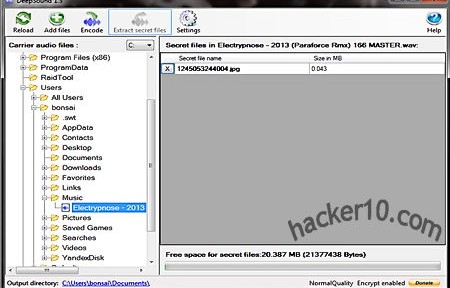
    DeepSound is a steganography tool to hide any kind of data, from text to photos, inside sound files, for extra security everything can be encrypted using AES256-bit and only available with the correct password, the modified audio file will play as normal and nobody should notice it contains hidden data inside. The program interface is very simple, it comes with a file browser to manually peruse the directory where a suitable carrier sound file can be found, when password protecting the data you will not be asked to confirm the black dot covered password twice, if you make a typo you will not notice it until it is too late, it will be best if you test the file after creating it to make sure everything works as expected.

    Encoding or extracting data can be quickly executed using shortcuts, the program settings allow you to graduate output quality ratio from low to high. If you are going to create an audio CD with hidden data the developer advises to disable volume normalization in the CD burning software to prevent data corruption that would stop hidden files recovery, a one page help manual with screenshots is included, you are not likely to have to read it.

    DeepSound hides data inside audio files
    DeepSound hides data inside audio files

    This tool can only hide data inside Waveform Audio File Format .wav and Free Lossless Audio Codec .flac sound files, these are not very common files, .wav is normally uncompressed, perfect to hide files inside, but the files are very large and not usually used for music, only small sounds.

    FLAC is a royalty free open source alternative to proprietary .mp3, .flac files are compressed and suitable for music albums, supporting metadata and album covert art, if you are going to hide data it will probably look less suspicious inside a .flac than the inadequate .wav file format, and it will be easier to distribute a .flac file given its smaller size. This application could also be used to watermark copyrighted music and track down the source if it is later found leaked in file sharing networks, but converting the file audio format to something else would get rid of the hidden watermark.

    Visit DeepSound homepage

  • Set up your own whistleblowing platform with Globaleaks

    Set up your own whistleblowing platform with Globaleaks

    Globaleaks is an open source framework allowing any activist group to set up their own anonymous whistle-blowing platform, using Globaleaks software the whistle blower will be kept anonymous by default. The tool conceives a javascript HTML Globaleaks client that can be provided as a browser addon or invoked through a content delivery network. On the server side tor hidden services give protection against legal liabilities, not only for the sender but also the receiver who will not be able to find out who sent the documents.

    You should not confuse this software platform with Wikileaks, Globaleaks does not provide a service, only the necessary software. When you set up a Globaleaks node you don’t become a part of any network, you own the node, with the responsibility of managing submitted leaked information falling on your side.

    Globaleaks whistleblowing platform
    Globaleaks whistleblowing platform

    Activists on the field can use a mobile phone to instantly submit photos, audio and video using GLDroid, a GlobaLeaks submission client for Android integrated with a tor proxy tool called Orbot.For those who can not use tor, Globaleaks allows Internet users to publish information via tor2web, a proxy service that can access hidden .onion sites through a web browser and does not require installing any extra software in the computer. Communication with the server is always encrypted end-to-end, a configurable time delay is introduced to stop a submission events being linked with an instant post on the website, document metadata clean up is optional and it will be up to each node administrator to turn it on.

    A nifty feature I liked is the coloured badge that sites running Globaleaks display to the user, pointing out anonymity, encryption and browser security level. A downside to the high security tor layered proxy approach is that the server will manifest high latency issues and it will take several seconds or minutes for the site to respond, during that waiting period Globaleaks will provide information to the user about safe whistleblowing procedures, reassuring the submitter that everything is working.

    Visit Globaleaks homepage

  • Facebook Privacy Watcher browser addon

    Facebook Privacy Watcher browser addon

    Facebook Privacy Watcher is a Firefox addon to help you manage Facebook privacy settings using colour codes. Instead of having to pay attention to checkboxes and tiny text in Account Settings> Security hoping that you got everything right, Facebook Privacy Watcher will visualize public posts in green, friends only posts in orange, red posts only visible to you and blue coloured posts only visible to a subset of friends.

    You can change any post privacy setting with a couple of clicks, colouring also works in your profile and photo albums. The addon runs in your browser no data is sent to the developer.

    Facebook Privacy Watcher
    Facebook Privacy Watcher

    This addon is not yet available in the official Mozilla addons repository but it is partly developed by the Technical Univeristy of Darmstadt which should give some peace of mind about malware.

    Other security measures you might want to take to secure your Facebook account are linking it to a mobile device, enabling always on secure HTTPS browsing, choose a strong password and set up login notifications where Facebook warns you when your account is accessed from a device not previously used.

    Visit Facebook Privacy Watcher homepage