Author: John Durret

  • 2 ways to track a stolen digital camera

    2 ways to track a stolen digital camera

    • Find your stolen camera using its serial number

    Digital cameras have a unique serial number, many cameras will embed this number in the digital photographs you take, more specifically it is included in what it is know as the EXIF (Exchangeable Image File Format) data, other data is also included there like geolocation, camera model, data and time, author,etc.

    Not all digital cameras store the camera’s serial number in the photographs, this will not work for everyone, it is also possible to erase or fake the EXIF metadata, Facebook for example, will automatically strip the EXIF data from pictures uploaded to your account, erasing EXIF data takes times and many people do not bother with it or just don’t know how to do it.

    Stolen Camera Finder is a website that will search pictures on the web taken with your camera, they do this by looking at the camera’s unique serial number stored in the pictures.

    Visit StolenCameraFinder homepage

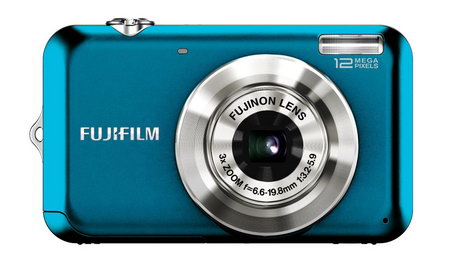
    FujiFilm FinePix digital camera
    FujiFilm FinePix digital camera
    • Find your stolen camera using Eye-Fi & Wifi & 3G

    An Eye-Fi card is composed of a memory card with wireless capabilities, it will upload all of your photos online automatically as soon as it detects an open Wifi access point in range, best of all, an Eye-Fi card will automatically tag your pictures and videos geographically with the details of the exact location where they have been taken.

    If your camera has been lost or stolen look at your online photo account, e.g. Flickr, SmugMug, to see if any pictures have been uploaded there recently, then look at the metadata (EXIF) and you will have not only the thief photographs but also the location of where the photos where taken, you should facilitate this information to the police for them to follow it up.

    One problem you will find is that most Wi-fi access points need a password and if your Eye-Fi card has not been configured to use it it won’t be able to access the Internet, it can be solved buying a high end digital camera with built-in 3G the latest Eye-Fi cards can be made to work with it an upload the photos using your camera built-in 3G Internet.

    Journalists and bloggers living in dangerous places will also appreciate the ability to upload their photos online instantly while erasing the pictures from their digital camera memory card just a couple minutes after they have been taken.

    Visit Eye-Fi homepage

  • 5 services to manage your online accounts after death

    5 services to manage your online accounts after death

    Online account management after death

    Death it is not a possibility but a certain fact that only depends on when and not if, it makes sense to prepare a list of all your valuable online accounts like Paypal, Google account, Flickr, eBay, Amazon, Hotmail, domain registrar accounts, etc, for your loved ones.

    You could store all of your digital accounts user names and passwords inside an encrypted file and tell your next of kin what the password is, with instructions to open it up and seize your digital accounts after you die, or you could use an online trustee that will take care of all of your digital assets and pass them on to your selected beneficiaries.

    The companies managing your online accounts will verify that you have died before carrying out any instructions, you can leave a last email to be sent after your death, including attachments with photos or documents,  some trustee services can be directed to update your social media accounts (Facebook, LinkedIn, Twitter, Flickr, etc) announcing you have died.

    Online legacy companies

    AfterSteps: They will send you a detailed planning guide to understand how everything works, you can upload any digital document and receive reminders about your progress completing the whole process. The company guarantees that your end of life plan will be received by your designated verifier, usually a family member or loved one, after you pass away.

    Digital legacy services AfterSteps
    Digital legacy services AfterSteps

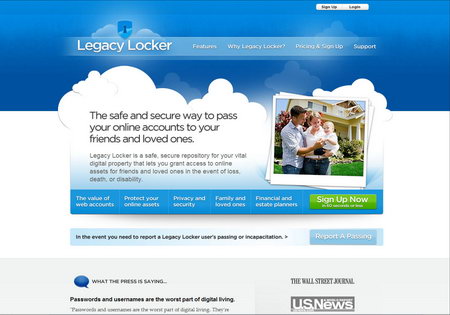
    Legacy Locker: After human verification process of your death or incapacitation, Legacy Locker will grant access to your loved ones to your digital accounts and digital documents or photos stored with them, until then, all of your stored data is kept encrypted and nobody can access it, not even the company can view your data.

    Legacy Locker online trustee after death
    Legacy Locker online trustee after death

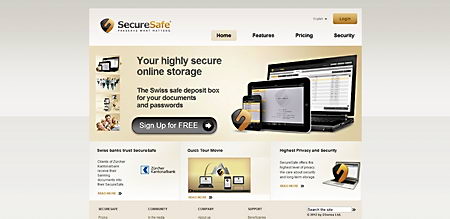
    SecureSafe: Any online account with a password and a username can be left with SecureSafe, there are various plans available, the basic one transfers your passwords and usernames to your designated person after death verification.

    SecureSafe online legacy services
    SecureSafe online legacy services

    AssetLock: It will organize all of the data you would like your family to know about if anything happened to you, this is not an online will but a digital assets manager that will pass on everything to your loved ones when you pass away, data is encrypted using AES 256bit. You should create various accounts and write down the credentials on your paper will for the benefactors to be able to log in and read the data.

    AssetLock online digital assets
    AssetLock online digital assets

    MyWonderfulLife: This service will help you plan your funeral online leaving letters for your loved ones and notes telling them where everything is located and what your last wishes are, you can even write your own orbituary after sharing stories and memories.

    MyWonderfulLife funeral planning
    MyWonderfulLife funeral planning
  • Hardware firewall Vs. software firewall

    Hardware firewall Vs. software firewall

    Software firewalls are most suitable for home users not running a network, they are installed in the operating system and only protect that particular machine, a software firewall will screen requests going in and out of the computer and determine whether the request between the client and the source is valid by looking at the predefined rules and verify the interaction.

    For a software firewall to be effective, its configuration rules will need to be set up properly. One of the main differences between software firewalls and hardware firewalls is that software firewalls restrict Internet access by application and hardware firewalls work looking at the port and URL address.

    Software firewall advantages:

    • Cheaper than a hardware firewall
    • Easier to configure than hardware firewalls
    • You can install a software firewall on a laptop and take it with you
    • Software firewalls application filtering makes them flexible
    BitDefender Internet Security firewall
    BitDefender Internet Security firewall

    Software firewall disadvantages:

    • They don’t protect a whole network needing one copy for each computer
    • Software firewalls consume more CPU and memory resources than hardware firewalls
    • Software firewalls have less configuration options than hardware firewalls

    Hardware firewall basics

    A hardware firewalls is a device placed in between your computer and the Internet, they are harder to configure than software firewalls, the high end broadband routers can come with an embedded hardware firewall inside, these are targeted at the home user and much easier to set up than a proper hardware firewall for businesses.

    Basic hardware firewalls use packet filtering, they scan packet headers to determine their source, origin and destination addresses, and whether the incoming traffic is related to an outgoing connection, such as a request for a website, this information is compared with the preset rules that determine whether the packet should be forwarded or blocked.

    The most advanced hardware firewalls can do stateful packet inspection looking into the contents of the data packet and state of the connection allowing the firewall to make decisions about packets based on context as well as the defined rules.

    Hardware firewall advantages:

    • A single hardware firewall can protect your entire network
    • They run on their own dedicated CPU and memory not taking away computer resources
    • Hardware firewalls can not be disabled by malware as easily as software firewalls can
    • A single hardware firewall can protect multiple computers not needing a license for each computer
    • Hardware firewalls still protect the computer when the operating system crashes
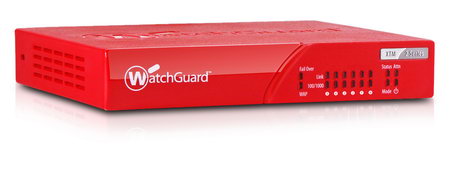
    Hardware firewall WatchGuard XTM 2Series
    Hardware firewall WatchGuard XTM 2Series

    Hardware firewall disadvantages:

    • A single router firewall is considerably more expensive than a license for a single software firewall
    • Hardware firewalls are more difficult to configure than software firewalls
    • Hardware firewalls need physical space where to install it and cable layout
    • A hardware firewall protecting the whole network will affect multiple computers if it fails

    What firewall to use?

    The average home user will be well protected with a software firewall, they are easier to manage and much cheaper in price than a dedicated hardware firewall. Large corporations and schools with big networks will need a hardware firewall as they are more cost effective, representing good value for money when defending a large network of computers and not having to pay licensing fees.

    When you use a firewall you still need antivirus and antispyware software installed in your computer, a firewall will protect you from intrusions while an antivirus protects you from malicious code running inside your computer.

  • How firewalls work & list of free firewalls

    How firewalls work & list of free firewalls

    Firewalls explained

    Your computer is open to attack from the moment you connect it to the Internet, even if you do not do anything with it, if the computer IP is visible on the Internet that is all that it is needed for a malicious hacker to attempt a break in.

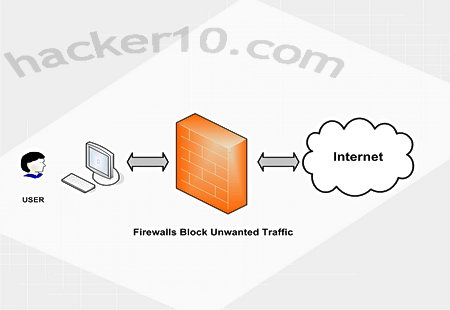
    A firewall is designed to shield a single computer or private network through a set rules that permit legitimate communications to pass and stops non authorized connections, firewalls regulate traffic in and out of the network using packet filtering, a proxy service or stateful inspection. A good firewall will deny unauthorized incoming requests probing all of your computer ports trying to find one of them open to launch an attack.

    Companies dealing with highly confidential data, i.e. banks, implement strict firewall rules in their network  only allowing  employees access to one part of the network and stopping them from accessing sensitive areas. The most advanced firewalls have the ability to ban content based on the words used to perform a search, they also make use of updated URL blacklists containing unsuitable websites, these options are meant to stop network users from coming across inappropriate content and wasting time on non productive websites.

    Simple firewall diagram
    Simple firewall diagram

    Home users tend to use software based firewalls, this is secure enough, schools and corporations with a large computer network will use a hardware based firewallnot having to install it on each one of the computers and being able to set it up inside a dedicated IT room instead of next to the computers.

    How to Access Windows Firewall Settings

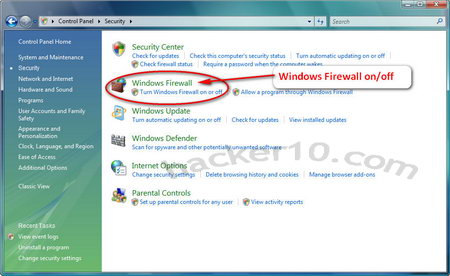
    The Windows operating system included a built in firewall starting in Windows XP, to locate Windows Vista firewall go to Start(Windows logo)>Control panel>Security>Windows firewall>Change settings

    Using Windows security control panel you can turn on and off your Windows firewall which is activated by default unless you change the setting during the operating system installation. The Windows built-in firewall is very basic and it lacks advanced configuration in comparison to third party software firewall packages, Windows firewall will only protect you from  attacks coming from the outside, if a trojan manages to lodge in your computer and wants to send data from inside your computer to the outside world, Windows firewall will not warn you of the nasty outgoing connection.

    To update Windows firewall you need to go to Start>All programs>Windows update, the Windows firewall updates itself using Windows update, it does not have any special update button.

    Windows built-in firewall settings
    Windows built-in firewall settings

    If you install a second software firewall in your computer you should disable Windows built-in firewall, as their traffic filtering rules may conflict with each other, most software firewall will automatically disable Windows firewall during installation.

    Most popular free firewalls

    • Comodo firewall: Comodo firewall is available for download as a standalone program or bundled with Comodo Internet Security Suite, the later providing antivirus and anti-malware protection too. Comodo Firewall will cross-references any new software you download with a whitelist of over 15 million trusted files and applications.
    • Online Armor free firewall: It prevents and removes spyware, very easy to use without too many annoying popups, Online Armor guards itself and other software from tampering by third party applications and it dettects keyloggers.
    • ZoneAlarm firewall: This free firewall will resist malware attacks, its SmartDefence Advisor reduces the number of pop ups you get, comes with automatic Wi-Fi security setting activation, antiphishing protection, a toolbar, 2GB of online free storage, an antivirus and parental controls.
  • How to encrypt and clear Windows page file

    How to encrypt and clear Windows page file

    When you are operate your computer the files you are managing will be temporarily stored in volatile RAM memory, once you close the files you are working on the occupied RAM memory will clear itself and be available again.

    Computer’s RAM memory (all computers have it) can run out, when this happens Windows will use what it is known as Windows page or swap file. This file is an internal Windows operating system file where temporary data is stored for the operating system to have quick read and write access.

    Using the page file has two implications, one is that it slows down your computer because the data is being read from the hard disk (slower than RAM memory) and two is that data written to the Windows page file can be recovered via specialist software, data stored in the Windows page file can include passwords and all kind of personal files, but if Windows did not have any page file and you exhausted your RAM memory, the computer would crash.

    How to locate and resize pagefile.sys

    Windows swap memory filename is pagefile.sys it is not visible to users and hard to locate, you can increase or decrease Windows default page file size or stop using it through Windows control panel, you might need to do this depending on how much RAM memory your computer has installed and how much you use, a bigger page file is suitable for those low on RAM and setting a smaller page file size will give you hard disk space back.

    In Windows Vista go to the Start Windows logo>Control Panel>System and Maintenance>System

    Where it says “Computer name, domain and workgroup settings” click on Settings, a new window will open asking you for administrator rights, on the new window click on the Advanced tab, right below where it says Perfomance click on Settings click on Advanced you will say that it says “Virtual memory and total paging file size for all drives” that is where you can change Windows page file size or instruct Windows not to use a page file at all.

    Windows Vista page file settings
    Windows Vista page file settings

    If you choose not to use a page file when your RAM memory runs out Windows will crash, if you have a high amount of RAM, like 8GB and do not run virtual memory intensive applications like high end games and graphic editors, you should never run out of RAM and it is safe to disable the Windows page file.

    How to encrypt Windows page file

    Your Windows operating system comes with a program installed called fsutil you can access it using Windows cmd command line, it is very important that you run Windows cmd as administrator, otherwise you won’t be able to encrypt the Windows page file.

    To run cmd as an administrator go to Start Windows logo>All programs>Accessories>Command prompt (right click on it and choose “Run as administrator“) Windows command line black window will open.

    To encrypt Windows page file type:

    fsutil behavior set EncryptPagingFile 1

    Before encryption takes place your computer needs to be rebooted.

    Windows page file encryption
    Windows page file encryption

    To check if Windows page file is encrypted type:

    fsutil behavior query EncryptPagingFile

    The value 1 indicates that the page file is encrypted, a value of 0 indicates that it is not.

    If something doesn’t work or you change your mind you can decrypt Windows page file typing:

    fsutil behavior set EncryptPagingFile 0

    When you encrypt Windows page file built-in Windows EFS (Encrypting File System) is used, the needed encryption keys are created and erased by Windows as needed, this only works in hard disks formatted with the NTFS file system (not FAT).

    How to clear Windows page file

    You can tell Windows to erase its virtual memory, aka page file, every time you shut down the computer, but be aware that this will slightly slow down the shutdown process.

    Registry editor ClearPageFileAtShutdown
    Registry editor ClearPageFileAtShutdown

    To automatically clear Windows page file contents on shut down invoke the registry editor, go to Windows Run using the Windows key on your keyboard +R, alternatively go to Start>All Programs>Accessories>Run, type regedit click enter and the Windows registry will open in a new window.

    Navigate to: HKEY_LOCAL_MACHINE\SYSTEM\CurrentControlSet\Control\Session
    Manager\

    You will see a DWORD value “ClearPageFileAtShutdown”, double-click on it and change value data from “0” to “1″, if you want to reverse the changes later on change the value back to “0“.

    Securely erasing the page file contents can only be done using specialist privacy data wiping software that will overwrite its contents, the system above will clear the page file contents but they will still be recoverable until the page file has been used, and overwritten, again.

  • How does encryption work? Encryption for dummies

    How does encryption work? Encryption for dummies

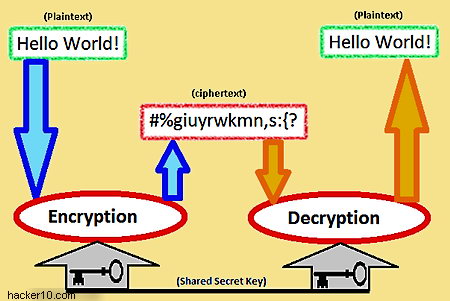
    In the online world encryption disguises data rearranging the data bits so that nobody can read or see the information without the secret key, this key can consist of a password or a digital file, aka keyfile, encryption secures plain text as well as any other digital media like photos, videos or software, you can also encrypt a whole operating system and a partition.

    To secure data, encryption uses mathematic functions known as cryptography algorithms, aka ciphers, some example of well known and trusted cryptography algorithms are AES, Blowfish, Twofish and Serpent, these ciphers can be subcategorized with a number indicating its strength in bits.

    An encryption algorithm key length indicates its size measured in bits, the length indicating the algorithm strength in bits will always be even (bit is binary unit composed of zeros and ones), these keys are used to control the operation of a cipher.

    The more mathematical strength the encryption algorithm has the more difficult it will be to crack it without access to the key but a strong cipher normally requires more computational power, a few seconds of wait might not matter much to the home user but for businesses dealing with thousands of calculations each hour to decrypt/encrypt data in their servers it will mean that more money has to be spent in hardware and electricity.

    Why not all websites use encrypted SSL connections

    If all of the websites on the Internet used encrypted SSL connections the servers serving content using SSL (Secure Socker Layer) would need more CPU power and more electricity, when you multiply this by millions of pages served each second, costs dramatically add up, page loading would also be slower because the decryption process needs to take place in the computer and those using very low end processors in mobile devices would suffer speed the most.

    Symmetric encryption diagram
    Symmetric encryption diagram

    When choosing an encryption algorithm it is important to look at is many factors, not only key size, when it comes to security how an algorithm has been implemented is much more important than key length, algorithm perfomance also matters, if people had to wait an hour to encrypt and decrypt files encryption would become unusable, a trade off in between security and usability needs to be established, the best is to always choose a standard algorithm that has been widely scrutinised by experts, aka cryptographers.

    What encryption key length should I choose?

    An AES 128-bit encryption key is considered very strong and suitable to withstand future attaks, the U.S. Government requires 192 or 256-bit AES encryption keys for highly sensitive data, AES is the standard US Government encryption algorithm for data encryption.

    A 128-bit key, can have more than 300,000,000,000,000,000,000,000,000,000,000,000 key combinations.

    The importance of choosing a strong password for encryption

    Encryption software gathers random data before encrypting your files, aka entropy, the password you use will be part of this random data gathered to cipher the files, hence why it is very important that you choose a long passphrase, in addition, you should not use any dictionary words to thwart brute force attacks.

    A brute force attack consists of an automatic process where all of the dictionary words are quickly whirled at the password login prompt, as computers have become increasingly faster this can be done in a matter of hours or less using cloud computing.

    Encryption security tips

    • Always choose an encryption program that uses a standard cipher that has been scrutinised by experts, e.g AES
    • Do not use dictionary words as your password, use a long passphrase made up of capital and small letters with punctuation signs and numbers
    • Do not use the passphrase you use to encrypt your data for anything else like your webmail password or an online forum which security can be compromised
    • Never trust a third party service to store your encryption keys or carry out the encryption implementation, if you store data online encrypt it yourself in your computer
    • Watch out for keyloggers and malware in your computer that could capture your keystrokes and your secret passphrase, use an updated antivirus and firewall
    • Never reveal to anyone your password, not even to a support department whose staff could be outsourced in a crime ridden country or could be impersonating someone else

    Encryption links for beginners

    National Cryptologic Museum Foundation

    NSA Cryptokids

    Intypedia Information Security

    Bruce Schneier’s blog (Cryptographer)