Category: Security

Computer Security

  • Startup analyzer and hijack protector Runscanner

    Startup analyzer and hijack protector Runscanner

    Runscanner is a free antispyware utility that will scan your computer for all running processes, it can detect system changes made by malware, like startup programs that show advertisements and ransomware, page hijackers, accidental misconfiguration or garbage left behind by uninstalled software.

    It only took a couple of minutes to scan my hard drive and all orphan files, registry keys and drivers, where clearly labelled in red making it easy to identify and select them for subsequent erasing. I could not see any evident false positive, only a few files that I did not know what they were for and I decided to keep them. Before deletion, using the “Fix it” button, you are given a clear warning about making sure you know what those files are.

    In advanced mode you will also see a tab called “Extra stuff” where you can edit Windows host file (often modified to show adware), check autostart items, kill processes, see installed software, and restore Runscanner history backups. Reports, using its own .run file extension, can be saved an opened, the tabbed interface has other options like  “Unrated items“, “Item fixer” and “Loaded modules“.

    Free startup and hijack analyzer runscanner
    Free startup and hijack analyzer runscanner

    The main window helps you distinguish files showing the item name, path, description, company and digital signer if any. When you find a suspicious item right clicking on it will allow you to submit the file for scanning to online antivirus “Virus Total” or look up the file MD5 at File advisor, Google or Runscanner database. Another button gives you quick access to a malware discussion forum where to ask questions.

    The advanced mode is potentially dangerous unless you understand what many of the files showing up in the window are, deleting something by accident could render your computer unbootable or without Internet access, the beginner mode only has the “Scan” an “Update” buttons visible, with no tweaking options, making it very hard to cause damage.

    Runscanner has many more features than the popular HiJackThis system analyzer, or Process Hacker, it is a good alternative to them and I would consider this tool for those who have already been infected or just want to make sure that everything is working as it should.

    Visit Runscanner homepage

  • Stop malware with Crystal Anti-Exploit Protection

    Stop malware with Crystal Anti-Exploit Protection

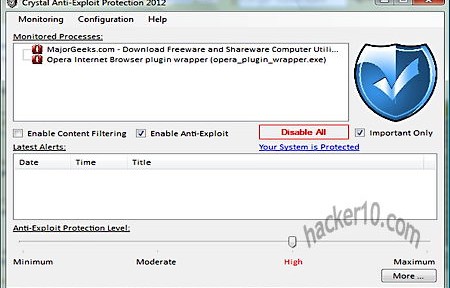
    Crystal Anti-Exploit Protection is a free utility to stop malware hijacking your computer, it will not replace your antivirus but act as a complement, the program will apply filters to your incoming and outgoing connections to decide if they should be allowed. Ironically enough my AVG antivirus flagged CrystalAEP as malware and I had to whitelist it.

    After launching CrystalAEP you will presented with a quick tutorial and asked to select all programs exposed to the Internet, like your Internet browser or messenger, CrystalAEP  will monitor them in real time, you can check what each program is doing in the alerts window, the default is set up at High Protection, programs security level can be individually modified using a level slider.

    Crystal Anti-Exploit Protection
    Crystal Anti-Exploit Protection

    CrystalAEP will stop malicious attacks carried out without user interaction, like a website instructing your Internet browser to load a module, but if you choose to willingly execute a process, i.e. download an unknow codec to see a cool video, then you will have to rely on your antivirus to pick that up. This program is targeted at advanced computer users, the expert mode has many configuration options that few people will understand, like DEP monitoring and COM/ActiveX monitoring, I would stick with the basic mode, it is adequate to stop malicious websites from exploiting software vulnerabilities.

    This tool consumes minimal resources and can be easily removed, it should help the computer paranoid, people visiting dodgy sites or those in high security environments to stop zero day exploits.

    Visit CrystalAEP homepage

  • Best Firefox addons for computer privacy and security

    Best Firefox addons for computer privacy and security

    Security Sanitizer: It will securely wipe your Internet browser cache, history, cookies, download&search list and saved passwords using the US DoD 5220 algorithm (3 passes) or a single pass overwriting.

    Encrypted Communication: It encrypts text messages password protecting them, the receiver will need to have the same addon installed and know the password. And easy way for low security email communications.

    Click&Clean: A one click Firefox browser addon to erase all temporary files, remove download files history, clean cookies, typed URLs, Flash Local Shared Objects and support for external erasers like Wise Cleaner and BleachBit.

    Tamper Data: For advanced Internet users wanting to view and modify HTTP/HTTPS headers and post parameters. Very useful to monitor traffic and see what data is being sent and received through Firefox.

    TamperData Firefox addon
    TamperData Firefox addon

    Ghostery: It reveals the companies that track you around the web when you visit a website and allows you to block the trackers giving the user ultimate control on what company cookies are blocked and which ones are allowed to prevail.

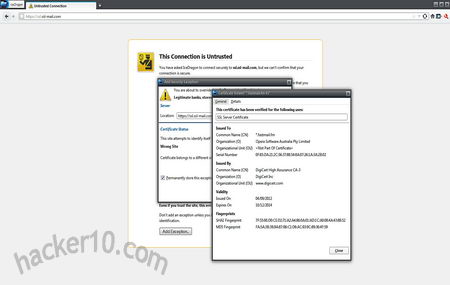
    Certificate Patrol: Shows what digital certificates have recently been updated to help the user decide if the change is legitimate. Helpful to stop websites with fake digital certificates, the user should have knowledge on how digital certificates work.

    BitDefender QuickScan: Online tool using cloud based antivirus services to quickly determine if a file is infected with malware, useful for a second antivirus opinion without having to install it in your computer.

    Browser Protect: Anti-hijacking extension to protect your browser from home page changes and  toolbars/search engine additions, protection level can be customized from high to low and URLs can be whitelisted.

    Stealthy: Fast proxy finder to hide your computer IP, it can be useful to access services only available in the US (Slacker Radio, CWTV), access banned websites like Facebook or fake your geolocation.

    Stealthy Firefox addon
    Stealthy Firefox addon

    LeetKey: It can encode plain text into L337, ROT13, BASE64, HEX, URL, BIN, DES, AES, Morse or DVORAK keyboard layout, it could be used to maintain private conversations on social networks or forums posting ciphered messages.

    KeeFox: A companion addon for KeePass password manager, KeeFox will connect to the password manager database and automatically fill in forms and password fields, automatically adding new entries to KeePass.

  • Review US anti-censorship proxy FreeGate

    Review US anti-censorship proxy FreeGate

    Freegate is a proxy software to enable people living in a country that censors the Internet to circumvent ISP filtering, it is one of the most used proxies in China and it is  hosted in hundreds of dynamic mirrors to outsmart the Chinese authorities, you can also request a download link emailed to you as FreeGate website is obviously blocked in China. The proxy was initially created by Falung Gong followers (a spiritual discipline banned in China), developed and maintained by Dynamic Internet Technology Inc. and it receives funding from non-profit American organizations, including the US Government.

    The project uses Hurricane Electric servers in California, you will get an US IP in that state when you use it, I had no problems watching Hulu (restricted to US residents) and listening to Pandora radio with FreeGate, at the time of my testing I was getting 1.5Mbp/s download speed, enough for video streaming, there are various servers available, all of them in the US, it is easy to switch in between them. The software interface looks outdated but is easy to manage, it contains a few extra options like erasing Internet Explorer history when the program exits and setting up a list of websites to connect directly without using FreeGate, it comes preconfigured to connect to some of the most popular Chinese websites like Baidu, Taobao and any .cn site without a proxy, a hotkey can be set up to hide/show FreeGate.

    Free US anti-censorship proxy FreeGate
    Free US anti-censorship proxy FreeGate

    The program automatically opens up Internet Explorer after executing it, it is possible to configure it with other browsers but it requires some manual tweaking changing the browser network settings, or you could download Gproxy Firefox addon to help you manage and switch proxy settings. There is no need to install FreeGate in your computer, the software will run from inside a thumbdrive with a double click but I was asked for administrator rights to allow FreeGate to pass through the Windows firewall and execute Java.

    Using FreeGate will not offer you the same degree of anonymity that the tor proxy does but it is considerably faster, if all you care about is bypassing an Internet filter FreeGate works very well, just remember that it has been designed for users in China, while it works elsewhere the developers are developing this proxy as a China centred circumvention tool and I doubt they will attend feedback from someone in Europe complaining that the can’t watch a US only TV film, this is also not a VPN, the only connection that will go through the proxy is the Internet browsing, all other applications (IM, torrents,SMTP) will be using your home computer IP.

    Some people report that the software is flagged by their antivirus, I use AVG antivirus and I did not get any malware warning, the software does not contain any trojan but it works similarly like trojan horses do penetrating firewalls, just make sure you download it from an official link. FreeGate is a good tool to have if you are going to travel to China or any other country with Internet censorship, like Iran and Vietnam.

    Visit FreeGate homepage

  • Convergence, a digital Certificate Authority replacement

    Convergence, a digital Certificate Authority replacement

    Convergence is an open source project that wants to replace Certificate Authority organizations issuing standardized X.509 digital certificates and confirm that the company signing it is who they say they are, for which a fee is normally charged, it can be very expensive to get a reputable Certificate Authority  (i.e. Verisign, GeoTrust)  that is included in all major Internet browsers root to confirm your identity. There has also been instances in which a Certificate Authority has been hacked by criminals, and likely nation states, to sign their unauthorized digital certificates with the own CA private keys allowing them to launch man-in-the-middle attacks against which the user has no defense.

    It is possible for someone to create a self-signed digital certificate, or buy a cheap one from a small Certificate Authority, but this will cause the Internet browser to beam a security warning during the SSL handshake and it easily scares off people not familiar with computer security.

    Convergence P2P digital certificate authority replacement
    Convergence P2P digital certificate authority replacement

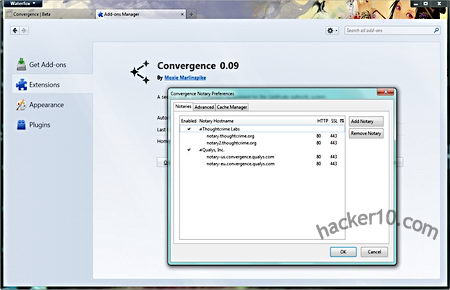
    Convergence allows people to configure a dynamic set of notaries that use the whole network to validate the communication, instead of having someone else telling you who to trust a whole set of users decide who is trustable.

    Anyone can run their own notary, the notary trust level can be set by the whole network of multiple notaries, information exchange is immediate and hides the user IP address, Convergence intends to eliminate the problem that comes with blindly trusting a single Certificate Authority and places trust in the hands of the whole community using the notaries network to check a digital certificate history before validating it, for this to work it will be necessary a large number of notaries.

    Visit Convergence homepage

    Note: Only available for Firefox users as an addon.

  • DeOps, a secure decentralized Instant Messenger

    DeOps, a secure decentralized Instant Messenger

    DeOps, Decentralized Operations, is a Windows P2P instant messenger for secure file sharing and chatting, unlike Windows Live Messenger or Yahoo! Messenger there is no central registration server where to recover data from, all of the settings are locally stored in your computer, communications are P2P and ports are chosen at random to avoid traffic fingerprinting. The messenger, a small 3MB download, doesn’t have to be installed,it can be run from inside a USB thumbdrive or encrypted container, copying the profile there will move all of your settings along the way. I noticed that Windows Firewall blocked me when I launched the application asking for confirmation that I wanted to grant Internet access to DeOps this means that in guest computers you might need administrator rights.

    After launching DeOps you can create a global ID and secret passphrase for your organization, DeOps calls every separate P2P network an “organization“, each one of them can contain multiple chatrooms and groups. A deops:// link composed of a long alphanumeric string will be created for your group, you can copy it to the clipboard and share it publicly or in private with prospective members, to join your new darknet people will need to know the passphrase together with the link, the passphrase can easily be changed by the group founder in the settings.

    If you want to join an existing organization open a .dop DeOps Identity file or copy and paste a deops:// link inside the Join Organization window.

    Decentralized P2P IM DeOps
    Decentralized P2P IM DeOps

    To add buddies to your IM list copy and paste their personal deops:// link  inside the add window, to share files with everyone in the group place them inside “My Shared Files” area where they can be marked as public to be found by anyone using DeOps or private to be shared with darknet friends only, it is possible to copy and paste into websites a unique deops:// link of each file to be downloaded by other people using the same P2P messenger, the files you are sharing will only be available while you are online, file transfers are automatically swarmed (multi-sourced) when multiple people are downloading the same file.

    DeOps organization types

    • Public: Anyone can join by entering deops://orgname
    • Private: Only those invited can join, utilizes the lookup network to aid in finding new members.
    • Secret: Same as private except the look up network is not utilized. Best for large networks and LANs.

    You can find the usual IM settings like ignoring people in the network or set your status to Available, Away or Invisible, advanced options have diagnostics to automatically configure your router opening the necessary ports, successful network connection is displayed with a green bar. The tools section includes a bandwidth graph, crawler, lookup, file transfer status, technical logs (called Internals), data packets details and a searcher to find users and organizations that have chosen to go public, the help manual is very basic and has not been finished yet.

    The software includes a DeOps Internet simulator able to create dummy users and networks for troubleshooting, I did not experience any kind of problem and had everything set up in under 5 minutes. The weak spot of this software is that you are not anonymous, no measures are taken to hide your IP from other users, if someone you are communicating with is not who you think they are (infiltration, kidnapping), your real identity would be compromised.

     Visit DeOps homepage

    Note: This software development is on-going.

  • Share encrypted messages on social networks with Privly

    Share encrypted messages on social networks with Privly

    Priv.ly is an open source project that allows you to communicate with others using the site of your choice while denying that site access to your data, everything is encrypted and shared through a link, the site can not be forced to reveal data it doesn’t hold and data retention won’t matter, by posting your messages through a link Google+, Twitter or Facebook will never have access to your private data. The messages will  be automatically decrypted by people using the Privly browser addon making the process easy an automatic for everyone, only users whose public encryption key has been used to encrypt data will be able to read the message, it is possible to revoke access to a single user by not using his key and the content on the server can quickly be destroyed or changed.

    At the moment Privly servers host the encryption keys to automate decryption and  the extension pulls the encryption key and content off the server after your friend clicks on a Privly URL link, this makes the central server vulnerable to attack, there are future plans to change it by creating a P2P decentralized storage system making impossible even for Privly staff to read your messages, another vulnerability that the developers are working on is preventing the browser from caching encrypted messages.

    Social network encrypted messages Priv.ly
    Social network encrypted messages Priv.ly

    Privly is an asymmetric public/private encryption key system, you could do this yourself encrypting your messages with PGP/GPG before posting them to a social network, Privly advantage over manual encryption is that it saves people time and makes the process easy by only needing a browser addon, their central delivery server also makes it possible to change or destroy a message after posting. You could try to achieve the same result using a self destructing messaging system but few of those services, if any, is open source. Privly is a good initiative to stop abusive social networks data retention policies and to stop censorship from software scanning the Internet for keywords.

    The key for Privly to work is adopting a standard that everyone will understand as soon as they see it, in this case a URL, having too many ways of doing the same thing does not help spreading a technology, it all comes down to everyone agreeing on a system. You still have to solve the anonymity side of your messages as your computer IP is visible when you post a Privly link to a website.

    Visit Privly homepage

    Note: The project is still in development and might not be stable.