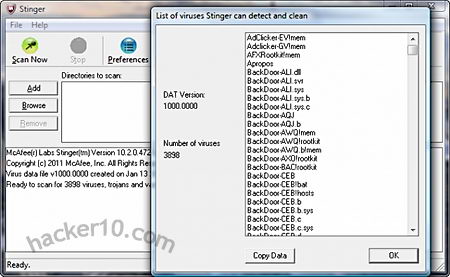
McAfee Stinger does not need installation and can be run from a USB thumbdrive but it asks for administrator rights, this tool has not been designed as a replacement for a fully fledged antivirus, you could use it when you are travelling to check an Internet cafe computer before using it, McAfee Stinger is light on resources, small and fast. After executing it you can select a directory for scanning or scan the whole computer which took me 2 minutes for a 300GB hard drive, McAfee Stinger will scan subdirectories and compressed (.zip,.rar,.7zip) files too, if anything is detected you can choose to repair, rename, delete or report only.
Besides providing protection for travellers using unknown computers this tool can be used as a second opinion if you detect an anomaly, the first thing quality malware will do is to disable your local antivirus, that is why it is important to scan your files with two different antiviruses when something does not add up, as well as checking for outgoing Internet connections.
Portable antivirus McAfee Stinger
This tool scans the boot sector which is where rootkits tend to lodge, processes and registry are also scanned, with an heuristic check which sensitivity can be adjusted from Very low to Very high, the default is Medium. Heuristics is a system to detect antivirus like behaviour, meant to discover zero day never seen before threats. McAfee Stinger comes with a very limited list of virus signatures, around 4000, they can be seen by clicking where it says “List of viruses“, it is mostly made up of trojan horses, McAfee claims that it can remove prevalent Fake Alert malware.
If you suspect your computer is infected you might want to check other software that McAfee’s has on its free tools page AntiMalware section, RootkitRemover and GetSusp, both directed at beginners and easy to use, good computer security is made up of layers, the more passive and active security layers you have the less chances of infection, another choice is to use an online antivirus if you are comfortable allowing access to your files.
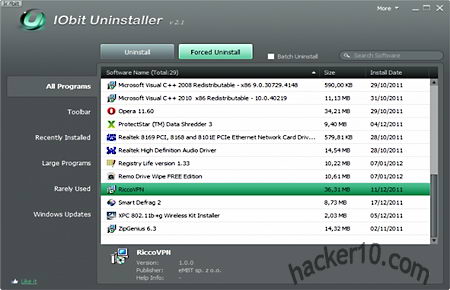
iObit uninstaller is a tool to help you get rid of junk left behind by uninstalled programs, some of its advantages over the standard Windows uninstaller is that it will scan the registry and hard drive to find invalid keys and leftover files, allows you to uninstall various program in batch mode using a single click, and it has a “Force Uninstall” mode to eliminate software not listed in the Windows Add/Remove control panel or if the original uninstaller no longer works, however this is not guaranteed to succeed all the time.
It’s tabbed interface classifies installed programs in “Windows Updates” ; “Rarely Used” ; “Large Programs” ; “Recently Installed” ; “Toolbars” and “All Programs“. This makes it very easy to find what you want to get rid of, an instant search box is also included, after using the Powerful Scan you will be presented with all the leftover files found and asked if you would like to erase them, anything you do is logged inside a text file accessible from the menu together with a shortcut to Windows Restore Point to reverse changes, iObit uninstaller will create a restore point every time you use the advanced uninstall mode.
iObit free Windows uninstaller
This program does not need installation and it can used in portable mode, it is a good tool to have for IT administrators, however, it requires administrator rights, unlike some of their competitors iObit uninstaller does not track what changes are made to your computer when you install software, the program is not as complete as Revo Uninstaller Pro, but it is free, if you are having problems eradicating a hard to go program it is well worth a try.
A keylogger is designed to capture every single keystroke you enter on your keyboard, it is one of the most effective ways to spy on someone and steal data, keyloggers are able to capture email passwords, credit card details and encrypted container passwords. The first line of defence to stop a keylogger from infecting your computer is a good antivirus, the second line of defence, once a keylogger has managed to make it into your computer, is to use a virtual keyboard but this will slow you down and is still vulnerable to trojan horses taking screenshots.
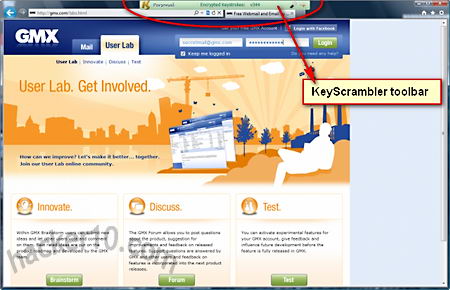
KeyScrambler defeats keyloggers by encrypting keystrokes at keyboard level using Blowfish-128bit and an asymmetric RSA 1024bit key, the space key is also encrypted, a malicious trojan horse capturing keystrokes will only manage to gather undecipherable data, there is no need to read anything to use KeyScrambler it allows the user to work as usual with no learning curve, a small green toolbar sits on top of the browser and automatically activates when you enter data confirming that it is working.
KeyScrambler toolbar
This program is ideal for protection against new sophisticated keyloggers not detected by any antivirus in the market, the kind of trojans state sponsored spy agencies use, anyone working in a financial environment should have a tool like this installed in their computer. The application could be improved with some antiscreen capturing feature, passwords are normally behind asterisks, but what you see on the screen could still be read through screenshots. KeyScrambler free version is very limited, it only works with Internet Explorer, Firefox and Flock, any browser addon like Lastpass password manager will also be supported. The paid for version of KeyScrambler version adds East Asian languages input, protects Windows Explorer, Windows logon screen and extra applications like the Opera browser, Safari, Chrome browser, Winrar, Notepad, iTunes, Filezilla, Truecrypt, Bestscrypt, LibreOffice, Skype, long etc .
KeyScrambler does not defeat hardware keyloggers it only starts working once the keystrokes have reached the Windows kernel working at driver level, in order for someone to install a hardware keylogger they will need physical access to the computer, most users are not at this level of risk, I think that this a good tool to have for high security environments.
Cipher Image let’s you hide plain text inside photos, a process known as steganography, it can hide messages of up to 64Kb in size, quite a few pages of information, the text has to be typed into the program, Cipher Image can not hide attached files. The data is hidden by replacing image pixels that are similar to each other making it unnoticeable to the human eye, the messages are encrypted using 128-bit, there is no mention of the algorithm used for this, images can be saved in 7 different file formats (jpeg, Gif, Tiff, Paintbrush, Windows Bitmap and OS/2 Bitmap), the included password generator can produce a random pass, it is not configurable and I did not find it useful as it will be impossible to remember whichever pass it produces, there is the option of saving the password in a .txt file but I would not advise it if the data is important.
Cipher Image steganography software
You will get tooltips with instructions when you hoover your mouse over the buttons, make sure to read them as the interface is not very intuitive it is easy to get lost, I would classify this tool as an adequate steganography program for low security stuff, mainly because it is not open source, the developers are not well known and the password generator is quite lousy, my only concern was encryption about which there is little information other than to say it uses 128bit, but people really won’t be able to spot any hidden text and that is what steganography is about, ideal to deliver secret messages using your Flickr or Picasa account, if you haven’t got any security agency going after you this program will get the covert communications job done.
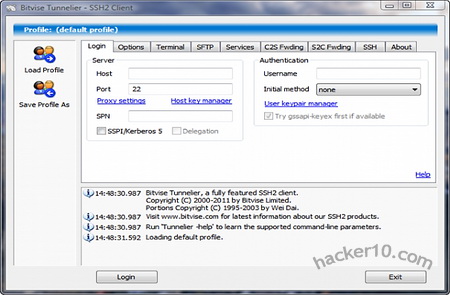
Bitvise Tunnelier is a highly configurable Windows SSH client supporting TCP/IP tunnelling, in between others, it can be used as alternative to PuTTY for port forwarding for anonymous Internet browsing hiding your computer IP and getting around filters, there is integrated support for HTTP and Socks proxies, auto-reconnect, graphical SFTP with passive and active mode, FTP to SFTP bridge, client to server/server to client port forwarding, enabling/disabling encryption algorithms for SSH sessions, and saving of profiles. Terminal emulation supports vt100, xterm and bvterm terminals, the most common protocols in SSH servers, there is colour support for xterm and bvterm, RSA/DSA public key authentication, scriptable with a command line remote execution client.
Optionally you can use Tunnelier in command line mode, this is normally use by IT administrators, it comes with flexible command lines able to load profiles on launching, it can be run in portable mode preventing any Windows registry changes. A .paf (PortableApps) and U3 (proprietary format specially designed for flash drives with the U3 Launchpad) portable Tunnelier made by users is available, though not supported by Bitvise.
Bitvise Tunnelier SSH client
The makers of this software also develop WinSSHD (a Windows SSH server), Bitvise Tunnelier comes with features to remotely control it, Tunnelier supports speeds of up to 5 MB/s when connected to a WinSSHD server. If you are wondering how you could use this software to browse the Internet or access your email through an encrypted tunnel, be aware you will need an SSH server for that, Tunnelier is the tool that will allow you to connect to the tunnel just like OpenVPN software is the tool to allow you to connect to a VPN server.
To get access to a SSH server for port forwarding, set up your own at home on a Windows computer with something like MobaSSH (not very difficult), learn Unix command line (advanced) and get a VPS, or find an SSH tunnel provider. I have used KiTTY and PuTTY to create SSH tunnels for Internet browsing and they both worked fine, but for high configuration and a nice GUI (interface), Tunnelier can not be beaten.
Note: Bitvise Tunnelier is free for personal use and limited use inside organizations.
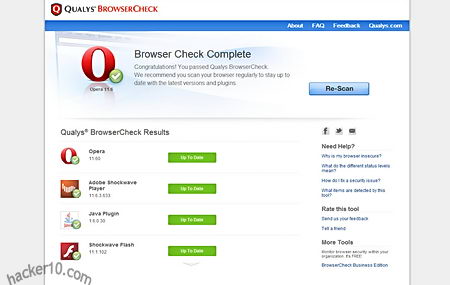
Qualys Browsercheck is an online test run by a vulnerability assessment company (Qualys) that scans your Internet browser version and outdated plugins after visiting their website. In order to perform a security analysis you will be asked to install a browser plugin available for IE, Firefox and Chrome, that will show complete information about installed applications, like path and associated files. If you do not wish to install Qualys plugin you can opt for a quick online scan with limited information running in your browser, this will only check for browser version, Flash, Shockwave and Java.
The results are neatly presented with an easy to understand colour code, if something has been found to be outdated you will be given a link to the official site from where to download an updated patched version of the software. After the updates have been applied you should rescan your Internet browser again to make sure everything went smoothly.
Qualys Browsercheck security test
If you can not update one of the vulnerable plugins installed in your browser, it is possible to disable them going into browser settings. The vsecurity test (with the browser plugin) includes the most used applications, like Adobe Flash Player, Sun Java, Shockwave, Apple Quicktime, Real Player, Adobe Reader and Windows Media Player together with inherent OS software like security updates, firewall and antivirus. Qualys security check plugin only works when you visit their Browsercheck website, you can uninstall it once you are done with it.
The vulnerability test is also available for mobile devices like Android, iPhone and iPad as well as little known browsers like K-Meleon, Sleipnir, MineField and Maxthon. A BrowserCheck business edition with a unique URL for company employees allows network administrators to view detailed user browser vulnerabilities in the network. Data collected by Qualys in these security test is anonymized and statistically released showing which are the most outdated plugins on the Internet, according to this data, Java appears to be the most likely application to be run outdated, hence exposed to hacking attacks.
A cryptographic hash function is a one-way computational mathematical operation (aka checksum or digest) that takes a stream of data and returns a fix sized bit string known as cryptographic hash value, this value is unique, any small modification to the file will change it, for example, modifying a single pixel on a photograph will not be noticeable by the human eye but a cryptographic hashing of the picture will return value differing from the original.
Cryptographic hashing algorithms are widely used in computer forensics to guarantee that files have not been tampered with, it can be compared to a digital fingerprint, security related software and Linux distributions normally come with a hash value, the user is meant to use a special program to calculate a hash value resulting from file he has just downloaded and make sure that it coincides with the string listed by the developer, if it doesn’t it means that the file been changed by someone or accidental data corruption occurred during the download, when two files have the same cryptographic hash value it is guaranteed that they are identical.
Hash function diagram
Hashing a file does not mean to encrypt it, cryptographic algorithms used for encryption are totally different from those used for hashing files, encryption software like Truecrypt, gives two algorithm choices, one for encrypting the data and another to hash the user keyfile or password. Another use of cryptographic hashes is password storage, encryption software does not store user passwords in plain text, it creates a cryptographic function of a password, when the user wants to decrypt the data the software performs that operation again, if the cryptographic hashes coincide it then decrypts everything.
SSL certificates contain a cryptographic hash to show its uniqueness, certification authorities use a hash algorithm to generate a certificate signature. Hashing algorithms can also be used to compare text, if the values coincide it assures content integrity this guarantees the receiver that the message has not been tampered with, in addition it is impossible to recreate the original message out of a hash string.
Note: Flaws have been found in the MD5 algorithm, The United States Computer Emergency Readiness Team (US-CERT) considers the MD5 algorithm broken and unsuitable for use, the MD5 hashing algorithm should not be used in SSL certificates and digital signatures. Most U.S. government applications require SHA-2 hash functions (SHA-224, SHA-256, SHA-384, SHA-512), SHA-2 has been designed by the National Security Agency (NSA) and stands for Secure Hashing Algorithm.
Cryptographic hashes and law enforcement
Law enforcement agencies and RIAA sponsored investigators use hashing algorithms to track down those sharing illegal files in P2P networks, in the case of law enforcement, when they seize child pornography images, they automatically hash photos and videos storing the hash strings on a database,these unique values are compared with the cryptohashes of other previously seized files to see if it matches any of them.
There are USB thumbdrives that can be plugged into a computer to scan its hard disk in search of files whose unique hashing algorithm matches one of the child pornography files previously seized, in a matter of minutes and without visually looking at the content law enforcement personnel can detect this kind of material, the same automatic software helps law enforcement to classify these images, when a new image not in the hashing database is found the software marks it for manual inspection to assess it.
Law enforcement also owns specialist software that analyses P2P networks attempting to match a cryptographic hash file to one of those in their database of banned child pornography images, with very little supervision it is possible to detect child pornography, once a file has been flagged it is brought to the attention of an officer to start the process of tracking down the IP and gathering further evidence, the only flaw this has is that if someone modifies one of those photos using a graphics editor giving it a little more/less brightness, then the cryptographic files will not coincide. Software like ssdeep attempts to plug that gap by using a technique known as fuzzy hashing, this method can match cryptographic hashes of very similar files, if someone changes a single bit on a file, it would still pick it up, extreme file changes would not, the same technique can be used to detect similar malware files.
RIAA sponsored companies can use cryptographic files to track down people sharing copyrighted material on P2P networks too, during their evidence gathering they will include a file hash value, if the case ever goes to court, after seizing the user’s computer, that unique hash string compared with the files in the computer will be solid evidence of guilt. Computer forensics software like Encase can create a cryptographic function of a computer hard disk as proof that the data not been tampered with when that hard disk gets to court or defence attorney.
P2P network diagram
In order to make it more difficult for intellectual rights owners to prosecute violators, a new peer to peer system using Distributed Hash Table (DHT) to defeat automatic tracking systems has been implemented in BitTorrent and eMule (changing default settings is needed), instead of names, DHT uses hashing algorithms to index files, it makes it harder for the user to find the files he wants but adds an extra layer of privacy to filesharing, although not enough to make it impossible to track the infringer, DHT does not hide an individual’s identity.
List of free hash and checksum calculators
To cryptographically hash a file you will need to obtain special software to do that, select the file you would like to hash, from a 1bit file up to a full hard disk, choose the algorithm of your choice and hash it, the same software can also allow you to verify that hashing algorithms coincide (aka integrity check). If you do not want to download software, websites like Hashemall allow you to compute hashes online.
FeeBooti: This free cryptographic hash value generator can computer all the common hashing algorithms (CRC32, MD5, Whirlpool, RipeMD160, SHA512, etc), simple to use interface, file integrity checksum for files of unlimited sizes, simultaneous checksum calculation using different algorithms, it copies hash values to Windows clipboard and integrates into windows property pages.
Multihasher: Portable hash value calculator supporting CRC32, MD5, SHA1,SHA256,SHA384 and SHA512. It can be used for hash file verification and upload files to VirusTotal querying its database to find out if the file is malware. Multihasher integrates with Windows Explorer context menu, supports Unicode characters, file drag and drop and much more.
Free checksum tool MultiHasher
HashGenerator: Beginner friendly application that can be installed or used as portable, to generate a hash file you simply right click on it using the context menu options or use the drag and drop feature. It computes 14 different type of checksums and can export a list of hashes to an HTML or .txt file.
MD5Deep: Command line open source hashing tool for Windows, it can be compiled for other systems like Linux and BSD, MD5Deep can compute MD5, SHA-1, SHA256, Tiger and Whirlpool message digests, it can process regular files or block devices, it can recursively dig through the directory structure. This tool is best avoided by beginners.