Category: Mobile Phone

Mobile phone security

  • Mobile phone private messaging with Schmoose App

    Mobile phone private messaging with Schmoose App

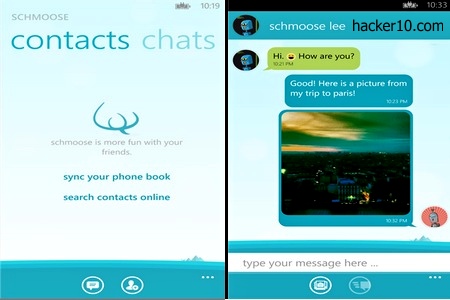
    Schmoose is a privacy messaging app for your mobile phone with end to end encryption, the ciphers used to secure your data are well known standards like AES256-bit, SHA-256 and RSA-2048-bits. Schmoose itself is not able to read what you send, a public/private encryption key is created in your phone during installation and data is encrypted before it leaves it, only the person you are sending the message to can decrypt it.

    When the sender and receiver both have the app installed they can chat like they would do in the popular WhatsApp and Kik without any messaging costs,the main difference is the strong privacy added to Schmoose. If anybody intercepted your messages, they would only be able to see meaningless random characters and the company can not be forced to decrypt them as they do not have the means to do that.

    You will be asked to verify your mobile phone number or email during installation and after that you are able to sync your contacts online, to keep contacts private, only hash values are sent to Schmoose servers in Germany, they don’t see names and addresses.
    Schmoose encrypted messaging app
    Schmoose encrypted messaging app

    The messaging program is very colourful, it can include embedded photos, custom backrgounds, avatars and fun chat features like in other chat messaging apps. If you choose to store the photos people send you in Schmoose make sure that it will not be something embarrassing, media storage is not encrypted and if you lose your phone there is potential for somebody to access the photo gallery.

    I did not like having to register to be able to use the app but it is possible to select email registration only, if you have an anonymous email account this should keep your identity hidden and it will not be as intrusive as using your mobile phone number linked to your real identity. I suspect that registration is necessary to assign you a Schmoose ID and to be found in the network.

    The good features are end to end public key encryption with no backdoor and easy of use. The bad part was that data was not being encrypted locally, to fix this your phone should be fully encrypted. Schmoose is a free app for a single device, a paid version increases the number of mobile phones in which it can run and lets you block other users and send videos (the free version only sends photos).

    I am glad to see more and more companies locking themselves out of customer’s encryption keys, this allows them to fight back against unreasonable legal requests asking for access to customer’s personal messages. The hard part, is that there is no interoperability in between similar privacy messaging apps and it is next to impossible to agree with all of your contacts to use the same app.
    Visit Schmoose homepage

  • Mobile phone end to end encrypted chat with Sicher

    Mobile phone end to end encrypted chat with Sicher

    Sicher is a free Android, iPhone ($1) and Windows Mobile messaging up with end to end encryption and message self-destruction. It can be used to securely chat and exchange files in group or individually with anybody in your contact list. As usual in alike apps, Sicher will not work unless your friends also have it installed.

    The company developing Sicher is based in Germany and they can’t gain access to your private encryption key, generation takes place in your mobile phone and never leaves it, in addition all Sicher servers are located in Germany and they do not store the data you send, after an encrypted message has been delivered it is automatically erased from the server.

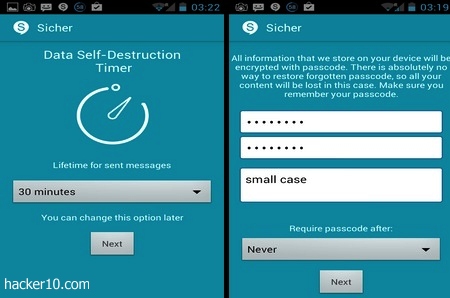
    To strengthen your security a self-destruction timer can be set with all messages or files you send, the lifetime of a message can be fixed from 30 minutes to up to 15 days. During the app set up you will be asked to enter a password used to encrypt data locally, this will block access to your account if your phone is lost or stolen, the company has no way to restore forgotten passwords, content will be lost if you forget about it. The app can be set to lock itself up after 15 minutes of inactivity, hourly or the more risky option of never asking for the password again while the phone is on, customize it to your security needs.

    Sicher encrypted chat messaging app
    Sicher encrypted chat messaging app

    I liked that Sicher has not been developed nor has servers in the USA, where the government is known for issuing gagging orders to technology companies forcing them to install a backdoor in their communication services. Sicher developers should also get bonus points for not sending crash logs, spy agencies are known to collect Windows logs sent over the Internet to learn more about a target’s computer, no such privacy risk here, and there is no social network integration, Facebook and Twitter apps don’t have access to Sicher, two companies that all privacy apps should block. Another nice feature is the settings allowing you to route Sicher communications through a proxy to hide your mobile phone IP.

    Besides the appalling app installation experience where I had to try multiple times before receiving the necessary SMS with a PIN code to activate the app, and besides Sicher’s freezing my screen when I finally entered the PIN number, forcing me to uninstall the app and reinstall again, security specs look fantastic.

    I would be willing to use this app if they did not enforce mobile phone number registration with them prior use, the requirement strips away your anonymity and I don’t understand why this is necessary. Even if the company can’t see the encrypted data being sent, Sicher servers, and anybody wiretapping them, should be able to see computer IPs connection length with timestamp and amount of data being transferred, what it is known as metadata, a very useful source of information for spy agencies.

    I trust that the developers will solve Sicher SMS registration problems, but as long as they insist that my mobile phone number must be registered with them, I will not use the app. If you don’t care about anonymity and all you long for is privacy, Sicher security far surpasses that of WhatsApp or Kik and it is preferable than those apps.

    Visit Sicher homepage

  • Android news reader with Tor,encryption and wiper

    Android news reader with Tor,encryption and wiper

    Courier Secure News Reader is a Guardian Project mobile phone app for secure and anonymous news reading.  The app works with Orbot, a Tor proxy for Android phones from the same developers. It hides your computer IP when downloading RSS feeds,  gets around ISP censorship in countries where they block websites and it encrypts what you download to thwart wire-tapping. The feeds can be synced automatically or manually, with the option of only syncing when on a Wi-fi network to stop expensive data roaming charges.

    Download news and personal data are stored encrypted in your mobile phone, in case of emergency they can  be wiped altogether with the app by swapping on the screen.  A smart move if you expect arrest but bear in mind that most arrests are never expected and the chances of you being able to wipe evidence that you have accessed banned news sites will not be too successful unless you have forewarning of the arrest in which case disposing of the whole device would be safer.

    Courier Secure News Reader Android
    Courier Secure News Reader Android

    The menu is simple and easy to use,  a button on top lets you know when you are connected to the Tor network, a “My Favourites” tab to bookmark sites and “Stories Received” tab can be tapped to read the news. Any data you receive from a friend will be listed separately in the “Receive a Share” tab.

    People who have no Internet access can still read the news as long as one of their peers manages to get online and shares it with them P2P using Courier Secure News Reader via Bluetooth.

    Courier Secure News Reader is open source, free and without any advertisements, the developers aim is to help those living in countries where news sites access is censored to be able to read them anonymously.

    The app has been digitally signed with a 4096-bit key to verify that it really came from the developers and nobody has replaced it with a fake malware app that spies on the user.

    Note: Courier Secure News Reader is currently in beta.

    Visit Courier Secure News Reader

  • Best smartphone apps to exchange secret messages

    Best smartphone apps to exchange secret messages

    Even if you take care of your personal privacy the people you are communicating with might not be as privacy conscious or knowledgeable. If one of your contacts misplaces their phone with your private pictures and messages you would also be compromised, or if they stop being your friends and become your enemies anything you have previously sent, could be used against you.

    The following smartphone apps will make it hard for others to permanently store text, photos and videos you send to them.

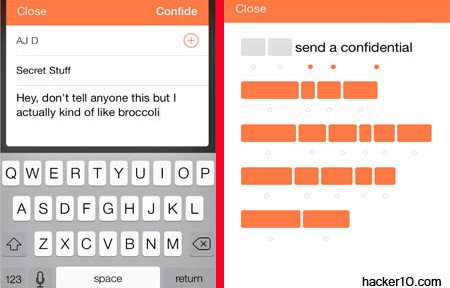
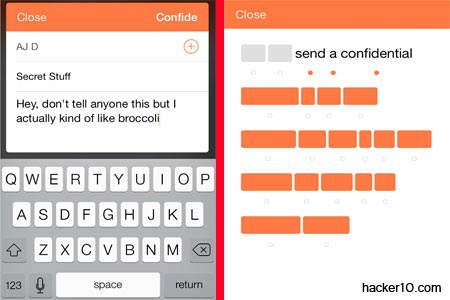
    Confide: It sends end to end encrypted messages that will disappear after reading and you will get a receipt once the message has been opened. There is built-in screenshot protection that makes it difficult to take a screenshot by concealing the message until somebody swipes the screen.

    Confide smartphone app
    Confide smartphone app

    Telegram: Cloud based encrypted self-destructing messages, you can create private group chats to share files and store data on the cloud that is available across devices. For higher security is best to adopt Telegram “Secret Chats” option, where encryption is end to end without going across any intermediary server.

    Whisper: This app will post messages and photos to your social network without revealing who you are. The idea is to allow people to share thoughts and information with people they known through a nickname. Whisper provides a huge amount of photos you can customize with your own feelings before posting, you can use it to vent frustration, people reading the messages can then choose to have a one to one private chat with you.

    Wickr: This is an app targeted at those really serious about security, it encrypts all communications, you can send texts, videos, photos and make calls in total privacy, with an expiration date. The app has security audit to make sure there are no flaws, and it is used by businesses to hide their trade secrets as well as people who want a private life, the app allows you to choose who has access to your messages and how long for.

    Self-destructing messages app Wickr
    Self-destructing messages app Wickr

    Dust: Available for Android and iPhone, this app can send messages that will self-destruct after a set number of days or hours, no data touches the memory card, nothing can be recovered and it warns you if anybody takes a screenshot of a message you sent. You can create discussion groups and invite other Dust users.

    DontTalk: If you make a mistake sending something the app allows you to recall messages before your friends see them, set up group chats, whispers and self-destructing pop messages. This app is appropriate for those trying to protect from pseudofriends leaking the information you send, but it will not serve as protection from a law enforcement agency although no doubt it will make their job harder.

  • Smartphone encrypted messenger HushHushApp

    Smartphone encrypted messenger HushHushApp

    HushHushApp is a secure Android messenger (iPhone planned), for encrypted chat and file sharing. This app will secure your conversations from eavesdropping but it will not make you anonymous, in fact, you have to register to open an account before you can use the messenger. For this you can use your phone number or an email address that will have to be confirmed with a registration code.

    During the registration process you are asked what country you live in and the app makes it very easy sending a text message or email to your contacts, querying if they want to chat with you using HushHushApp. You should be careful not to carry out a mass mail by mistake as all contacts are checked by default, and most likely people will only want to suggest the encrypted chat to a couple of friends.

    Smartphone encrypted chat HushHushApp
    Smartphone encrypted chat HushHushApp

    Once you have opened the account you will be assigned a HushHush ID, HID, and be able to manage your profile where you can upload an avatar. The HID is used for other people to find you in the network and add you to their list of contacts. You don’t need to hand over your phone number to chat with others, the short HID alphanumeric code will be your contact ID. Another option is to individually control if a contact will be allowed to be notified when you read a message and if your location can be revealed to them.

    You can create a chat group from the interface where three or four people can chat securely at the same time. If files are sent, they will be encrypted and stored that way, only accessible through the application.

    Security wise, you are only told that HushHushApp uses a scrambling algorithm with no additional knowledge of what algorithm is or how it works. HushHushApp mentions that messages are deleted from the server, this means your data flows across a central server, a potential weak spot if the server is compromised. The good points are that messages have a digital fingerprint, with local storage and users database being kept encrypted, but again, no mention of what encryption they are using, you are supposed to trust they are doing a good job but you know nothing about the company either, other than their website features section is unfinished and written all in Spanish.

    After I used the “Delete Account” option and uninstalled this app, browsing the storage phone I noticed a folder named com.hushhushapp.android and a tiny file named hushushgirl.3gp left behind on my phone, this shows some sloppiness by the developers part.

    HushHushApp interface is user friendly and easy to use but the lack of detailed information about what security measures HushHushApp deploys does not inspire trust. You can’t confide privacy on anybody saying that they will scramble your messages and hope that all will be fine. Using a central server to deliver your messages is also not ok, it adds an additional way to break your security. I would avoid this app for secure chat based on this but it should be fine for non privacy chatting, just like MSN or Yahoo.

    Visit HushHushApp homepage

  • Exchange encrypted SMS messages with Tinfoil-SMS

    Exchange encrypted SMS messages with Tinfoil-SMS

    Tinfoil-SMS is a free open source Android app to exchange encrypted SMS messages with other Tinfoil-SMS users. After installation you can import contacts from your phone and all future conversations will be handled by Tinfoil-SMS but communications with contacts will not be secure until a successful key exchange has been executed.

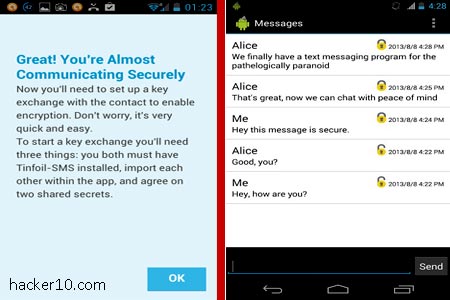
    To stop man in the middle attacks, where encryption keys are replaced by an attacker and messages forwarded after logging them, a signed encryption keys exchange must take place first. In the app menu you will see two fields labelled Shared Secrets, there you need to input two secret passphrases and save them, Tinfoil-SMS advises a minimum of 8 characters for each shared secret, you have to transmit the secret to your contact by secure means (not your phone).

    The receiver will get a notification showing your phone number next to “Pending key exchanges“, he will have to enter the passphrase you have given him and from then on any future message exchange will be encrypted.

    Tinfoil-SMS encrypted Android SMS message
    Tinfoil-SMS encrypted Android SMS message

    Messages are secured using AES256-bit in CTR mode, in the SMS thread you will see a padlock attesting that encryption is on. Tinfoil-SMS settings allow you disable and enable SMS encryption, manage encryption keys and delete/adding contacts. It is similar to TextSecure, another encryption SMS app, the main differences in between both are that Tinfoil-SMS signs key exchange with the shared secret, encryption algorithms are slightly different, Tinfoil-SMS cipher is AES256bit and TextSecure AES128bit and Tinfoil-SMS will not encrypt messages locally in your phone whereas TextSecure does.

    The reason Tinfoil-SMS developers give to support SMS instead of real time chat encryption is that many oppressive regimes are in third world countries where people does not have data plans and use SMS messages to communicate, this has the added benefit that the app would still work if the government shuts down Internet access.

    Tinfoil-SMS future plans include incorporating steganography to hide that you are using encryption. There is also planned a detailed cryptanalysis of the application which will always be free and open source.

    This is an app I would trust due to its open source nature and what it looks like a good security model, with the only inconvenience of having to exchange the shared secrets by secure means before encrypted communication can be established, which can be problematic and it is likely to force some people to transmit the secrets insecurely.

    You can download Tinfoil-SMS from Google Play or F-Droid, an alternative Android marketplace made up entirely of free open source software and not controlled by Google.

    Visit Tinfoil-SMS homepage

  • Smartphone privacy Internet browser Dolphin Zero

    Smartphone privacy Internet browser Dolphin Zero

    Dolphin Zero is a privacy focused Internet browser for Android (iOS version planned). It does not store visited internet sites, cookies, passwords, favicons, or cache. Dolphin Zero is analogous to your desktop Internet browser privacy or Incognito mode with the distinction that in this browser privacy mode is always on by default.

    The browser’s default search engine is DuckDuckGo, a searcher that does not log computer IP or keep tracks of its users. If you are not happy with DuckDuckGo you can easily swap it to Google or Bing tapping on the toolbar.

    This browser will not block advertisements or scripts, your online movements will still be tracked by websites during each Internet session but on closing the window you will see an animated shredder graphic telling you that all temporary cookies and files have been erased. Websites will not be able to track your movements for more than one session at the time, the downside is that settings will never be saved.

    Smartphone privacy Internet browser Dolphin Zero
    Smartphone privacy Internet browser Dolphin Zero

    Do not be fooled by the shredding graphic, Dolphin Zero does not wipe data, it simply does not store it on the phone’s or SD card to start with. Your Internet session runs in RAM memory that vanishes when you close down the browser. This method is safer than erasing the data after it has touched the memory card. The Dolphin Zero browser main function is to protect you from people who could get hold of your mobile device, and it does it well.

    Dolphin Zero has Do Not Track enabled, a quirk in the HTTP browser headers indicating all websites you visit that you don’t want them to monitor your online behaviour to serve you advertising based on the pages you visit. However, only a few companies considerate this request and it is not compulsory to do so by law.

    Dolphin Zero is the privacy version of the long established Dolphin browser, hinting at a valuable development team behind the program, Dolphin Zero is compatible with all websites I tried it on and my experience has been that it is more polished to have a dedicated privacy browser to visit websites you don’t want anybody to know about, than switching in between private and non private tabs that are easily forgettable or mixed up.

    I find it very effective having Dolphin Zero installed alongside my main browser, I missed bookmarking but that feature would defeat the whole purpose of hiding the list of sites you visit. This browser is perfect to keep visited sites secret from anybody with access to my phone and to reduce online tracking, undoubtedly I am keeping this app.

    Visit Dolphin Zero in Google Play