Category: Mobile Phone

Mobile phone security

  • Encrypt Android and iPhone text messages with TXTcrypt

    Encrypt Android and iPhone text messages with TXTcrypt

    TXTCrypt is a free app for Android, iPhone, Palm and desktop computer to encrypt any text message, from SMS up to notes, an online version exists to encrypt/decrypt messages if you do not want to download the app.TXTCrypt uses RC4 for encryption, a malleable and quick stream cipher designed in RSA laboratories, these days it is not considered secure enough to withstand a state sponsored attack on your communications but it should stop the average hacker.

    TXTCrypt uses symmetric encryption, where you password protect your text message and it can be decrypted by anyone who knows it, a system will have to be designed to pass on the password, which should be as long as possible to employ the full 64bit cipher strength.

    TXTCrypt mobile phone text encryption
    TXTCrypt mobile phone text encryption

    While more secure encryption apps exist, TXTCrypt appeal lies on its simplicity and multiple platform support, being available as a Java download means that this program will run in obscure operating systems like Solaris and FreeBSD, adding to Windows, Mac and Linux.

    Being available for desktop as well as mobile phones it is also a strong point, as long as your security needs are low this is a good app, otherwise search for an encryption app using the AES cipher.

    Visit TXTCrypt homepage

  • Anti-forensics mobile phone app Wickr

    Anti-forensics mobile phone app Wickr

    Wickr is an all-round free smartphone app for the iPhone with an Android version coming soon, it provides text, image, audio and video encryption with AES256bit, self-destructing messages with a timer regulating who can read text, photo or video messages and how long for they are available for retrieval but its best feature is possibly Wickr destroying files metadata erasing all attached personal information identifying the author and file creation details with a data shredder making sure that when you erase something it is really gone beyond recovery. The service also hides usernames and phone serial number by adding several random digits to each value and salting and hashing it to make it undecipherable.

    Even thought you need an account with Wickr you can still use this app anonymously, you are not asked for any identifiable information, minimal connection logs are kept and they do not contain anything that could be linked to a user, the messages stored in Wickr servers are all encrypted, it would not be possible to force the company to reveal its content, the password to decipher the data is only kept in your own phone. Your mobile phone provider will see that your are connecting Wickr servers but they will not be able to read your messages or learn who you are communicating with, any logging from their part to spy on you would be unproductive.

    Wickr antiforensics mobile app
    Wickr antiforensics mobile app

    The only weak spot Wickr has is that the phone screen capture utility can be used to copy a time restricted message, Apple does not allow developers to disable screen capture on their iPhones and there is nothing that can be done about this. The app complies with HIPAA requirements for encryption and privacy and encryption is FIPS 140-3 compliant, a U.S. government computer security standard issued by NIST, standing for Federal Information Processing Standards. The app is the brainchild of a former defense contractor and a former forensics investigator, these are people with the know how, not some some CEO expert in marketing learning about a product on the go as it often is, the antiforensics expertise of the people behind the app shows in the end product quality.

    To secure your communications the app will have to be installed in both phones, sender and receiver, home users can use all features for free but if you would like to send a message to multiple people at once, a typical corporate use, you will be asked to upgrade. This app can punch a big hole in data retention laws.

    Visit Wickr homepage

  • ArmorText  Android app to encrypt SMS&MMS messages

    ArmorText Android app to encrypt SMS&MMS messages

    ArmorText is a free Android app to secure text messages, it uses RSA1024 and AES256bit to encrypt your SMS&MMS messages, the receiver will need to have the same app installed to be able to decrypt the messages. ArmorText will connect to the Internet after launching it for the first time to retrieve your friends public key encryption. Security can easily be enabled tapping an ON/OFF lock button, a Smart Predict option will detect when the app believes you need to encrypt your text messages (based on the last texts sent) and automatically turn security on unless you decide otherwise, the app can stop message forwarding by the recipient too.

    ArmorText is a pure text messaging solution, not a chat client, it only encrypts SMS and MMS messages with photos.
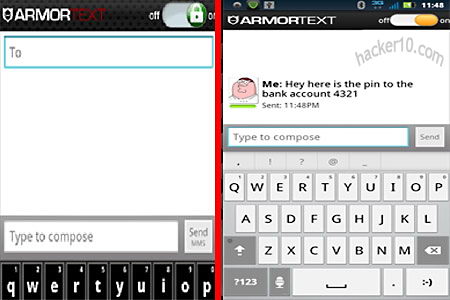
    ArmorText Android SMS encryption
    ArmorText Android SMS encryption

    With smart phones increasingly used for mobile payments, email and online banking they have become a prized asset for thieves, ArmorText will protect your data even when it is not stored in your phone but the person you are communicating with, messages are encrypted before sending, stopping middle man eavesdroppers, like your network provider. Planned features for the future include controlling how many times a text message can be viewed, how long the message is available for and non-repudiation.

    Update 2014: This app is no longer available in Google Play
    Visit ArmorText homepage

  • Android phone encrypted IM chat with ChatSecure

    Android phone encrypted IM chat with ChatSecure

    Gibberbot renamed ChatSecure is a secure Instant Messenger app for Android phones, it works with any Jabber or XMPP compatible chat software (Facebook chat, GTalk, Ovi, Openfire, etc) this open source messenger developed by the Guardian Project uses end to end encryption with Off-the-Record messaging (OTR) standard, it will keep your service provider out of the equation making it impossible for an eavesdropper to read the messages.

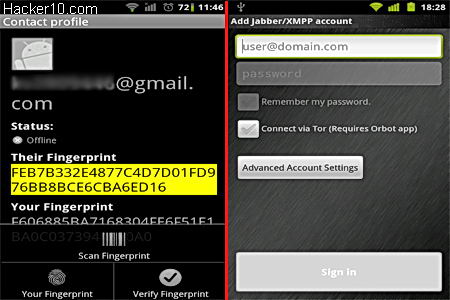
    Optionally ChatSecure can be used with Orbot (tor on Android app) to chat over the tor network, adding anonymity to an already private chat and circumventing censorship firewalls. Before signing into the chat you will be asked if you would like to save your password, you shouldn’t do this as anyone with access to your phone would be able to impersonate you.

    Android secure IM Gibberbot
    Android secure IM ChatSecure

    Off-the-Record encryption needs both parties to be using it, the people you are chatting with must have ChatSecure installed or be using a desktop computer with an instant messenger that has the plugin installed, Pidgin (Windows&Linux) and Adium (Mac) can all use Off-the-Record (OTR).

    You should swap digital fingerprints first to make sure he/she is the right person behind the keyboard, ChatSecure allows you create a scannable QR (Quick Response) code out of a digital fingerprint making it easy to exchange in person, after verifying fingerprints with your partner the chatbox will be shown green indicating that encryption and identity have all been authenticated, if you can not verify your partner’s identity the chatbox will be coloured orange indicating that encryption is working but identification failed, if encryption doesn’t work because the other end hasn’t got ChatSecure installed the chatbox will be shown in red colour and can still be used.

    Visit ChatSecure Google Play page

  • Aircover mobile phone security for Android and iPhone

    Aircover mobile phone security for Android and iPhone

    Aircover is a security and privacy app for Android with an iPhone version coming soon, what makes this app stand out from the crowd is that it pretends to be an all-round solution not needing anything else to secure your smartphone.

    This app comes with an anti-virus offering real time protection against malware, GPS tracking to locate your loved ones with automatic notification when someone moves out of a pre-defined location, privacy protection allowing the user to control what apps can access what, online cloud backup with 2GB of expandable storage space to copy and restore personal data to a new device in case the mobile phone gets lost or stolen, a device found alarm that lets you track down a lost mobile phone from a PC and remotely wipe it to protect your personal data, and system optimization providing details on resource usage (CPU, battery,memory) able to kill processes, clean cache and other tasks that will speed up your device.

    AirCover mobile phone security software
    AirCover mobile phone security software

    The battery meter tells you the approximate time you have left to complete a particular activity (Wifi, voice call, 3G Internet) before it cuts off averting getting stuck in the middle. Aircover is an excellent idea, instead of having five apps to do everything, you download a single app to address all of the problems that most security conscious people have, it will help you make your mobile phone theft proof.

    It probably could be improved with a screen lock, and if you are picky, not knowing what anti-virus engine Aircover is using to find malware could be a bit concerning, we will have to trust it is as good as the likes of KasperSky and F-Secure, the only thing I would not be using this app for is the online backup, there is no mention at all of encryption for data backups, I can see someone hacking a server and getting access to your private data due to this, I am not  comfortable having unencrypted data stored online, the app is still in beta and I hope the developers add encryption to their online backups in future versions.

    Visit AirCover homepage

  • Android phone backup app Titanium backup

    Android phone backup app Titanium backup

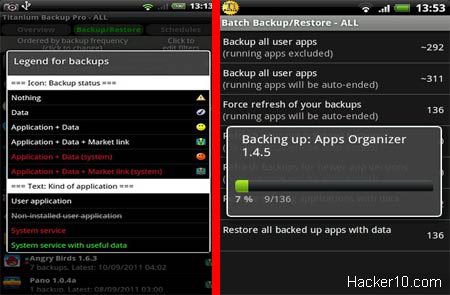
    Titanium Android backup app, unlike the Google Backup feature that comes with all Android phones, can copy and restore your apps including user data within each app, general data and Market links to an external SD card, including protected and system apps, after setting it up Titanium backup will automatically copy your data as scheduled with zero clicks. Apps can be backed up individually or in group, to restore the data you can choose to only recover settings, app, data or everything at once.

    This is a very powerful app, before you click on anything, make sure to read what it says, Titanium backup has access to your system files and it is easy to wreck something if you are not careful, if you are not sure refer to Titanium online Wiki. The whole backup process can take up to 15min depending on the amount of data and your Android phone processing power, once the backup has finished you can browse where everything is kept, inside the SD card in a folder named /TitaniumBackup/, you might want to copy that data online or to your desktop computer using a USB cable or Bluetooth.

    Titanium Android backup app
    Titanium Android backup app

    This app is suitable for advanced/power users as it has lots of configuration options, for complex operations, like restoring data to your Android phone after it has been updated with a custom ROM, check out the online Titanium backup Wiki. The paid Pro version of this app can encrypt your backups (using RSA&AES), copy apps without closing them, freeze an app without uninstalling it, convert system apps into user apps (or vice-versa), batch verify backup integrity, sync backups online with Dropbox, and much more.

    Note: This app requires root which will invalidate the phone warranty, rooting is necessary to access system files.

    Visit Titanium Backup Android GooglePlay

  • Top 5 Windows Mobile Phone security apps

    Windows Phone apps

    SecureID: Password manager and data vault for your Windows phone, it encrypts all data using AES256, it can encrypt any kind of data, including audio recordings. The passwords can be classified into categories and searched, a password generator indicating password strength is included.

     7pass: Non official version of open source Keepass password manager for Windows mobile phones, it is compatible with Keepass desktop edition in your PC, it can securely store usernames and passwords as well as credit card details and notes, you will need a master password to access the encrypted database. It includes a password generator just like the original Keepass for PC.

    Message Encryption: It can encrypt text messages using the encryption key of your choice, after encryption it will send the message to the person you choose, using the same window you can decrypt received messages, lean on configuration settings and features, but easy to use.

    Password Vault: Windows Phone 7 app to securely store passwords, financial information and images, the application encrypts and groups data as Financial, Internet, Personal and Others. Instant search helps you to find out what you want when you need it, stored notes have a preview and can be edited, all you need to access your data is the master password.

     Secure Keys: Secure configurable password generator, it creates a hard to crack password with numbers, letters and special characters all based on the passphrase you entered, making it easy for you to remember your password yet hard for others to guess. The created password isn’t saved on the phone or sent over the Internet making it impossible for someone to know it other than looking at the screen on the phone.